
Cisco Networking Academy (NetAcad) 2026: Registration, Free Courses, Certifications & Complete User Guide

Building a successful career in information technology does not necessarily require expensive training or a university degree. Students, beginners, working professionals, and career changers in the Philippines can develop valuable technical skills through Cisco Networking Academy (NetAcad), an online learning platform offering structured courses in computer networking, cybersecurity, programming, data science, and other technology-related fields.
The official Cisco Networking Academy website provides access to educational resources, practical learning activities, and professional development opportunities for learners with different levels of experience. Whether you want to understand computer networks, learn Python programming, explore cybersecurity, or prepare for a Cisco certification examination, NetAcad provides a structured environment to help you build your knowledge and technical abilities.
For Filipino learners, Cisco NetAcad is particularly useful because it offers different learning opportunities, including self-paced courses and instructor-led training through participating educational institutions. While many introductory learning resources are available free of charge, certain courses, training programmes, and professional certification examinations may involve additional fees.
Cisco Networking Academy Overview and Key Information
Cisco Networking Academy is a global educational initiative developed by Cisco to help individuals acquire practical technology knowledge and prepare for opportunities in the digital economy. The platform provides structured educational resources covering important areas such as networking, cybersecurity, programming, data science, and digital literacy.
Through Cisco NetAcad, learners can explore introductory subjects, develop technical competencies, and progress towards more advanced learning programmes. Depending on the course and participating educational provider, students may also receive instructor guidance, practical assignments, assessments, and opportunities to earn course completion credentials.
The platform supports different learning requirements, making it suitable for students preparing for IT-related careers, beginners exploring technology, and professionals interested in improving their existing technical skills.
Cisco NetAcad – Quick Information
Cisco Networking Academy (NetAcad) allows students, beginners, and IT professionals to learn practical technology skills through online courses and training programmes. Users can explore different subjects, complete learning activities, improve their technical knowledge, and prepare for career opportunities in the IT industry.
Through Cisco NetAcad, you can:
- Learn Computer Networking: Understand networking fundamentals, routers, switches, IP addresses, and network configuration.
- Study Cybersecurity: Learn about online security, network protection, cyber threats, and basic security practices.
- Learn Programming: Develop coding skills and understand programming languages such as Python.
- Explore Data Science: Learn data analysis, data handling, and other essential data science concepts.
- Complete Online Courses: Access self-paced courses and study according to your available time.
- Practice Technical Skills: Complete practical activities, exercises, simulations, and assessments.
- Earn Course Credentials: Receive eligible course completion certificates or digital credentials.
- Prepare for Cisco Certifications: Build foundational knowledge for professional Cisco certification exams.
- Improve Career Opportunities: Develop skills that can help you pursue careers in networking, cybersecurity, and other IT fields.
What Can You Do Through NetAcad?
Cisco Networking Academy provides access to a range of educational resources designed to develop practical and theoretical technology skills. After accessing the appropriate Cisco learning platform, you can explore different subjects and choose learning opportunities that match your interests and career objectives. Visit Homepage.
The main activities and learning opportunities include:
- Explore networking courses: Understand computer networks, network devices, connectivity, IP addressing, and basic network configuration.
- Develop cybersecurity knowledge: Learn about digital security, common cyber threats, network protection, and cybersecurity fundamentals.
- Learn programming: Explore programming concepts through Python and other available technical learning resources.
- Study computer hardware: Develop an understanding of computer components, hardware maintenance, and basic troubleshooting.
- Practise with Cisco Packet Tracer: Build virtual network environments and experiment with networking configurations using simulation tools.
- Access instructor-led training: Participate in eligible training programmes offered through Cisco Networking Academy partners and educational institutions.
- Complete course assessments: Test your understanding through quizzes, practical activities, and other assessments where available.
- Earn eligible credentials: Obtain course completion certificates or other learning credentials when you meet the relevant programme requirements.
- Prepare for professional development: Build foundational knowledge that can support further technical training and Cisco certification preparation.
Whether you are a university student, an aspiring IT professional, or someone learning technology independently, Cisco NetAcad can provide a useful starting point for developing relevant digital skills.
Requirements Before Creating a Cisco NetAcad Account
Before registering for Cisco Networking Academy, make sure you have the basic information, equipment, and internet access required to use the platform. Preparing these requirements in advance can make the registration and learning process easier.
An active email address is especially important because Cisco may use it for account verification, authentication notifications, password recovery, and other account-related communications.
Basic Registration and Learning Requirements
| Requirement | Why You Need It |
|---|---|
| Active email address | For account registration, verification, and password recovery |
| Reliable internet connection | To access online courses, lessons, and learning materials |
| Computer or laptop | For studying technical subjects and completing practical activities |
| Updated web browser | To open the official Cisco website and supported learning resources |
| Personal information | To complete your account profile accurately |
| Secure password | To protect your Cisco account from unauthorised access |
| Philippines as your country or region | To provide the correct location when requested during registration |
| Basic computer knowledge | Helpful for navigating the platform and understanding introductory IT lessons |
A desktop computer or laptop is generally recommended, particularly for networking and cybersecurity courses that involve technical activities. A larger screen makes it easier to follow instructions, review course materials, and work with networking tools.
If you plan to use Cisco Packet Tracer, check the current system requirements and download the compatible version for your operating system.
You should also use an email address that you can access regularly. This will help you receive important account notifications and avoid difficulties when signing in or recovering your password.
How to Register for Cisco Networking Academy
Creating an account is an important first step towards accessing Cisco Networking Academy’s educational resources. The registration process may involve Cisco account authentication, email verification, and additional profile information, depending on the learning service or course you choose.
New learners in the Philippines can follow the instructions below to begin the registration process through the official Cisco website.
Step 1: Visit the Official Cisco NetAcad Website
First, open a web browser such as Google Chrome, Mozilla Firefox, or Microsoft Edge on your computer or laptop.
Enter the official Cisco Networking Academy website address in the browser’s address bar:
Official website: https://www.netacad.com/
Wait for the homepage to load completely. From the homepage, you can explore the available learning resources, discover technology courses, and locate the account access options.
Before entering any personal information, check that the website address belongs to the official Cisco domain. This precaution helps protect your information from unofficial registration pages, misleading advertisements, and potentially fraudulent websites.

Step 2: Find the Sign-Up or Login Option
Once the Cisco Networking Academy homepage has loaded, look for the account access options, such as Log In, Sign In, or Sign Up.
If you are visiting the platform for the first time and do not already have an account, select the available registration or account creation option.
Cisco may redirect you to its official account authentication service to complete the process. Follow the instructions displayed on the screen and make sure you are using the official Cisco website throughout registration.
If you already have a Cisco account, you may be able to use the existing credentials instead of creating another account.

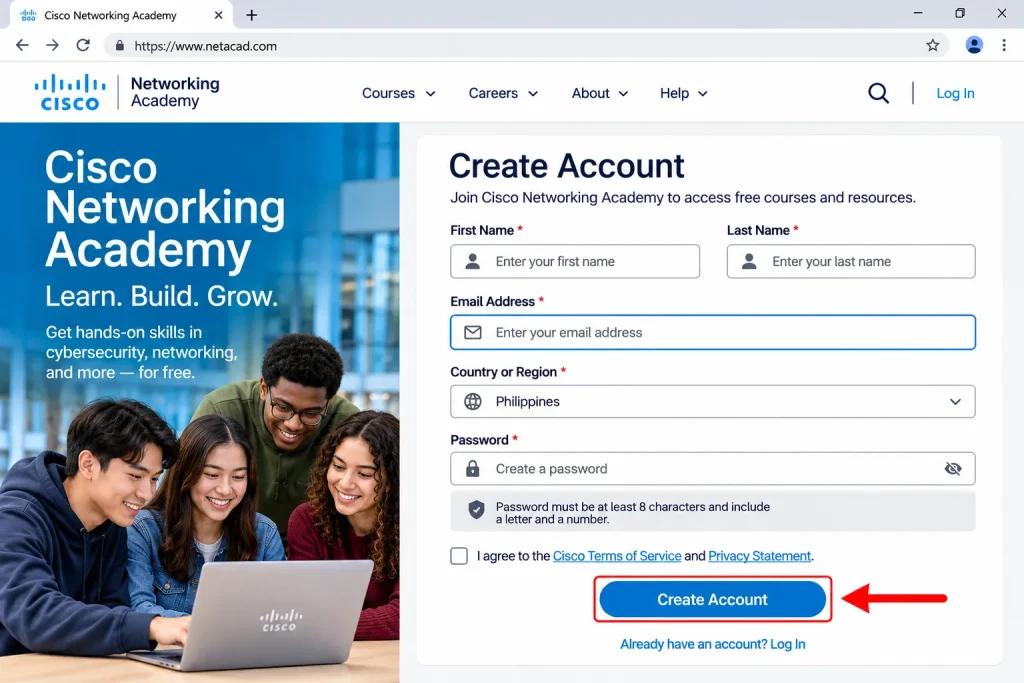
Step 3: Enter Your Email Address and Create an Account
After selecting the registration option, provide the email address you want to associate with your Cisco account.
Choose an email address that is active, accessible, and regularly monitored. You will need it if Cisco requires account verification or if you later need to reset your password.
Depending on the registration form, you may also be asked to provide additional information, including:
- First and last name.
- Email address.
- Country or region, selecting the Philippines where requested.
- A secure password that meets Cisco’s displayed security requirements.
- Other personal or account information requested during registration.
Review all the information carefully before submitting the form. Make sure your name and email address are entered correctly, as inaccurate details may create difficulties during account verification or future account recovery.
After checking your information, follow the on-screen instructions to submit your registration details.
Step 4: Complete Email Verification
If Cisco requires email verification, open the inbox associated with your newly registered account.
Look for the verification message sent by Cisco and follow the instructions provided in the email. Depending on the authentication process, you may need to select a verification link or enter a code to confirm your email address.
If the verification email does not arrive immediately, try the following troubleshooting steps:
- Refresh your email inbox and check for newly received messages.
- Open the Spam or Junk folder in case the message was filtered automatically.
- Check the Promotions or other email categories if your provider uses them.
- Confirm that you entered the correct email address during registration.
- Use the resend verification option if it is available on the Cisco registration page.
Once your email address has been successfully verified, return to the official Cisco website and continue with the remaining account setup instructions.

Step 5: Complete Your Profile and Access Learning Resources
After completing the required verification process, sign in to your Cisco account and follow any additional profile setup instructions displayed on the platform.
Depending on the learning service or programme, you may be asked to provide additional details about your educational background, employment status, location, or technology-related interests.
Once the required account setup is complete, explore the available learning resources and identify courses that match your experience level and learning objectives.
Beginners may find it helpful to start with introductory courses in networking, cybersecurity, or programming before progressing to more advanced technical subjects.
Exploring Cisco NetAcad Courses and Choosing the Right Programme
One of the biggest advantages of Cisco Networking Academy (NetAcad) is its wide selection of technology courses designed for learners with different interests, educational backgrounds, and experience levels. Whether you are a university student, an IT beginner, or a working professional in the Philippines, you can explore learning opportunities that match your current knowledge and future career goals.
You do not need extensive technical experience to start learning through Cisco NetAcad. Several introductory courses explain essential concepts in a beginner-friendly format before introducing more advanced subjects and practical activities. As you progress, you can develop valuable skills in networking, cybersecurity, programming, artificial intelligence, and data science.
Popular Cisco NetAcad Course Categories
Cisco Networking Academy offers learning resources across several technology-related fields. Understanding these categories can help you choose a programme that matches your interests and professional objectives.
1. Cybersecurity
Cybersecurity courses introduce learners to online threats, digital security, system vulnerabilities, and methods used to protect computer networks and information. You can develop an understanding of common cyberattacks, security awareness, and basic protection techniques.
For beginners, Introduction to Cybersecurity is a useful starting point for exploring the fundamentals of online safety and information security.
2. Computer Networking
Networking courses help learners understand how computers and other devices communicate through connected systems. Topics may include IP addressing, network devices, communication protocols, connectivity, and basic network configuration.
If you are new to networking, Networking Basics provides a foundation before progressing towards more advanced networking concepts.
3. Programming
Programming courses introduce coding principles, logical thinking, problem-solving, and software development fundamentals. Learners can explore programming languages and develop practical skills through structured lessons and exercises.
Python Essentials 1 is a suitable introductory option for learners interested in understanding Python programming and developing their first coding projects.
4. Artificial Intelligence and Data Science
Artificial intelligence and data science courses introduce learners to modern technologies used for analysing information, identifying patterns, and solving practical problems.
These learning areas can help you understand data-related concepts, explore AI applications, and develop knowledge relevant to emerging technology careers.
5. Information Technology and Digital Literacy
IT and digital literacy programmes help learners understand computer systems, digital tools, hardware, software, and technology used in everyday professional environments.
These subjects are particularly useful for students and beginners who want to develop general computer knowledge before moving into specialised technical training.
Recommended Beginner Courses for Filipino Students
If you are starting your IT learning journey, consider exploring introductory courses before choosing advanced technical programmes. The following examples cover several important technology subjects available through Cisco’s learning resources.
| Course | Main Learning Objective |
|---|---|
| Introduction to Cybersecurity | Understand cybersecurity fundamentals, common threats, and basic protection methods |
| Networking Basics | Learn how computer networks operate and how devices communicate |
| Introduction to Data Science | Explore data analysis, information, and analytical concepts |
| Python Essentials 1 | Develop introductory programming and problem-solving skills |
| Getting Started with Cisco Packet Tracer | Understand the network simulation environment and its basic functions |
| Ethical Hacker | Explore ethical hacking principles and offensive security concepts |
These courses represent examples of Cisco-related learning opportunities rather than a guarantee of current enrolment availability. Course titles, content, duration, fees, and access requirements may change. Always check the official Cisco learning catalogue for the latest information.
How to Find and Enrol in a Cisco NetAcad Course
After creating your Cisco account, the next step is to identify a suitable learning programme and complete its enrolment requirements. Cisco Networking Academy provides an official learning catalogue where you can explore available subjects, review course descriptions, and find suitable learning opportunities.
The following steps explain how to search for courses and get started with your preferred programme.
Step 1: Open the Cisco Learning Catalogue
Start by visiting the official Cisco Networking Academy website:
Official website: https://www.netacad.com/
From the homepage, look for the Learning Catalog, Explore Courses, or Explore Full Catalog option, depending on the current website layout. The catalogue allows you to explore different technology subjects and identify learning programmes according to your interests.
Make sure you are using the official Cisco website when reviewing course information or proceeding with enrolment.
Step 2: Search by Subject or Course Name
Once you access the learning catalogue, use the available search field to find a specific course or subject.
You can enter a course name or a general technology keyword to discover relevant learning opportunities.
For example, try searching for:
- Cybersecurity: Explore online security, cyber threats, and information protection.
- Networking Basics: Find introductory lessons about computer networks and connectivity.
- Python Essentials: Discover programming courses for beginners.
- Data Science: Explore data analysis and related technology subjects.
- Cisco Packet Tracer: Find learning resources about network simulation and practical networking exercises.
If you are unsure which course to select, browse the available subject categories and compare their learning objectives before making a decision.
Step 3: Review the Course Details
Before enrolling in a Cisco NetAcad course, open its description and carefully review the information provided.
Understanding the course requirements in advance can help you choose a programme that matches your current experience and available study time.
Pay particular attention to the following details:
- Difficulty level: Determine whether the course is suitable for beginners, intermediate learners, or advanced students.
- Estimated learning hours: Check the recommended time needed to complete the course.
- Language availability: Confirm whether the learning materials are available in a language you understand.
- Learning format: Identify whether the course is self-paced or instructor-led.
- Assessments and practical activities: Review whether the programme includes quizzes, exercises, laboratory activities, or examinations.
- Completion credentials: Check whether a certificate, digital badge, or other completion credential is available.
- Enrolment requirements: Determine whether you can enrol independently or need an instructor or participating academy.
Reviewing these details before registration can help you avoid choosing a programme that is too advanced or unsuitable for your learning objectives.
Step 4: Start a Self-Paced Course or Find a Cisco Academy
After selecting a suitable programme, follow the enrolment instructions displayed on the official Cisco website.
If the course offers independent online learning, look for an option such as Get Started, Start Learning, or Get Started with Self-Paced. The exact wording may vary depending on the course and current platform layout.
Self-paced learning allows you to study independently and organise your schedule according to your availability.
Alternatively, if you prefer guided instruction, explore the Find an Academy option through Cisco Networking Academy. This can help you identify participating educational institutions and training providers in the Philippines.
You can search for an academy using the available location or institution details.
Instructor-led programmes may offer additional learning support, including:
- Scheduled classroom or online lessons.
- Guidance from qualified instructors.
- Practical networking activities.
- Structured learning schedules.
- Course assessments and learning support.
However, availability, admission requirements, schedules, and training fees depend on the individual academy and programme. Contact the participating institution directly to confirm its current offerings.
Step 5: Begin Studying and Track Your Progress
Once your enrolment is complete, access your selected course and follow the learning sequence provided by Cisco.
Start with the introductory lessons and gradually progress towards more advanced topics. Complete the available reading materials, interactive activities, practical exercises, and assessments according to the course requirements.
For better learning results, consider following these study recommendations:
- Create a study schedule: Set aside a regular period each day or week for your Cisco NetAcad lessons.
- Follow the course sequence: Complete introductory topics before moving to advanced modules.
- Practise regularly: Apply the concepts you learn through exercises and practical networking activities.
- Review difficult topics: Revisit lessons whenever you encounter unfamiliar technical terms or concepts.
- Complete assessments: Use available quizzes and exercises to evaluate your understanding.
- Monitor your progress: Check your course dashboard or learning interface for completed modules and remaining activities.
Avoid trying to complete an entire technical course in one sitting. Consistent learning and regular practical exercises can help you understand complex concepts, retain information, and develop stronger technical skills.
For Filipino students preparing for an IT-related career, combining Cisco NetAcad lessons with practical experience can be a valuable way to build foundational knowledge and prepare for more advanced training.
Understanding Your Cisco Learning Environment
After logging in, the available dashboard and navigation options may differ depending on the Cisco learning service, course, and account type you are using.
However, you may find several useful sections that help you manage your learning activities and access educational resources.
| Section | Purpose |
|---|---|
| My Learning | Access your enrolled learning activities and programmes |
| Courses | Explore or open available course content |
| Progress | Review completed lessons and learning activities |
| Assessments | Access quizzes, exercises, and course examinations |
| Achievements | View eligible digital badges and completion credentials |
| Resources | Find additional learning materials and supporting tools |
Your learning dashboard is an important place to monitor your progress and manage your enrolled programmes. Depending on the course, it may also display upcoming activities, completed modules, and available assessments.
How to Download Cisco Packet Tracer from the Official Website
The safest way to download Cisco Packet Tracer is through Cisco’s official Networking Academy website. The platform provides information about the software, learning resources and access instructions for eligible learners.
Cisco may update its registration process, course requirements and download options over time. Always follow the instructions and availability information currently displayed on its official website.
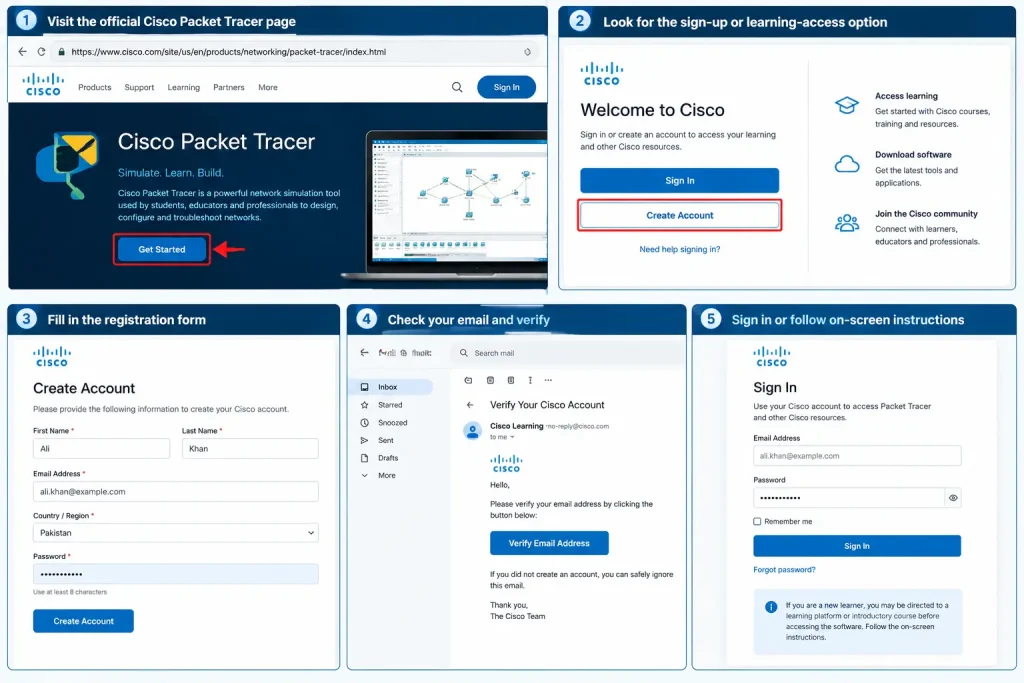
Step 1: Create or Access Your Cisco Learning Account
- Visit the official Cisco Packet Tracer page.
- Find the available sign-up, enrolment or learning-access option.
- If an account is required, register by entering your name, email address, country or region and any other requested details.
- Check your email inbox and complete the verification process if Cisco requests it.
- If you already have an eligible Cisco learning account, sign in instead of creating a duplicate account.
Cisco may direct new learners to a related learning platform or introductory course before providing Packet Tracer access. Follow the current on-screen instructions because the website layout and access process may differ from older tutorials.
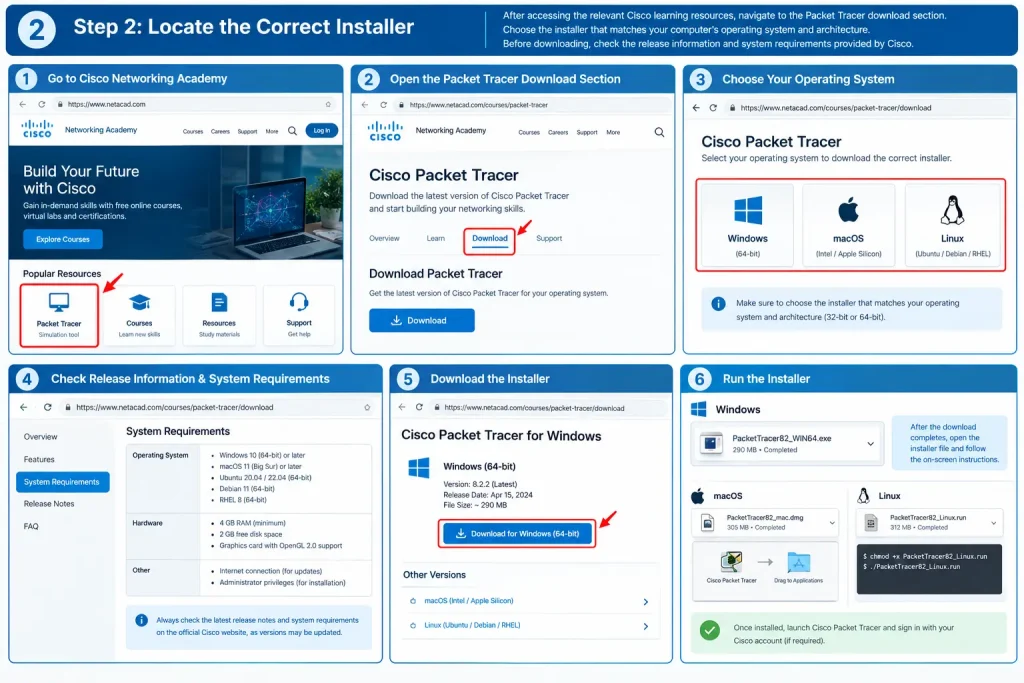
Step 2: Locate the Correct Installer
After accessing the relevant Cisco learning resources, navigate to the Packet Tracer download section. Select the installer compatible with your computer’s operating system.
For example, Windows users should choose the appropriate Windows installer, while Linux users should select a compatible package for their distribution. macOS users should check whether a supported version is available for their installed operating system.
Before downloading, review Cisco’s published release information and system requirements. Avoid relying on version numbers mentioned in older tutorials because newer releases may become available.
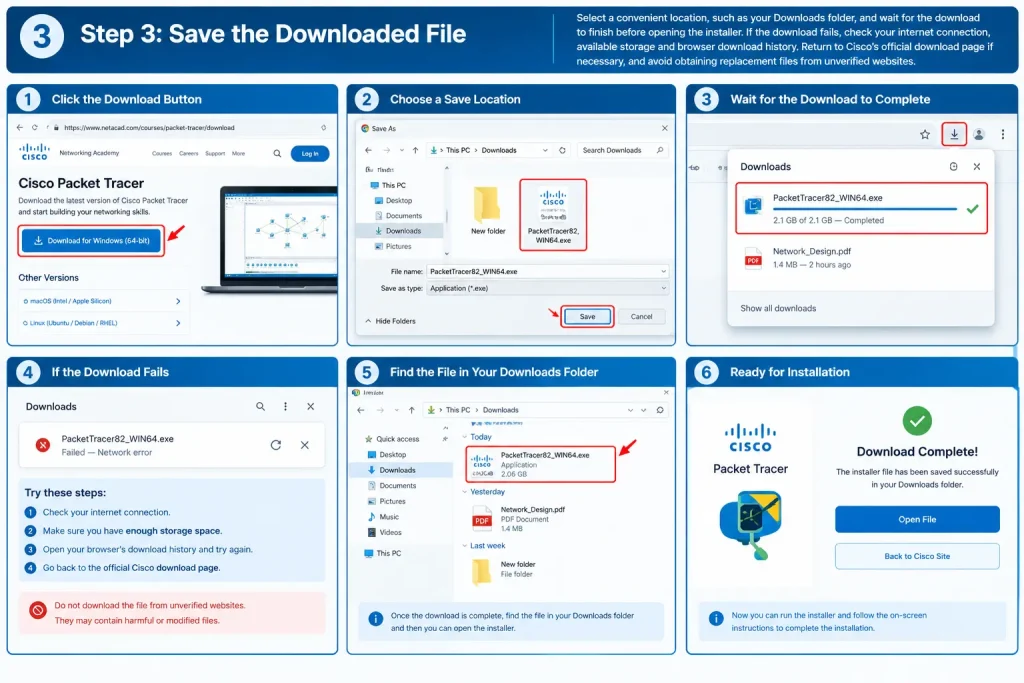
Step 3: Save the Downloaded File
Choose a convenient location, such as your computer’s Downloads folder, and wait until the download is complete before opening the installer.
If the download fails, check your internet connection, available storage and browser download history. You can return to Cisco’s official download page and try again. Avoid downloading replacement installers from unfamiliar websites, as unofficial files may be outdated or unsafe.
First-Time Cisco Packet Tracer Setup
Once installation is complete, launch Cisco Packet Tracer from your desktop shortcut or Windows Start Menu.
If this is your first time using the application, take a few minutes to explore its interface before creating a network.
Here are the main areas you should understand:
- Sign-in or access screen: Follow the account authentication or access instructions displayed by the application.
- Device selection panel: Explore the available routers, switches, computers, and other network devices.
- Workspace: Use the main working area to place devices and design your virtual network.
- Connection tools: Select suitable cables and connection options to link different devices.
- Configuration options: Open individual devices to review or modify their available network settings.
- Simulation tools: Explore the available simulation features to observe how network communication takes place.
For your first practice activity, start with a small network containing two computers connected through a suitable network connection. Once the devices are connected, explore their IP address settings and practise testing communication between them.
Cisco Networking Academy Certificates
Completing a course through Cisco Networking Academy (NetAcad) can help demonstrate the technical knowledge and skills you have developed during your learning journey. These achievements can also support your professional development by providing evidence of your participation in technology-related training.
However, learners should understand the difference between a course completion certificate, a digital badge, and an official Cisco professional certification. Although these credentials are related to technical education, they represent different levels of achievement and have different requirements.
What Credentials Can You Earn Through Cisco NetAcad?
Depending on the course and its completion requirements, learners may receive a certificate, digital badge, or another form of achievement recognition.
The following table explains the main differences:
| Credential | What It Represents |
|---|---|
| Course Completion Certificate | Confirms that a learner has successfully completed an eligible course and met its requirements |
| Digital Badge | Provides a shareable digital record of specific skills, learning achievements, or completed training |
| Cisco Professional Certification | An industry-recognised technical credential earned by passing the required official Cisco certification examination |
For example, successfully completing Networking Basics can demonstrate your understanding of foundational networking concepts. However, completing this course does not automatically qualify you as a Cisco Certified Network Associate (CCNA).
Professional certifications have separate examination requirements, and learners must follow the relevant Cisco certification pathway to obtain them.
Popular Cisco Certification Learning Pathways
If you want to develop a career in information technology, choosing a learning pathway according to your preferred specialisation can help you build relevant knowledge gradually.
Here are some areas worth exploring through Cisco Networking Academy:
- Networking: Begin with Networking Basics to understand IP addressing, network devices, connectivity, and communication. You can then progress towards more advanced networking studies and CCNA examination preparation.
- Cybersecurity: Start with Introduction to Cybersecurity to learn about online threats, security awareness, and basic protection techniques before exploring more specialised security subjects.
- Programming: Explore Python Essentials to develop coding fundamentals, logical thinking, and problem-solving abilities.
- IT Support: Develop foundational knowledge of computer hardware, operating systems, software, and troubleshooting techniques.
- Data Science: Explore data-related subjects to understand information analysis, data interpretation, and modern analytical technologies.
Your learning pathway should reflect your existing knowledge and long-term career objectives. Beginners may benefit from completing introductory courses before moving towards professional certification preparation.
For the latest certification pathways, examination details, and eligibility requirements, visit the official Cisco Certifications website:
How to Prepare for a Cisco Certification Examination
Earning an official Cisco certification requires more than completing an introductory NetAcad course. You need to understand the examination objectives, develop practical technical knowledge, and prepare for the specific assessment associated with your chosen certification.
Follow these steps to organise your preparation:
Step 1: Choose Your Preferred Certification
Identify the Cisco certification that matches your professional interests. Consider whether you want to specialise in networking, cybersecurity, or another technology-related field.
Step 2: Review the Official Examination Topics
Visit Cisco’s certification website and review the current examination objectives, topics, requirements, and recommended preparation resources.
Step 3: Complete Relevant NetAcad Courses
Choose Cisco Networking Academy courses that cover the foundational knowledge required for your selected certification pathway.
Step 4: Practise Technical Activities
Use Cisco Packet Tracer and other appropriate learning tools to practise network configurations, connectivity testing, and troubleshooting activities.
Step 5: Review Your Knowledge
Revisit difficult topics, complete available practice exercises, and identify areas where you need additional preparation.
Step 6: Register for the Official Examination
When you are sufficiently prepared, follow Cisco’s official examination registration instructions and use its authorised examination channels.
Some eligible educational programmes or academy partnerships may provide examination discounts or additional preparation opportunities. However, these benefits are not guaranteed for every learner. Contact your participating academy or instructor to confirm current eligibility and availability.
Cisco NetAcad Benefits for Students and Job Seekers
Cisco Networking Academy can be a valuable educational resource for Filipino students, beginners, working professionals, and job seekers interested in developing technology-related skills.
Instead of immediately investing in expensive technical training, learners can explore introductory courses and build foundational knowledge through available Cisco learning resources.
The platform offers several benefits that can support your educational and professional development.
Main Benefits of Cisco Networking Academy
- Accessible learning opportunities: Explore technology courses and educational resources online from different locations across the Philippines.
- Beginner-friendly subjects: Start with introductory IT topics and gradually progress towards more specialised technical learning.
- Practical networking experience: Use Cisco Packet Tracer to create simulated networks, practise configurations, and understand how networking devices communicate.
- Flexible study options: Self-paced courses allow eligible learners to organise their study schedules according to their personal commitments.
- Career-oriented knowledge: Develop technical foundations relevant to networking, cybersecurity, programming, and other IT-related professions.
- Achievement recognition: Earn eligible course completion certificates and digital badges to document your learning progress.
- Opportunities for further education: Use introductory courses as preparation for advanced technical training and professional certification pathways.
For Filipino students studying computer science, information technology, or related programmes, Cisco NetAcad can complement academic learning by introducing practical concepts used in professional technology environments.
Career Resources and Employment Preparation
Developing technical knowledge is an important step towards an IT career, but learning how to present your skills to potential employers is equally important.
Cisco Networking Academy also provides career development resources that can help learners understand the transition from technical education to employment.
Depending on the resources available, learners may explore support related to:
- Career planning and professional development.
- CV and résumé preparation.
- Job application techniques.
- Interview preparation.
- Internship and apprenticeship opportunities.
- Technology-related employment resources.
- Presenting technical skills and learning achievements to employers.
For students and job seekers in the Philippines, these resources can provide useful guidance when preparing for entry-level opportunities and planning a long-term career in technology.
You can explore the official Cisco Networking Academy website for available career resources and employment-related support:
Remember that completing a Cisco NetAcad course does not guarantee employment. Your career opportunities will also depend on your practical abilities, educational background, experience, and the requirements of individual employers.
Common Cisco NetAcad Problems and Their Solutions
Although Cisco Networking Academy is designed to provide an accessible online learning experience, users may occasionally encounter registration errors, login difficulties, missing courses, or technical problems when installing Cisco Packet Tracer.
Understanding the possible causes of these issues can help you resolve common problems without unnecessary delays.
The following troubleshooting table covers situations that learners may experience while using Cisco NetAcad.
Cisco NetAcad Troubleshooting Guide
| Common Problem | Possible Solution |
|---|---|
| Registration email not received | Check your Spam, Junk, and Promotions folders. Confirm that your email address was entered correctly and request another verification message if available. |
| Unable to log in | Check your registered email address and password. Make sure you are using the correct Cisco account. |
| Forgot password | Select the password recovery option on the official Cisco sign-in page and follow the reset instructions. |
| Course not appearing | Confirm that you are signed in with the correct account and that your course enrolment has been completed. |
| Course will not open | Refresh the page, check your internet connection, update your browser, and try again. |
| Packet Tracer installation fails | Check your operating-system compatibility, available storage, and the software’s current installation requirements. |
| Packet Tracer cannot connect | Check your internet connection and follow the sign-in or access instructions displayed by the application. |
| Certificate not available | Review the course completion requirements and confirm whether the selected programme provides a certificate or digital badge. |
| Account verification unsuccessful | Check the verification instructions and use the available resend or account recovery options. |
| Learning progress not updated | Refresh your learning dashboard and check whether the relevant lesson or assessment was successfully completed. |
Important security reminder: Never share your Cisco password, verification codes, or account recovery information with unofficial support services. Always use the official Cisco website and authorised account recovery facilities when dealing with registration or login problems.
If a technical issue continues after trying the suggested solutions, consult Cisco’s official support resources or contact the educational academy responsible for your course.
Important Tips for Getting Better Results from Cisco NetAcad
Making consistent progress through Cisco Networking Academy requires a suitable study routine, regular practice, and a clear understanding of your learning objectives.
Whether you are studying networking, cybersecurity, programming, or data science, the following recommendations can help you make better use of the available learning resources.
- Start with beginner-level courses: Build a strong foundation before attempting advanced technical programmes.
- Focus on one subject at a time: Complete the main learning activities of your selected course before moving to another subject.
- Practise using Cisco Packet Tracer: Apply networking concepts through virtual configurations and simulation exercises.
- Maintain personal study notes: Record important commands, technical terms, configurations, and concepts for future reference.
- Complete course assessments: Use quizzes and practical activities to evaluate your understanding and identify knowledge gaps.
- Save your learning credentials: Keep copies or records of eligible certificates and digital badges for future reference.
- Update your professional profile: Add relevant technical skills and genuine learning achievements to your CV or LinkedIn profile.
- Follow official Cisco resources: Regularly check the official website for updated courses, certification information, and learning opportunities.
- Develop practical problem-solving skills: Focus on understanding how technical concepts work rather than simply memorising information.
- Maintain a regular study schedule: Consistent learning can help you retain information and gradually improve your technical abilities.
For Filipino students and aspiring IT professionals, combining Cisco NetAcad courses with practical exercises, personal projects, and further technical education can provide a stronger foundation for career development.
A course certificate or digital badge can help document your educational achievements, but employers also value practical knowledge, problem-solving abilities, communication skills, and the ability to apply technical concepts in real-world situations.
Frequently Asked Questions About Cisco Networking Academy
Final Thoughts
Cisco Networking Academy (NetAcad) is a valuable learning platform for students, beginners, working professionals, and job seekers in the Philippines who want to develop their technology skills in 2026. With learning opportunities in computer networking, cybersecurity, programming, data science, and other IT-related subjects, the platform provides a practical starting point for exploring different technology careers. By creating an account, selecting suitable courses, practising with Cisco Packet Tracer, and completing eligible learning programmes, you can gradually strengthen your technical knowledge and build a foundation for further professional development. Whether your goal is to learn basic computer networking, explore cybersecurity, improve your programming abilities, or prepare for a Cisco certification such as CCNA, consistent study and practical experience are essential. Visit the official Cisco Networking Academy website to explore available courses, review enrolment requirements, and begin your technology learning journey.