eFPS Login Philippines 2026: Complete eFPS Registration, Login, Tax Filing & Payment Guide

The eFPS Login portal is the official electronic tax filing and payment system of the Bureau of Internal Revenue (BIR) in the Philippines. It allows qualified taxpayers to prepare and submit tax returns online and pay their tax liabilities electronically, reducing the need to visit a Revenue District Office (RDO) in person.
For corporations, large taxpayers, government offices, and other taxpayers required to use the system, bir efps login plays an important role in maintaining proper tax compliance. Users can log in to their accounts, complete the required electronic tax forms, submit returns to the BIR, and process payments through accredited banking institutions.
This guide provides a complete overview of eFPS Login, covering account registration, first-time login, password recovery, online tax filing, electronic payments, and solutions to common login and account-related problems.
What Is the BIR eFPS System?
The Electronic Filing and Payment System (eFPS) is an online service developed by the Bureau of Internal Revenue to modernise tax administration and simplify tax compliance. Visit Homepage
Using the bir efps login platform, taxpayers can:
The system is designed to provide a secure environment where tax obligations can be completed digitally while maintaining compliance with BIR regulations.
eFPS Login Portal Overview
| Details | Information |
|---|---|
| System Name | BIR Electronic Filing and Payment System (eFPS) |
| Portal Type | Online Tax Filing and Payment Platform |
| Official Login URL | https://efps.bir.gov.ph/efps-war/EFPSWeb_war/registration/ADCSLogon.xhtml |
| Managed By | Bureau of Internal Revenue (BIR) |
| Primary Users | Corporations, Large Taxpayers, Government Agencies, Mandated Taxpayers |
| Main Services | Tax Filing, Tax Payment, Return Submission |
| Access Method | Web Browser |
| Account Requirement | Approved eFPS Registration |
| Login Credentials | TIN, Username, Password |
Requirements Before Registering for BIR eFPS
Before starting your BIR eFPS registration, make sure you have the necessary information and documents ready. Having these requirements prepared in advance can help ensure a smoother enrollment process and reduce the chances of delays or application issues.
| Requirement | Purpose |
|---|---|
| TIN and Branch Code | Your Taxpayer Identification Number (TIN) and branch code must match the records maintained by the BIR. Incorrect details may lead to enrollment errors or filing complications. |
| BIR Certificate of Registration (BIR Form 2303) | This document contains important registration information, including your registered business name, Revenue District Office (RDO), tax types, and business activity details. |
| Registered Address and Contact Details | The address, phone number, and other contact information provided during enrollment should be consistent with your existing BIR records. |
| Valid Email Address | An active email account is required because BIR sends enrollment confirmations, notifications, and other important updates electronically. |
| Authorized Representative Information | Businesses, government agencies, partnerships, and corporations may need to provide details of the individual authorized to manage tax transactions. |
| Authority or Authorization Documents | Corporations and partnerships should prepare supporting documents that verify who has the authority to enroll, file returns, and make tax payments on behalf of the organization. |
| Bank Account with an eFPS-Accredited Bank | A bank account with a participating Authorized Agent Bank (AAB) is necessary to complete electronic tax payments through the eFPS system. |
| Relevant RDO or Large Taxpayer Office Records | Access to registration records can be useful if the BIR requests verification, updates, or corrections during the enrollment process. |
How to Login to BIR eFPS
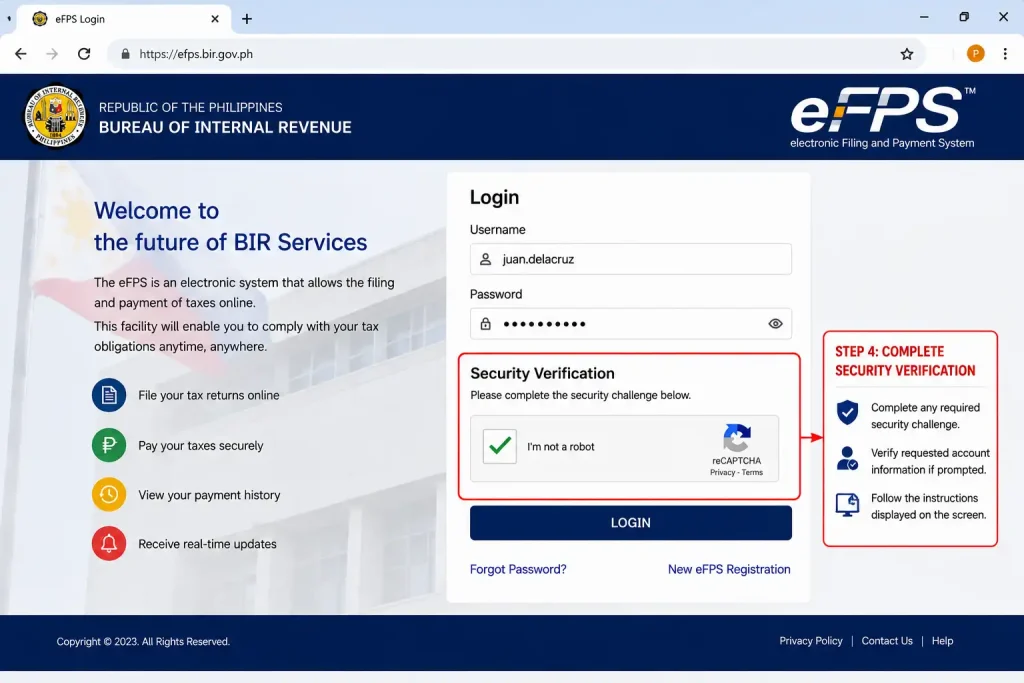
Step 1: Open the Official eFPS Website
Start by visiting the official BIR eFPS Login portal using a secure internet connection. Make sure you are accessing the correct website to protect your account information and avoid phishing sites.

Step 2: Enter Your Username
On the login page, locate the username field and enter the username you created during the eFPS enrollment process. Ensure there are no typing mistakes.

Step 3: Enter Your Password
Carefully enter your password in the designated field. Passwords are case-sensitive, so make sure the correct characters are used.

Step 4: Complete Security Verification
Some users may be required to complete an additional security check before accessing their account. Follow any on-screen instructions if verification appears.
Step 5: Click the Login Button
After entering your credentials, click the Login button to submit your information to the system for verification.

Step 6: Access Your eFPS Dashboard
If your login details are correct, the system will direct you to your eFPS account dashboard. From there, you can manage tax filing and payment activities.

Step 7: Log Out After Use
When you finish using the portal, always log out properly to keep your account secure, especially when using a shared or public computer.
Important Registration Tips
Before submitting an enrolment request:
✔ Use an active email address
✔ Ensure TIN information is correct
✔ Keep copies of all submitted documents
✔ Follow RDO instructions carefully
✔ Store login credentials securely
Benefits of Using efps login page
| Benefit | Description |
|---|---|
| Faster Tax Processing | The bir efps login system allows taxpayers to prepare, file, and submit tax returns online, significantly reducing processing time compared to manual filing methods. |
| Convenient Online Payments | Tax liabilities can be paid electronically through participating Authorized Agent Banks (AABs), making the payment process faster and more accessible. |
| Less Paperwork | Since returns and supporting documents are submitted electronically, taxpayers can reduce the use of printed forms and physical paperwork. |
| Efficient Record Keeping | The platform stores electronic records of filed returns, payment confirmations, and transaction receipts, making document management easier. |
| Improved Accuracy | Built-in validation and error-checking features help users identify incomplete information and calculation mistakes before filing, reducing the risk of errors. |
| 24/7 Accessibility | Taxpayers can access the eFPS Login portal anytime and from virtually anywhere with an internet connection, providing greater flexibility. |
| Secure Transactions | The system uses security measures to protect taxpayer information and ensure that filings and payments are processed safely. |
| Better Compliance Management | Electronic filing helps taxpayers meet deadlines mor |
How to Register for the eFPS Portal
Step 1: Visit the eFPS Enrollment Page
To begin your registration, access the official bir efps login website and select the “Enroll to eFPS” option. This will open the online enrollment form for new users.
Step 2: Enter Your Taxpayer Information
Complete the enrollment form with the required details. All information should match the records registered with the BIR to avoid delays in approval.
Step 3: Create Your Login Credentials
You will be asked to create the account credentials that will be used for future eFPS Login access. Choose secure information that is easy for you to remember.
Step 4: Review and Submit the Application
Before submitting, carefully review all information entered in the form. Incorrect details may result in processing delays or rejection.
Step 5: Prepare Supporting Documents
Some taxpayers may be required to provide additional documents for verification. Having these documents ready can help speed up the registration process.
Step 6: Coordinate with Your Revenue District Office (RDO)
Your assigned RDO may need to verify your registration details before approving the enrollment request. Follow any instructions provided by the BIR.
Recovering a Forgotten eFPS Password
Forgetting your bir efps login password does not necessarily mean losing access to your account. The Bureau of Internal Revenue provides recovery options for eligible users who have previously registered their account information.
When Password Recovery Is Needed
You may need to reset your credentials if:
What Happens When an eFPS Account Is Locked?
The bir efps login system includes security protections that temporarily restrict access after multiple unsuccessful login attempts.
Common Causes of Account Lockout
An account may become locked because of:
How to Restore Access
If self-service recovery does not work:
- Contact your Revenue District Office.
- Prepare a valid government-issued ID.
- Submit a written request for account recovery.
- Follow any verification procedures required by BIR.
In many cases, the RDO can assist with credential verification and account restoration.
How to Reset Your eFPS Password
Step 1: Open the Password Recovery Page
If you cannot access your account, visit the official eFPS Login portal and select the “Forgot Password” option. This will start the password recovery process.
Step 2: Enter Your Account Information
Provide the required details to help the system identify your account. Make sure the information matches your eFPS registration records.
Step 3: Complete Identity Verification
For security purposes, the system may ask you to verify your identity before allowing a password reset.
Step 4: Receive Password Reset Instructions
Once your account has been verified, the system will send password recovery instructions to your registered email address.
Step 5: Create a New Password
After accessing the password reset link, create a new password that is secure and easy for you to remember.
Step 6: Save Your New Login Details
After successfully changing your password, keep your updated credentials in a secure location for future use.
Step 7: Login Using Your New Password
Return to the bir efps login page and sign in using your updated credentials to confirm that the password reset was successful.
Understanding the eFPS Dashboard
After a successful eFPS Login, taxpayers are directed to the system dashboard.
The dashboard serves as the central location for filing returns, making payments, and reviewing previous transactions.
Typical dashboard functions include:
Taking time to familiarise yourself with the dashboard can make future filings more efficient.
Preparing Before Filing a Tax Return
Before using the bir efps login system to file taxes, gather all necessary records and supporting information.
Documents Commonly Needed
Depending on the tax form being filed, you may need:
Why Preparation Matters
Incomplete information often causes delays during filing.
Reviewing records beforehand can help ensure:
Step-by-Step Guide to Filing Tax Returns Through eFPS Login
One of the primary functions of the efps login page platform is electronic tax return filing.
The process generally follows five major stages.
Step 1: Select the Appropriate Tax Form
After logging in, navigate to the E-Filing section.
Choose the tax return required for your filing obligation.
Common forms may include:
| Tax Type | Common Form |
|---|---|
| VAT Returns | BIR Form 2550M / 2550Q |
| Corporate Income Tax | BIR Form 1702 |
| Compensation Withholding Tax | BIR Form 1601C |
| Other Tax Obligations | Applicable BIR Form |
Always verify filing requirements before proceeding.
Step 2: Review Taxpayer Information
Many fields may already contain taxpayer information from registration records.
Review all displayed information carefully, including:
If any information appears incorrect, contact the appropriate BIR office before submitting the return.
Step 3: Enter Tax Return Information
Input all required financial information into the selected form.
Typical data includes:
Accuracy is extremely important because submitted returns become part of official tax records.
Step 4: Validate the Return
Before submission, use the built-in validation feature.
The validation process checks:
Correct all identified errors before continuing.
Step 5: Finalise the Filing
Once validation is successful:
The system will generate a Filing Reference Number (FRN).
This number serves as proof that the return has been successfully transmitted to BIR.
Understanding the Filing Reference Number (FRN)
After successful filing through the bir efps login system, an FRN is generated.
The Filing Reference Number helps taxpayers:
Never discard or ignore the FRN generated by the system.
How to Pay Taxes Through the eFPS Login System
After successfully filing a return through the efps login page, taxpayers can proceed directly to the electronic payment section. The eFPS platform is integrated with accredited banking partners, allowing users to pay tax liabilities online without visiting a bank branch.
Step 1: Open the ePayment Section
After completing your tax return submission, select the Proceed to Payment option.
The system will redirect you to the electronic payment module where available payment channels are displayed.
Step 2: Choose an Accredited Bank
Select your preferred Authorized Agent Bank (AAB) that participates in the BIR eFPS programme.
Only accredited banking institutions linked to the eFPS system can process online tax payments through the portal.
Step 3: Verify Payment Information
Review all transaction details carefully, including:
Any discrepancy should be corrected before authorising payment.
Step 4: Authorise the Transaction
Confirm the payment request according to your bank’s authentication process.
Depending on the bank, this may involve:
Step 5: Receive Payment Confirmation
Once the transaction is completed successfully, the system generates payment confirmation records.
Keep copies of:
These documents serve as evidence that both filing and payment requirements have been completed.
Records You Should Always Save
Every successful efps login page filing session should end with proper record keeping.
Taxpayers are encouraged to save both digital and printed copies of:
Maintaining organised records can help during audits, compliance reviews, and future tax filings.
Common eFPS Login Problems and Solutions
| Issue | Possible Causes | Recommended Solutions |
|---|---|---|
| Unable to Access the Website | • Internet connection problems • Browser compatibility issues • Temporary eFPS system maintenance • Firewall or network restrictions | • Refresh the webpage • Try a different browser • Clear browser cache and cookies • Check your internet connection • Access the portal again later |
| Invalid Username or Password | • Incorrect login credentials • Typographical errors • Expired account credentials • Forgotten username or password | • Re-enter your login details carefully • Verify Caps Lock is turned off • Use the Forgot Password feature • Contact your RDO if the issue continues |
| Account Locked | • Multiple failed login attempts • Security protection measures triggered by the system | • Wait for the temporary lockout period to end • Reset your password if necessary • Contact your Revenue District Office (RDO) for assistance |
| Missing Confirmation Receipt | • Internet interruption during filing • Incomplete transaction processing • Browser timeout or session expiration | • Check your filing history in eFPS • Verify payment status with your bank • Review email confirmations • Contact the bank or BIR if the receipt is unavailable |
| No Email Notification Received | • Incorrect email address on file • Email filtered as spam or junk • Delayed system notification | • Check your spam or junk folder • Verify your registered email address • Wait a few hours and check again • Contact your RDO if no email arrives |
| Payment Not Reflected | • Bank processing delays • Incomplete payment transaction • System synchronization issues | • Verify the transaction with your bank • Check your account statement • Review payment confirmation records • Contact the bank’s customer support if needed |
| Session Timeout During Filing | • Inactivity for an extended period • Slow internet connection • Browser-related issues | • Save information frequently • Log in again and continue the process • Use a stable internet connection • Avoid leaving the session idle for long periods |
| Forms Not Available in eFPS | • Incorrect taxpayer classification • Missing tax type registration • Account configuration issues | • Verify your tax types with the BIR • Contact your RDO for account validation • Ensure your taxpayer records are updated |
Security Tips for efps login page Users
- Use Only the Official eFPS Website
- Access your account only through the official BIR eFPS portal.
- Bookmark the official login page for easy access.
- Avoid clicking suspicious links from emails, messages, or social media.
- Protect Your Login Credentials
- Never share your username or password with anyone.
- Keep security questions and answers confidential.
- Do not disclose OTPs or verification codes.
- Change Your Password Regularly
- Create a strong and unique password.
- Avoid using personal information in your password.
- Update your password periodically for better security.
- Log Out After Every Session
- Always click the Logout button when finished.
- Close your browser after signing out.
- Be extra cautious when using shared or public computers.
- Monitor Your Account Activity
- Review your filing and payment records regularly.
- Check confirmation receipts and transaction history.
- Report any suspicious activity immediately.
- Use a Secure Internet Connection
- Avoid logging in through public Wi-Fi networks.
- Use a trusted and secure internet connection.
- Keep your device’s antivirus and security software updated.
- Keep Your Contact Information Updated
- Maintain an active email address on your account.
- Update your contact details whenever changes occur.
- Monitor your email for important BIR notifications and alerts.
- Store Important Records Safely
- Save copies of filing confirmations and payment receipts.
- Keep electronic records in a secure location.
- Back up important tax documents regularly.
Best Practices for Smooth eFPS Filing
Experienced taxpayers follow several best practices to make the eFPS filing process faster, more accurate, and less stressful.
File Your Returns Before the Deadline
Submitting your tax returns early can help you avoid last-minute issues and ensure that your filing is completed on time.
Prepare All Required Documents in Advance
Having your records ready before you begin can make the filing process more efficient and help prevent delays.
Review All Information Carefully
Checking your entries before submission can help reduce errors and avoid the need for amendments later.
Keep Backup Copies of Your Records
Maintaining backup copies of important documents provides additional protection in case of data loss or system issues.
Ensure a Stable Internet Connection
A reliable internet connection can help prevent interruptions during filing and payment transactions.
Save Filing and Payment Confirmations
Confirmation records serve as proof of successful filing and payment and may be needed for future reference.
Frequently Asked Questions About eFPS Login
Conclusion
The eFPS Login system has transformed the way qualified taxpayers in the Philippines fulfill their tax obligations by providing a secure and convenient platform for electronic filing and payment. Through the Bureau of Internal Revenue’s Electronic Filing and Payment System, taxpayers can file tax returns, make online tax payments, access filing records, and manage tax-related transactions without the need to visit a Revenue District Office.
From eFPS registration and account activation to efps login page, password recovery, tax return filing, and electronic payment processing, the platform streamlines the entire tax compliance process. The system also offers important features such as filing validation, payment confirmations, filing reference numbers, electronic record keeping, and account security measures that help taxpayers maintain accurate and organized records.
To ensure a smooth experience, taxpayers should always use the official eFPS portal, verify all information before submission, keep copies of filing and payment confirmations, and follow recommended security practices. Preparing documents in advance, filing before deadlines, and maintaining updated account information can help avoid common filing issues and delays.