PhilSys Registration Philippines 2026: Complete National ID Guide
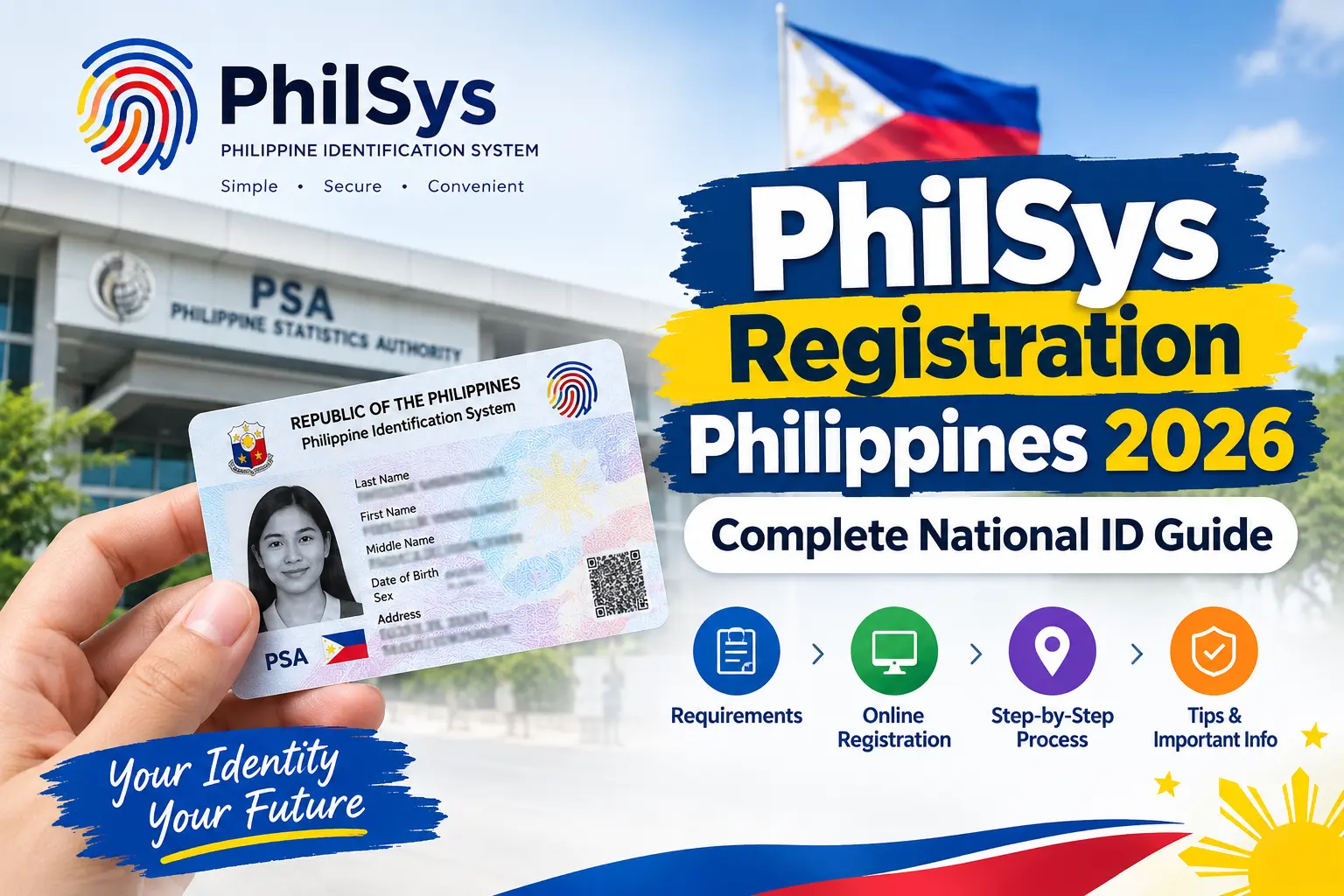
The Philippine Identification System (PhilSys) provides Filipino citizens and eligible residents with a government-recognized national identification system designed to simplify identity verification and support access to public and private services. Whether you are a student applying for identification, an employee completing workplace requirements, or a resident preparing for government transactions, understanding PhilSys registration in the Philippines can help you prepare the necessary documents and follow the appropriate application procedures.
The Philippine Statistics Authority (PSA) administers PhilSys and oversees the processing of registration information and National ID services. Depending on the current registration arrangements, applicants may need to provide demographic information, present supporting identification documents, and attend an authorized registration facility for identity validation and biometric capture. This comprehensive guide explains the registration requirements, application steps, National ID processing, verification options, and common problems applicants may encounter in 2026.
What Is PhilSys and Why Is the National ID Important?
The Philippine Identification System, commonly known as PhilSys, is the Philippine government’s national identification system. It establishes a standardized method of verifying an individual’s identity through registered demographic and biometric information.
The PhilSys National ID provides an identification option that individuals may use when dealing with government agencies, participating financial institutions, employers, and other organizations that accept the applicable National ID format. Its purpose is to make identity verification more convenient and consistent across eligible transactions.
Completing PhilSys registration allows eligible individuals to enter the national identification system and follow the applicable process for obtaining or accessing their National ID.
Key Benefits of the PhilSys National ID
The National ID offers several practical benefits:
- Reliable identity verification: Provides a government-recognized means of establishing an individual’s identity.
- Convenient access to services: May support transactions with government offices and participating private institutions, subject to their applicable requirements.
- An additional identification option: Gives registered individuals another form of identification when accepted by the organization handling a transaction.
- Digital identity verification: Supported verification facilities may help confirm the authenticity of eligible National ID formats.
- Simplified identification procedures: Can reduce the need to present multiple identification documents for certain transactions when the National ID is accepted.
Acceptance policies may vary depending on the organization, transaction, and applicable regulations. Therefore, applicants should confirm the identification requirements of the specific institution they intend to visit. Visit Homepage.
PhilSys Registration Philippines 2026 at a Glance
Understanding the main stages of the National ID application process can help applicants prepare before visiting a registration facility.
| Registration Stage | Description |
|---|---|
| Preparation | Review official instructions and prepare the required personal information and documents. |
| Demographic information | Provide the requested personal details through the registration procedure currently available. |
| In-person registration | Attend an authorized registration center when required for document checking and biometric capture. |
| Reference information | Keep the application or transaction reference details provided during registration. |
| Data processing | The PSA processes the submitted information and performs applicable validation procedures. |
| National ID availability | Follow official instructions to check or obtain an available National ID format. |
| Identity verification | Use an official verification facility when checking a supported ID or QR code. |
Registration arrangements, appointment requirements, and available digital services may change. Always confirm the current procedure through the official PhilSys website before beginning your application.
PhilSys Registration Requirements
Preparing the required information before starting your PhilSys National ID registration can help make the process more organized. The documents and information required may depend on the current PSA guidelines and the applicant’s circumstances.
Before travelling to a registration center, review the latest official instructions to confirm which documents are accepted and whether an appointment or other preliminary step is necessary.
1. Personal Information
Applicants should be prepared to provide accurate demographic information, including the following details when requested:
- Full legal name
- Sex
- Date of birth
- Place of birth
- Blood type, if required
- Marital status, if required
- Present residential address
- Permanent address, where applicable
- Other demographic information requested during registration
Make sure your information is accurate and consistent with your supporting documents wherever applicable. Incorrect spelling, an inaccurate birth date, or an outdated address may require additional clarification during registration or subsequent processing.
2. Supporting Identification Documents
Applicants may need to present an accepted original document to establish their identity or verify specific personal details. Depending on the applicable PSA guidelines, potentially relevant documents may include a PSA-issued birth certificate, passport, driver’s license, UMID, or another officially accepted identification document.
However, not every document mentioned in general online guides is necessarily accepted in every situation. Requirements can change, and some applicants may need to provide additional supporting documents.
Check the current official PhilSys registration requirements before visiting a registration facility.
3. Preparation Checklist Before Visiting a Registration Center
Use the following checklist to prepare for your National ID application:
- Review the official PhilSys registration instructions.
- Confirm whether registration appointments or walk-in services are available.
- Prepare your demographic information.
- Bring the original supporting documents required for your situation.
- Save any application confirmation, appointment details, or reference number you receive.
- Verify the registration center’s location and current operating arrangements.
- Keep your personal information and identification documents secure.
Important security reminder: Use official government websites when submitting personal information. Avoid unofficial websites or intermediaries that request unnecessary identity documents, passwords, sensitive information, or payments in exchange for supposedly faster National ID registration.
How to Complete the PhilSys Registration Process
The first step is to determine which registration procedure is currently available. The PhilSys registration process may involve different arrangements depending on the PSA’s current services and the applicant’s registration status.
Follow the official instructions rather than assuming that an online form, appointment system, or walk-in service is always available.
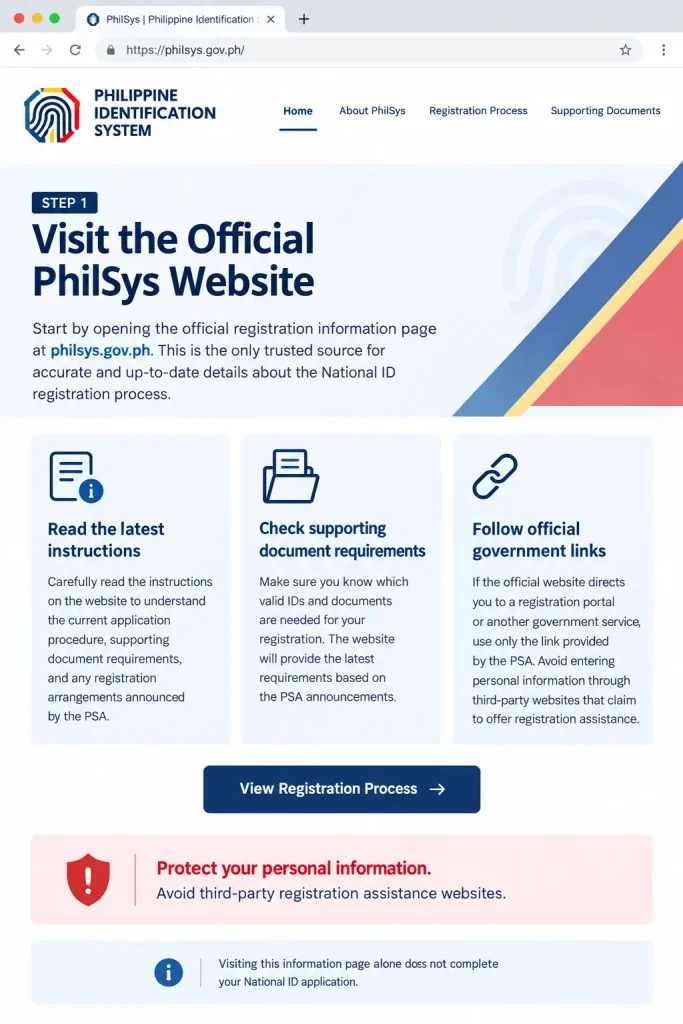
Step 1: Visit the Official PhilSys Website
Start by opening the official registration information page:
Read the instructions carefully to understand the current application procedure, supporting document requirements, and any registration arrangements announced by the PSA.
If the official website directs you to a registration portal or another government service, use the link provided by the official source. Avoid entering personal information through third-party websites that claim to offer registration assistance.
Step 2: Provide Your Demographic Information
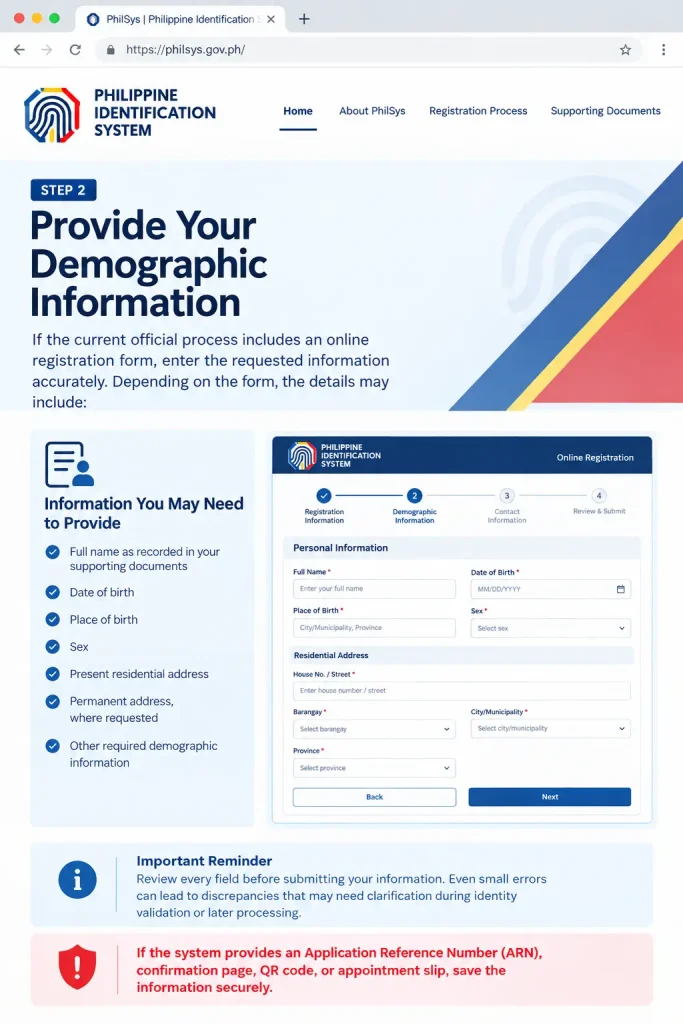
If the current official process includes an online registration form, enter the requested information accurately. Depending on the form, the details may include:
- Full name as recorded in your supporting documents
- Date of birth
- Place of birth
- Sex
- Present residential address
- Permanent address, where requested
- Other required demographic information
Review every field before submitting your information. Even small errors can lead to discrepancies that may need clarification during identity validation or later processing.
If the system provides an Application Reference Number (ARN), confirmation page, QR code, or appointment slip, save the information securely.
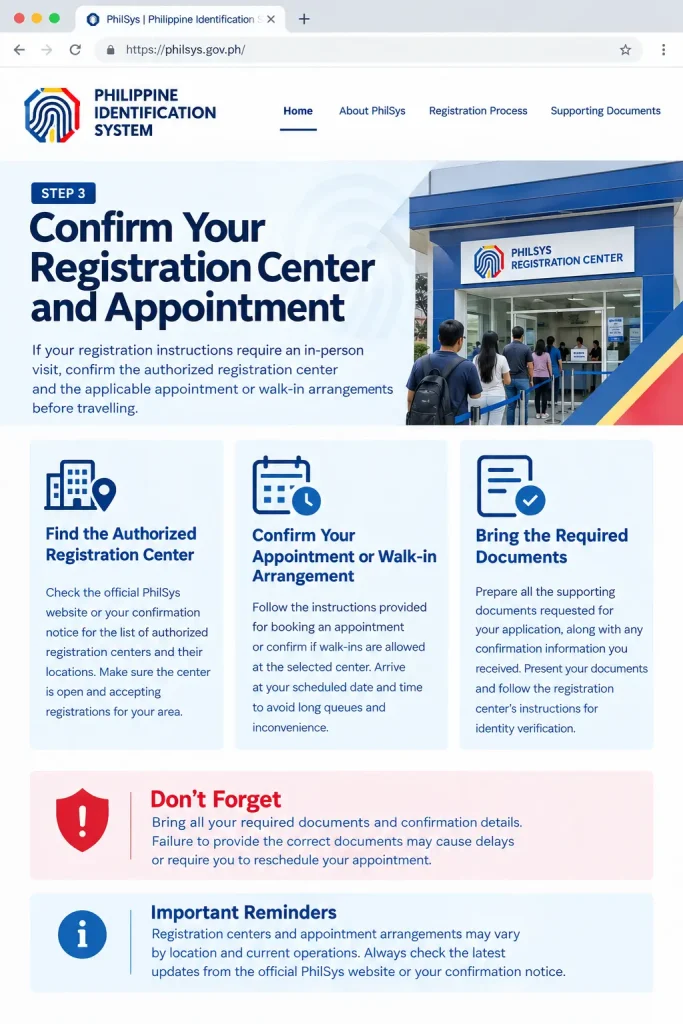
Step 3: Confirm Your Registration Center and Appointment
If your registration instructions require an in-person visit, confirm the authorized registration center and the applicable appointment or walk-in arrangements before travelling.
Depending on current operations, registration may be conducted at designated government facilities or other officially authorized locations.
Bring the supporting documents requested for your application and any confirmation information you received. Follow the registration center’s instructions for presenting your documents and verifying your identity.
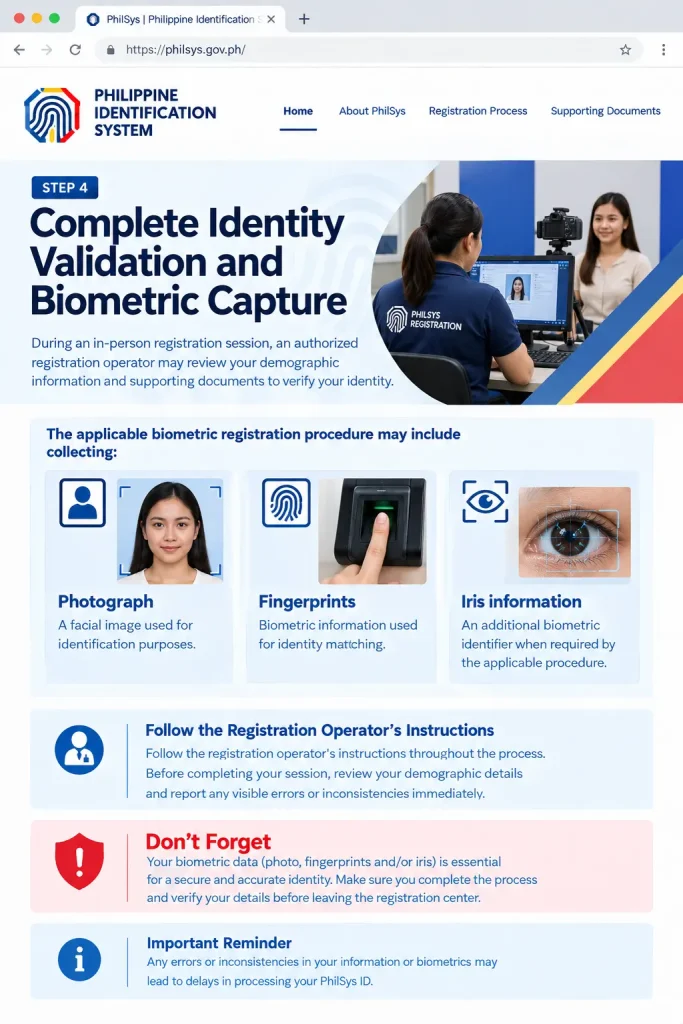
Step 4: Complete Identity Validation and Biometric Capture
During an in-person registration session, an authorized registration operator may review your demographic information and supporting documents to verify your identity.
The applicable biometric registration procedure may include collecting:
- Photograph: A facial image used for identification purposes.
- Fingerprints: Biometric information used for identity matching.
- Iris information: An additional biometric identifier when required by the applicable procedure.
Follow the registration operator’s instructions throughout the process. Before completing your session, review your demographic details and report any visible errors or inconsistencies immediately.
Step 5: Keep Your Registration Reference Details Safe
After completing the relevant registration steps, you may receive a transaction slip containing reference information, such as a Transaction Reference Number (TRN), depending on the procedure used.
Keep the slip in a secure location. If permitted, retain a clear photograph or digital copy for your personal records.
Your reference details may help when following up on your application or requesting assistance with a missing transaction record.
PhilSys National ID Processing and Issuance
After completing the required registration steps, applicants must wait for the Philippine Statistics Authority (PSA) to process their information and complete the applicable validation procedures. Completing PhilSys registration does not necessarily mean that the physical National ID card will be available immediately.
The processing period and available identification formats may vary depending on the applicant’s registration status and current PSA procedures. For this reason, applicants should rely on official announcements when checking their National ID status, delivery arrangements, or eligibility for an alternative identification format.
Understanding the difference between the PhilSys Number, registration reference numbers, digital ID options, and the physical National ID card can help applicants manage their records and follow the correct procedures.
Understanding the PhilSys Number (PSN)
The PhilSys Number (PSN) is the permanent identification number assigned to a registered individual within the Philippine Identification System. It is different from an Application Reference Number (ARN) or a Transaction Reference Number (TRN), which may be associated with particular registration or transaction stages.
Each number serves a different purpose, so applicants should not treat them as interchangeable.
Here is a simple comparison:
| Identification Number | Purpose |
|---|---|
| PhilSys Number (PSN) | The permanent identification number associated with a registered individual. |
| Application Reference Number (ARN) | A reference that may be provided during an applicable online application or registration stage. |
| Transaction Reference Number (TRN) | A reference associated with a registration transaction, depending on the procedure followed. |
Keep any reference information you receive in a secure place. Follow official PSA instructions regarding the appropriate use and disclosure of your PSN and other personal identification details.
ePhilID and Other Digital National ID Formats
The ePhilID has been made available as an alternative National ID format for eligible registered individuals. Digital identification options may provide a convenient way to access or present identification without waiting for, or carrying, a physical card.
However, the availability of particular digital formats, access methods, and claiming procedures may change over time. Applicants should confirm which options are currently available and whether additional identity verification is required.
Before attempting to access or claim a digital National ID, remember the following:
- Confirm that the service is provided or authorized by the relevant government agency.
- Follow the current instructions for accessing your digital identification.
- Use accurate personal information when completing any required verification.
- Protect your login credentials and personal identification details.
- Avoid unofficial websites that promise instant access to a National ID in exchange for sensitive information or unauthorized payments.
Do not assume that every registered individual can immediately download or claim an ePhilID or another digital format. Eligibility and access depend on the applicable official procedures.
Physical PhilSys National ID Card
The physical PhilSys National ID card is another identification format associated with the national identification system. Its issuance generally involves registration, information processing, validation, and the applicable card production or delivery arrangements.
To help avoid unnecessary complications, check that the residential address and other relevant information provided during registration are accurate. If you need to correct personal details or inquire about delivery, follow the official PSA assistance procedures.
How to Check PhilSys National ID Status
Applicants who have completed their registration may want to determine whether their information has been processed or whether their National ID is available. The appropriate way to follow up depends on the services currently offered by the PSA and the applicant’s registration details.
Step 1: Visit the Official PhilSys Website
Open the PhilSys official website and look for current announcements or instructions relating to registration status, National ID availability, and applicant assistance.
Use only official links when accessing any service that requests personal information.
Step 2: Review the Available Status or Assistance Options
Check whether the PSA currently provides an online status-checking facility or another official method for following up on your application.
Not every registration stage necessarily has an online tracking service. If a status-checking option is unavailable, follow the official instructions for obtaining assistance.
Step 3: Prepare Your Registration Information
If the official service requires reference details, prepare the information provided during registration. Depending on the applicable procedure, this may include a registration slip or transaction reference.
Enter information only on an official service that is intended for that purpose. Do not disclose your PSN, reference numbers, or other sensitive details on unfamiliar websites.
Step 4: Follow the Instructions Provided
Review the information displayed by the official service and follow any instructions concerning further processing, identification verification, or assistance.
If your application status cannot be confirmed online, contact an authorized registration center or use the support channel identified by the PSA.
Step 5: Keep Your Records Updated
Store your registration slip, confirmation details, and relevant correspondence securely. These records may be helpful when requesting assistance about a delayed card, a missing reference number, or a discrepancy in your personal information.
Important: The availability of online tracking and the exact steps required to check National ID status may change. Confirm the current procedure before relying on a particular tracking method.
What to Do If Your National ID Has Not Arrived
A delay in receiving a physical National ID does not automatically mean that your registration has failed. Processing, validation, production, and delivery are separate stages, and applicants may experience different timelines.
If your National ID has not arrived, consider the following steps:
- Review your registration records. Check your transaction slip and any confirmation information received during registration.
- Confirm your registered address. Make sure the address provided during registration was accurate.
- Check official announcements. Visit the PhilSys website for information about current issuance and delivery arrangements.
- Request assistance if necessary. Contact an authorized registration center or the appropriate PSA support channel if the delay continues.
- Ask about available alternatives. If you need identification for an urgent transaction, check whether an available National ID format can be accessed and whether the organization handling your transaction accepts it.
Avoid submitting another registration application simply because your physical card has not arrived. First, confirm your existing registration status and follow the appropriate official procedure.
How to Correct Errors in PhilSys Registration Information
Accurate demographic information is important for identity verification. If you notice a mistake in your registered name, birth date, address, or another personal detail, you should ask the appropriate government authority how to correct it.
The correction procedure may depend on the type of error, the supporting documents available, and the current PSA guidelines.
Common Personal Information Errors
Examples of discrepancies that may require assistance include:
- Incorrect spelling of a name
- An inaccurate date or place of birth
- An incorrect residential address
- Differences between registration details and supporting documents
- Other demographic information that does not match the applicant’s official records
Can You Use the PhilSys National ID for Official Transactions?
The PhilSys National ID is designed to support identity verification for eligible transactions. However, acceptance depends on the applicable rules, the type of transaction, and the procedures of the organization involved.
Before visiting a government office, bank, employer, or other institution, check its current identification requirements.
Consider these practical recommendations:
- Confirm whether the institution accepts the National ID format you have.
- Check whether additional documents are required for the particular transaction.
- Follow the institution’s instructions for presenting or verifying your identification.
- Use an official verification facility if QR-based verification is required and supported.
- Keep your identification information private and secure.
Possessing a National ID does not automatically eliminate every other documentation requirement. Certain services may require additional records to establish eligibility, confirm an address, or complete a separate application.
Important Tips for a Smooth PhilSys Registration Experience
Following a few basic precautions can help you avoid common mistakes during registration, processing, and follow-up.
- Use official information: Start with philsys.gov.ph for current announcements and registration guidance.
- Check your personal details: Make sure your information is accurate before submitting it.
- Prepare your documents: Confirm which original documents are required for your circumstances.
- Keep reference information safe: Store your ARN, TRN, registration slip, and other records securely when applicable.
- Confirm arrangements before travelling: Check the current location, operating arrangements, and appointment requirements of the registration center.
- Protect your identity: Do not post your National ID, PSN, QR code, or other sensitive identification information publicly.
- Be patient with processing: Registration, validation, card issuance, and delivery may occur at different stages.
- Avoid unauthorized intermediaries: Do not rely on unofficial promises of guaranteed approval or faster delivery.
- Verify conflicting information: If online guides provide different instructions, prioritize the latest applicable PSA guidance.
Following these recommendations can help make your PhilSys National ID application and subsequent follow-up more organized and secure.
How to Recover a Lost PhilSys Registration Reference Number
An Application Reference Number (ARN) may be provided during an applicable online registration stage. If you can no longer locate your ARN, follow these steps:
- Check your saved records: Look through downloaded documents, screenshots, browser downloads, and any registration confirmation messages you saved.
- Review your confirmation details: If you received an appointment confirmation or another registration record, check whether it contains the reference information you need.
- Contact an authorized registration center: If you cannot recover the number, ask the registration center or the appropriate PSA support channel for guidance.
- Follow identity verification instructions: Be prepared to provide the information requested to confirm your identity through the authorized process.
- Avoid duplicate registration: Do not submit another application simply because you lost the ARN. Confirm whether a new application is necessary before proceeding.
How to Verify a PhilSys National ID Online
PhilSys National ID verification helps establish whether a supported identification document or QR code is authentic. The available verification options depend on the identification format and the services currently provided by the PSA.
Applicants and organizations should use official verification facilities rather than unfamiliar websites that request sensitive personal information.
Before proceeding, confirm that the verification service supports your particular National ID format.
Steps for PhilSys National ID QR Code Verification
Step 1: Visit the Official PhilSys Verification Website
Begin by opening your preferred web browser and accessing the official PhilSys Check website at https://verify.philsys.gov.ph/. Before proceeding, carefully check the website address to ensure you are using the legitimate verification service. Using the official platform helps protect your personal information and reduces the risk of exposing sensitive identification details to unauthorised websites. Avoid third-party services that claim to verify your National ID without clear official authorisation.
Step 2: Review the Verification Instructions
Once the PhilSys verification website opens, read the instructions provided on the page before starting the scanning process. Identify the available QR code verification option and check whether your National ID format is supported by the service. Following the displayed guidance can help you avoid unnecessary scanning errors and understand what information you may need to provide. If the website offers different verification options, select the one that matches your document and follow the official instructions carefully.
Step 3: Enable Camera Access if Required
Some QR code verification services use your device’s camera to scan the National ID directly. If the official PhilSys Check website requests camera access, review the browser permission prompt and allow access when necessary. Make sure you are on the correct official website before granting permission. If the camera does not open, check your browser’s site permissions, confirm that another application is not using the camera, and reload the page if needed. You can also review whether the verification service provides another supported scanning method.
Step 4: Scan the National ID QR Code
Position the QR code printed on your supported National ID within the scanning area displayed on your screen. Keep your device steady and ensure the code is clearly visible, properly aligned, and free from obstruction. Good lighting can improve scanning accuracy, while glare, shadows, damaged printing, or a blurry image may prevent the system from reading the code correctly. If the scan does not work on the first attempt, adjust the angle or distance slightly and try again, following the instructions shown on the official website.
Step 5: Check the Verification Result
After scanning the QR code, allow the official PhilSys verification service to process the information and display its result. Read the message carefully and follow any additional instructions provided on the screen. If the service confirms successful verification, review the displayed information as instructed to ensure the result corresponds to the verification you intended to perform. If verification fails or the system cannot read the QR code, check the code’s clarity and confirm that your document is supported. For persistent problems, consult official PhilSys or Philippine Statistics Authority assistance channels rather than relying on unofficial verification services.
What to Do If PhilSys QR Verification Fails
If you cannot verify your National ID online, try the following troubleshooting steps:
- Check your internet connection.
- Make sure the QR code is clear and unobstructed.
- Improve the lighting around the identification document.
- Confirm that your browser has the necessary camera permissions.
- Follow the official instructions for the supported ID format.
- Contact the appropriate PSA support channel if the issue continues.
Security reminder: Never upload your National ID to an unfamiliar website simply to check its authenticity. Use the official verification service and avoid sharing screenshots that contain sensitive personal information.
Common PhilSys Registration Problems and Solutions
Applicants may experience difficulties while completing registration, following up on an application, accessing verification services, or waiting for their National ID. Many issues can be addressed by checking the official instructions and contacting an authorized registration center when necessary.
The following table outlines common problems and practical solutions.
| Common Problem | Recommended Solution |
|---|---|
| PhilSys registration website does not load | Check your internet connection, refresh the page, and try again later. Access registration information through the official PSA website. |
| Online registration option is unavailable | Review current PSA announcements and confirm which registration arrangements are available. |
| Personal information is incorrect | Ask an authorized registration center or the appropriate PSA support channel about the applicable correction procedure. |
| Application Reference Number (ARN) is missing | Check saved confirmations, screenshots, and downloaded documents. Contact an authorized registration center if you cannot recover it. |
| Transaction Reference Number (TRN) slip is lost | Request assistance from an authorized registration center and follow its identity verification requirements. |
| Physical National ID has not arrived | Review official announcements and follow the available status-checking or assistance procedures. |
| QR code cannot be scanned | Improve lighting, check camera permissions, and confirm that your identification format is supported. |
| Online verification is unsuccessful | Review the official verification instructions and contact the appropriate support channel if the problem continues. |
| Registration details do not match supporting documents | Ask the PSA or authorized registration personnel how to resolve the discrepancy and which documents are required. |
| Unsure where to obtain assistance | Start with the official PhilSys website and follow its current guidance. |
Do not pay an unofficial agent to recover a reference number, correct registration information, or guarantee National ID delivery. Confirm any applicable fees, services, and procedures through official government sources.
Important Tips for a Successful
A well-prepared application can help reduce avoidable errors and make it easier to follow up on your registration. Keep the following recommendations in mind throughout the process.
- Use official sources: Visit philsys.gov.ph for registration instructions and announcements.
- Prepare accurate information: Review your demographic details and compare them with your supporting documents wherever applicable.
- Check current requirements: Confirm the accepted documents and registration arrangements before travelling.
- Keep your records secure: Store your registration slip, ARN, TRN, and other relevant confirmations safely.
- Protect your identity: Avoid publicly sharing your PSN, QR code, or identification documents.
- Confirm before making a trip: Check the registration center’s current instructions and operating arrangements.
- Follow official correction procedures: Seek authorized assistance if your personal information contains an error.
- Be patient with processing: Registration, validation, card issuance, and delivery are separate stages, and processing times may vary.
- Avoid unauthorized services: Do not trust claims of guaranteed approval or instant delivery from unofficial intermediaries.
- Verify information before acting: If online articles conflict with official instructions, prioritize the latest applicable PSA guidance.
Following these practices can help applicants manage their PhilSys registration records, protect their personal information, and respond appropriately if problems arise.
Frequently Asked Questions
Final Thoughts
Completing PhilSys registration in the Philippines is an important step toward obtaining access to the country’s national identification system. By preparing accurate demographic information, checking the required supporting documents, following the current registration procedure, and keeping reference details secure, applicants can manage the process more confidently.
It is equally important to understand that registration, information validation, National ID issuance, and delivery may occur at different stages. Applicants should use official PSA resources when checking their application status, correcting personal information, recovering lost reference numbers, or verifying a supported National ID.