DITO SIM Registration 2026 Philippines | Step by Step Guide
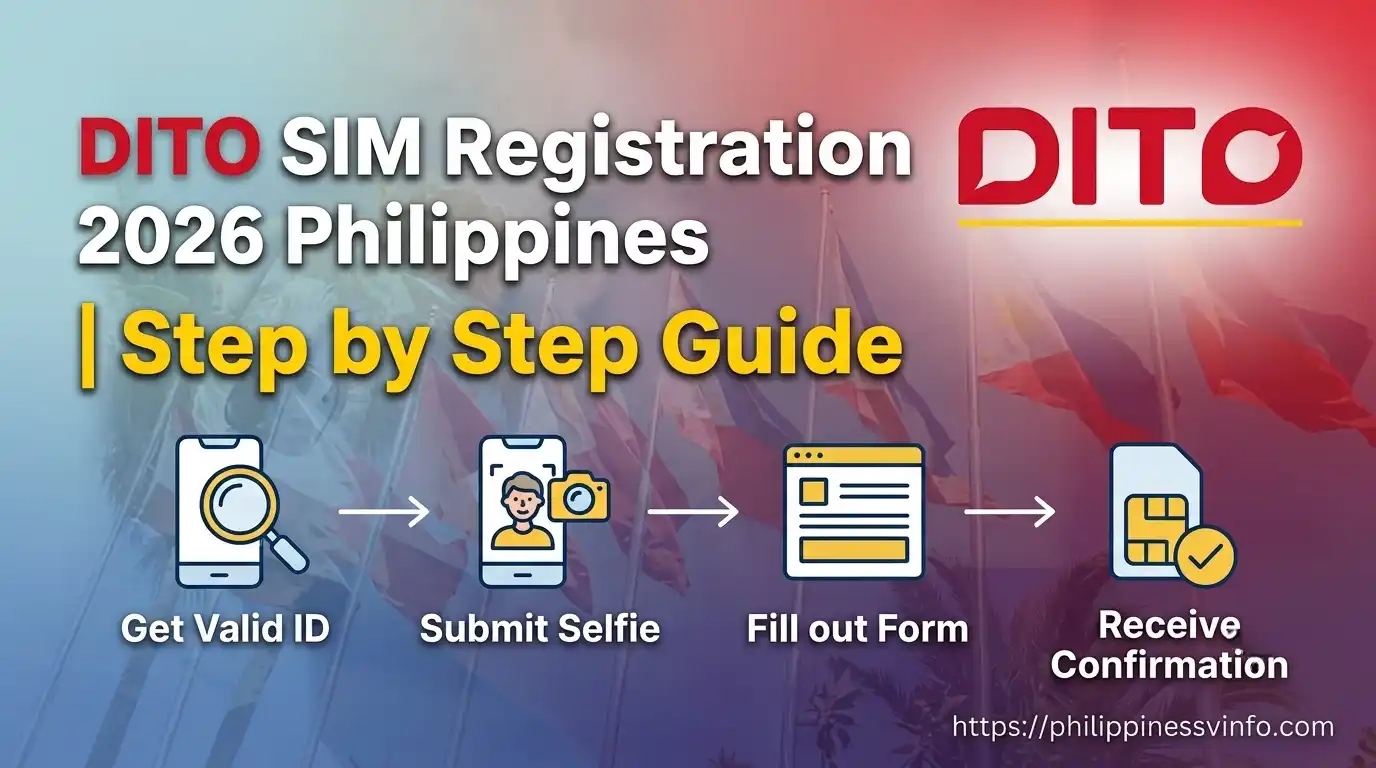
DITO SIM Registration is the official process that activates your DITO SIM and keeps your mobile number compliant with Philippine SIM registration regulations. Whether you’re registering a brand-new DITO SIM or updating an existing one, completing the registration is fast, secure, and essential before you can enjoy uninterrupted calls, text messages, and high-speed mobile data.
This complete 2026 guide covers everything you need to know—from registration requirements and accepted valid IDs to step-by-step instructions, troubleshooting tips, and solutions to common verification issues. Follow this guide to complete your DITO SIM Registration quickly, avoid delays or rejected applications, and activate your SIM with confidence.
Why Is DITO SIM Registration Important?
The Philippine SIM Registration Act (Republic Act No. 11934) was introduced to strengthen public safety, combat cybercrime, and prevent the misuse of mobile numbers for illegal activities. By requiring all prepaid and postpaid SIM cards to be registered with verified personal information, the government can more effectively identify fraudulent users, reduce text scams, phishing attacks, identity theft, and other forms of mobile-related crime.
Completing your DITO SIM Registration is not only a legal requirement but also the key to keeping your mobile services active. A successfully registered SIM allows you to continue making voice calls, sending text messages, accessing high-speed mobile data, and using digital services without interruption. In addition, registration helps protect your account from unauthorized use, supports secure identity verification, and provides a safer and more reliable mobile experience for every DITO subscriber in the Philippines.
How to Register a New DITO SIM Card in the Philippines
Registering your DITO SIM card is an online process that only takes a few minutes. Before you begin, make sure you have a stable internet connection, a valid government-issued ID, and your mobile device ready.
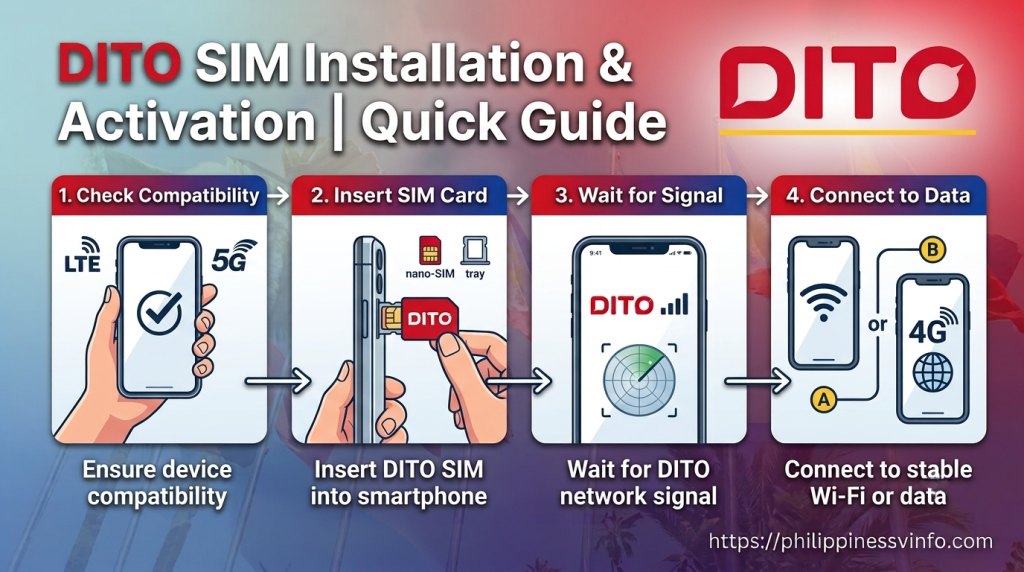
Step 1: Install and Activate Your DITO SIM
Insert your SIM card into a compatible smartphone and wait for the DITO network signal to appear. Before starting the registration process, make sure your device is connected to a stable Wi-Fi or mobile data connection for a smooth and uninterrupted experience.
Step 2: Open the Official DITO SIM Registration Link
After activating your SIM, you will receive a text message containing the official DITO registration link. Tap the link to access the registration portal and begin the verification process. Always use the official DITO registration link to protect your personal information.

Step 3: Fill in Your Registration Details
Carefully complete the online registration form by providing your personal information exactly as it appears on your valid government-issued ID. You may also be asked to:

Step 4: Save Your Registration Confirmation
After completing your DITO online SIM registration, you will receive a confirmation message on the screen or through SMS. Save this confirmation carefully, as it serves as proof that your SIM has been successfully registered and may be required for future verification.

Why Is SIM Registration Required?
The DITO SIM online Act was implemented to reduce the misuse of mobile SIM cards for unlawful activities across the Philippines. By requiring every SIM card to be registered under the owner’s verified identity, the government can better combat mobile scams, fraudulent schemes, spam messages, identity theft, and other forms of cybercrime. This registration system promotes greater accountability among SIM users while helping law enforcement investigate illegal activities more effectively. As a result, Filipino citizens can enjoy a safer and more secure mobile communication environment with stronger protection against fraud and deceptive text messages.
Requirements for Registering a New DITO SIM Card in the Philippines
Before starting your DITO portal registration, gather the necessary information and supporting documents to avoid delays during the verification process. Every subscriber must provide accurate personal details and complete identity verification as required under the SIM portal Act.
The standard information required includes:
In addition to these details, you must upload a valid government-issued ID and complete the identity verification process. Depending on your status, such as being a minor, tourist, foreign national, or business representative, additional documents may also be required.
Requirements for Minors
Subscribers under 18 years old cannot register a SIM card independently. The registration must be completed under the supervision of a parent or legal guardian.
Requirements for Business Registration
Registering a DITO Business SIM requires companies and organizations to submit documents that verify their legal business status and confirm that the person completing the registration is officially authorized to act on the company’s behalf.
Requirements for Tourists
Foreign visitors who need a local mobile number while staying in the Philippines can also register a DITO SIM card by providing documents that confirm their identity and temporary stay.
The required documents are:
Requirements for Foreign Nationals with a Non-Tourist Visa
Foreign residents staying in the Philippines for work, study, or other long-term purposes must provide additional documents during SIM portal. Prepare the following:
DITO SIM Registration vs TNT SIM online
| Feature | DITO SIM Registration | TNT SIM online |
|---|---|---|
| Network Provider | DITO Telecommunity | TNT (Smart Communications) |
| Registration Requirement | Mandatory for all SIM users | Mandatory for all TNT SIM users |
| Registration Fee | Free | Free |
| Official Registration Method | DITO App or official SIM Portal | Smart SIM Portal or Smart App |
| Eligible Users | Filipino citizens and foreign nationals | Filipino citizens and foreign nationals |
| Documents Required | Valid government-issued ID and selfie | Valid government-issued ID and selfie |
| Information Required | Personal details, ID information, mobile number, and address | Personal details, ID information, mobile number, and address |
| Verification Method | One-Time Password (OTP) sent to the DITO number | One-Time Password (OTP) sent to the TNT number |
| Processing Time | Usually completed within a few minutes | Usually completed within a few minutes |
| Registration Deadline | Must follow the government-mandated deadline | Must follow the government-mandated deadline |
| Penalty for Non-Registration | SIM card may be deactivated | SIM card may be deactivated |
| Status Check | Through the DITO App or DITO Customer Support | Through the Smart App, registration portal, or Customer Support |
| Customer Support | DITO App, DITO Experience Stores, Customer Care | Smart Stores, TNT Customer Care, Smart App |
| Main Purpose | Prevent fraud, scams, spam messages, and improve user security | Prevent fraud, scams, spam messages, and improve user security |
Common DITO online portal Issues and Solutions
Although the registration process is straightforward, some users may encounter verification or submission errors. Most of these issues can be resolved by following a few simple troubleshooting steps.
OTP Verification Code Not Received
If you do not receive the One-Time Password (OTP), try the following solutions before requesting another code:
Unable to Upload Your Valid ID
ID upload failures usually occur when the uploaded image is unclear or does not meet the required quality standards.
To avoid this problem:
Registration Form Errors
Registration form errors are one of the most common reasons for a failed DITO online SIM registration. To avoid delays or rejection, make sure all the personal information you enter is accurate and matches the details on your valid government-issued ID.
DITO Prepaid Plans: Flexible and Budget-Friendly
Once you’ve used the free data included with your newly activated DITO online SIM card, you can continue enjoying mobile services by subscribing to one of DITO’s affordable prepaid promos. These plans are available at different price points, allowing you to choose the option that best fits your budget and data needs.
Level-Up Pack
The Level-Up Pack is designed for users who want more high-speed mobile data. It provides additional 5G data allocation with a validity period of up to 30 days, making it suitable for everyday browsing, streaming, and downloading.
Level-Up Socials
If you spend most of your time on social networking platforms, the Level-Up Socials promo is a practical choice. It includes dedicated data for popular social media apps, helping you stay connected with friends and family without quickly consuming your regular data allowance.
Unli 5G
For users within DITO’s 5G coverage areas, the Unli 5G promo offers unlimited 5G data access for up to 30 days. It is ideal for heavy internet users who frequently stream videos, play online games, or work remotely using mobile data.
Data Sachet
Need mobile data for a short period? Data Sachet promos are budget-friendly options that start from ₱10, making them perfect for light internet usage or emergency connectivity.
App Booster
The App Booster promo provides additional data for selected applications used for work, education, communication, and entertainment. It’s an excellent option if you regularly use specific apps throughout the day.
App Combo
With the App Combo plan, you receive data allocation for a combination of supported gaming and streaming applications. This promo is ideal for users who enjoy watching videos, listening to music, or playing mobile games without heavily using their primary data balance.
How to Make the Most of Your SIM’s Free Data
Every newly activated DITO online SIM card comes with free mobile data and other introductory benefits. To maximise these free rewards, use your data wisely and take advantage of DITO’s available promotions.
Here are a few practical tips:
DITO SIM portal Safety Tips
Use Only the Official DITO Registration Portal
Always register your DITO SIM through the official DITO website or the DITO App. Avoid clicking registration links from unknown text messages, emails, or social media posts, as they may lead to fake websites designed to steal your personal information.
Never Share Your OTP or Verification Code
Your One-Time Password (OTP) is a security code used to verify your identity. Never share it with anyone, even if they claim to be from DITO Customer Support. Official representatives will never ask for your OTP.
Use a Secure Internet Connection
Complete your DITO SIM online using your home Wi-Fi or mobile data instead of public Wi-Fi. A secure internet connection helps protect your personal information from hackers and unauthorized access.
Verify Your Information Before Submitting
Double-check your name, mobile number, date of birth, and ID details before submitting the registration form. Accurate information helps prevent verification failures and avoids delays in activating your SIM.
Beware of Phishing and Online Scams
Scammers often send fake messages asking users to “update” or “verify” their DITO SIM registration. Always confirm announcements through official DITO channels and never provide personal details on suspicious websites.
Keep Your Personal Information Safe
After completing your registration, store your identification documents securely and avoid sharing screenshots of your registration confirmation online. Protecting your personal data reduces the risk of identity theft and unauthorized use of your SIM.
FAQ: DITO SIM Online Registration
Conclusion
Completing your DITO SIM registration is an essential step for every mobile user in the Philippines. Besides complying with the SIM portal Act (Republic Act No. 11934), registration helps protect your mobile number from misuse, supports the fight against scams and fraudulent activities, and ensures your identity is properly verified.
The registration process is quick and convenient when you have the required information and documents prepared in advance. By carefully entering accurate details and following the official registration procedure, you can avoid common verification issues and activate your DITO SIM Registration without delays. Once your registration is successful, you’ll enjoy uninterrupted access to calls, text messages, mobile data, and all the services and prepaid promos that DITO offers, giving you a secure and reliable mobile experience.