eGov PH 2026: Complete e.gov.ph Registration, Login & Government Services Guide

The eGov PH Super App, commonly known as eGov PH, is the Philippine government’s official digital platform developed by the Department of Information and Communications Technology (DICT). It serves as a unified gateway that enables Filipinos to securely access a wide range of government services through a single mobile application. Instead of navigating multiple agency websites or visiting government offices in person, users can conveniently complete essential public transactions from one trusted platform.
Designed to support the country’s digital transformation initiatives, this portal allows citizens and residents to verify their identity, manage official government records, and interact with participating agencies anytime and anywhere. Whether you need to access your Digital National ID, review PhilHealth or SSS information, submit an eTravel declaration, or connect with your Local Government Unit (LGU), the app streamlines these services into one secure and user-friendly ecosystem.
What is eGov PH?
eGov PH is the official Philippine Government Super App that centralises digital public services into a single, secure platform. Developed and maintained by the Department of Information and Communications Technology (DICT), the application enables users to authenticate their identity, access government-issued digital credentials, submit online applications, track transactions, and receive real-time notifications from participating government agencies.
Rather than creating and managing separate accounts for individual government departments, users can access multiple public services using one verified Electronic Government account. This unified approach simplifies the digital government experience while reducing the time and effort required to complete official transactions.
The platform continues to evolve as additional government agencies, Local Government Units (LGUs), and public institutions integrate their online services, making government assistance more accessible, efficient, and secure for every Filipino.
eGov PH at a Glance
| Feature | Details |
|---|---|
| Platform Name | Super App |
| Official Website | https://e.gov.ph/ |
| Developed By | Department of Information and Communications Technology (DICT) |
| Country | Philippines |
| Platform Category | Government Digital Services |
| Supported Devices | Android and iOS |
| Registration Fee | Free |
| Login Options | Mobile Number, OTP, PIN, or Biometrics |
| Identity Verification | Government-Issued ID with Facial Recognition |
| Security Features | OTP Verification, Biometric Authentication, and Encrypted Login Sessions |
Main Features
The Electronic Government PH Super App brings together a wide range of government services within a single secure platform, making public transactions faster and more convenient. Instead of accessing multiple government websites individually, users can manage essential services through one verified account.
Some of the key features available through Electronic Government PH include:
By integrating these services into one application, PH simplifies government transactions while improving accessibility, efficiency, and security for users across the Philippines. Visit Homepage
Requirements Before Registering
Before creating your account, make sure you have the following requirements ready to ensure a smooth registration and identity verification process.
| Requirement | Purpose |
|---|---|
| Android Smartphone or iPhone | Install and use the official PH app |
| Active Philippine Mobile Number | Receive OTP for account verification |
| Valid Email Address | Register and verify your account |
| Stable Internet Connection | Complete registration without interruptions |
| Government-Issued ID | Verify your identity |
| Device Camera | Capture your face and scan your ID during verification |
Preparing these requirements in advance helps reduce delays and ensures your account can be verified successfully.
Accepted Government IDs
To complete the identity verification process, Electronic Government PH requires users to present a valid government-issued identification document. The ID must be clear, readable, and currently valid to avoid verification issues.
Commonly accepted government IDs include:
How to Download the Official eGov PH App
Getting started with this portal is simple. The official application is available free of charge for both Android and iPhone users. To protect your personal information, always download the app from official sources published by the Department of Information and Communications Technology (DICT).
Step 1: Visit the Official eGov Website
Go to the official eGov PH website, where you’ll find links to download the mobile application for your device. Using the official portal helps ensure you’re installing the genuine version of the app.
Step 2: Download the App from Your App Store
Open Google Play Store (Android) or the Apple App Store (iPhone), then search for:
Before installing, confirm that the application is published by the Department of Information and Communications Technology (DICT). Avoid downloading apps from unofficial developers, as they may pose security risks.
Step 3: Install the Application
Tap Install and wait for the download and installation process to complete. The required time may vary depending on your internet connection and device.
Step 4: Launch the PH App
Once installed, open the application.
- New users: Tap Register to create a new account.
- Existing users: Select Login and enter your account credentials to access government services.
How to Register for an eGov PH Account
Creating an Electronic Government PH account is a straightforward process that usually takes only a few minutes. Follow the steps below to complete your registration successfully.
Step 1: Visit the Official eGov PH Website
From the official website, you can learn more about the platform or download the eGov PH mobile app for Android or iPhone. Always use the official website or authorized app stores to protect your personal information and avoid fake applications.
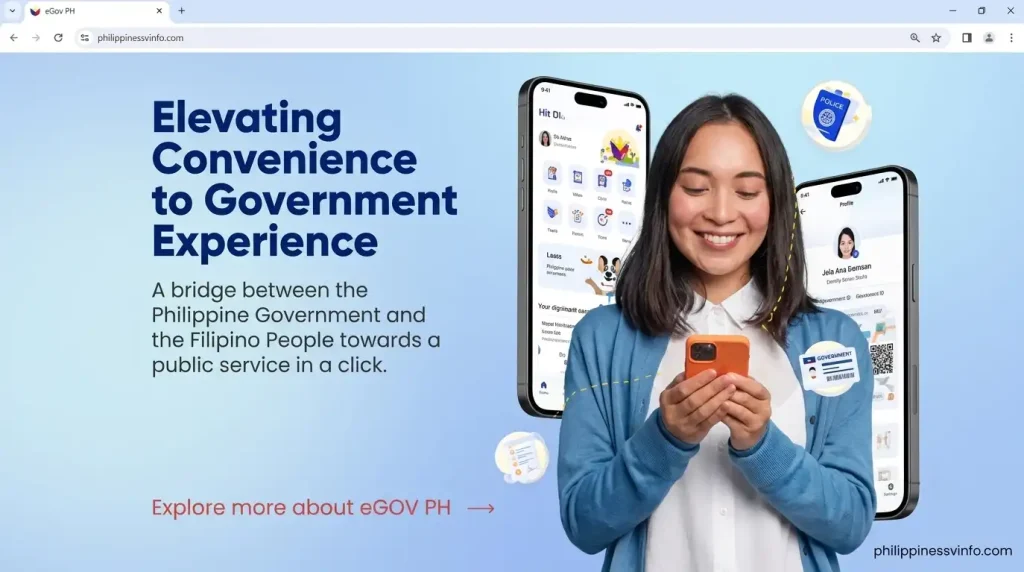
Step 2: Enter Your Mobile Number
Provide your active Philippine mobile number. This number will be linked to your account and used for several important functions, including:
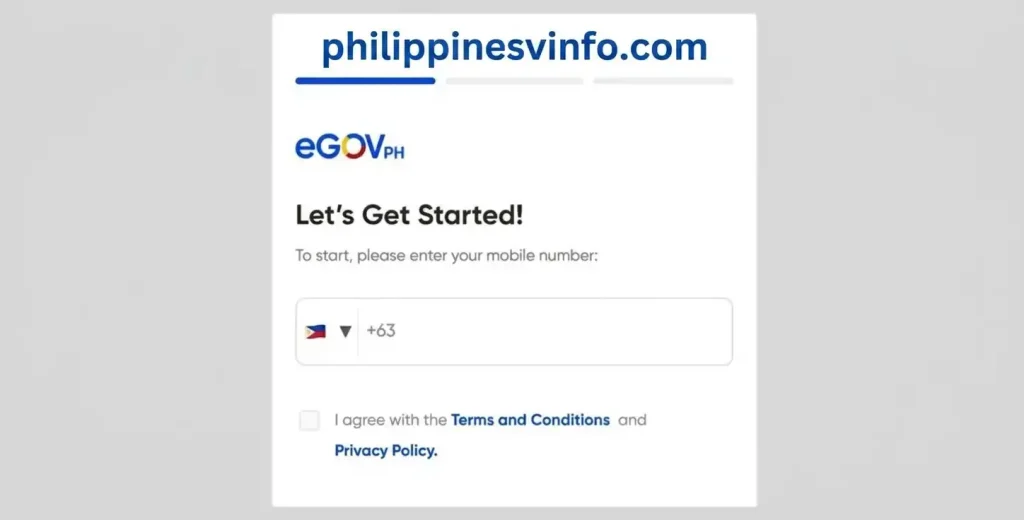
Make sure the number is active, as you’ll need it whenever you access your account.
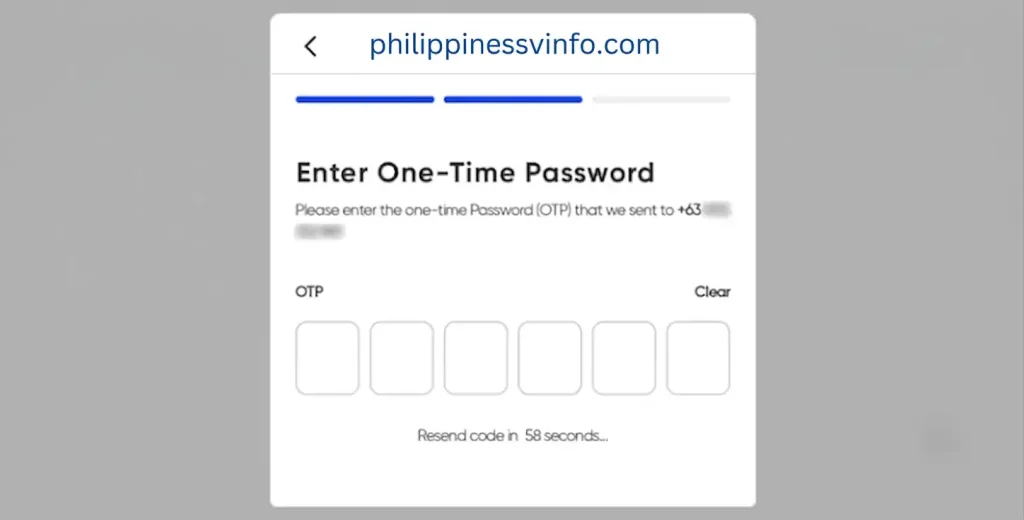
Step 3: Verify Your Mobile Number with OTP
A 6-digit One-Time Password (OTP) will be sent to your registered mobile number via SMS.
Enter the verification code before it expires. If you do not receive the message or the code becomes invalid, simply request a new OTP and try again.
Step 4: Create a Secure PIN
Next, set up a 6-digit security PIN that will protect your account.
For better security, avoid using predictable PINs such as:
Choose a unique PIN that is easy for you to remember but difficult for others to guess.

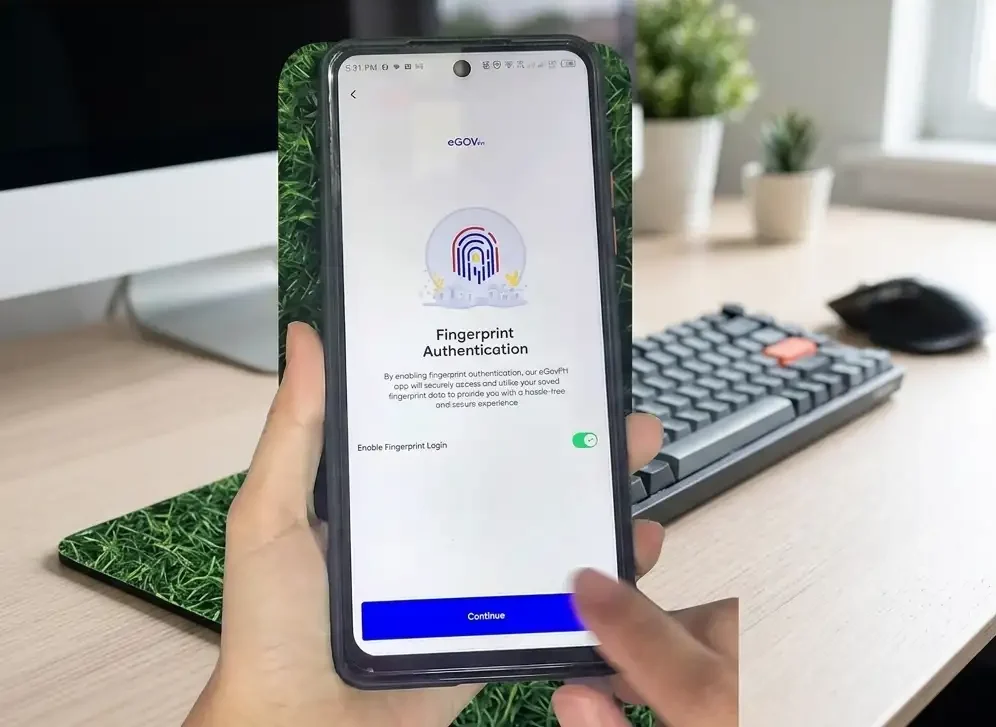
Step 5: Enable Biometric Login (Optional)
If your smartphone supports biometric authentication, you can enable one of the following login methods:
Biometric authentication provides a quicker and more secure way to access your account without entering your PIN every time.
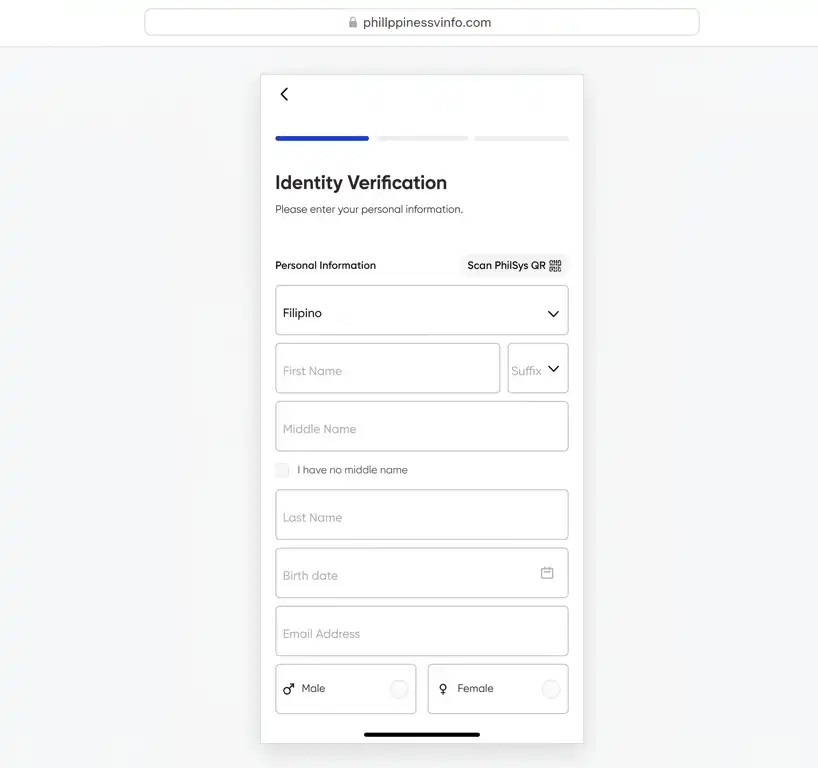
Step 6: Complete Your Personal Information
Fill in your profile using accurate and up-to-date information. You will typically be asked to provide:
Review every detail carefully before continuing, as incorrect information may delay identity verification.
Step 7: Verify Your Email Address
After submitting your registration, check your email inbox for a verification message from this system.
Open the email and click the verification link to activate your account. Once your email has been successfully verified, you can sign in and begin using the available government services.
Why Identity Verification is Important
Creating an Electronic Government PH account gives you access to basic platform features, but completing identity verification is essential to unlock the full range of government services. A verified account enables secure access to digital government records and allows you to use integrated services offered by participating agencies.
Identity verification is designed to:
Once your identity has been successfully verified, additional services and features will become available through your Electronic Government PH dashboard.
How to Verify Your Identity
To access all available government services, you must complete the identity verification process. Follow the steps below to verify your account successfully.
Step 1: Log In to Your PH Account
Open the official Electronic Government application and sign in using one of the following authentication methods:
Step 2: Access Your Profile
After signing in:
Step 3: Select Your Government-Issued ID
Choose the identification document you want to use for verification.
Accepted IDs commonly include:
Note: Ensure your ID is valid, readable, and has not expired before proceeding.
Step 4: Scan Your Identification Card
Use your smartphone’s camera to capture your ID.
During the scanning process:
The system will automatically extract the required information from your ID.
Step 5: Complete the Facial Recognition Check
To confirm your identity, the app will guide you through a live facial recognition scan.
For the best verification results:
This security step verifies that the person registering matches the submitted government-issued ID.
Step 6: Review Your Personal Information
After the scan, Electronic Government PH may automatically populate your personal details.
Carefully review the information, including:
If any information is incorrect, update it before submitting your verification request.
Step 7: Submit Your Verification Request
Once you have confirmed that all details are accurate, tap Submit.
Depending on system processing and validation by the relevant government agency, your verification may be approved immediately or within approximately 24 hours.
Tips for Successful Identity Verification
Following these best practices can help prevent verification delays or failed submissions:
Understanding the PH Dashboard
This PH dashboard is designed with a user-friendly interface, allowing you to access essential government services quickly from a single screen. After signing in, you can monitor your account, view important updates, and navigate to participating government agencies without switching between multiple platforms.
Each section of the dashboard is organised to help users complete transactions efficiently while keeping important information readily accessible.
Home Dashboard
The Home Dashboard provides an overview of your account and offers quick access to the services you use most often.
From the home screen, you can easily view:
This centralised layout allows you to access essential features with just a few taps.
Services Section
The Services tab groups participating government agencies into organised categories, making it easier to locate the service you need.
Common service categories include:
As more agencies join the platform, additional services continue to become available through the app.
Wallet (My Cards)
The Wallet, also known as My Cards, securely stores your verified digital government credentials for convenient access whenever needed.
Depending on available government integrations, your wallet may include:
This feature helps reduce the need to carry physical documents during supported transactions.
Notifications
The Notifications section keeps you informed about important account activities and government updates in real time.
You may receive notifications for:
Regularly checking your notifications helps you stay informed about your ongoing transactions.
Government Services Available Through eGov PH
One of the biggest advantages of PH is its ability to connect multiple Philippine government agencies through a single digital platform. Instead of accessing different government websites, users can manage a variety of public services using one verified account.
Digital National ID
Through Electronic Government, eligible users can securely access their Digital National ID, which serves as the electronic version of their official PhilID for supported government transactions.
Key benefits include:
eTravel Services
International travellers can conveniently complete required travel declarations using the integrated eTravel service available within the app.
Available features include:
Using the integrated platform makes travel documentation more efficient before international departures or arrivals.
PhilHealth Services
Eligible members can access selected PhilHealth services directly through Electronic Government PH, eliminating the need to visit multiple government portals.
Available services may include:
SSS Services
The integration with the Social Security System (SSS) enables members to manage important account information from within the Electronic Government PH platform.
Available services may include:
GSIS Services
Government employees covered by the Government Service Insurance System (GSIS) can access selected digital services through the application.
Available features may include:
Local Government Unit (LGU) Services
Many participating Local Government Units (LGUs) provide digital public services through E-Gov PH, allowing residents to complete local transactions more conveniently.
Depending on your city or municipality, available services may include:
Note: Available services vary depending on the participating LGU.
DOLE and PhilJobNet Services
Job seekers can explore employment opportunities through integrated services provided by the Department of Labor and Employment (DOLE) and PhilJobNet.
These services may include:
The integration helps job seekers connect with available employment opportunities across the Philippines.
SIM Registration Information
Where supported, Electronic Government PH allows users to view SIM registration information associated with their verified identity. This feature helps users monitor registered SIM details linked to their account, providing an additional layer of transparency and account management within the platform.
eGov PH Common Problems and Solutions
While Electronic Government PH is designed to provide a reliable and seamless digital government experience, users may occasionally experience issues related to registration, login, identity verification, or integrated government services. Most problems can be resolved by checking your account information, ensuring a stable internet connection, or waiting for scheduled system maintenance to be completed.
| Problem | Possible Cause | Recommended Solution |
|---|---|---|
| OTP Not Received | SMS delay or network congestion | Wait 60–90 seconds, tap Resend OTP, and ensure your mobile signal is stable. |
| Invalid Mobile Number | Incorrect number entered | Verify that you entered your registered Philippine mobile number correctly and try again. |
| Facial Verification Failed | Poor lighting or incorrect face positioning | Move to a well-lit area, remove hats or glasses, centre your face, and repeat the scan. |
| ID Scan Unreadable | Blurry image, glare, or damaged ID | Place the ID on a dark surface and retake the photo with good lighting and no reflections. |
| Email Verification Not Received | Email delivery delay or spam filtering | Check your Spam or Junk folder, then request a new verification email if necessary. |
| Login Failed | Incorrect PIN or authentication issue | Re-enter your PIN carefully or use Face ID/Fingerprint login if biometric authentication is enabled. |
| App Keeps Crashing | Outdated app version or cached data | Update the app from the official app store, clear the app cache, or restart your device. |
| Agency Service Unavailable | Scheduled maintenance by the government agency | Wait until maintenance is complete and try accessing the service again later. |
| Verification Pending | High volume of verification requests | Allow up to 24 hours for processing before checking your verification status again. |
| Slow App Performance | Weak or unstable internet connection | Switch to a stronger Wi-Fi or mobile data connection and try again. |
Security Tips for Using eGov PH Safely
Since Electronic Government PH provides access to sensitive personal information and government services, keeping your account secure should always be a priority. Following these security best practices can help protect your personal data and prevent unauthorised access.
Best Practices for Account Security
Benefits of Using eGov PH
The Electronic Government PH Super App simplifies digital government transactions by bringing multiple public services together on a single secure platform. Instead of managing separate government portals, users can conveniently access participating agencies through one verified account.
Key Benefits
Limitations of eGov PH
Although E-Gov PH continues to expand its services, there are still a few limitations users should keep in mind before relying on the platform for every government transaction.
Current Limitations
eGov PH vs Traditional Government Services
The table below highlights how E-Gov PH improves the way Filipinos access government services compared with the traditional office-based process. By offering digital access to multiple agencies through a single platform, E-Gov PH helps reduce paperwork, waiting times, and unnecessary travel.
| Feature | Electronic Government PH | Traditional Government Services |
|---|---|---|
| Access Availability | Available 24/7 | Limited to office operating hours |
| Registration Process | Online through the E-Gov PH app | In-person at the government office |
| Identity Verification | Digital verification with biometrics | Manual document verification |
| Waiting Time | Generally shorter | Often involves longer queues |
| Digital National ID | Supported within the app | Physical ID usually required |
| Government Notifications | Instant, real-time updates | Manual follow-up or office visits |
| Multi-Agency Access | Multiple services in one platform | Separate visits to different offices |
| Travel Requirement | Not required for many services | Usually requires travelling to government offices |
| Document Management | Secure digital records | Paper-based document handling |
| Overall Convenience | High | Moderate |
Best Practices for a Better eGov PH Experience
Following a few simple recommendations can help you enjoy a faster, safer, and more reliable experience while using E-Gov PH.
Recommended Best Practices
Frequently Asked Questions (FAQs)
Conclusion
The eGov PH Super App represents a major milestone in the Philippines’ digital transformation by bringing essential government services together on one secure and easy-to-use platform. From account registration and identity verification to accessing your Digital National ID, PhilHealth, SSS, GSIS, eTravel, and participating LGU services, this simplifies government transactions while reducing the need for in-person office visits. With secure authentication, biometric login, and continuous integration of new government agencies, the platform offers a more efficient and accessible way for Filipinos to interact with public services.
Whether you’re creating your first E-Gov PH account or making full use of your verified profile, following the official registration process and recommended security practices will help ensure a safe and seamless experience. As more government agencies continue to expand their digital services, E-Gov PH is expected to become the Philippines’ primary gateway for secure, reliable, and convenient online government transactions. To protect your personal information, always access services through the official e.gov.ph website and the official eGov PH mobile application.