Globe SIM Registration Online 2026 Philippines: Complete Guide, Requirements, Link & Activation

Registering your Globe SIM Registration is one of the first things every Globe mobile user should complete to keep their SIM active and continue enjoying calls, texts, mobile data, and digital services. Whether you have a new prepaid SIM, a postpaid plan, a Globe At Home Prepaid WiFi modem, or a TM SIM, the registration process is completed through the official sim registration globe portal.
This updated guide explains everything you need to know about sim registration globe Online, including eligibility, required documents, supported IDs, registration requirements, and the official registration website. Later sections will also cover Globe At Home Prepaid WiFi registration, troubleshooting common registration problems, and practical tips to help you complete the process successfully.
What Is Globe SIM Registration?
Globe registration sim is the official identity verification process required for all Globe mobile subscribers in the Philippines. During registration, users provide their personal information together with a valid government-issued ID to verify ownership of the SIM card. Visit Homepage
The registration process applies to various Globe services, including:
Once your sim registration globe is completed successfully, your SIM remains active and linked to your verified identity, helping improve user security and reduce fraudulent activities involving anonymous mobile numbers.
Why Globe SIM Registration Is Important
Completing Globe registration sim Online offers more than regulatory compliance. It also protects your mobile account and ensures uninterrupted access to Globe services.
Some of the biggest benefits include:
| Benefit | Description |
|---|---|
| Continued SIM Activation | Prevents SIM deactivation. |
| Identity Protection | Helps prevent unauthorized SIM ownership. |
| Fraud Prevention | Reduces scams involving unregistered numbers. |
| Secure Transactions | Supports safer mobile banking and digital wallet verification. |
| Easier Account Recovery | Makes recovering lost or stolen SIM cards much simpler. |
| Better Customer Support | Globe can verify account ownership faster when assistance is required. |
Registering your SIM early also helps avoid service interruptions that may occur if registration requirements are not completed within the required period.
Who Needs Globe SIM Registration?
Almost every Globe subscriber must complete sim registration globe regardless of the device they use.
The registration requirement generally applies to:
Each subscriber category may have slightly different verification requirements, but all registrations are completed through the official Globe registration system.
Globe registration sim Requirements
Before starting Globe SIM Registration Online, prepare all necessary information and supporting documents. Having everything ready will make the registration process much faster.
Personal Information Required
You may be asked to provide:
Always ensure that the information entered matches your identification document to avoid verification delays.
Accepted Valid IDs for Globe SIM Registration
Globe accepts numerous government-issued identification documents for identity verification.
Commonly accepted IDs include:
| Accepted Identification |
|---|
| Philippine Passport |
| Driver’s License |
| UMID Card |
| PhilSys National ID |
| Social Security System (SSS) ID |
| GSIS e-Card |
| Postal ID |
| Voter’s ID (where accepted) |
| PRC ID |
| Senior Citizen ID |
| OWWA ID |
| PWD ID |
| IBP ID |
| NBI Clearance (where applicable) |
| School ID (for qualified students, when supported) |
Foreign nationals may also register using eligible travel and immigration documents required by Globe.
Globe SIM Registration Online: Step-by-Step Guide
The easiest way to complete sim registration globe is through the official online registration portal. Visit Homepage
Follow these steps carefully.
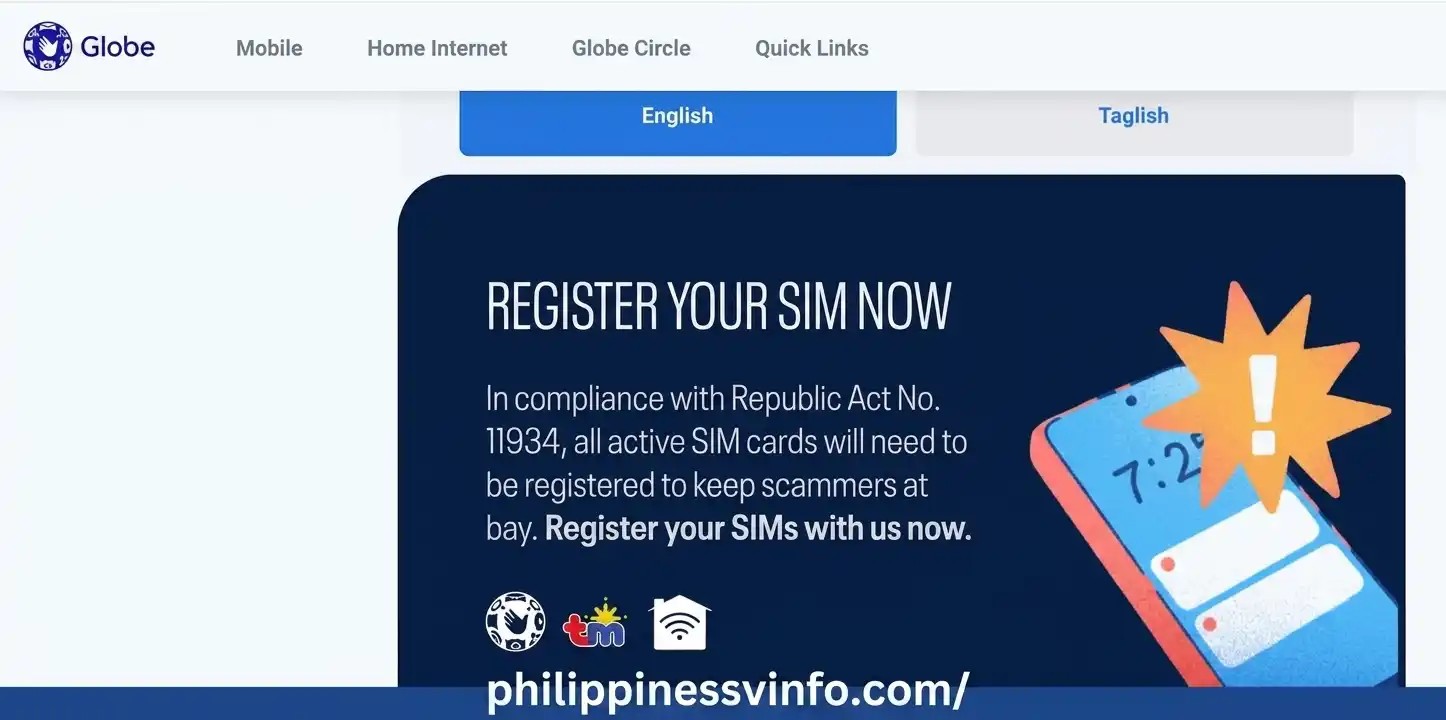
Step 1: Visit the Official Globe registration sim Website
Open your preferred web browser and access the official sim registration globe website to begin the registration process. Make sure you are using the official portal to securely register your Globe SIM and keep your service active.
Step 2: Enter Your Globe Mobile Number
Type your Globe mobile number exactly as prompted on the registration page. Carefully review every digit to ensure the number is correct, as the One-Time Password (OTP) will be sent to this mobile number for verification. Once you have confirmed that the information is accurate, click or tap Request PIN to receive your OTP and continue with the Globe registration sim process.

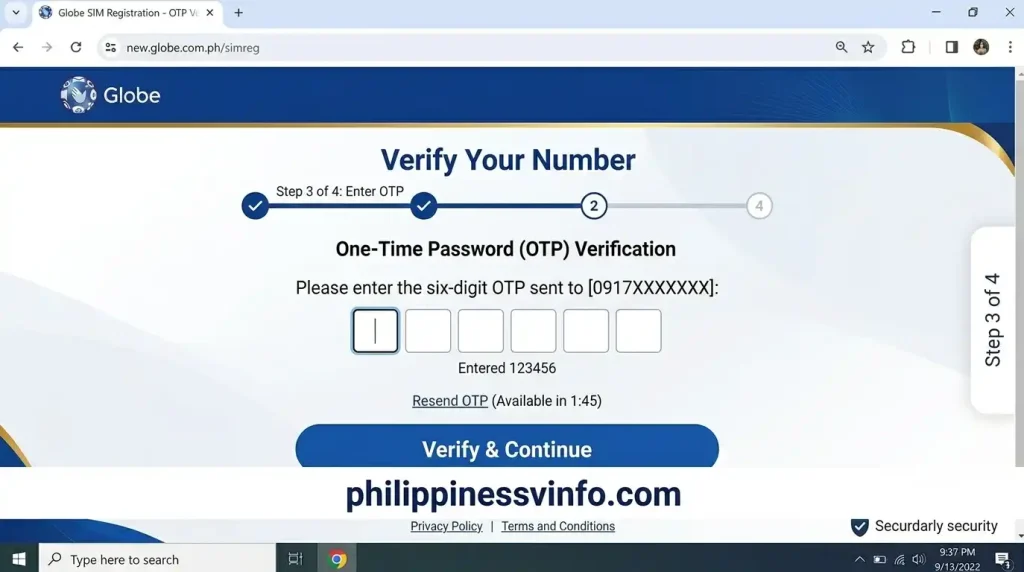
Step 3: Receive and Enter the OTP
Within a few moments, Globe sends a six-digit One-Time Password (OTP).
Enter the OTP before it expires.
If you do not receive the code immediately:
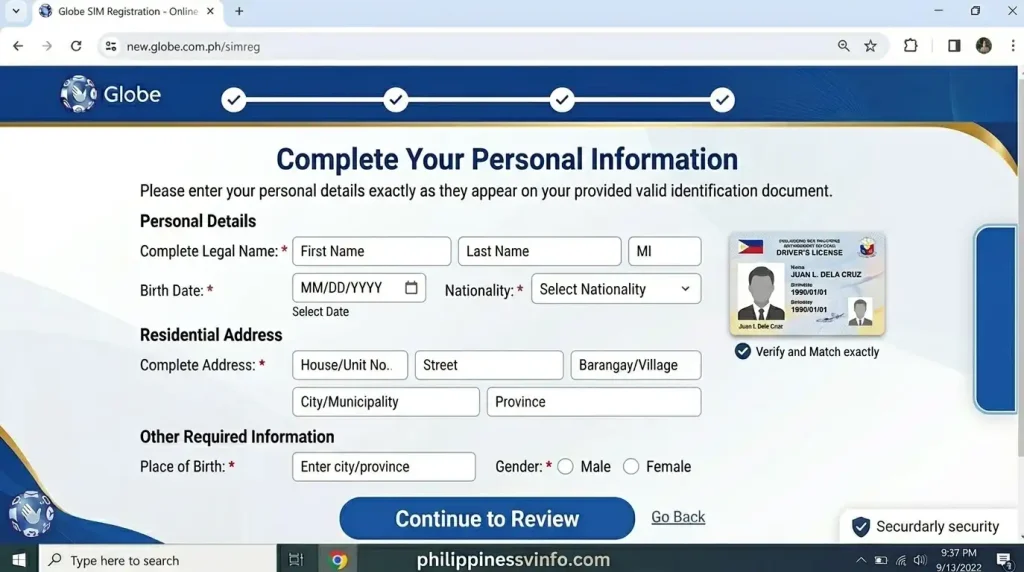
Step 4: Complete Your Personal Information
After OTP verification, the registration page will request your personal details.
Carefully enter:
Make sure every detail matches your valid identification document exactly.
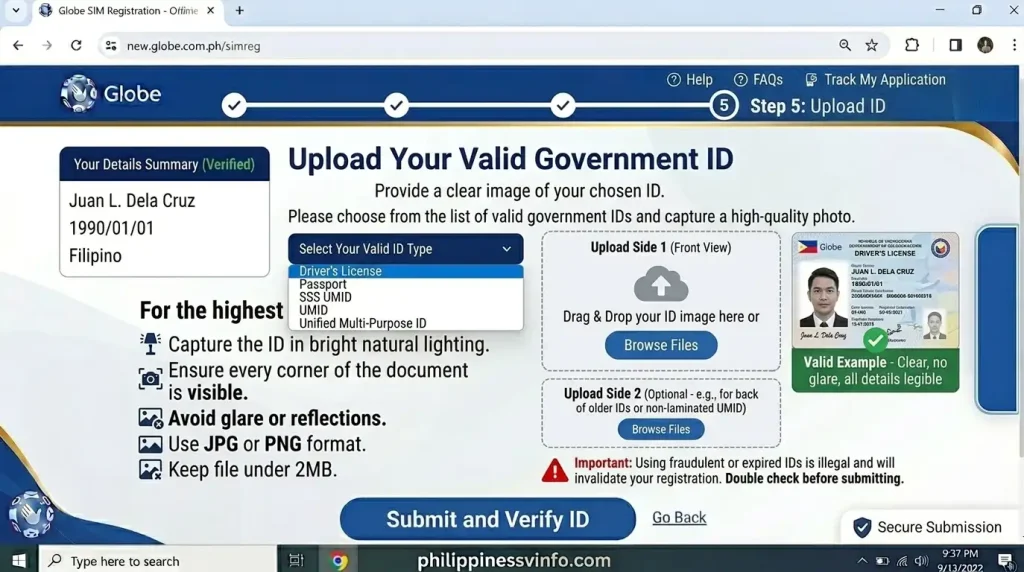
Step 5: Upload Your Valid Government ID
Next, upload a clear image of your chosen government-issued ID.
For the highest chance of approval:
Poor-quality images are among the most common reasons why Globe registration sim verification is delayed.
Step 6: Verify Your Identity
Some registrations require a live selfie or facial verification.
Hold your phone steadily while following the on-screen instructions.
This verification step helps Globe confirm that the person registering the SIM matches the identification provided.
Step 7: Review and Submit Your Globe SIM Registration
Before submitting the application:
Once everything is correct, submit your registration request.
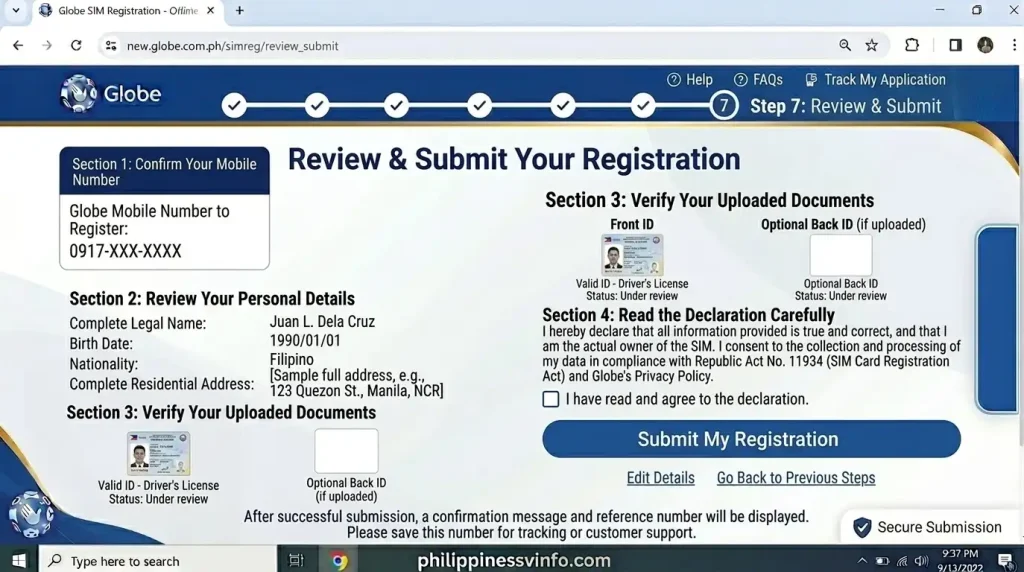
After successful submission, Globe will display a confirmation message together with a reference number. Save a screenshot or note this reference number, as it may be useful if you need to track your registration or contact customer support.
How to Register a Globe At Home Prepaid WiFi SIM
If you use a Globe At Home Prepaid WiFi modem, the Globe registration sim process is slightly different from registering a regular mobile SIM. Instead of receiving the One-Time Password (OTP) on a smartphone, the code is delivered to your modem’s built-in SMS inbox.
Prepare the following items before registering your Globe At Home Prepaid WiFi SIM:
Having these ready will help you complete the Globe registration sim process without interruptions.
Step 1: Connect to Your Globe At Home WiFi
Turn on your Globe At Home Prepaid WiFi modem and wait until all indicator lights show a stable connection.
On your phone or computer:
Ensure your device remains connected throughout the Globe registration sim Online process.
Step 2: Open the Modem Dashboard
Launch a web browser such as Chrome, Edge, Firefox, or Safari.
In the address bar, enter one of the following local modem addresses:
- 192.168.254.254
- 192.168.8.1 (for some older Globe modem models)
Log in using the administrator credentials printed on your modem sticker. Most newer devices include the username and password on the label instead of using default credentials.
After signing in, locate the SMS, Messages, or Inbox section within the modem dashboard. Keep this page open because your OTP for sim registration globe will appear here.
Step 3: Request Your Globe SIM Registration OTP
Open a new browser tab while keeping your Globe At Home Prepaid WiFi dashboard open. Visit the official Globe registration sim portal, enter your 11-digit Globe mobile number, and request the verification code to continue the registration process.
Step 4: Retrieve the OTP from the Modem Inbox
Return to your Globe At Home Prepaid WiFi modem dashboard and open the SMS inbox. Find the latest message from Globe, copy the 6-digit OTP, and enter it on the Globe registration sim portal before the code expires.
Step 5: Complete the Registration Form
Once the OTP has been verified, continue filling out the sim registration globe form.
Provide:
Ensure every detail matches your valid identification document.
Step 6: Upload Your Valid ID and Identity Verification
Upload a clear photo of your government-issued ID.
For the best verification results:
If prompted, complete the selfie verification by following the instructions displayed on the screen.
Step 7: Submit Your Globe SIM Registration
Review all entered information carefully before submitting.
Verify:
- Mobile number
- Personal details
- Uploaded ID
- Address information
Once everything is accurate, submit your application.
After successful sim registration globe, save your confirmation message and reference number for future reference.
Common Globe SIM Registration Problems and Solutions
Most users complete sim registration globe Online without difficulty. However, occasional technical or verification issues can occur. The following solutions address the most frequently reported registration problems.
System Error, Blank Screen, or 502 Bad Gateway
Possible Cause
The registration portal may be experiencing heavy traffic or temporary maintenance.
Recommended Solution
OTP Not Received or OTP Attempt Limit Reached
Possible Cause
Poor network coverage, multiple OTP requests, or repeated incorrect entries can temporarily prevent new OTP generation.
Recommended Solution
ID Verification Failed
Possible Cause
Blurry photos, glare, cropped images, or unsupported file formats are the most common reasons for rejection.
Recommended Solution
Invalid Address or Postal Code
Possible Cause
Address information entered manually may not match the available regional database.
Recommended Solution
Choose your:
from the drop-down menus first. After that, manually enter your street name, house number, subdivision, or unit details.
Expert Tips for Successful Globe SIM Registration
Following a few best practices can make your Globe registration sim Online experience faster and reduce the likelihood of rejection.
These simple precautions can help you avoid delays and complete your Globe registration sim successfully on the first attempt.
How to Check Your Globe SIM Registration Status
After completing your Globe registration sim, you may want to confirm that your application has been successfully processed. While Globe does not always provide a separate public status checker, there are several ways to verify whether your registration was completed successfully.
You can confirm your registration by:
Keeping a copy of your confirmation details is recommended in case you need assistance later.
What Happens After Globe SIM Registration?
Once your Globe registration sim Online application has been submitted, Globe reviews the information and documents you provided.
If everything is accurate, your registration is processed successfully, and your SIM remains active. Depending on the verification process, some applications may require additional time before final approval.
After successful registration, you can continue using Globe services without interruption, including:
If Globe requires additional verification, follow any instructions sent through official communication channels.
Important Safety Tips During Globe SIM Registration
Protecting your personal information is just as important as completing the registration itself. Since Globe registration sim involves uploading identification documents and personal details, always follow safe online practices.
Register Only Through Official Globe Websites
Never use unofficial registration links shared through text messages, emails, or social media posts.
Use only the official Globe pages:
- Globe registration sim Information
- Sim registration globe Portal
Never Share Your OTP
The One-Time Password (OTP) is confidential.
Do not share it with:
Globe will never ask for your OTP through unsolicited calls or messages.
Protect Your Personal Documents
Your uploaded ID contains sensitive personal information.
Before uploading:
Beware of Fake Globe Registration Websites
Cybercriminals often create fake websites that closely resemble legitimate Globe pages.
Before entering any information:
Common Mistakes to Avoid During Globe SIM Registration
Many registration delays happen because of simple mistakes that can easily be prevented.
Avoid these common errors:
Reviewing your information one final time before submission can help you avoid unnecessary delays.
Frequently Asked Questions About Globe SIM Registration
Conclusion
Completing your Sim registration globe is an essential step for keeping your mobile services active and protecting your account from unauthorized use. Whether you are registering a prepaid SIM, postpaid line, TM SIM, or a Globe At Home Prepaid WiFi modem, the official Sim registration globe Online portal makes the process straightforward when you prepare the required information in advance.
Before submitting your application, verify that your personal details exactly match your valid ID, upload clear images, and keep your confirmation reference number in a safe place. If you encounter any issues, follow the troubleshooting steps outlined in this guide or seek assistance through Globe’s official support channels.
By using only the official Globe registration sim website and following the recommended best practices, you can complete your registration securely, avoid common errors, and continue enjoying uninterrupted Globe services throughout 2026.