SSS Online Registration 2026 Philippines: Login, Benefits, Pension & Employer Portal Guide
SSS Online Registration allows Filipinos to access Social Security System services without visiting branch. Through the official Portal, members can register an online account, monitor contributions, apply for loans and benefits, update personal information, generate Payment Reference Numbers (PRNs), and manage employer transactions anytime.
Whether you are starting your first job, working as a self-employed professional, contributing voluntarily, employed overseas, running a business, or already receiving a pension, completing your Online Registration gives you secure access to your social security records and online services. Once your account is activated, most transactions can be completed digitally from any location with an internet connection.
What Is the Social Security System
The Social Security System is a government-owned social insurance program that protects private-sector workers and qualified members throughout the Philippines. Established under the Social Security Act, it provides financial assistance during different stages of life by offering various benefits and insurance program.
Members who maintain active contributions may qualify for several benefits, including:
Today, the Online Registration system and the Portal enable members to perform many of these transactions online, reducing paperwork and eliminating unnecessary visits to local offices.
Who Needs an SSS Online Account?
Having an Social Security System membership number is only the first step. To access digital services, every eligible member should complete Online Registration and activate account.
Online registration is recommended for:
Creating your account early makes it easier to keep track of contributions, apply for qualified benefits, monitor loan applications, and update personal records whenever necessary.
How to Register an SSS Online Account
Step 1: Visit the Official SSS Member Portal
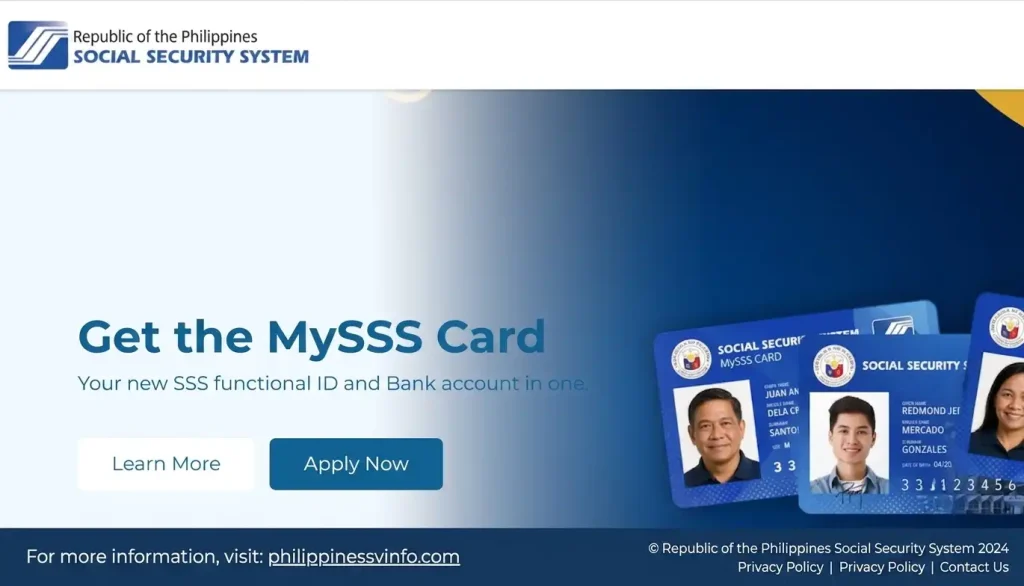
To begin your online registration, open a secure web browser and visit the official Member Portal. Always use the official SSS website to protect your personal information and avoid fraudulent websites.
Step 2: Choose Your Registration Option
Click the Register button and select the registration option that matches your Social Security System membership details. Read the instructions carefully, choose the correct account type, and continue to the next page.

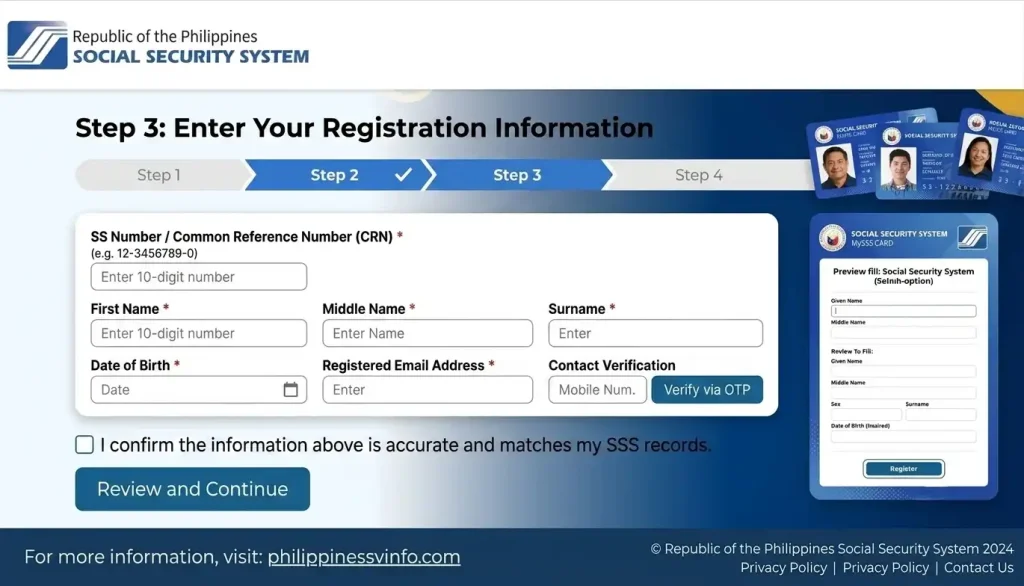
Step 3: Enter Your Registration Information
Provide the required personal details exactly as they appear in your Social Security System records. Accurate information helps the system verify your identity and prevents registration errors.
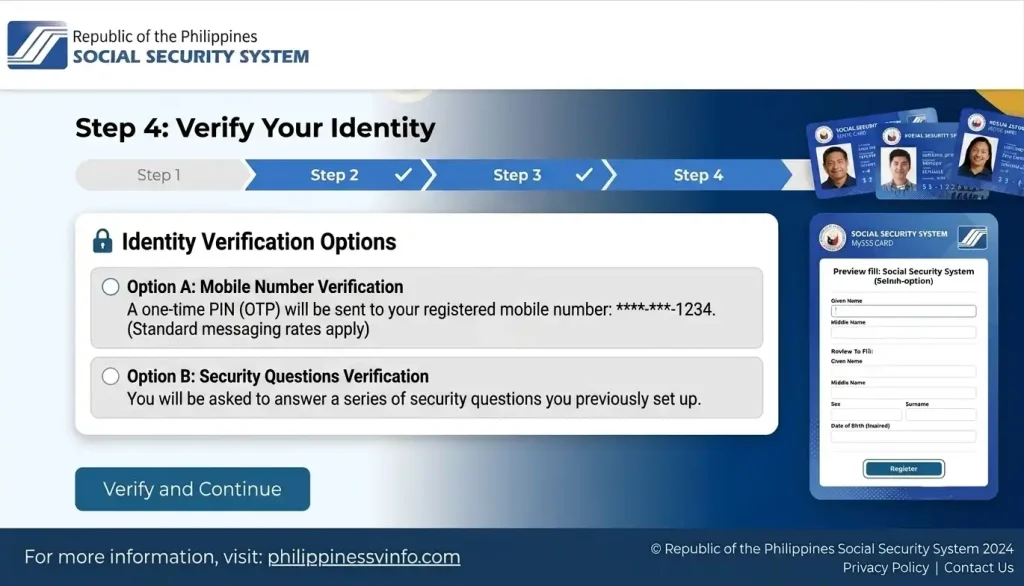
Step 4: Verify Your Identity
The Social Security System system will verify your identity using the information you provided. Make sure all details are correct before submitting.
Step 5: Create Your My.SSS Login Credentials
After your information is verified, create your My.SSS account credentials. Choose a secure username and password to keep your account protected.

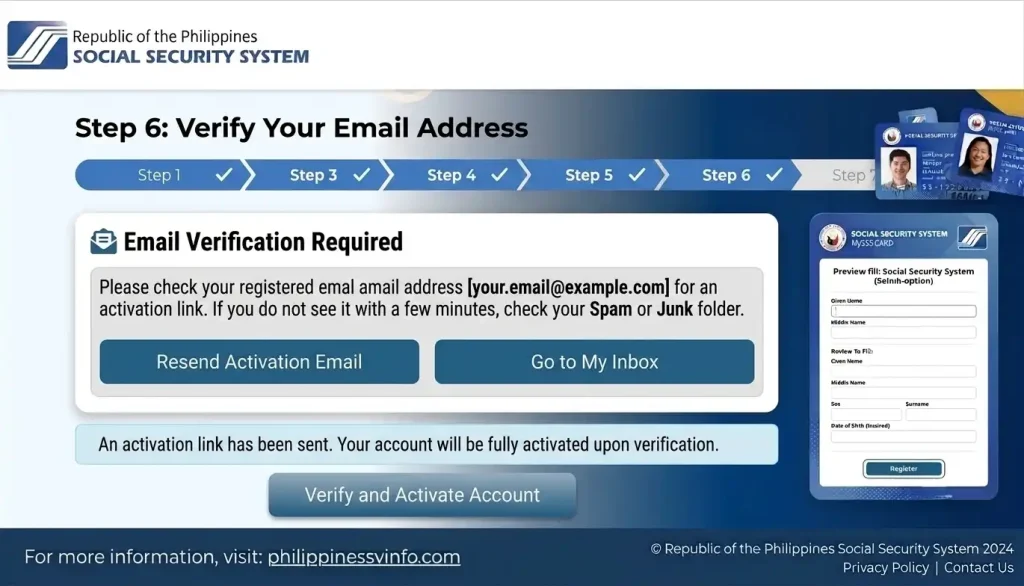
Step 6: Verify Your Email Address
Check your registered email address for the Social Security System activation message. Open the email, click the activation link, and follow the instructions to verify and activate your account.
Step 7: Log In to Your My.SSS Account
Once your account is activated, you can sign in and access all available online services.
How to Login to Your Account Online
Step 1: Visit the Official Login Portal
Open your preferred web browser and go to the official Social Security System website or Member Portal. Always access the official portal to keep your account secure.
Step 2: Select the Appropriate Portal
Choose the login portal based on the type of account you want to access. Selecting the correct portal ensures you reach the right dashboard and available services.
Step 3: Sign In Using Your Account Credentials
Enter your registered login information carefully to access your My.SSS account. Double-check your details to avoid login errors.
Step 4: Verify the Security Check
If prompted, complete the reCAPTCHA verification by selecting “I’m not a robot.” You may also be asked to complete an image verification to confirm that you are the account owner.
Step 5: Complete the Login Verification
Click the Sign In button to continue. If your account has Two-Factor Authentication (2FA) enabled, enter the One-Time Password (OTP) sent to your registered mobile number or email address.
Step 6: Access Your Dashboard
After successful authentication, you will be redirected to your My.SSS dashboard where you can manage your account and use various online services.
Main Features Available Through the Portal
The My.SSS Portal brings almost every major system service together in one secure online dashboard.
| Feature | Purpose |
|---|---|
| Online Account Registration | Create and activate a My.SSS account |
| Secure Member Login | Access your personal dashboard |
| Contribution Inquiry | View posted monthly contributions |
| Employment Records | Review employer and contribution history |
| Online Benefit Applications | Apply for qualified Social Security System benefits |
| Salary Loan Services | Submit eligible loan applications |
| Pension Information | Monitor retirement and pension records |
| Member Record Updates | Change personal and contact information |
| Payment Reference Number (PRN) | Generate PRNs for contribution payments |
| Employer Portal | Register businesses and manage employee contributions |
| Notifications | Receive updates about applications and transactions |
| SSS Mobile App Access | Manage your account using your smartphone |
Benefits of Using the Online Portal
The online portal is designed to save members both time and effort while making government services more accessible.
Some of its major advantages include:
Requirements Before Starting Online Registration
Preparing your information before beginning the registration process helps prevent delays and verification issues.
Basic Requirements
Before creating your My.SSS account, make sure you have:
Documents You May Need During Registration
Depending on your membership type, SSS may request one or more identification documents to verify your identity.
| Document | Purpose |
|---|---|
| Philippine Passport | Identity verification |
| PhilSys National ID | Primary government-issued identification |
| Driver’s Licence | Identity verification |
| UMID Card | Existing identification |
| PRC ID | Professional identification |
| Postal ID | Government-issued identification |
| Birth Certificate | Verify personal information |
| Marriage Certificate (if applicable) | Update civil status |
| Active Email Address | Account activation |
| Mobile Number | OTP verification and notifications |
How to Check Your Employment History Online
Your employment history is an essential part of your membership record. It shows your registered employers, employment periods, and posted contributions, helping you confirm that your records are accurate. Reviewing this information regularly can help you spot missing employer contributions early and avoid delays when applying for portal loans, retirement pensions, or other benefits.
Step 1: Log In to Your My.SSS Account
Visit the official Social Security System website and sign in to your account using your User ID and password. Complete any required security verification to continue.
Step 2: Access Your Member Dashboard
After logging in, open your member dashboard where all available online services and account information are displayed.
Step 3: Open the Employment History Section
Navigate to Employment History to view your employment records. Here, you can check:
Step 4: Review Your Information
Verify that all details are correct, including:
If you notice any errors or missing contributions, contact your employer or visit the nearest branch for assistance.
Why Your Employment History Is Important
Maintaining accurate employment records helps ensure faster processing of many Social Security System services. Your employment history is commonly used for:
Incorrect employer records or missing contributions may delay the approval of your future claims.
Employment History Overview
| Record Information | Purpose |
|---|---|
| Employer Name | Identifies your registered employer |
| Employment Dates | Confirms your work history |
| Monthly Contributions | Verifies contribution payments |
| Contribution Status | Shows posted contribution records |
| Membership Record | Supports future benefit applications |
Retirement Pension Guide
The Social Security System Retirement Pension provides financial support to qualified members after retirement. Members who meet the required age and contribution requirements may receive either a monthly pension or a one-time lump sum benefit, depending on their contribution history.
Your retirement benefit is calculated using factors such as your total posted contributions, credited years of service, retirement age, and Average Monthly Salary Credit (AMSC).
Who Is Eligible for an Retirement Pension?
To qualify for retirement benefits, members generally must:
Final eligibility is determined according to the latest SSS rules at the time of application.
Types of Retirement Benefits
| Benefit Type | Description |
|---|---|
| Monthly Pension | Regular monthly retirement income for qualified members |
| Lump Sum Benefit | One-time payment for members who do not qualify for a monthly pension |
The benefit you receive depends on your total contributions and overall eligibility.
Factors That Affect Your Pension
Several factors influence the amount of your retirement benefit, including:
Making regular contributions throughout your working years can help maximise your retirement benefits.
Funeral Benefit and Death Benefit
Aside from retirement benefits, the Social Security System also provides Funeral Benefits and Death Benefits to qualified members and their families. These programmes offer financial assistance to help cover funeral expenses and provide support to eligible beneficiaries.
What Is the Funeral Benefit?
The Funeral Benefit is financial assistance given to the person who paid for the funeral expenses of a qualified member or pensioner.
The benefit may help cover costs such as:
Benefit amounts and eligibility are based on current Social Security System regulations.
Who Can Claim the Funeral Benefit?
The claimant is usually the individual who paid the funeral expenses, including:
Supporting documents may be required during the application process.
Understanding the Death Benefit
The Death Benefit provides financial assistance to the legal beneficiaries of a deceased Social Security System member who met the required contribution conditions. It is designed to help surviving family members maintain financial stability after the loss of a qualified member.
Qualified Beneficiaries May Include
The final beneficiary is determined based on official portal records and applicable rules.
Types of Death Benefits
| Benefit | Description |
|---|---|
| Monthly Pension | Paid regularly to qualified beneficiaries |
| Lump Sum Benefit | One-time payment if pension requirements are not met |
The approved benefit depends on the deceased member’s contribution history and eligibility.
Documents Commonly Required
Applicants may need to submit the following documents:
Providing complete and accurate documents helps prevent processing delays.
Important Reminders for Members
To ensure your family can easily process future claims:
Quick Summary of Online Services
| Service | Available Online | Purpose |
|---|---|---|
| Employment History | ✔ | View employer and contribution records |
| Retirement Information | ✔ | Monitor retirement eligibility |
| Funeral Benefit Information | ✔ | Learn about funeral assistance |
| Death Benefit Information | ✔ | Understand survivor benefits |
| Member Dashboard | ✔ | Access personal membership records |
| Contribution Records | ✔ | Verify posted monthly contributions |
Employer Portal Services
The Social Security System Employer Portal helps registered employers manage employee records and fulfil their Social Security System obligations online. Instead of visiting an system branch, employers can handle essential transactions digitally, making contribution reporting faster, more accurate, and fully compliant with requirements.
Services Available Through the Employer Portal
The online employer portal offers several tools designed to simplify business-related portal transactions.
Employers can use the portal to:
These online services reduce paperwork while helping employers maintain accurate contribution records.
Employer Services at a Glance
| Employer Service | Purpose |
|---|---|
| Employer Registration | Register a business with system |
| Employee Management | Maintain employee information |
| Contribution Reporting | Submit monthly contribution reports |
| PRN Generation | Generate Payment Reference Numbers |
| Online Payments | Pay employer and employee contributions |
| Record Monitoring | Review submitted reports and payment history |
Updating Your SSS Member Information
Keeping your Social Security System member information accurate helps prevent delays when processing contributions, salary loans, pensions, benefit claims, and other online services. If your personal, employment, or contact details have changed, you should update them through the Portal or follow the official update process for requests that require document verification.
Member Information You Can Update
Depending on your account type and the required supporting documents, you may update the following details:
Important: Certain updates require supporting documents and verification before Social Security System approves the changes.
Mobile App Guide
The Social Security System Mobile App allows members to access essential services directly from their smartphones. It provides a convenient way to manage your account, monitor contributions, and stay informed without using a desktop computer.
Features of the Mobile App
Members can perform several transactions through the mobile application, including:
The app is ideal for members who need quick and convenient access to their Social Security System account anytime.
Mobile App Features
| Feature | Available |
|---|---|
| Member Login | ✔ |
| Contribution Inquiry | ✔ |
| Employment History | ✔ |
| Benefit Information | ✔ |
| Loan Monitoring | ✔ |
| PRN Generation | ✔ |
| Notifications | ✔ |
| Selected Account Updates | ✔ |
Common Problems and How to Fix Them
Although the Online Registration system is generally reliable, members may occasionally experience login or technical issues. Most problems can be resolved quickly by following the appropriate troubleshooting steps.
Common Issues and Solutions
| Problem | Possible Cause | Recommended Solution |
|---|---|---|
| Unable to Log In | Incorrect User ID or password | Reset your password using the official recovery option |
| Forgot Password | Lost login credentials | Use the Forgot Password feature |
| OTP Not Received | Mobile network delay | Wait a few minutes or request another OTP |
| Account Locked | Multiple failed login attempts | Wait for the lock period or complete account recovery |
| Missing Contributions | Contributions not yet posted | Contact your employer or the nearest Social Security System branch |
| Registration Error | Incorrect personal information | Verify and correct your registration details |
| Website Not Loading | Browser or internet issue | Refresh the page, clear cache, or use another browser |
Quick Troubleshooting Tips
Before contacting Social Security System support, try these solutions:
If the issue continues, contact Social Security System through its official customer support channels.
Benefits of Using Online Services
The Online Portal gives both members and employers faster access to important Social Security services while reducing the need for branch visits.
Key Benefits
Benefits Overview
| Benefit | Description |
|---|---|
| 24/7 Access | Use SSS services anytime |
| Online Convenience | Complete transactions without visiting a branch |
| Faster Processing | Reduce paperwork and waiting time |
| Secure Account | Protect personal and contribution records |
| Better Record Management | Track employment and contribution history |
| Mobile Access | Manage your account using the SSS Mobile App |
Account Security Tips
Your account contains important personal and financial information. Following good security practices helps protect your account from unauthorised access.
Best Practices for Account Security
Frequently Asked Questions (FAQs)
Conclusion
Completing your SSS Online Registration is the first step toward managing your Social Security records conveniently and securely. Once your account is activated, you can check contributions, review employment history, apply for qualified benefits, monitor retirement information, generate PRNs, update member records, and access employer services—all from one secure online portal.
Whether you are a private employee, self-employed professional, voluntary contributor, Overseas Filipino Worker (OFW), employer, or pensioner, keeping your account active and your information up to date ensures uninterrupted access to Social Security System services. By following the guidance and security tips in this article, you can confidently use the Online Registration system and make the most of the digital services offered by the Social Security System in the Philippines.