Globe SIM Registration 2026: Verification, Login, OTP & Complete Guide

If you have a new or existing Globe SIM in the Philippines, completing Globe SIM registration is an essential step before you can fully access mobile services. Globe provides an official online registration platform that allows subscribers to verify their mobile number, enter their personal information, upload a valid government-issued ID and selfie, and receive a registration reference number after successful submission.
The official SIM registration Globe website currently guides users through five key stages: mobile number verification, selecting the appropriate registration type, submitting an ID and selfie, completing the registration form, and reviewing the information before final submission.
Globe also provides SIM registration through the GlobeOne App. Customers who require additional assistance can visit an authorized Globe Store. Globe advises subscribers to use only official registration channels and avoid suspicious or unofficial websites, as fraudulent links may be designed to collect sensitive personal information.
What Is Globe SIM Registration?
Globe SIM registration is the process of registering a Globe mobile number with the subscriber’s required personal information under the Philippines’ SIM Registration Act, Republic Act No. 11934. The requirement applies to both physical SIM cards and eSIMs, including those used in mobile phones, prepaid WiFi devices, and other compatible equipment. New Globe subscribers must complete registration before fully using their SIM, while existing subscribers may need to confirm or update their registration information depending on their service and account status. Globe also states that SIM registration through its official channels is free and zero-rated, so subscribers do not need to pay a registration fee.
The SIM Registration Act was introduced to strengthen accountability and help prevent scams, smishing, fraud, and other unlawful activities involving mobile numbers. During SIM registration Globe, subscribers should provide complete, accurate, and truthful information that matches their valid identification document. Using the official Globe registration platform is important because it helps protect personal information and reduces the risk of submitting sensitive details through fraudulent or unofficial websites.
Globe SIM Registration Requirements
Before starting your Globe SIM registration, prepare the necessary information, documents, and device. Having these requirements ready can make the process easier and help prevent delays during OTP verification, ID uploading, and identity verification. Visit Homepage
| Requirement | What to Prepare |
|---|---|
| Globe SIM | The Globe mobile number you want to register |
| Mobile phone | A device capable of receiving SMS |
| Internet connection | A stable internet connection |
| Personal information | Full name, date of birth, gender, and address |
| Government-issued ID | A valid government-issued photo ID |
| Selfie | A clear selfie that matches your submitted ID |
| OTP | Six-digit verification code sent to your Globe number |
| Reference number | The number provided after successful registration |
Globe’s registration requirements include personal information such as your full name, date of birth, gender, and address, together with a valid government-issued photo ID. Your identification document should be valid, clearly visible, and readable.
Accepted IDs for SIM registration Globe
Globe provides a list of identification documents that subscribers may use when completing registration. Depending on the registration channel and subscriber category, commonly accepted IDs include:
When uploading an ID, make sure the document meets Globe’s current image format and file-size requirements. The ID should not be expired, excessively blurred, damaged, or cropped in a way that hides important information.
Helpful tip: Take your ID photo in a well-lit environment and check the image carefully before uploading it. Your name, photograph, identification details, and other important information should be clearly readable. A low-quality or incomplete image may cause the verification process to fail or require you to submit the information again.
How to Register a Globe SIM Online
The official Globe SIM Registration portal makes it easy to complete your registration online. Follow these six steps carefully and make sure the information you provide matches your valid identification document.
Step 1: Open the Official Portal
Visit the official SIM registration Globe website and select the registration option that applies to your Globe service. Always use the official portal to protect your personal information.
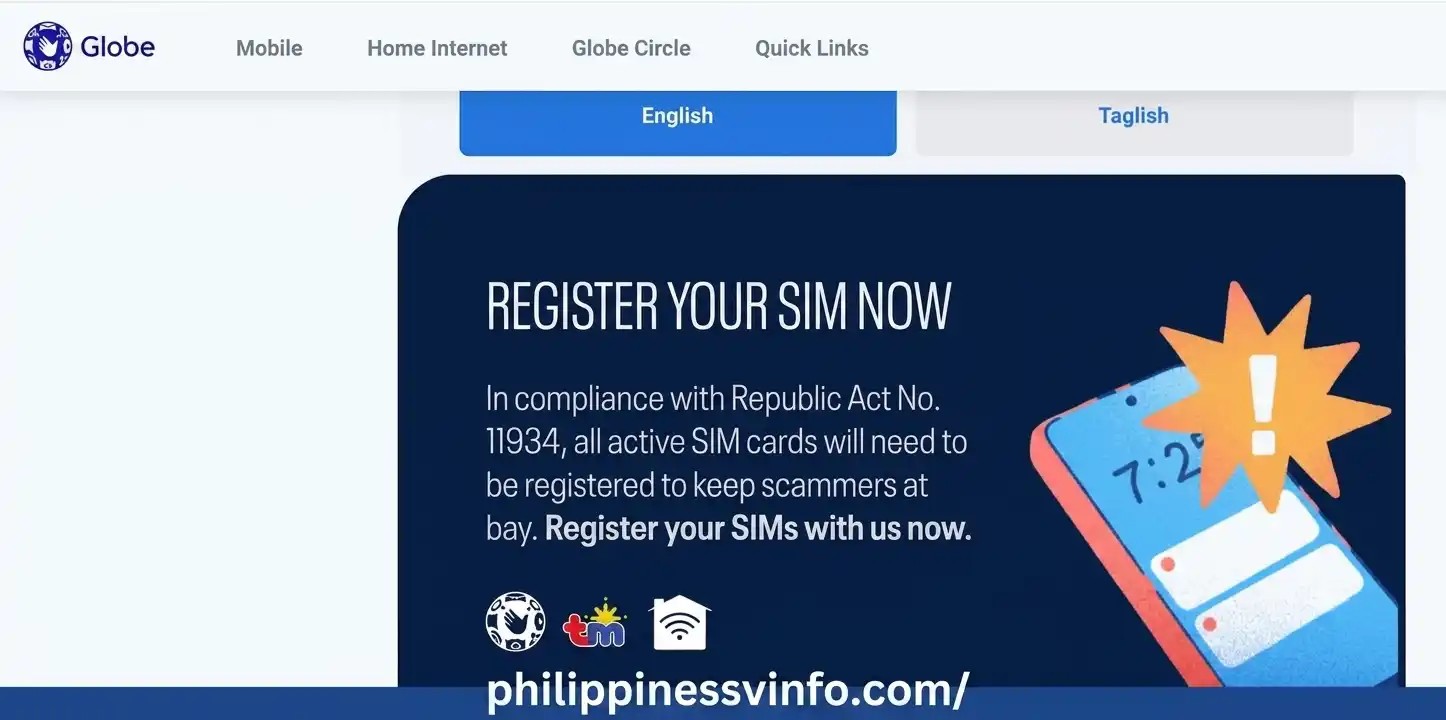
Step 2: Enter Your Globe Mobile Number
Enter the Globe mobile number you want to register in the required field. Make sure the SIM is active and inserted into a device that can receive SMS messages.

Step 3: Verify Your Number With an OTP
After entering your mobile number, Globe will send a six-digit One-Time PIN (OTP) to the SIM. Enter the code on the registration page promptly because the OTP expires after five minutes.
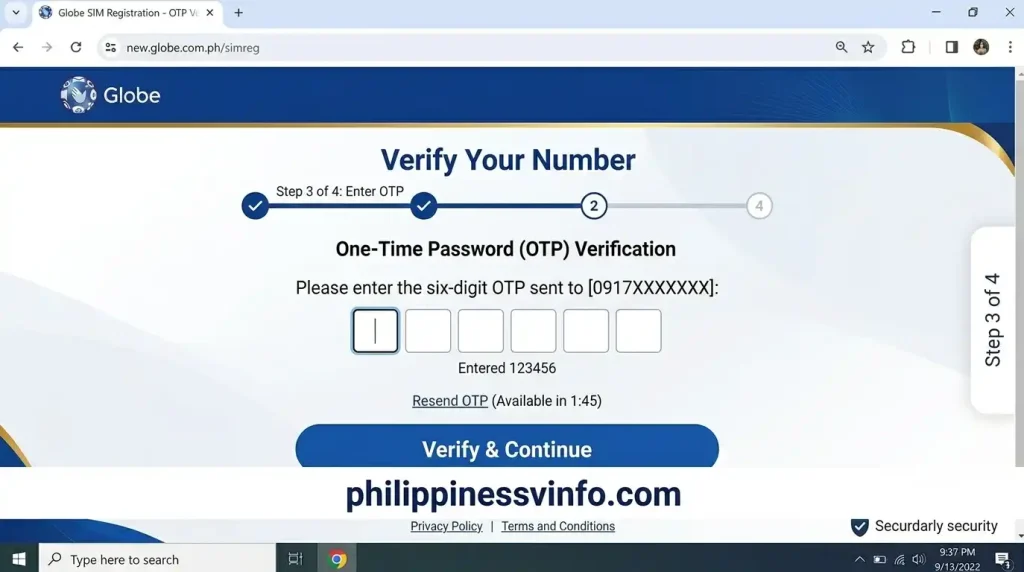
Step 4: Select the Registration Type and Enter Your Details
Once your number is verified, choose the registration type that matches your Globe service and complete the required personal information. Make sure all details are accurate and consistent with your identification document.
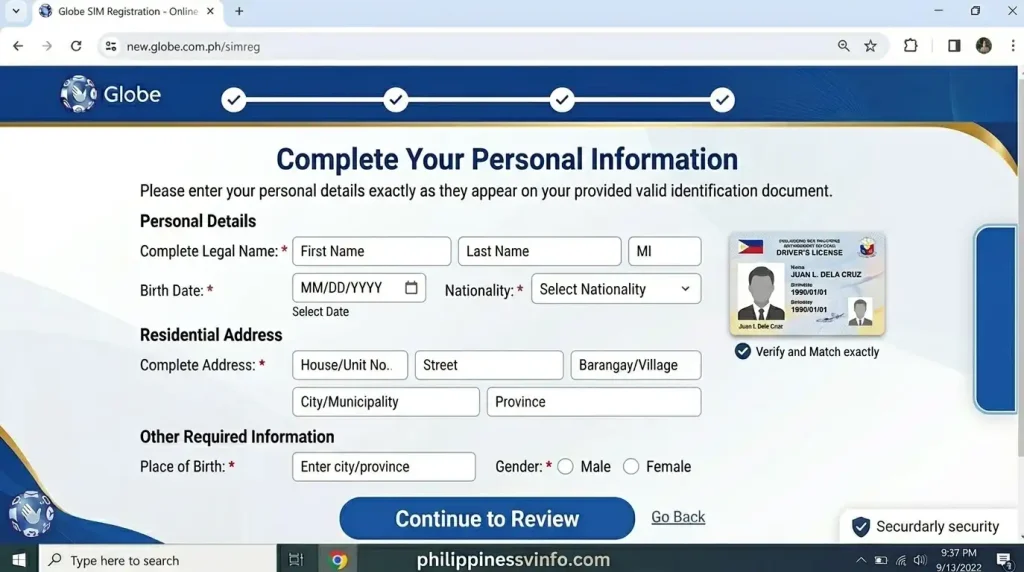
Step 5: Upload Your ID and Selfie
Provide a clear image of your valid government-issued ID and complete the selfie verification when required. Use good lighting and ensure your face and ID details are clearly visible.
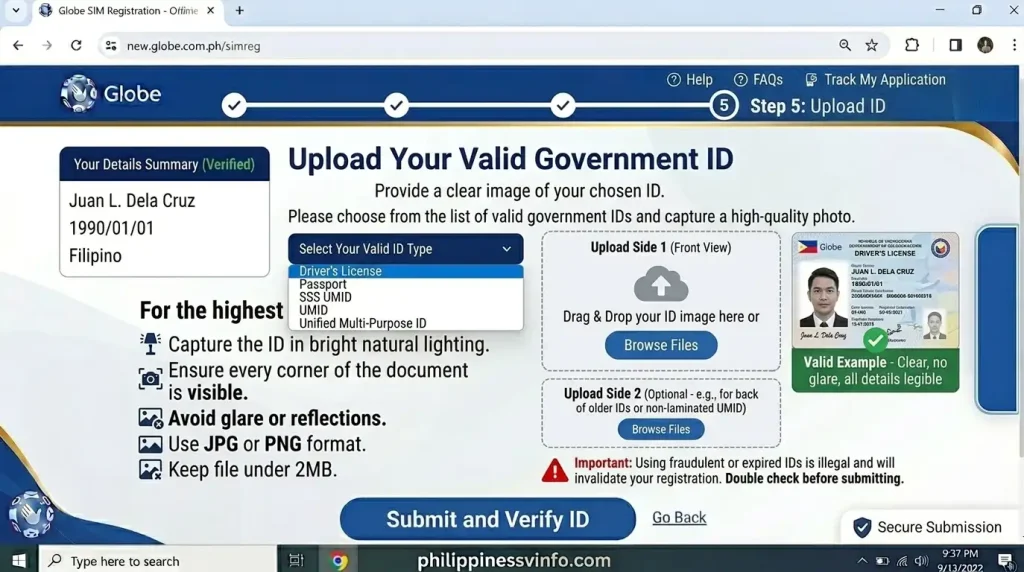
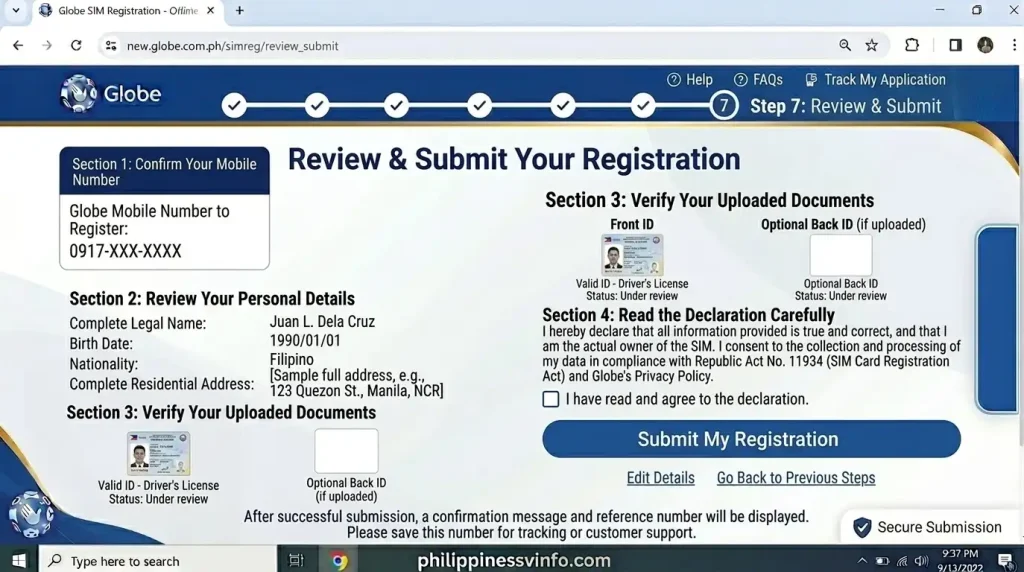
Step 6: Review and Submit Your Registration
Before submitting, carefully review all the information you entered and make any necessary corrections. After successful submission, save the registration reference number securely for future reference.
- Verify your mobile number, personal details, and ID information.
- Click Submit after confirming that everything is correct.
- Save your registration reference number and do not publicly share it.
How to Know if Your Globe SIM Registration Was Successful
Submitting the form is not the only thing to check. After completing SIM registration Globe, you should look for confirmation that your mobile number has been successfully registered.
Globe’s official guidance says prepaid users can verify their status through a confirmation SMS or by checking the registered badge in the GlobeOne App. If your SIM has already been registered but is still not working, Globe recommends contacting its support channels or visiting a Globe Store.
Check Your Confirmation SMS
After a successful registration, Globe sends a confirmation message to the registered number. Keep this message if you need to prove that the registration was completed.
For certain existing customers, Globe may first send an SMS asking you to confirm that the information associated with the account is correct. For the applicable mobile registration process, Globe’s published instructions say customers can confirm by texting SIMREG to 8080.
Important: Globe says its official messages will not ask for your OTP or direct you to suspicious links. If you receive a message claiming to be from Globe that requests your One-Time PIN, do not provide it.
Verify Through the GlobeOne App
The GlobeOne App is another convenient way to manage your Globe account. Globe’s official help information says prepaid users can look for the registered badge in the app as an indication that their SIM registration has been completed.
If you haven’t created a GlobeOne account yet, download the official app and follow its account-creation process. Globe says users can create an account by choosing their login number, verifying it with an OTP and setting a six-digit PIN.
Keep Your Reference Number Safe
The reference number displayed after your Globe SIM registration is worth saving. Globe specifically advises customers to keep it for future concerns because it serves as a record of the completed registration.
You can save it in a secure note, take a screenshot or keep the confirmation message. Don’t post the reference number or other registration details publicly.
Globe SIM Registration Verification Options
There isn’t just one way to manage registration-related concerns. The best option depends on whether you simply want confirmation, need account assistance or have encountered a problem.
| Verification or Support Method | Best For | What to Do |
|---|---|---|
| Confirmation SMS | Confirming successful registration | Check the message sent by Globe |
| GlobeOne App | Checking your account | Sign in and look for your registration status |
| Official SIM Portal | Registering or managing registration | Open the official SIM registration Globe site |
| Globe Store | Complicated registration concerns | Bring your SIM and valid identification |
| Globe Support | Technical or account problems | Use Globe’s official support channels |
The current official SIM registration portal also provides separate options for Register Your SIM, Update Registration Details, and Transfer of SIM Assignment.
What to Do If Your Globe SIM Registration Fails
A failed attempt doesn’t necessarily mean there is a serious problem with your SIM. Registration can be interrupted by an incorrect detail, an expired OTP, an unclear document or a temporary technical issue.
Start by identifying exactly where the process stopped. If the problem occurred during OTP verification, check your mobile signal and SMS inbox. If it happened while uploading documents, review the image quality and file-size requirements.
OTP Not Received
The OTP is required to verify that you have access to the mobile number being registered. Globe’s official registration instructions state that the six-digit OTP expires after five minutes.
If your OTP hasn’t arrived:
Don’t share an OTP with anyone claiming to be a Globe representative. Globe explicitly states that official Globe or 8080 messages won’t ask for your One-Time PIN.
ID Upload Error or File Too Large
An ID photograph that exceeds the portal’s permitted size may fail to upload. Globe’s published instructions for Home Prepaid WiFi registration, for example, specify that images should not exceed 4 MB.
If the portal rejects your file, try taking a new photograph at a lower resolution or reducing the file size while keeping the ID readable.
Don’t over-compress the image. A smaller file is useful only if the important text remains clear enough for verification.
Blurry ID or Selfie
A blurry photograph can make it difficult to verify your identity. Retake the image rather than repeatedly submitting the same poor-quality photograph.
For the ID:
For the selfie, use a clear image that accurately represents you. Avoid filters or anything that makes your appearance difficult to compare with your identification document.
Information Does Not Match Your ID
Your registration information should be accurate. If the name, birthday or another required detail is entered incorrectly, review the form before submitting it.
Pay particular attention to spelling. Don’t deliberately alter information on the registration form simply to make it fit an unofficial document or account record. Use the correct information required by Globe’s registration process.
If you have already submitted incorrect information, Globe says customers who need to change their registration information should visit a Globe Store for assistance.
What If the Portal Says Your Number Is Already Registered?
Seeing an already registered message can be confusing, particularly when you’re trying to register a recently acquired SIM.
Globe’s official SIM Registration Act FAQ says that if you attempted registration but the system indicates that your number has already been registered, you should contact Globe through its official Facebook Messenger support channel or visit the nearest Globe Store.
Avoid trying to register the same number repeatedly through unofficial websites. Your personal information should only be entered through Globe’s recognised registration channels.
SIM registration Globe for Postpaid Customers
The process can differ for existing postpaid subscribers because Globe may already have customer information from the original account application.
According to Globe, postpaid customers may receive an SMS asking them to check whether their SIM registration details are correct. If the information is correct, the customer can follow Globe’s confirmation instructions. If changes are required, Globe directs customers to visit a Globe Store.
This means a postpaid subscriber shouldn’t assume that the same online form used for a new prepaid SIM is always required. Follow the instructions sent by Globe for the particular account.
Globe SIM Registration for Globe AT HOME and Mobile WiFi
Not every Globe SIM is used inside an ordinary smartphone. Globe also provides registration processes for services such as Globe AT HOME Prepaid WiFi and Globe Mobile WiFi.
For Globe AT HOME Prepaid WiFi, Globe’s instructions involve using the GlobeOne App, enrolling the relevant account and selecting the option to register the SIM. The customer then provides the required personal information, selfie and valid government ID before submitting the registration.
For Globe Mobile WiFi, the OTP may be delivered through the device’s SMS inbox rather than an ordinary phone messaging application. Globe’s published instructions explain that customers should connect to the Mobile WiFi device and access its inbox to retrieve the registration message and OTP.
This distinction matters because a customer may incorrectly assume that the OTP should arrive on another phone number.
Globe SIM Registration and the GlobeOne App
The GlobeOne App can be useful after Globe SIM because it provides a central place to manage Globe services.
Globe describes GlobeOne as its digital companion for managing accounts. Depending on the service, users can view account information, monitor usage, manage bills and access other Globe features.
If the app isn’t working correctly, Globe recommends checking your internet connection, keeping the app updated and restarting it when necessary. Its support documentation also provides troubleshooting instructions for OTP and account-access problems.
Forgot Your GlobeOne PIN?
If you’ve completed registration but later forget your GlobeOne six-digit PIN, you don’t need to create another account. Globe’s current support instructions say to select Forgot PIN?, verify your account using the required OTP and then create a new six-digit PIN.
Only perform this process inside the official GlobeOne App. Never give your PIN or OTP to another person.
Follow These Safety Rules
Use the official portal:
Start from the official SIM registration Globe website rather than a link from an unknown social-media account.
Protect your OTP:
Your OTP is a verification credential. Globe says official messages will not ask you to disclose it.
Check the website before entering information:
Look carefully at the domain before uploading an ID or entering personal details.
Don’t send your ID to strangers:
A person offering to “register your SIM for you” may not be an authorised Globe representative.
Save your reference number privately:
Keep it available for future support requests, but don’t publish it online.
Use official assistance for changes:
If your submitted information needs correction, use Globe’s official support channels or visit a Globe Store rather than attempting to modify information through a third-party website.
What Happens After SIM registration Globe?
Once your Globe registration sim Online application has been submitted, Globe reviews the information and documents you provided.
If everything is accurate, your registration is processed successfully, and your SIM remains active. Depending on the verification process, some applications may require additional time before final approval.
After successful registration, you can continue using Globe services without interruption, including:
If Globe requires additional verification, follow any instructions sent through official communication channels.
When You Should Visit a Globe Store
Online Globe SIM is designed to be convenient, but some situations are better handled with in-person assistance.
Consider visiting a Globe Store if:
Globe’s official FAQ specifically directs customers to a Globe Store or official support when a registered SIM still doesn’t work or when a number appears to have already been registered.
Important Safety Tips During Globe SIM Registration
Protecting your personal information is just as important as completing the registration itself. Since Globe registration sim involves uploading identification documents and personal details, always follow safe online practices.
Register Only Through Official Globe Websites
Never use unofficial registration links shared through text messages, emails, or social media posts.
Use only the official Globe pages:
Never Share Your OTP
The One-Time Password (OTP) is confidential.
Do not share it with:
Globe will never ask for your OTP through unsolicited calls or messages.
Protect Your Personal Documents
Your uploaded ID contains sensitive personal information.
Before uploading:
Beware of Fake Globe Registration Websites
Cybercriminals often create fake websites that closely resemble legitimate Globe pages.
Before entering any information:
Frequently Asked Questions About Globe SIM Registration
Conclusion
Completing Globe SIM Registration is an important requirement for Globe subscribers in the Philippines. Whether you have a new prepaid SIM, an existing mobile number, or a supported Globe WiFi or eSIM service, using the official Globe registration channels helps ensure that your SIM is properly registered and your personal information is submitted securely.
The registration process is straightforward: verify your Globe mobile number with an OTP, select the appropriate registration type, provide your personal details, upload a valid government-issued ID and selfie when required, and carefully review your information before submitting. After successful registration, keep your reference number and confirmation details for future use.
If you experience problems with OTP verification, ID uploads, incorrect information, or an already-registered number, use Globe’s official support channels or visit an authorized Globe Store. Most importantly, avoid unofficial registration websites and never share your OTP or other sensitive information with strangers.