ORUS Registration Philippines 2026: Complete Online TIN, Business Registration & Digital Tax Guide

Whether you are starting a new business, registering as a freelancer, updating your tax records, or applying for a Taxpayer Identification Number (TIN), ORUS (Online Registration and Update System) has made these processes faster, easier, and more convenient. Through BIR ORUS, eligible taxpayers can complete many registration and account update services online without visiting a Revenue District Office (RDO), saving both time and effort. ORUS is the Bureau of Internal Revenue’s official digital platform designed to simplify taxpayer registration and record management across the Philippines.
Developed by the Bureau of Internal Revenue (BIR) as part of the government’s digital transformation initiative, ORUS enables individuals, self-employed professionals, corporations, and qualified foreign taxpayers to register, update personal information, apply for a Taxpayer Identification Number (TIN), download certificates, and manage tax-related records securely through the official online portal. By using ORUS BIR, taxpayers can reduce paperwork, enjoy faster processing, and conveniently access essential BIR services anytime and anywhere.
What is ORUS BIR?
The BIR Online Registration and Update System is the official digital platform developed by the Bureau of Internal Revenue (BIR) Philippines to simplify taxpayer registration and account management. Instead of completing many registration procedures manually at an RDO, taxpayers can perform them online through one secure account. Visit Homepage
Quick Overview
| Feature | Details |
|---|---|
| Official Portal | BIR Online Registration and Update System |
| Managed By | Bureau of Internal Revenue (BIR) |
| Country | Philippines |
| Availability | 24 Hours a Day, 7 Days a Week |
| Registration Fee | Free Account Registration |
| Documentary Stamp Tax | PHP 30 (when applicable) |
| Annual Registration Fee | Waived beginning January 2024 |
| Digital TIN ID | Available for eligible taxpayers |
| Main Purpose | Online taxpayer registration, TIN services, business registration, and record updates |
The system supports individuals, self-employed professionals, business owners, corporations, employees, and qualified foreign entities by allowing them to manage important tax registration services electronically.
It was introduced as part of the Bureau’s digital modernisation program and supports the Philippine government’s commitment to improving public services through online transactions. It also aligns with initiatives under Revenue Memorandum Order (RMO) No. 27-2020 and the Ease of Doing Business Act (Republic Act No. 11032), helping reduce unnecessary office visits and paperwork.
Today, it serves more than one million registered users, offering convenient access to BIR services from virtually anywhere with an internet connection.
Why Matters for Philippine Taxpayers
Traditional tax registration often required multiple office visits, printed forms, and long waiting times. it changes that experience by allowing many registration activities to be completed online.
Some of its biggest advantages include:
For many taxpayers, this means faster processing, improved convenience, and easier compliance with BIR requirements.
How to Register your Account
Once your email has been updated with the BIR (if necessary), you can create your online account.
Step 1: Visit the Official Portal
Visit the official BIR ORUS website using your preferred web browser. On the homepage, click the “Register” button to begin creating your online account and access BIR’s digital registration services.

Step 2: Enter Your Personal Information
Fill in the required information carefully.
This normally includes:
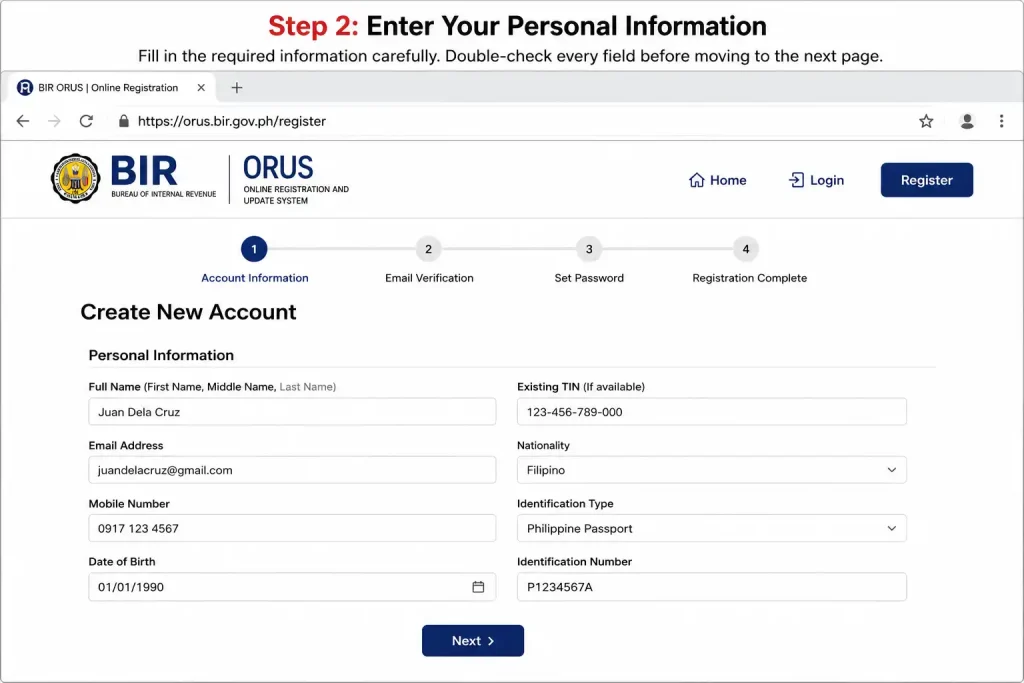
Double-check every field before moving to the next page.
Step 3: Create Your Login Credentials
Choose a strong password that contains a combination of:

Avoid using birthdays, names, or other information that can be easily guessed.
Step 4: Verify Your Email Address
After registration, portal sends a verification message to your registered email address.
Open the email and click the verification link to activate your account.

Step 5: Sign In to Your Account
After successfully verifying your email address, return to the official BIR ORUS portal and sign in using your registered email address and password. Once logged in, you can access your dashboard and use all available BIR online services.

Main Services Available Through ORUS BIR
This platform is designed to support nearly every stage of taxpayer registration and maintenance. Its services can generally be grouped into three major categories.
1. Online Taxpayer Registration
Online Registration and Update System allows qualified applicants to complete various registration processes digitally. Depending on eligibility, users can:
This eliminates much of the paperwork previously associated with taxpayer registration.
2. Registration of Business Documents
Businesses can also manage several compliance requirements directly through it.
These include:
These services help businesses maintain proper tax documentation while reducing manual submissions.
3. Updating Taxpayer Information
As businesses grow or personal information changes, taxpayers may need to update their BIR records.
It provides online access to requests such as:
This makes ongoing compliance significantly easier than relying solely on in-person transactions.
Who Can Use the BIR ORUS Portal?
It has been developed to serve a wide range of taxpayers across the Philippines.
Eligible users include:
Freelancers
Independent professionals can register as self-employed taxpayers, obtain their TIN, and choose the optional 8% income tax rate, where applicable.
Online Sellers
Individuals operating e-commerce businesses can register their enterprise, obtain a Certificate of Registration (COR), and apply for Authority to Print documents.
Sole Proprietors
Business owners with a DTI registration can complete their taxpayer registration and register their Books of Accounts online.
Domestic Corporations
Corporations may use ORUS BIR for company registration, employer enrolment, branch registration, and other corporate tax services.
Employees
Individuals who plan to start a business while employed can request the conversion of their employee TIN to the appropriate taxpayer classification.
Foreign Companies
Certain foreign corporations and foreign digital service providers with Philippine tax obligations may also register through it, subject to BIR requirements.
Key Features
The platform combines several digital tax services into one secure online account.
Some of its most valuable features include:
| Feature | Benefit |
|---|---|
| Online Tax Registration | Complete many registration processes without visiting an RDO |
| Digital TIN ID | Download a government-issued digital identification linked to your TIN |
| Business Registration | Register businesses and branches electronically |
| Online Record Updates | Modify taxpayer information through your account |
| Electronic Certificates | Download approved registration documents online |
| Business Search | Verify registered businesses when available |
| TIN Verification | Confirm taxpayer information using BIR services |
| Secure User Account | Access registration services through a protected online portal |
| 24/7 Availability | Submit requests at any convenient time |
Benefits of Using ORUS BIR Instead of Visiting an RDO
Choosing Online Registration and Update System offers several practical advantages over traditional in-person registration.
Some of the most noticeable benefits include:
For business owners, professionals, and first-time taxpayers alike, represents a significant step towards a faster and more efficient tax registration experience.
Basic Requirements Before You Register
Before starting your application, make sure you have the following:
Documents Required for Individual and Sole Proprietor Registration
If you are registering as a self-employed individual, freelancer, professional, or sole proprietor, prepare these documents before beginning your online application.
| Required Document | Purpose |
|---|---|
| BIR Form 1901 | Individual taxpayer registration |
| Valid Government ID | Identity verification |
| DTI Business Name Certificate | Proof of registered business name |
| Barangay Clearance or Business Permit | Local business authorisation |
| Proof of Business Address | Confirms business location |
| Birth Certificate | Required for first-time TIN applicants (when applicable) |
| Marriage Certificate | Supports name changes |
| Community Tax Certificate (Cedula) | Additional supporting document when required |
Documents Required for Corporations and Partnerships
Business entities registered with the Securities and Exchange Commission (SEC) must provide additional legal documents.
Prepare the following:
These documents allow BIR to verify the legal existence and authorised representatives of the business.
Requirements for Foreign Corporations
Certain foreign companies with Philippine tax obligations may also register through it.
Common requirements include:
The exact requirements may vary depending on the company’s registration category.
Completing Your Online Registration
After logging in, choose the transaction that matches your requirements.
Depending on your taxpayer classification, you may be asked to:
Complete every section carefully and upload any required supporting documents.
Before submitting your application, review all information thoroughly to avoid unnecessary corrections later.
Registration Fees and Online Payment
One of the biggest improvements introduced by Online Registration and Update System is simplified online payment.
Documentary Stamp Tax (DST)
Applicants may be required to pay a PHP 30 Documentary Stamp Tax (DST) depending on the transaction.
Annual Registration Fee
The previous PHP 500 Annual Registration Fee (ARF) has been waived beginning January 2024, reducing the cost of business registration for many taxpayers.
Supported Online Payment Methods
It supports several electronic payment channels, including:
Electronic payments allow applicants to complete their transactions without visiting payment centres.
What Happens After Submission?
Once your application has been submitted successfully, the Bureau of Internal Revenue reviews the information and supporting documents.
If everything is complete and approved, eligible applicants can download their registration documents directly from their account.
These may include:
Processing times vary depending on the type of application, document verification, and BIR review requirements.
Tips for a Successful Application
Following a few best practices can help prevent delays.
✔ Use an active email address that you check regularly.
✔ Upload clear, readable copies of all required documents.
✔ Ensure your personal information matches your government-issued identification.
✔ Review every field before submitting the application.
✔ Save copies of payment confirmations and downloaded certificates for future reference.
✔ Keep your ORUS BIR login credentials secure.
What is a Digital TIN ID?
A Digital TIN ID is an electronic version of your Taxpayer Identification Number (TIN) identification card. It contains your registered taxpayer information and is generated through the ORUS BIR portal after your registration has been approved.
Unlike the traditional physical TIN card, the digital version can be accessed online whenever needed, eliminating the need to visit a Revenue District Office (RDO) simply to obtain a copy.
Key Features of the Digital TIN ID
The Digital TIN ID offers several practical benefits for taxpayers.
| Feature | Description |
|---|---|
| Free Download | Available at no cost through your account |
| QR Code Verification | Includes a QR code for authenticity checks |
| Government-Issued | Officially generated by the Bureau of Internal Revenue |
| Online Access | Download anytime through this portal |
| Secure Digital Format | Helps reduce fraud and unauthorised alterations |
Benefits of Using the Digital TIN ID
Many taxpayers now prefer the Digital TIN ID because of its convenience.
Some of its major advantages include:
ORUS vs Traditional RDO Registration
Before Online Registration and Update System, nearly every registration process required an in-person visit to a Revenue District Office. Today, many services can be completed online, making registration much more efficient.
| Feature | Online | Traditional RDO Visit |
|---|---|---|
| Service Availability | 24/7 | Office Hours Only |
| Application Submission | Online | In Person |
| Waiting Time | Minimal | May involve long queues |
| Document Access | Digital Download | Physical Collection |
| Payment Options | Electronic Payment Channels | Cash or Bank Payments |
| Convenience | Accessible Anywhere | Requires Office Visit |
For most eligible services, ORUS BIR significantly reduces the time and effort needed to complete tax-related registrations.
Common ORUS Problems and Their Solutions
Although Online Registration and Update System is designed to simplify registration, users may occasionally encounter technical or account-related issues. Understanding the most common problems can help you resolve them quickly.
1. Email Verification Link Expired
If you did not activate your account within the required period, the verification link becomes invalid.
Solution
2. Duplicate Taxpayer Record
Some applicants receive a notification indicating that a taxpayer record already exists.
Possible Causes
Solution
Contact your assigned Revenue District Office or the BIR support team for record verification before creating another account.
3. Unable to Generate a TIN
If ORUS BIR cannot issue your TIN, it usually means additional verification is required.
Recommended Action
4. Account Locked
Multiple incorrect password attempts may temporarily lock your account.
Solution
5. Website Not Loading
Occasionally, users may experience slow loading or temporary service interruptions.
Try these troubleshooting steps:
6. Missing Corporate Documents
Corporate registrations may be delayed if mandatory documents are incomplete.
Always ensure that:
Official Support Contacts
If you cannot resolve your concern through the online portal, the Bureau of Internal Revenue provides official support channels for taxpayer assistance.
| Contact Method | Information |
|---|---|
| Hotline | (02) 8538-3200 |
| [email protected] | |
| BIR Action Centre | (02) 8981-7000 |
Frequently Asked Questions (FAQs)
Final Thoughts
ORUS has transformed how taxpayers in the Philippines manage their tax registration, taxpayer information, and compliance requirements online. Through BIR ORUS, individuals and businesses can access essential Bureau of Internal Revenue (BIR) services without making frequent visits to their Revenue District Office (RDO). ORUS allows users to register a business, update taxpayer records, obtain electronic certificates, apply for a Digital TIN ID, and complete various tax-related transactions through a secure online platform. Whether you are a first-time taxpayer, freelancer, entrepreneur, corporation, or foreign business with Philippine tax obligations, ORUS provides a faster, more convenient, and more efficient way to manage your BIR registration and tax records. Preparing the required documents in advance and following the official BIR ORUS procedures will help ensure a smoother registration and application.