PRC ID Online Registration 2026 Philippines: Complete PRC LERIS Renewal, Exam Application & Professional ID Guide
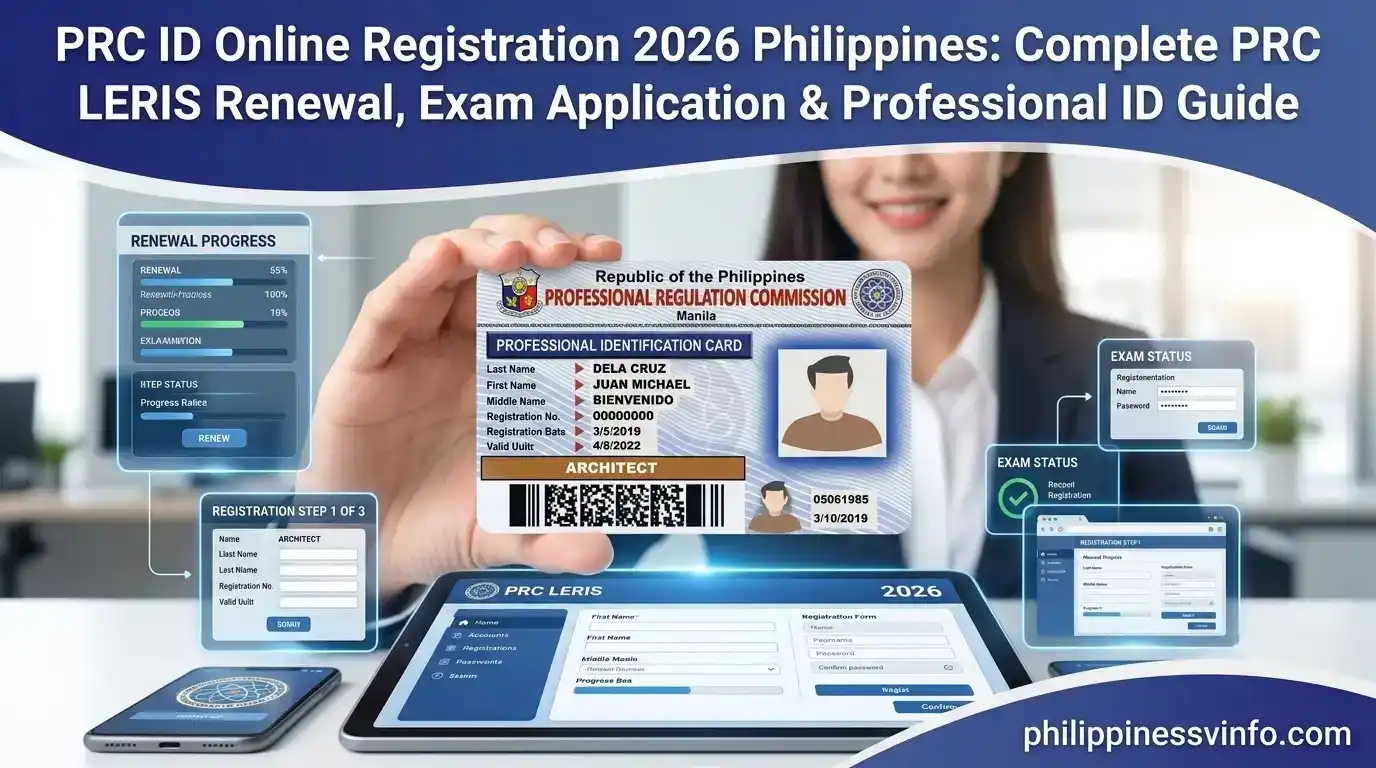
For every licensed professional in the Philippines, a PRC ID serves as the official proof that they are legally authorized to practise their profession. Whether you are applying for a new id, completing your first registration after passing the licensure examination, replacing a lost card, or processing your PRC ID renewal, nearly every service can now be completed online through the Licensure Examination and Registration Information System (LERIS). The Professional Regulation Commission developed the LERIS online registration system to make PRC ID applications and other regulatory services faster, more convenient, and accessible. Instead of spending hours at PRC regional offices, applicants can create an online account, book appointments, upload required documents, pay fees securely, and track the status of their transactions from any internet-connected device.
If you are searching for the complete this ID Online Registration 2026 guide, this article explains every major service available on the official LERIS portal, including account creation, login, board examination application, ID renewal, duplicate ID replacement, payment options, appointment scheduling, claiming procedures, and practical tips that help you avoid common mistakes.
What Is PRC LERIS?
The Licensure Examination and Registration Information System (LERIS) is the official online portal developed by the Professional Regulation Commission (PRC) to provide convenient digital services for licensed professionals, board examination applicants, and graduates across the Philippines. Through this secure government platform, users can complete a wide range of transactions, including PRC ID applications, without visiting a PRC office for every request. Using PRC LERIS, applicants can create an online account, apply for licensure examinations, complete their initial registration after passing the board exam, process PRC ID renewal, request a replacement for a lost or damaged PRC ID, schedule appointments, pay fees online, and download important application documents. The system streamlines PRC services, making them faster, more organized, and easily accessible while ensuring every transaction is processed securely through the official government portal. Visit Homepage for more information
Who Should Register your Account?
This online account is useful for anyone who needs to access services. This includes:
Creating your account early allows you to complete future transactions more efficiently.
LERIS PRC Online Registration Process
Before you can apply for a board examination, renew your PRC ID, or access other online services, you must first create a LERIS Professional Regulation Commission account. Registration is straightforward, but providing accurate information and preparing your documents beforehand will help you complete the process without delays.
Step 1: Access the Official Portal
Open your preferred web browser and visit the official PRC LERIS website at https://online.prc.gov.ph/. If you previously had an account on the old this Online system, you’ll need to register again because existing accounts from the previous platform cannot be used on LERIS.
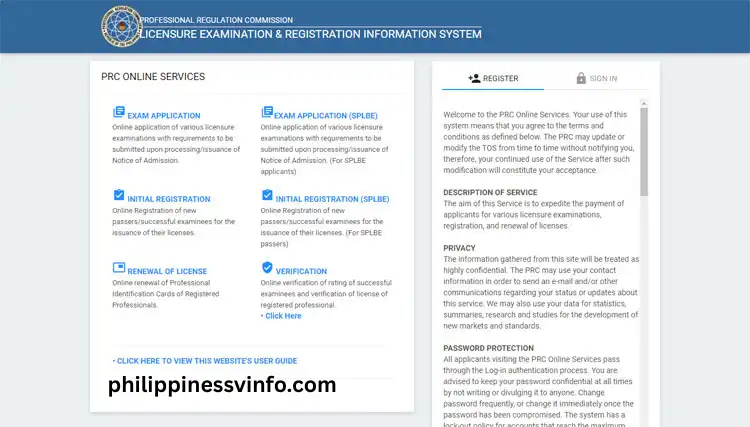
Step 2: Review and Accept the Terms of Service
Read the registration instructions and Terms of Service carefully before creating your account. Once you’ve reviewed the guidelines, scroll to the bottom of the page and click “I Agree” to continue.
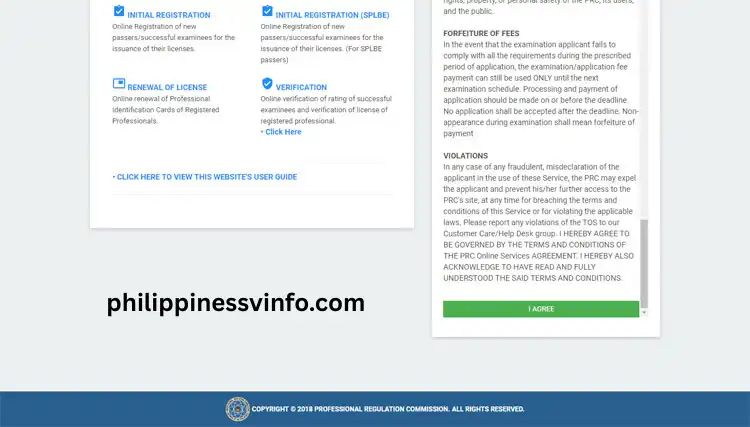
Step 3: Enter Your Personal Information
Fill in your personal details exactly as they appear on your Notice of Admission (NOA) or a valid government-issued ID. You’ll also need to provide an active email address and create a secure password to protect your account.
Your password should include:

Step 4: Complete Your Profile Information
After creating your account, continue by filling out your complete profile. Provide accurate personal, educational, and identification details, then review everything before moving to the next step.
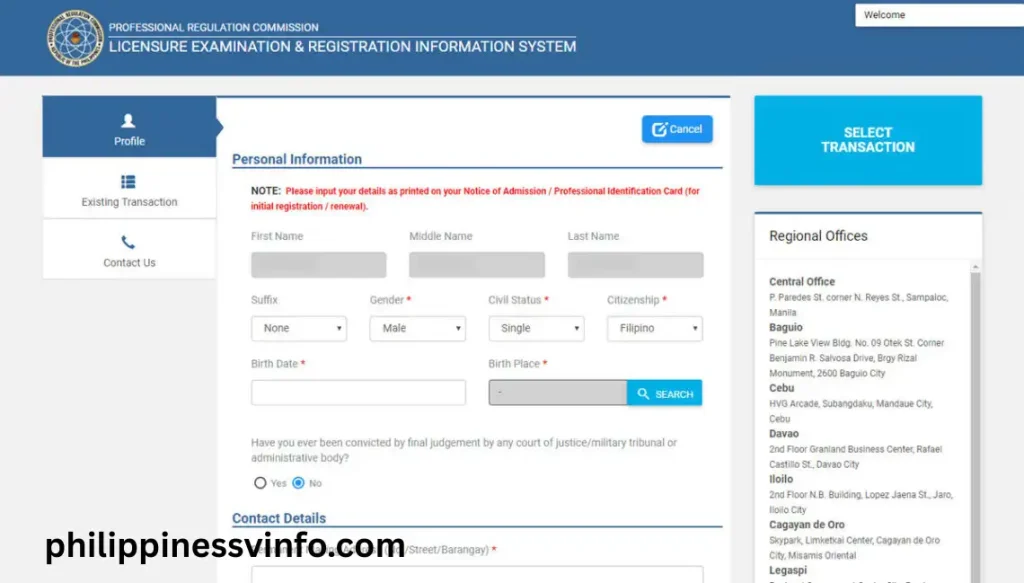
Step 5: Save Your Registration Details
Once all mandatory fields have been completed, click “Save Information” to store your profile. Take a moment to review your entries to ensure all information is correct before proceeding.
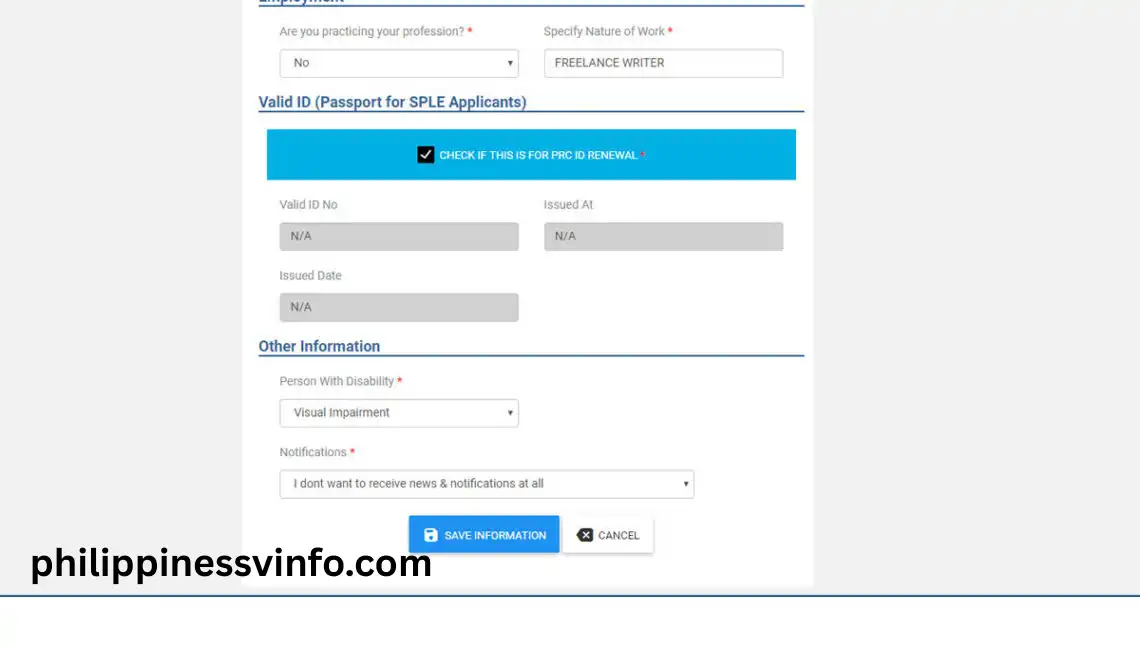
Step 6: Upload Your Passport-Style Photo
Upload a recent digital photograph that follows the official portal photo requirements. Make sure the image is clear and properly positioned within the preview window before submitting it.
Your photo must meet these specifications:
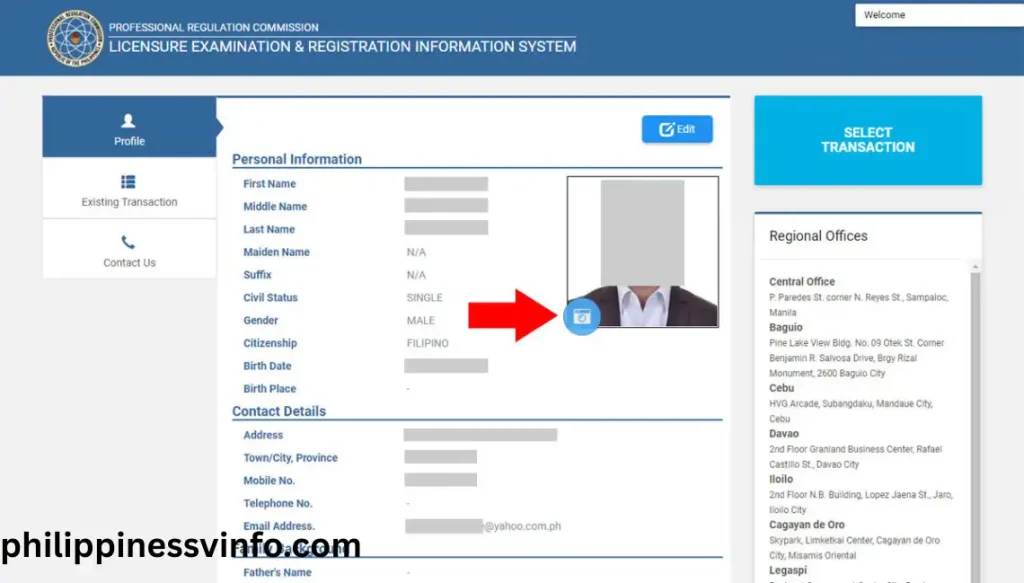
Step 7: Select Your Transaction
After successfully completing your profile and uploading your photo, open the Transaction menu from your dashboard. Select the service you wish to process and continue with the appointment, payment, and document submission requirements.
Available transactions include:

Services Available Through the PRC Online Portal
The PRC LERIS portal combines multiple government services into one secure online account. Once your profile has been created, you can use the same account for future transactions.
The portal currently supports:
Using one account for every transaction makes it easier to manage your professional records throughout your career.
Requirements Before Starting Online Registration
Preparing your documents before opening the registration page saves time and reduces the chance of delays. Make sure the information you provide matches your official records because discrepancies can affect future applications.
Active Email Address
Your email address is used throughout every PRC transaction. It is required for:
Choose an email account that you access regularly.
Active Mobile Number
An active Philippine mobile number is also required because PRC may use it for:
Avoid using temporary or inactive numbers.
Personal Information
Prepare the following personal details before registering:
Ensure every detail matches your government-issued documents.
Educational Information
Applicants should also have their educational records available, including:
Accurate educational information is especially important for board examination applications.
Valid Government Identification
PRC accepts recognised government-issued IDs, including:
Bring the same identification during your appointment if required.
Digital Photo Requirements
One of the most common reasons for application delays is an incorrect photo upload. Before creating your profile, prepare a recent digital photograph that meets the official PRC specifications.
Your photo should have:
PRC id renewal Online
Licensed professionals can conveniently renew their Professional Identification Card (PIC) through the PRC LERIS portal. The renewal process is completed online, while personal appearance is still required during the scheduled appointment.
Step 1: Sign In to Your LERIS Account
Log in using your registered email address and password to access your PRC LERIS account and begin the renewal process.
Step 2: Start a New Transaction
Select the renewal service from your dashboard to begin renewing your Professional Identification Card.
Step 3: Review and Complete Your Information
Check your personal information carefully and update any details that have changed before submitting your renewal request.
Step 4: Schedule Your Appointment
Choose the PRC office, appointment date, and available time slot that works best for you.
Step 5: Pay the Renewal Fee
Complete the payment using any available payment channel and wait for confirmation.
Step 6: Print Your Renewal Form
After your payment has been verified, download and print your Renewal Application Form. Bring the printed form, valid identification, and any additional required documents to your scheduled PRC appointment.
How to Replace a Lost, Stolen, or Damaged PRC ID
If your ID has been lost, stolen, destroyed, or badly damaged, you can request a duplicate Professional Identification Card through the official PRC LERIS portal.
This service is available only to professionals with an existing PRC licence.
Documents Required
Prepare the following before starting your application:
Having complete documents helps prevent delays during your scheduled appointment.
PRC Fee Guide
The exact amount depends on your transaction and profession.
| Transaction | Typical Fee |
|---|---|
| Board Examination (Baccalaureate) | ₱900 + applicable system fee |
| Board Examination (Non-Baccalaureate) | ₱600 + applicable system fee |
| Initial Registration | ₱1,050 |
| Renewal (Baccalaureate) | ₱450 |
| Renewal (Non-Baccalaureate) | ₱420 |
| Duplicate | ₱250 |
Note: Additional convenience or service fees may apply depending on your selected payment method.
How to Replace a Lost or Damaged PRC ID Online Through LERIS
Step 1: Log In to Your LERIS Account
Visit the official PRC LERIS portal at https://online.prc.gov.ph/ and sign in using your registered email address and password. Use the same account linked to your PRC licence to begin the replacement process.
Step 2: Choose the Duplicate Transaction
From your dashboard, click Select Transaction and choose Duplicate. This option is used to replace a lost, stolen, damaged, or destroyed PRC ID.
Step 3: Enter Your Professional Information
Provide your professional details exactly as they appear in your PRC records. Accurate information helps prevent delays during verification.
Step 4: Schedule Your PRC Appointment
Choose the PRC office where you want to process your replacement request and book an available appointment.
Step 5: Pay the Replacement Fee
Choose your preferred payment method and complete the payment through the available PRC payment channels. Wait until your payment has been successfully confirmed.
Step 6: Download and Print the Application Form
Once your payment is confirmed, open Existing Transactions and download your Duplicate PRC ID Application Form. Print a copy for your appointment.
Step 7: Attend Your Scheduled Appointment
Visit your selected PRC office on your appointment date with all the required documents. PRC staff will verify your information before issuing your replacement PRC ID.
How to Claim Your PRC ID
After your application has been approved, you can receive your portal through the option selected during your application.
Option 1 – Personal Collection
Bring the following:
Visit your selected PRC office on the exact appointment date and time.
After document verification and biometrics (when required), your Professional Identification Card will be released.
Option 2 – Courier Delivery
Where available, some renewal transactions allow delivery through an authorised courier.
If you selected home delivery:
- Enter your complete delivery address carefully.
- Pay the applicable delivery fee.
- Monitor your delivery using the tracking information provided in your LERIS account.
Common Problems and Solutions
Even though the PRC LERIS portal is designed to be user-friendly, some applicants may occasionally experience technical issues.
| Problem | Possible Solution |
|---|---|
| Forgot Password | Use the Forgot Password option on the login page. |
| Verification email not received | Check your Spam or Junk folder and verify that your email address was entered correctly. |
| Unable to sign in | Confirm that your registered email address and password are correct. |
| Photo upload rejected | Upload a recent 2 × 2 JPG/JPEG image with a plain white background that meets PRC specifications. |
| Website loading slowly | Clear your browser cache, try Incognito mode, or use another browser. |
| Payment not reflected | Wait for payment confirmation and check your transaction history before making another payment. |
| No appointment slots available | Check the portal regularly because new appointment schedules may become available. |
Best Practices When Using PRC LERIS
To enjoy a smooth application experience, keep these recommendations in mind:
Why Use the PRC LERIS Portal?
The online portal provides several advantages compared with manual processing.
Key Benefits
PRC Licensure Examination Application Guide
Applying for a PRC licensure examination is one of the most important steps toward becoming a licensed professional in the Philippines. Through the PRC LERIS portal, applicants can complete the entire application process online, including profile updates, appointment scheduling, fee payment, and printing the required documents. Before starting your application, make sure all your personal information and supporting documents are complete to avoid delays during verification.
Requirements Before Applying for the PRC Board Examination
Prepare the following requirements before accessing your PRC LERIS account. Having these documents ready will help you complete your application smoothly.
| Requirement | Description |
|---|---|
| Active Email Address | Required for account registration, verification, and PRC notifications. |
| Active Mobile Number | Used for security verification and transaction updates. |
| 2×2 Digital Photo | Recent JPG/JPEG photo with a white background, collared attire, and taken within the last six months. |
| Valid Government ID | Passport, PhilID, UMID, Driver’s Licence, or any PRC-accepted government-issued ID. |
| Transcript of Records (TOR) | Official TOR issued for board examination purposes. |
| PSA Certificates | PSA Birth Certificate and PSA Marriage Certificate (for married female applicants, if applicable). |
Professional ID Guide
The Professional ID services available through the PRC LERIS portal allow licensed professionals and board examination applicants to complete essential PRC transactions online. Whether you’re applying for a licensure examination, completing your initial registration after passing the board exam, renewing your Professional Identification Card (PIC), or updating your professional records, you’ll need an active LERIS account and a scheduled appointment. Preparing your documents in advance helps ensure a faster and smoother application process.
Requirements Before You Begin
Before creating your LERIS account or starting any PRC transaction, make sure you have all the required information and documents ready. This helps prevent delays, incomplete applications, and session timeouts while using the portal.
| Requirement | Details |
|---|---|
| Active Email Address | Use a valid personal email address for account registration, verification, password recovery, and transaction updates. |
| Active Mobile Number | Provide an active Philippine mobile number to receive notifications and important account alerts. |
| Recent Digital Photo | Upload a 2 × 2 inch JPG/JPEG photo with a plain white background, wearing appropriate collared attire. The photo should be taken within the last six months, with your face clearly visible and no eyeglasses or filters. |
| Valid Government-Issued ID | Prepare a valid ID such as a Philippine Passport, PhilID, UMID, Driver’s Licence, SSS ID, or any other PRC-accepted government-issued identification. |
| CPD Compliance (For Renewal) | Professionals renewing their PRC ID should prepare their Continuing Professional Development (CPD) records or complete the required CPD Undertaking if applicable under current PRC guidelines. |
Frequently Asked Questions About PRC ID
Conclusion
The PRC ID Online Registration 2026 system has made it easier than ever for licensed professionals, graduates, and board examination applicants to access essential services through the official PRC LERIS portal. From creating a LERIS account and applying for licensure examinations to completing PRC ID renewal, replacing a lost or damaged card, scheduling appointments, and making secure online payments, the platform brings almost every PRC service together in one convenient online system. By preparing your documents in advance, following the official requirements, and completing each step carefully, you can avoid unnecessary delays and ensure a smooth application process.
Whether you are applying for your first PRC ID, renewing your Professional Identification Card, or managing other professional transactions, always use the official PRC LERIS portal and keep your personal information up to date. Following the correct procedures, submitting accurate documents, and attending your scheduled appointment will help you complete your transaction quickly while maintaining your professional licence without interruption.