LERIS Account 2026 Philippines: Complete PRC LERIS Registration, Login & Professional ID Guide

The LERIS account is your gateway to almost every online service offered by the Professional Regulation Commission (PRC) in the Philippines. Whether you are applying for a licensure examination for the first time, renewing your Professional Identification Card (PIC), requesting certifications, or scheduling an appointment at a PRC office, you must first create and verify your PRC LERIS account. The LERIS account PRC system allows applicants and professionals to manage important PRC transactions online without needing to visit an office for every step.
Instead of completing every transaction in person, PRC introduced the Licensure Examination and Registration Information System (LERIS) to make government services faster, more organised, and accessible from anywhere in the country. After registering your account, you can submit applications online, upload the required documents, monitor requests, and pay official fees through supported payment channels. You can also use LERIS account login to access your profile and continue with available PRC services whenever needed.
What Is a LERIS Account?
A LERIS account is a personal online account within the Professional Regulation Commission (PRC) Licensure Examination and Registration Information System (LERIS). It securely stores your personal information, educational background, examination records, and professional registration details.
Every examinee and licensed professional needs only one leris prc account throughout their PRC journey. The same account can later be used for multiple services without creating another profile. Visit Homepage
Using your account, you can:
Since all records are connected to your account, PRC strongly recommends maintaining only a single verified account.
Why Every PRC Applicant Needs a LERIS Account
Years ago, applicants had to visit PRC offices several times just to begin an application. Today, this account allows most of the process to be completed online before attending a scheduled appointment.
Having a verified leris prc account offers several advantages:
| Benefit | Description |
|---|---|
| Online Applications | Submit board examination and registration requests without completing paper forms manually. |
| Faster Processing | Save time by entering your information online before your appointment. |
| Secure Records | Your professional information remains stored in one secure account. |
| Appointment Booking | Reserve available schedules at your preferred PRC office. |
| Payment Tracking | Monitor payment status and keep official transaction records. |
| ID Renewal | Renew your Professional Identification Card (PIC) using the same account. |
| Anytime Access | Log in from any computer or mobile device with internet access. |
LERIS PRC Online Registration Process
Creating a LERIS PRC account is the first step before you can apply for a licensure examination, renew your PRC ID, or use any online PRC service. The registration process only takes a few minutes, but you must enter accurate information and prepare the required documents in advance to avoid delays.
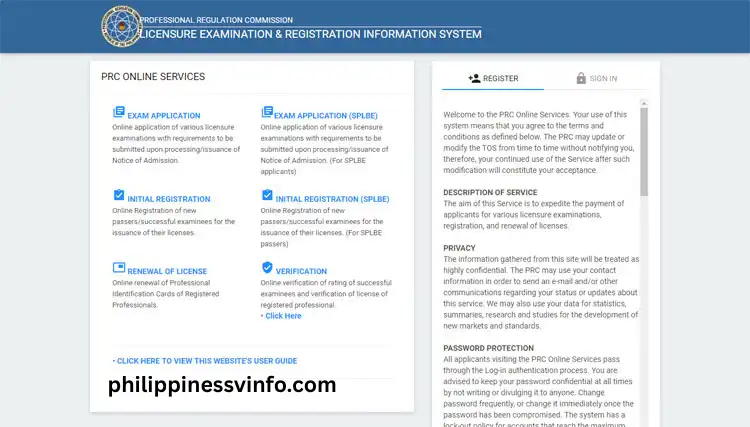
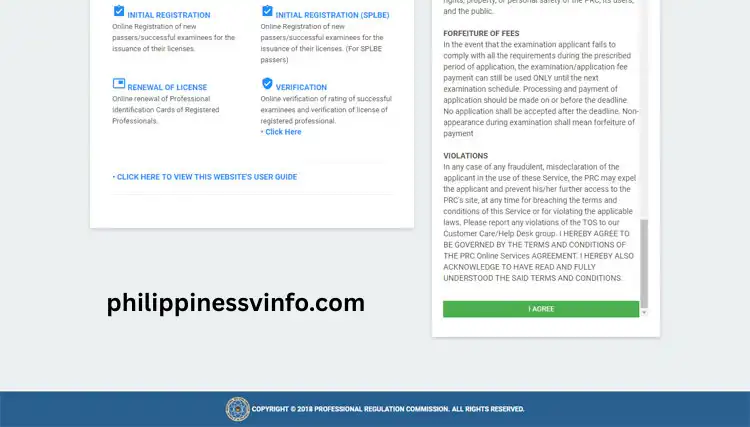
Your password must:
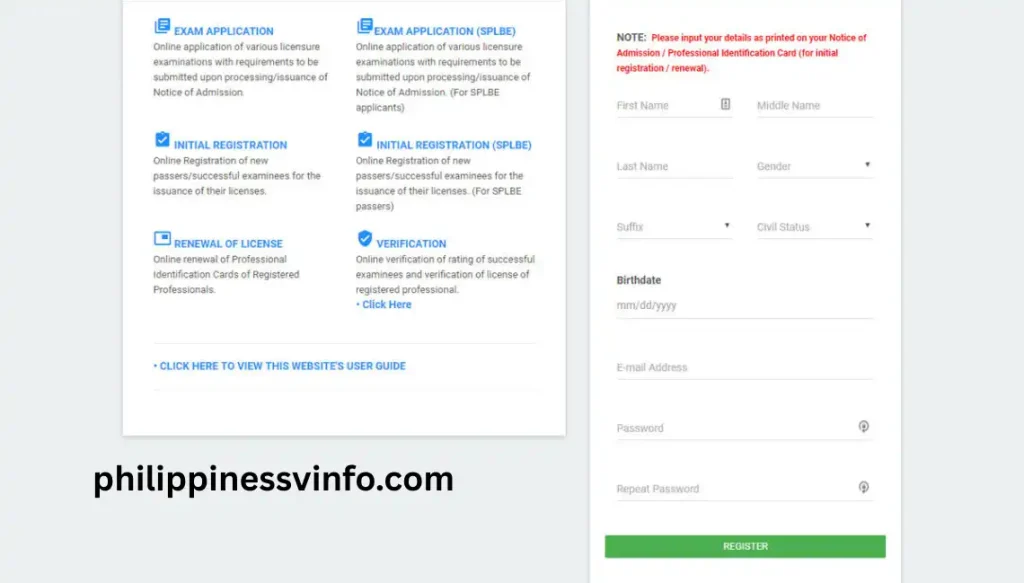
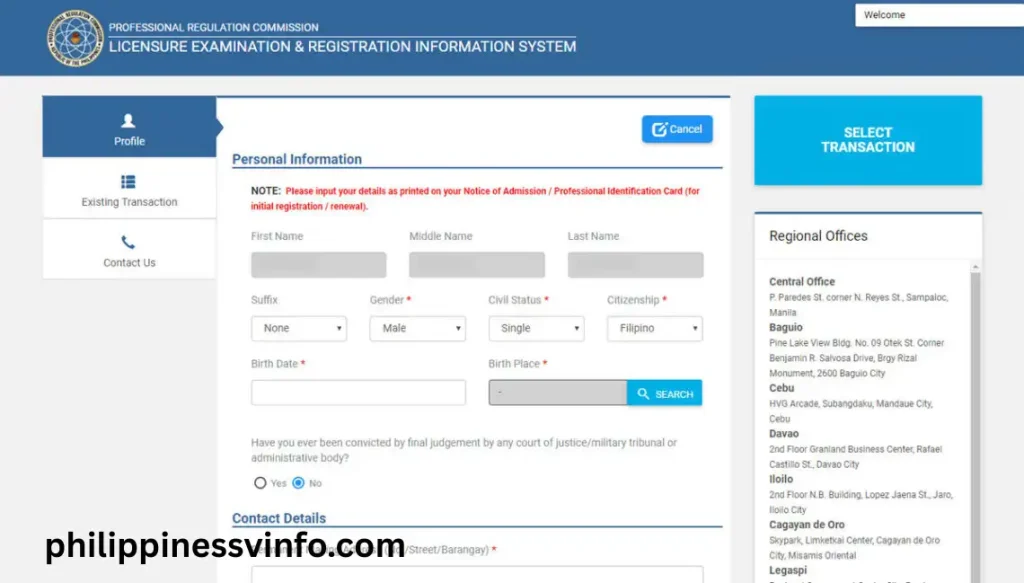
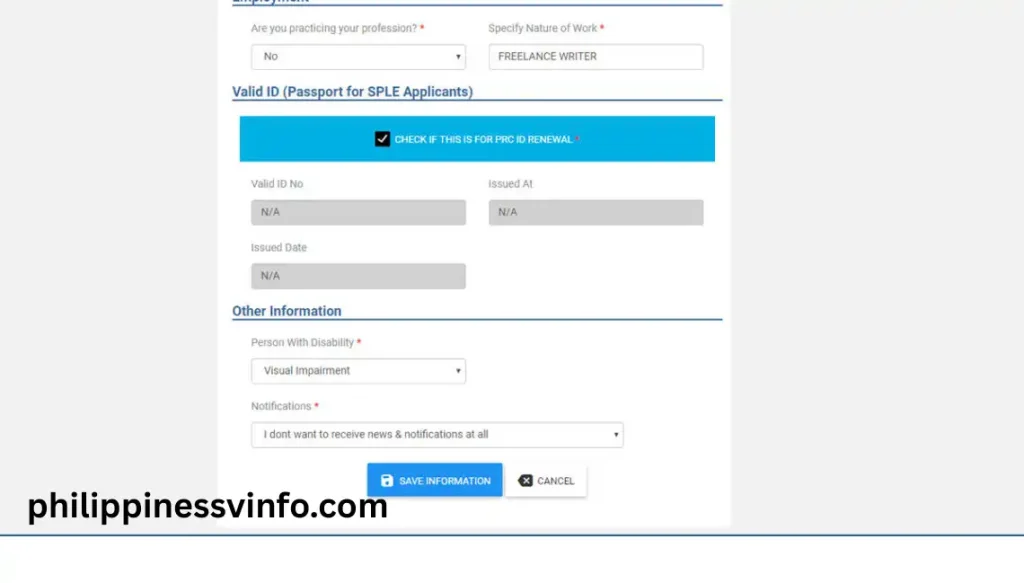
Your photo should meet these specifications:
Adjust the image within the preview frame before uploading it.
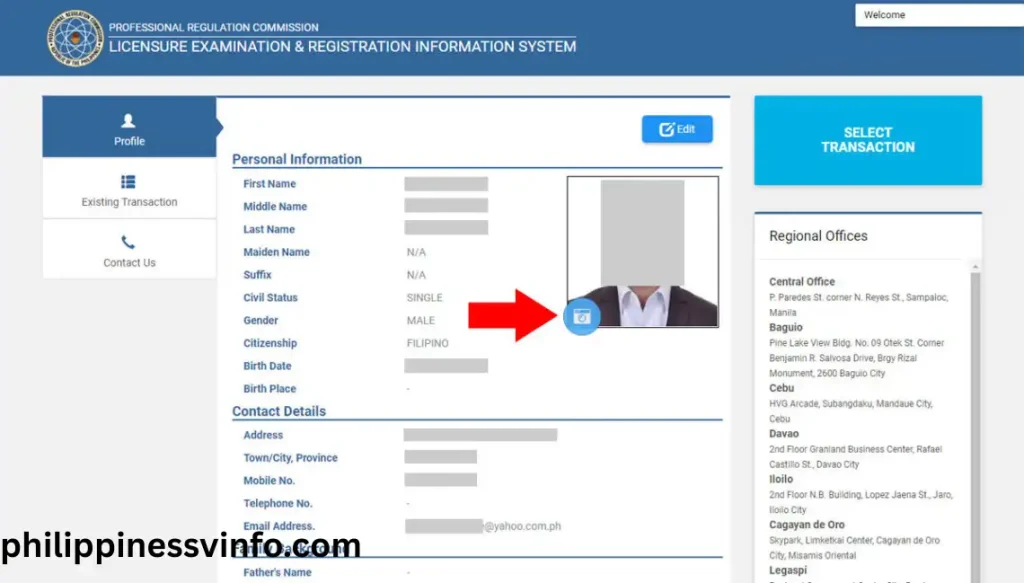
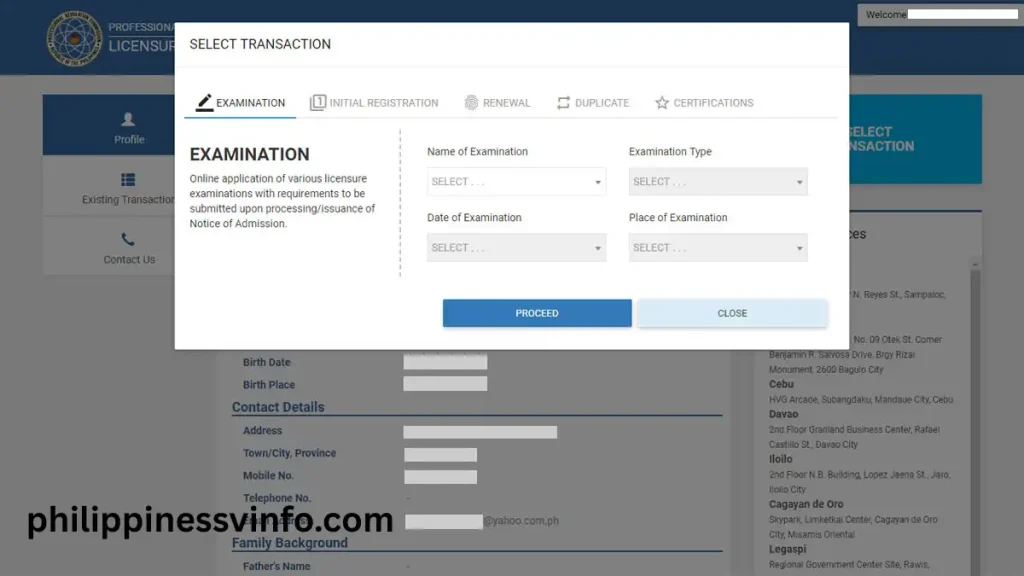
Once you’ve selected your transaction, you can proceed with appointment scheduling, payment, and document submission through your account.
Services You Can Access Through Your Account
After successfully creating your leris prc account, numerous PRC services become available from your dashboard.
These include:
Licensure Examination Applications
Graduates who wish to take a PRC board examination can submit their application online, choose a testing location, upload the required information, and print the application documents.
Initial Professional Registration
After passing the licensure examination, successful examinees use their account to complete their first professional registration before receiving their Professional Identification Card.
Professional ID Renewal
Licensed professionals can renew expired or soon-to-expire PRC IDs through their leris prc and schedule an appointment for claiming their new card.
Appointment Scheduling
Many PRC services require an appointment. This account lets users choose an available PRC office, date, and time before visiting.
Certifications and Authentication
Professionals may request official certifications, authenticated documents, and other PRC-issued records through the portal.
Record Management
Your LERIS account stores your examination history, educational background, uploaded photo, and personal information for future transactions.
Before You Create Your LERIS Account
Preparing your documents beforehand makes the registration process much smoother. Since the portal asks for several personal details during account creation, gathering everything in advance can help prevent errors or delays.
Below is a simple checklist based on the registration requirements provided by PRC.
| Requirement | Details |
|---|---|
| Valid Email Address | Use an active Gmail, Yahoo, or another email account that you can access for verification messages. |
| Active Mobile Number | Required for notifications and payment updates. |
| Digital Photo | JPG or PNG format, white background, recent photo (within six months), with proper attire and a collar. |
| Personal Information | Prepare your complete name, birth date, civil status, gender, educational background, graduation details, and valid government ID information. |
Registration Requirements
| Requirement | Why It’s Required | Important Details |
|---|---|---|
| Active Email Address | Used for account activation, email verification, password recovery, appointment confirmations, and PRC notifications. | Use an active Gmail, Yahoo, or other email account that you access regularly. Check your Spam/Junk folder if you don’t receive verification emails. |
| Working Mobile Number | Used for transaction updates, payment notifications, and important PRC communications. | Provide an active mobile number that you can receive calls or SMS on. Avoid using inactive or temporary numbers. |
| Recent Digital Photo | Required for your LERIS profile and future PRC transactions such as board exam applications and Professional ID renewal. | Format: JPG or PNG Background: Plain white Photo Age: Taken within the last 6 months Attire: Decent clothing with a collar Quality: Clear image without filters, editing, or selfie effects. |
| Accurate Personal Information | Ensures your PRC records match your official documents and prevents delays during verification or application processing. | Prepare your complete legal name, date of birth, gender, civil status, educational background, school attended, graduation date, and valid government-issued ID details. All information should exactly match your official records. |
Important Reminders Before Registration
Before creating your LERIS account, keep these best practices in mind:
Following these recommendations can help ensure a smoother registration experience and reduce the likelihood of delays.
Fill Out Your Registration Form Correctly
The registration form requests your personal information. Since these details become part of your permanent PRC record, accuracy is extremely important.
Complete every required field using information that matches your official documents.
The form typically asks for:
Best Practices When Entering Your Information
To avoid verification problems later, remember these recommendations:
Even a small typing error can cause difficulties during examination applications or professional registration.
Create a Strong Password
Your account contains sensitive personal and professional information, so using a secure password is essential.
Choose a password that includes:
Avoid Using
A stronger password helps protect your account from unauthorised access.
Verify Your Email Address
Email verification activates your newly created leris prc account.
Without completing this step, you will not be able to access PRC online services.
Follow These Steps
- Open your registered email inbox.
- Look for an email from PRC.
- If you cannot find it, check your Spam or Junk folder.
- Open the message.
- Click the verification or activation link provided.
- Wait until the activation confirmation appears.
After successful verification, your account becomes active.
If You Don’t Receive the Email
Sometimes verification emails take a few minutes to arrive.
If you still cannot locate it:
How to Reset Your Password
Forgetting your LERIS account password is common, especially if you haven’t logged in for several months. PRC provides a password recovery option that allows you to regain access without creating another account.
Step 1: Open the PRC LERIS Login Page
Visit the official PRC LERIS website and select Forgot Password? below the sign-in form.
Step 2: Enter Your Registered Email Address
Type the same email address used when creating your leris prc account.
Double-check for spelling mistakes before submitting.
Step 3: Check Your Email
PRC will send a password reset link to your registered email address.
If you don’t see the message immediately:
Step 4: Create a New Password
Open the reset link and enter a strong new password.
Your password should include:
Avoid reusing passwords you’ve used on other websites.
Step 5: Sign In Again
Return to the official PRC LERIS login page and sign in using your new password.
Your leris prc should now be accessible.
Common LERIS Account Problems and Solutions
Even though the PRC LERIS portal is designed to simplify online transactions, users may occasionally encounter issues. Most of these can be resolved by reviewing your information or following the correct procedure.
| Problem | Possible Cause | Solution |
|---|---|---|
| Verification email not received | Incorrect email or delayed delivery | Check Spam/Junk folders and verify your email address. |
| Cannot sign in | Wrong password or email | Use the Forgot Password option to reset your password. |
| Photo upload rejected | Image does not meet PRC standards | Upload a recent JPG/PNG photo with a white background and proper attire. |
| Duplicate account warning | Multiple registrations | Continue using your original account and avoid creating another profile. |
| Incorrect personal details | Typographical errors | Review and correct your information before submitting any application. |
| Payment not reflected | Processing delay | Save your reference number and payment receipt while waiting for the payment to be posted. |
Expert Tips for a Successful PRC Transaction
A little preparation can save you time and help prevent delays when using your leris prc.
Keep Only One Account
PRC recommends maintaining only one LERIS account throughout your professional career. Multiple accounts may cause duplicate records and processing issues.
Save Your Login Information
Store your email address and password securely. Avoid sharing them with others.
Use Accurate Personal Information
Always enter details exactly as they appear on your government-issued documents and school records.
Follow Photo Guidelines
A professional-looking photo with a white background and proper attire reduces the chances of rejection.
Save Payment Records
Whenever you complete an online payment, keep a copy of:
These documents may be helpful if payment verification takes longer than expected.
Check Announcements Regularly
PRC occasionally updates application schedules, examination dates, and service advisories. Log in to your leris prc regularly and monitor official announcements.
Security Tips to Protect Your LERIS Account
Since your leris prc contains sensitive personal and professional information, account security should always be a priority.
Follow these safety practices:
These simple habits can help keep your account protected from unauthorised access.
Frequently Asked Questions (FAQs)
Final Thoughts
Creating a LERIS account is the first and most important step toward accessing the Professional Regulation Commission’s online services. Whether you are preparing for your first licensure examination, completing your initial professional registration, renewing your PRC ID, or requesting official certifications, maintaining a single, accurate and secure LERIS account PRC will make every future transaction faster and more convenient.
Before submitting any application, review your personal information, upload a photo that meets PRC requirements, keep copies of your payment receipts, and regularly monitor your account for updates. Using the LERIS account login regularly can help you stay informed about your applications, appointments, and other PRC transactions. Keeping your LERIS account information accurate and secure will also help you avoid unnecessary delays and ensure a smoother experience with the PRC LERIS portal.