MISMO Philippines 2026: Complete MARINA Online Appointment, Registration, Login & Seafarer Guide
For Filipino seafarers, handling MARINA requirements online can make the application process more organised and reduce unnecessary trips to government offices. The MARINA Integrated Seafarers Management Online system is the official online platform used by the Maritime Industry Authority (MARINA) for seafarer-related services, including account management, certification transactions and other online processing. Before starting, it is important to know which MARINA service you need because some appointments have moved to the eGovPH platform in 2026. In particular, MARINA confirmed that new appointments for the Seafarer’s Identity Document (SID) and Seafarer’s Record Book (SRB) are now handled through the eGovPH App, while existing appointments made before the change remain valid.
This official system remains an important starting point for seafarers who need to manage their MARINA account and access applicable services. You should always begin with the official MARINA website rather than relying on agents, social-media pages or websites offering guaranteed appointment slots. MARINA has repeatedly warned the public about fixers and unauthorised individuals, so keeping your account credentials and personal information within official government systems is essential. For this registration and account access, use the official portal below.
What Is MISMO Philippines?
Its means MARINA Integrated Seafarers Management Online. It is MARINA’s online system for managing seafarer accounts and supporting digital processing of applicable maritime certification and related transactions. Instead of handling every account-related requirement manually, registered seafarers can use the system to maintain their information and access the services available to their account. This official registration page currently provides fields for a user’s first name, middle name, last name, email address, birthdate, password and password confirmation, followed by acceptance of the system’s Terms and Conditions.
The platform is operated by the Maritime Industry Authority, the government agency responsible for regulating and developing the Philippine maritime industry. Depending on the transaction and the user’s eligibility, it can support activities connected with seafarer certification, including applicable STCW-related applications, account information, certification processing and examination-related information. It is also important to understand that it and the MARINA Online Appointment System are not necessarily the same route for every service. In 2026, MARINA integrated appointment processes with eGovPH, and new SID/SRB appointments are now processed exclusively through the eGovPH App. Visit Homepage
Services You May Access
Depending on your account and the MARINA service involved, the system may be used for:
MISMO and eGovPH: What Changed in 2026?
A common source of confusion is assuming that every MARINA appointment can still be booked directly through the old OAS website. That is no longer correct for new SID and SRB appointments. MARINA Advisory No. 2026-24 states that, effective 13 May 2026, appointments for the issuance, renewal and replacement of the Seafarer’s Identity Document (SID) and Seafarer’s Record Book (SRB) are processed exclusively through the eGovPH App.
MARINA’s published instructions say applicants should create and verify an eGovPH account, search for MARINA services, choose the relevant SID or SRB appointment, enter the required information, select an available date and venue, confirm the appointment and complete payment where applicable. Applicants with appointments confirmed before 13 May 2026 do not need to book again simply because of this system change.
Registration Requirements
Before opening a new MISMO account, prepare the basic information requested by the registration form. Using accurate information from the beginning can help prevent account verification and record-matching problems later.
You should have:
The current official registration page confirms that these details are part of the new-account form.
How to Register
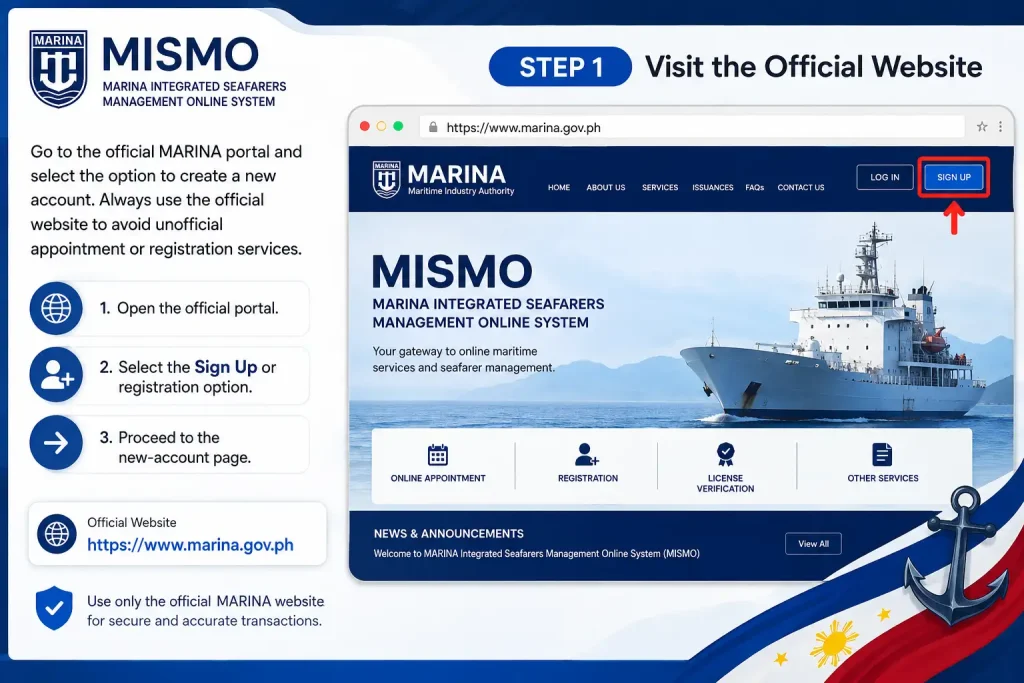
Step 1: Visit the Official Website
Go to the official MARINA portal and select the option to create a new account. Always use the official website to avoid unofficial appointment or registration services.
Step 2: Select Register New Account
Choose Register New Account to open the registration form. This page is used to provide the basic information needed to create your seafarer account.

Step 3: Enter Your Personal Details
Fill in the registration form using your accurate information. Make sure your details are entered correctly, especially your name, birthdate and email address, because these details may be used for account verification.

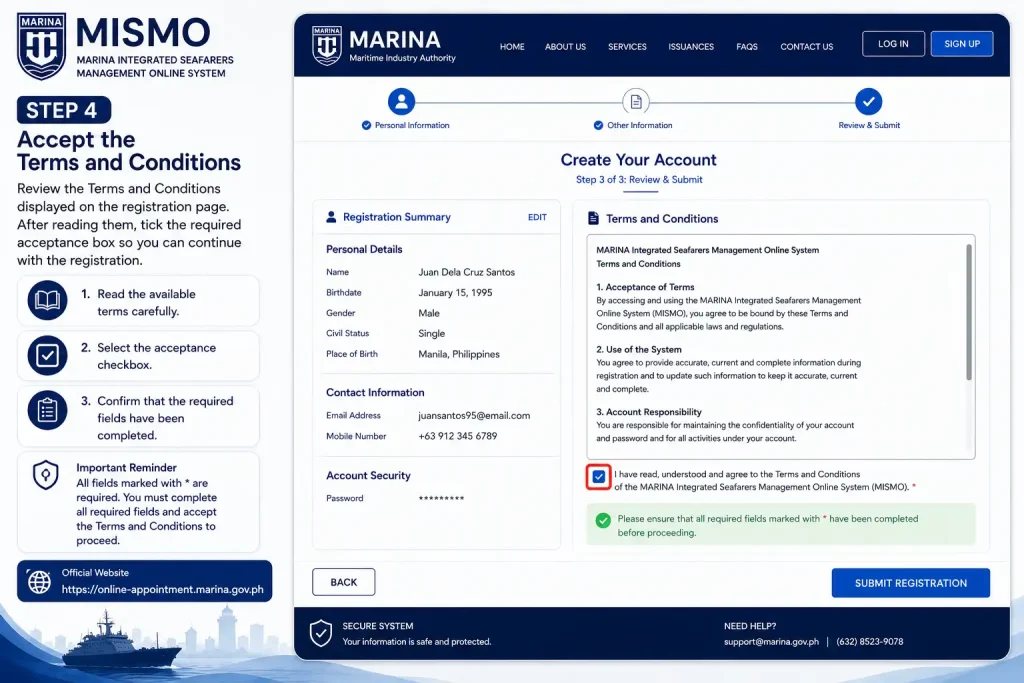
Step 4: Accept the Terms and Conditions
Review the Terms and Conditions displayed on the registration page. After reading them, tick the required acceptance box so you can continue with the registration.
Step 5: Submit Your Registration
Review all the information you entered before selecting Register. If everything is correct, submit the form and continue with the email-verification process provided by mismo marina.

How to Verify Your MISMO Account
Email verification is an important part of setting up your account. After submitting the registration form, monitor the email address you provided and look for the verification message from the system. If the message does not appear immediately, check your Spam or Junk folder and search your mailbox for terms such as MARINA or MISMO. Also make sure that the email address entered during registration was correct.
If you need another verification message, use the official MARINA resend-verification page: Once you receive the verification email, open the supplied link and follow the activation instructions. After successful verification, return to this and sign in with your registered credentials.
Finish Your Profile
Creating an account does not necessarily mean that every part of your MARINA profile is ready for a transaction. After activation, sign in and review the information associated with your account before starting a certification or other service.
Pay particular attention to personal details and any seafarer information requested by the system. If the transaction asks for supporting documents or existing MARINA information, use accurate details that correspond with your official records.
Check These Details Before Proceeding
What Is an SRN in mismo marina?
The Seafarer’s Registration Number (SRN) is an identifier associated with a seafarer’s MARINA records. If you already have an SRN, use the information associated with your existing record when the system asks for it.
Avoid creating duplicate accounts or entering inconsistent personal information simply to complete a transaction. If you are unsure whether you already have a MARINA record, check the available options within the official system or contact MARINA through its official channels.
Forgot Your Password?
If you cannot remember your password, use the official password-recovery page rather than creating another account. Follow the instructions shown on the page and use the email address associated with your account.
How to Book a New SID or SRB Appointment in 2026
If your purpose is to obtain, renew or replace a Seafarer’s Identity Document (SID) or Seafarer’s Record Book (SRB), follow the newer eGovPH route rather than assuming that the old standalone appointment process still applies. MARINA confirms that new SID/SRB appointments have been processed through eGovPH since 13 May 2026.
Step 1: Open the Official eGovPH App
Begin by downloading and opening the official eGovPH App on your mobile device. If you already have an account, sign in using your existing credentials. New users should create an eGovPH account before continuing with the MARINA appointment process.
Official eGovPH Website:
eGovPH Official Website
Step 2: Verify Your eGovPH Account
After creating or accessing your account, complete the required eGovPH verification. A verified account is needed for the Single Sign-On process used for the new MARINA SID and SRB appointment system.
Step 3: Find the MARINA Service
Once your eGovPH account is ready, open the available government services and search for MARINA or MARINA OAS. Select the MARINA appointment service to continue with your application.
Step 4: Select SID or SRB
Choose the appropriate transaction based on your requirement. Select either the Seafarer’s Identity Document (SID) or Seafarer’s Record Book (SRB) service, then provide the personal information requested by the system.
Step 5: Choose an Appointment Schedule
Review the available MARINA appointment dates and processing locations. Select a convenient date and venue, then carefully check the appointment details before confirming your selection.
Step 6: Confirm the Appointment and Pay
Review all the information displayed on the appointment summary. If everything is correct, confirm the booking and complete any applicable payment through the payment option provided in the official system.
Step 7: Attend Your MARINA Appointment
After the appointment has been successfully confirmed, keep your appointment details for reference. Visit the selected MARINA office or processing centre on the scheduled date and time with the required documents.
MARINA advises applicants to arrive one hour before the scheduled appointment and bring the required documentary requirements for processing.
Three Things to Remember Before Your MARINA Transaction
Registration Checklist
Before you finish your account setup, make sure:
A little care at the registration stage can prevent avoidable problems later. Most importantly, do not pay an unofficial person who claims to have guaranteed MARINA appointment slots. MARINA has warned the public about fixers and has moved new SID/SRB bookings into eGovPH partly to improve security and transparency.
How to Log In to MISMO
Start from the official MARINA MISMO portal:
On the login page, enter the email address and password associated with your account. After successful authentication, your mismo marina dashboard will provide access to the services available to your account.
If you cannot remember your password, use the official recovery option instead of creating another account. Creating duplicate accounts can make it harder to match your existing seafarer information with your online profile.
Password recovery
If you have forgotten your mismo marina password:
- Open the official MISMO website.
- Select the Forgot Password option.
- Enter the email address connected to your account.
- Follow the password-reset instructions sent to your email.
- Return to portal and sign in with the new password.
Keep your login details private. MARINA has also warned the public about unauthorised individuals or “fixers”, particularly in relation to SID and SRB transactions.
What to Do Inside Your Dashboard
After logging in, take a moment to check your account information before starting a new transaction.
Your profile should contain accurate information that corresponds with your official records. This is particularly important when you are applying for a Certificate of Proficiency (COP), Certificate of Competency (COC) or another MARINA-related service.
Review:
Do not upload an unclear photograph or document simply to complete the form. If MARINA needs to verify your records, poor-quality files can delay processing.
Applying for a COP
A Certificate of Proficiency (COP) is one of the certification-related services handled through the MARINA system. The exact documentary requirements depend on the particular COP and the applicable MARINA rules.
MARINA’s published application instructions demonstrate the online workflow: applicants log in to mismo marina, select a transaction, choose the appropriate certificate or application, upload the required documents and proceed through the available application and scheduling stages.
Before submitting, check that:
Certificate of Competency (COC) Applications
A Certificate of Competency (COC) is another important MARINA certification service for qualified officer-seafarers.
The COC process is not identical for every applicant. Documentary requirements can depend on the officer’s qualification, previous certificates, examination or assessment records and the specific application being submitted.
MARINA’s official documentation confirms that applications for certain COC issuance or revalidation transactions are filed online through the MARINA system.
Before starting a COC application
Have the relevant records available, such as applicable:
MARINA publishes documentary requirement guides for COC applications, so applicants should always check the current official requirements instead of relying on an old checklist found on another website.
Understanding MISMO Appointments and Evaluation Schedules
One part of the mismo marina Philippines process that often causes confusion is the difference between an online application and an appointment.
Submitting an application does not automatically mean that every service is completed instantly. Depending on the transaction, the system may require you to select an evaluation schedule or another appointment-related step.
MARINA’s official COP instructions show that applicants proceed through the online transaction and select an evaluation schedule where required.
Before selecting a schedule
Check:
Choose a schedule that you can actually attend when personal appearance is required.
Some MARINA certification procedures allow regular applications to be processed without personal appearance, while exceptions can apply, including cases where documents need clarification or where expedited processing is involved.
The 2026 SID and SRB Appointment Change
This is one of the most important updates for anyone searching for MARINA online appointment information in 2026.
Starting 13 May 2026, new appointments for the issuance, renewal and replacement of the Seafarer’s Identity Document (SID) and Seafarer’s Record Book (SRB) are processed exclusively through the eGovPH App. MARINA issued Advisory No. 2026-24 confirming that the MARINA Online Appointment System for these services is accessible through the eGovPH platform.
Therefore, if your purpose is specifically to book a new SID or SRB appointment, do not rely on older instructions that tell you to make a new booking through the previous standalone route.
How to Book a SID/SRB Appointment Through eGovPH
For new SID or SRB appointments in 2026, use the eGovPH App. MARINA’s instructions require applicants to complete the appointment process through the eGovPH platform rather than relying on the previous standalone appointment route.
Step 1: Install the eGovPH App
Download the official eGovPH App from your device’s recognised app store. Open the application once installation is complete and make sure you are using the official government application.
Step 2: Create or Log In to Your Account
Open eGovPH and create an account if you are a first-time user. If you already have an account, simply sign in using your existing eGovPH credentials.
Step 3: Verify Your Account
Complete the verification process requested by eGovPH. Check your personal information carefully before continuing because the verified account is used to access government services.
Step 4: Search for MARINA OAS
After logging in, use the search function in the app and look for MARINA OAS. Select the MARINA appointment service when it appears.
Step 5: Enter Your Appointment Details
Select the appropriate service and provide the requested appointment information. Choose your preferred processing location, available date and appointment slot, then review everything before proceeding.
Step 6: Confirm and Pay
Check the appointment details one final time and confirm your booking. If payment is required, complete the applicable payment process through the available option and keep your appointment confirmation for reference.
Step 7: Attend Your MARINA Appointment
Visit the selected MARINA processing centre on your scheduled date and bring the required documents for your SID or SRB transaction. Keep your appointment confirmation accessible when you arrive.
Before leaving for your appointment, remember:
Can You Still Use the Old MARINA OAS for SID/SRB?
For new SID/SRB appointments after 13 May 2026, the answer is no. MARINA announced that new appointments for these services must be made through the eGovPH App. However, applicants who already had an appointment booked under the previous system do not need to book again. MARINA clarified that appointments made before the transition remain valid, so these applicants do not need to register again in eGovPH simply because of the new process. This distinction is important because many older online guides may still describe the previous MARINA appointment procedure.
How to Track Your MARINA Application
After submitting an online transaction, keep your application reference number, confirmation details, and other transaction information for future reference. Depending on the service, you may be able to monitor the application status through the relevant MARINA online system or receive notifications about the next stage of processing.
If your application is returned or requires clarification, carefully read the reason provided by MARINA and correct the requested information or documents instead of immediately submitting a new application. A returned application does not necessarily mean that you need to create a new mismo marina account; in many cases, you can continue with the existing application by following the instructions provided by MARINA.
If MARINA asks for clarification
Check:
- Which document or information needs correction.
- Whether the requested file is readable.
- Whether the document is current.
- Whether all required pages were submitted.
- Whether the information matches your official records.
Then follow the instructions provided by MARINA for completing the transaction.
Common MISMO Application Mistakes to Avoid
Even when the mismo marina website is working normally, an application can be delayed by incorrect information or incomplete documentation.
1. Creating multiple accounts
If you already have this account, do not create another one simply because you forgot your password.
Use the official recovery process first.
2. Uploading unclear documents
A blurry scan may prevent the information from being properly evaluated. Use a clear and complete copy.
3. Selecting the wrong transaction
Read the service description before submitting. COP, COC, SID and SRB transactions are not interchangeable.
4. Following outdated appointment instructions
This is particularly important in 2026. SID and SRB appointments have moved to the eGovPH App for new bookings.
5. Using unofficial fixers
MARINA has specifically warned the public about unauthorised individuals and fixers and advised applicants to protect their personal information.
MISMO, eGovPH and MARINA: Which One Should You Use?
| Your requirement | Correct starting point |
|---|---|
| MISMO account | Official MARINA portal |
| STCW certification transaction | MISMO, subject to the applicable MARINA procedure |
| COP application | marina mismo |
| COC-related online application | MISMO, where applicable |
| New SID appointment | eGovPH App |
| New SRB appointment | eGovPH App |
| SID/SRB verification | MARINA verification service |
| General MARINA information | Official MARINA website |
Common Problems and Solutions
MISMO Verification Email Not Received
If you completed your MISMO registration but cannot find the verification message, first check your email carefully.
Try these actions:
- Check your Spam or Junk folder.
- Search for messages containing MARINA or MISMO.
- Confirm that you used the correct email address during registration.
- Use the official Resend Verification function if available.
- Try again later if the email service is experiencing a delay.
Official portal verification tools should be used instead of registering several accounts with different email addresses.
Forgot Your marina mismo Password?
A forgotten password does not mean you need a new MISMO account.
Go to the official password-recovery page:
Enter the email address associated with your account and follow the instructions provided by the system.
Password recovery checklist
If you no longer have access to the email address connected to your account, contact MARINA through its official support channels rather than creating multiple accounts.
MISMO Website Not Loading
Sometimes the problem is not your account at all. A temporary browser, network or server issue can prevent the marina mismo website from opening correctly.
Try the following:
If the portal remains unavailable, wait and try again later. Avoid repeatedly submitting the same application simply because the page appears slow.
A useful precaution
Before clicking Submit, Register, Pay or another final action, check whether the transaction has already been processed. Repeated clicks can sometimes create confusion about whether an application or payment was successfully submitted.
Document Upload Problems in portal
Document uploads are an important part of many MARINA online applications. A file can fail because of its format, size, quality or another requirement shown by the application page.
If an upload does not work:
Do not rely on an old file-size limit copied from another website. Use the limit and file specifications displayed by the current MISMO transaction, because requirements can change between services.
Make your documents easy to review
A good scan should be:
If a document contains several pages, make sure you follow the particular transaction’s instructions about whether all pages need to be uploaded.
What If Your Application Is Returned?
A returned application is not necessarily a rejection.
MARINA may require clarification, correction or additional documentation depending on the transaction. When this happens, read the status or notification carefully and identify exactly what needs attention.
Before resubmitting:
- Read the reason for the return.
- Correct the specified information.
- Replace unclear or incorrect documents.
- Check your personal details again.
- Submit only after confirming that the requested correction has been made.
Avoid changing unrelated information unless the system or MARINA instructs you to do so.
What If Your SRN Is Already Linked?
An SRN already linked message can be confusing, particularly for a seafarer who believes they are registering for the first time.
One possible reason is that your information has already been associated with an existing MARINA record.
Do not immediately create another this account.
Instead, check whether you previously:
If you cannot resolve the issue through the available online options, contact the appropriate MARINA office for assistance with your existing record.
Appointment Problems
Appointment availability can vary according to the service, location and schedule.
If you cannot find your preferred date:
The last point is particularly important in 2026.
For new SID and SRB appointments, MARINA announced that the process moved exclusively to the eGovPH App effective 13 May 2026. Existing appointments booked before the transition remain valid.
Therefore, if you are searching for a new SID or SRB appointment and cannot find the expected booking option in the old workflow, check the eGovPH process instead.
Is MISMO the Same as MARINA Online Appointment?
The terms can be confusing because several MARINA online services are connected to appointments and certification processing.
For example:
| Service | Platform to check |
|---|---|
| marina mismo account | MARINA portal |
| Applicable COP transactions | MISMO |
| Applicable COC transactions | MISMO |
| New SID appointment | eGovPH App |
| New SRB appointment | eGovPH App |
| MARINA information and announcements | Official MARINA website |
Always confirm the latest instructions for your specific transaction before booking.
Frequently Asked Questions
Conclusion
The MISMO Philippines 2026 system remains an important online platform for Filipino seafarers who need to manage their MARINA records and process applicable certification-related transactions. From creating and verifying its account to submitting COP or COC applications, uploading documents, monitoring application status and managing seafarer information, using the official MARINA system can make the overall process more organised and convenient.
However, applicants should pay close attention to the 2026 MARINA appointment changes. New appointments for the Seafarer’s Identity Document (SID) and Seafarer’s Record Book (SRB) are now processed through the eGovPH App, effective 13 May 2026, while appointments made before the transition remain valid. Therefore, always identify your specific MARINA service before starting an application or appointment.