MMSU Student Portal 2026: Login, Enrollment, Grades & Student Guide

The MMSU Student Portal is Mariano Marcos State University’s online system for managing a range of student and academic services in one place. Through the portal, students can handle tasks such as enrolment, course selection, academic records, personal information updates, and other university-related transactions without needing to visit different offices for routine requests.
Students can access the official Student Portal MMSU at mys.mmsu.edu.ph. MMSU refers to the platform as its Integrated University Student Information System (IUSIS), which supports services including online course enrolment, grade monitoring, and the submission of selected academic requirements. For admission details, university announcements, programmes, and general information, students should also use the official Mariano Marcos State University website.
MMSU Student Portal at a Glance
The MMSU Student Portal brings several student services together in one online account. Its usefulness is especially noticeable during enrolment, when students may need to select subjects, update their personal information and send their enrolment request for adviser approval.
Students may use the portal for:
The exact options available can depend on the student’s account, academic status and the current MMSU process. Visit Homepage
Quick Answer: How Do I Access Student Portal MMSU?
Go directly to mys.mmsu.edu.ph and sign in with the credentials assigned to your student account. Existing students generally use their Student Number and password, while admission students may need to use their MCAT account according to MMSU’s instructions.
MMSU Student Portal Login
Logging in is straightforward when your account details are ready. The most important point is to use the official MMSU address and enter the credentials associated with your account.
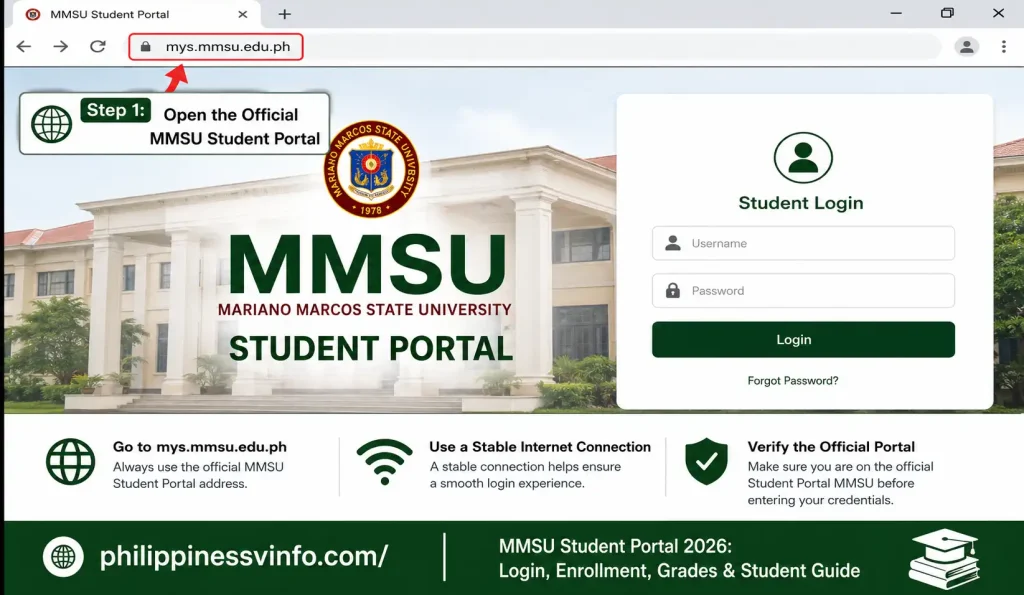
1. Open the Official MMSU Student Portal
Start by opening a reliable web browser on your phone, tablet, or computer. Use the official MMSU Student Portal address to make sure you are accessing the correct university website.
2. Locate the Student Login Section
After the portal page opens, find the student login area. This section is designed for students to enter their account information and access the available online services.

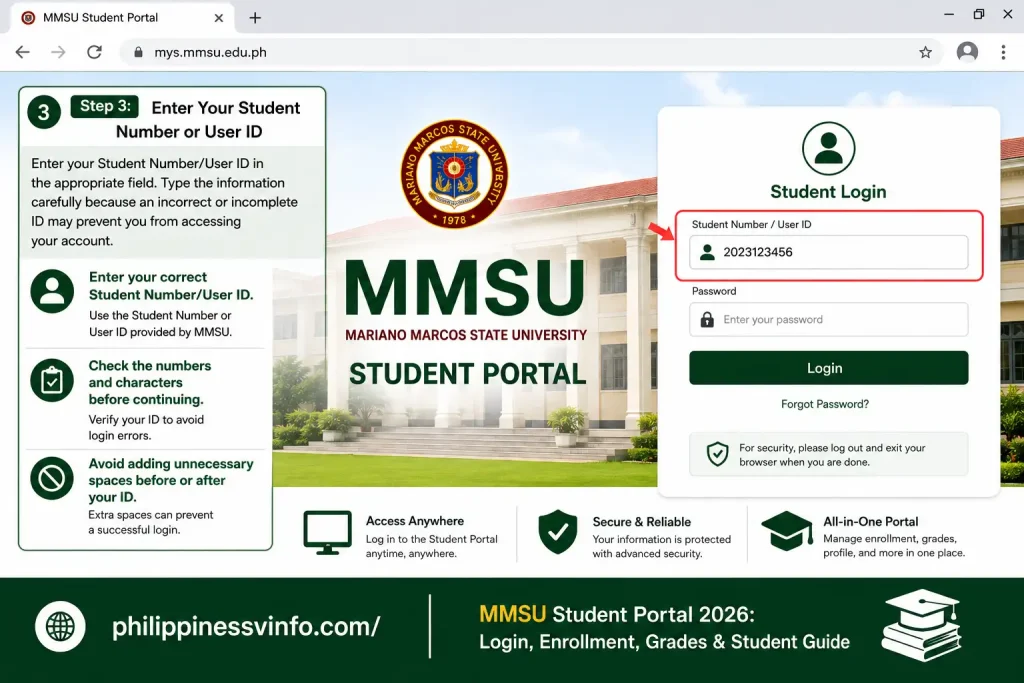
3. Enter Your Student Number or User ID
Enter your Student Number/User ID in the appropriate field. Type the information carefully because an incorrect or incomplete ID may prevent you from accessing your account.
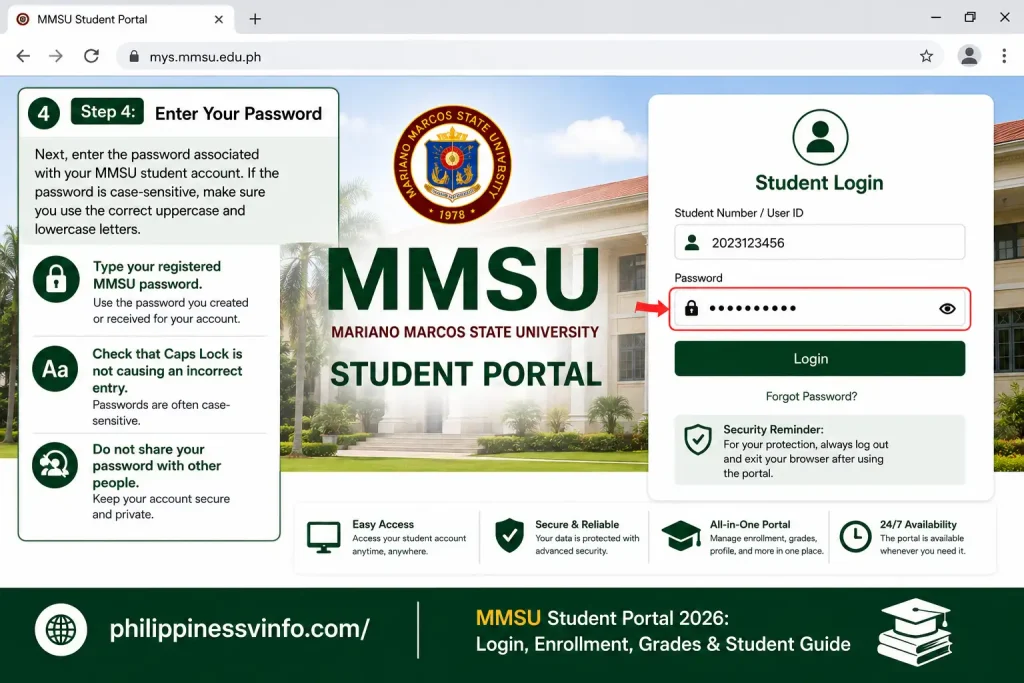
4. Enter Your Password
Next, enter the password associated with your MMSU student account. If the password is case-sensitive, make sure you use the correct uppercase and lowercase letters.
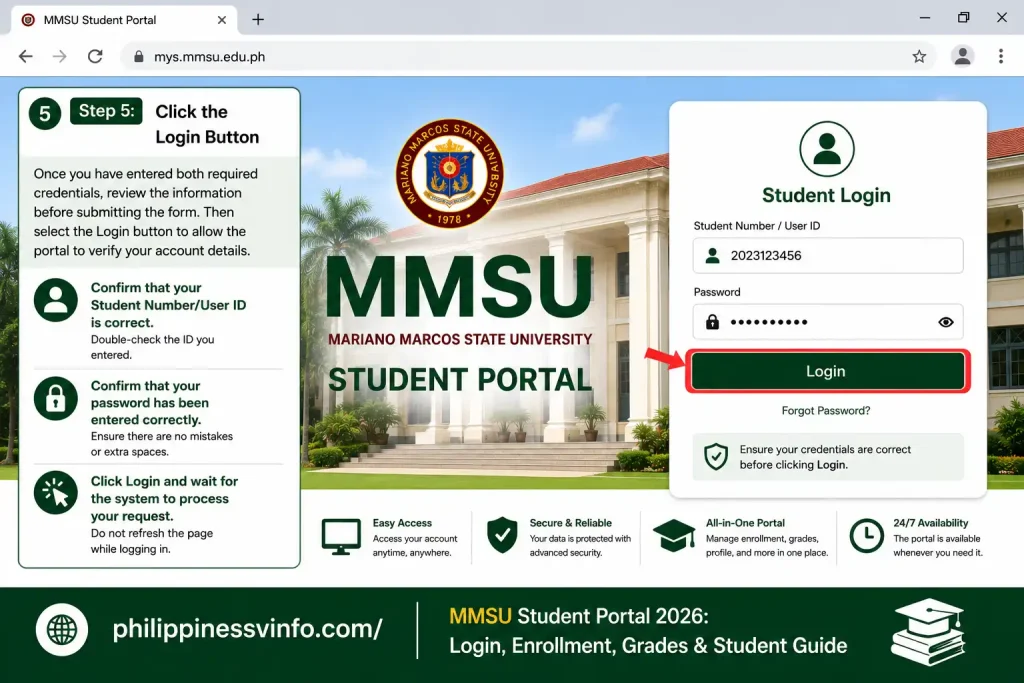
5. Click the Login Button
Once you have entered both required credentials, review the information before submitting the form. Then select the Login button to allow the portal to verify your account details.
6. Access Your Student Dashboard
If your credentials are correct and your account is active, the portal should take you to your MMSU student dashboard. From there, you can use the academic services and information available to your account.
What Should I Check If MMSU Login Fails?
A failed login does not necessarily mean that there is a serious problem with your account. Recheck the details you entered before trying other solutions, particularly your Student Number and password.
If the password is the problem, use the password-reset facility rather than repeatedly entering incorrect credentials.
MMSU Enrollment Guide
MMSU enrollment allows students to register for their courses and complete important registration requirements through the university’s online system. The Student Portal MMSU can be used to select subjects, review enrollment information, update the Personal Data Sheet, and submit an enrollment request for adviser approval.
How to Complete MMSU Online Enrollment
Students should complete enrollment during their assigned registration period and follow the instructions provided by Mariano Marcos State University.
- Open the Student Portal MMSU
Visit the official Student Portal at mys.mmsu.edu.ph and sign in using your Student Number/User ID and password. - Check Your Enrollment Schedule
Confirm that your assigned enrollment period has started. Enrollment services may only be available during the schedule set by MMSU. - Select Your Courses
Review the courses available for your program and select the subjects you are expected to take. Check the course details carefully before continuing. - Review Your Personal Information
Check your Personal Data Sheet and update the information that MMSU allows you to change. Make sure important details are accurate. - Review Your Selected Subjects
Before submitting your enrollment request, check your selected courses for missing, incorrect, or unwanted subjects. Make corrections where the system allows. - Submit Your Enrollment Request
Once everything is correct, submit your enrollment request through the portal. Your request may then be forwarded to the appropriate Enrolling Adviser for review and approval. - Check Your Enrollment Status
Return to the portal to monitor your enrollment request and follow any additional instructions provided by MMSU.
MMSU Enrollment Process at a Glance
| Enrollment Stage | What Students Should Do |
|---|---|
| Enrollment Schedule | Check your assigned registration period. |
| Portal Login | Sign in using your MMSU account. |
| Course Selection | Choose the appropriate subjects for your program. |
| Personal Data Sheet | Review and update your personal information. |
| Subject Review | Check your courses carefully before submission. |
| Request Submission | Submit your enrollment request through the portal. |
| Adviser Approval | Wait for the Enrolling Adviser to review the request. |
| Final Steps | Follow any remaining payment or registration instructions from MMSU. |
Password Reset
If you have forgotten your Student Portal MMSU password, you can use the password recovery option to request a reset. You will generally need access to the email address associated with your student account so you can receive the password-reset instructions.
1. Open the Official MMSU Password Reset Page
Begin by opening the official MMSU password-reset page in a reliable web browser. Use the university’s official portal rather than entering your credentials on an unfamiliar website.
2. Enter Your Registered Email Address
The password recovery page asks for the email address associated with your MMSU student account. Enter the same email address you previously registered with the portal.
3. Submit the Password Reset Request
After entering your email address, review the information and submit the password recovery request. The system can then process the request and provide the next instructions.
4. Check Your Email Inbox
After submitting the request, open the email account connected to your MMSU student account. Look for a message containing the password-reset instructions.
5. Follow the Password Reset Instructions
Open the password-reset email and follow the instructions provided by the MMSU system. If a reset link is included, use it to continue the password recovery process.
6. Log In With Your New Password
After successfully changing your password, return to the Student Portal MMSU login page and sign in using your Student Number/User ID and new password.
First-Time Access for New MMSU Students
New students should not assume that their login process will be identical to that of continuing students. MMSU’s current portal instructions distinguish admission students from existing student accounts and state that students for admission should use their MCAT account to access the system.
Admission-related instructions also indicate that freshmen may use the MMSU portal to upload or update documents required for their admission process.
What Should You Prepare Before Your First Login?
Having your account information ready can make the first portal visit easier. Students should use the credentials and instructions supplied by MMSU for their particular admission or student status.
Do not share your login information with classmates or other people. The portal may contain academic and personal records that should only be accessible to the account holder.
MMSU Student Portal Online Enrollment
Online enrolment is one of the main reasons students use the Student Portal MMSU. The current process allows eligible students to log in during their scheduled enrolment period, choose courses, update their Personal Data Sheet, review their subjects and submit the enrolment request for adviser approval.
The process generally follows this flow:
| Enrolment stage | Student action |
|---|---|
| Enrolment schedule | Access the portal during the assigned period |
| Course selection | Choose the subjects to be taken |
| Personal information | Review and update the Personal Data Sheet |
| Course review | Add, remove or edit courses where permitted |
| Submission | Send the enrolment request for approval |
| Adviser review | Wait for the Enrolling Adviser to review it |
| Finalisation | Follow the applicable payment or enrolment instructions |
How to Check Grades Through the MMSU Portal
View Your Latest Course Grades
The MMSU portal allows students to check the grades recorded for their enrolled subjects. Once you sign in, navigate to the area containing grades, academic records, or student information. Keep in mind that grades may only appear after instructors and the appropriate university offices have completed the posting and approval process.
Check Grades for a Specific Semester
Depending on the features available in your account, you may be able to select a semester or academic year to view previous academic results. Choosing the correct school period helps you locate grades from earlier terms instead of relying only on the latest available records.
Confirm the Details of Each Subject
When checking your results, carefully review the subject title, course code, semester, and corresponding grade. Comparing these details helps ensure that the displayed result belongs to the correct subject and academic period, particularly if you have taken courses with similar names.
What to Do If a Grade Is Not Available
If one of your grades is missing, avoid assuming that the result indicates a failing mark or an error in your academic record. The grade may still be under review, processing, or awaiting approval. If the result remains unavailable after other grades have been released, contact your instructor or the appropriate MMSU academic office for assistance.
Save Your Grade Information for Reference
If the MMSU portal provides an option to download or print your academic results, keeping a personal copy can be helpful for future reference. However, remember that information shown online may not serve as an official transcript or certified academic document. For formal requirements, always check which document MMSU requires.
MMSU Student Records and Academic Information
Review Your Student Profile
The MMSU Student Portal provides a convenient place to access various types of student-related information. Depending on your account and the services currently offered, you may find details associated with your student profile, academic program, enrollment status, and other university records.
Check Your Current Enrollment Details
After completing enrollment, review the subjects and registration information displayed in your account. This can help you spot issues such as an unexpected subject, a missing course, or another enrollment discrepancy that may need to be corrected before classes continue.
Monitor Your Previous Academic Records
Your account may provide access to academic information from earlier semesters or school years. Reviewing these records can help you keep track of completed courses and monitor your progress within your chosen degree or academic program.
Make Sure Your Personal Details Are Correct
Regularly review the personal information associated with your MMSU account. If you notice an incorrect name, contact information, or other official detail, determine whether the portal allows you to update it. For information that cannot be changed online, follow the university’s process for requesting a correction.
Know When You Need an Official Academic Document
Portal information is useful for checking and managing your student records, but it may not replace documents officially issued by MMSU. If you need records for a scholarship, employment application, transfer, further education, or another formal purpose, confirm whether you need an official transcript, certificate, authenticated record, or another university-issued document.
Common MMSU Portal Login Problems and Solutions
| Common Issue | Possible Cause | Recommended Solution |
|---|---|---|
| Incorrect Student Number/User ID | The Student Number or User ID may have been entered incorrectly. | Carefully check your credentials and enter the Student Number or User ID exactly as provided by MMSU. |
| Forgotten Password | You may have forgotten the password associated with your portal account. | Use the official password recovery facility if available, or contact the appropriate MMSU support office. |
| Login Page Does Not Open | Internet connectivity, browser problems, or temporary portal issues may prevent the page from loading. | Check your connection, refresh the page, clear temporary browser data if needed, or try an updated browser. |
| Invalid Credentials | The username or password entered does not match the information registered with the account. | Re-enter your login details carefully and check for spelling mistakes, incorrect characters, or unwanted spaces. |
| Account Temporarily Locked | Several unsuccessful login attempts may cause a temporary security restriction. | Avoid repeatedly trying to sign in and follow the official recovery or account-support instructions. |
| Grades Are Not Displayed | Your instructor or the university may not have finalized or posted the grades yet. | Allow additional processing time and check the portal again after grades are officially released. |
| Enrollment Details Are Missing | Your enrollment transaction may still be processing or the portal may not have updated yet. | Wait for the system to process the transaction, then review the correct semester or academic period again. |
| A Portal Service Is Unavailable | A particular feature may be undergoing maintenance or may temporarily be unavailable. | Check official MMSU announcements and contact the relevant university office if the service remains unavailable. |
| Portal Is Running Slowly | High traffic or temporary technical issues can affect portal performance. | Refresh the page, wait a few minutes, or try accessing the system again during a less busy period. |
| Password Recovery Fails | The recovery details may not match your account or the reset service may temporarily be unavailable. | Recheck the information you provide and contact the appropriate MMSU support channel if the issue continues. |
Tips for Using the MMSU Student Portal Safely
Using the Student Portal MMSU safely helps protect your student account, academic records, and personal information. Follow these simple practices:
Frequently Asked Questions
Conclusion
The MMSU Student Portal makes it easier for students of Mariano Marcos State University to manage important academic tasks online. From checking grades and reviewing student records to completing online enrolment and updating personal information, the portal brings many university services together in one convenient platform.
For a smooth experience, students should always use the official MMSU portal, keep their login details secure, follow the correct enrolment schedule, and check university announcements for updated instructions. If grades, enrolment details, or other information do not appear correctly, students should allow time for processing and contact the appropriate MMSU office when necessary.
Whether you are a new student, continuing student, or transfer applicant, understanding how the Student Portal MMSU works can save time and make common university transactions easier. Always rely on official MMSU instructions for the latest requirements, schedules, and academic procedures.