Smart eSIM Philippines 2026: Complete Smart eSIM Activation, Registration & Setup Guide
Smart eSIM provides Smart subscribers with a modern and convenient way to connect to the Smart network without using a traditional plastic SIM card. Instead of inserting a physical SIM, users can download a digital SIM profile onto an eSIM-compatible smartphone and activate their mobile service in just a few simple steps. Whether you’re purchasing a new Smart Prepaid eSIM, activating a Smart Postpaid eSIM, or converting your existing physical Smart SIM into an eSIM, the entire process is designed to be faster, more secure, and easier than managing a physical SIM card.
As more smartphones support embedded SIM technology, eSIM Smart has become an increasingly popular choice across the Philippines. It allows users to keep multiple mobile numbers on a single device, switch easily between personal and business lines, and enjoy a more streamlined mobile experience without replacing or carrying physical SIM cards. Before getting started, it’s important to confirm that your device supports eSIM technology, understand the activation requirements, and complete the mandatory SIM registration. This guide explains everything you need to know, including compatible devices, purchasing options, activation, registration, installation, and setup to help you start using your Smart eSIM successfully.
Understanding Smart eSIM
Smart eSIM is the digital equivalent of a traditional Smart SIM card offered by Smart Communications. Rather than storing your mobile subscription on a removable SIM, the subscriber profile is securely installed on your phone’s built-in eSIM chip.
Once your eSIM Smart has been activated, it functions exactly like a regular Smart SIM, allowing you to:
Since the SIM profile is delivered digitally, there’s no need to insert, remove, or replace a physical SIM card when activating a new line or switching eligible Smart services.
Why Smart eSIM Is Becoming a Popular Choice in the Philippines
Many Smart subscribers are moving to eSIM Smart because it offers greater flexibility than conventional SIM cards. Whether you’re a frequent traveller, manage separate personal and business numbers, or simply prefer a more streamlined mobile experience, Smart eSIM makes everyday connectivity much easier. Visit Homepage
Some of its key advantages include:
For users who regularly upgrade smartphones, eSIM Smart also removes the hassle of transferring or replacing a physical SIM card whenever changing devices.
How to Complete Your Registration
After installing your eSIM Smart, you must complete the mandatory SIM registration required under the SIM Registration Act (Republic Act No. 11934). The process only takes a few minutes and helps protect your account from fraud and unauthorised use.
Step 1: Visit the Official Smart SIM Registration Portal
Open the official Smart SIM Registration Portal using your preferred web browser to begin the registration process.

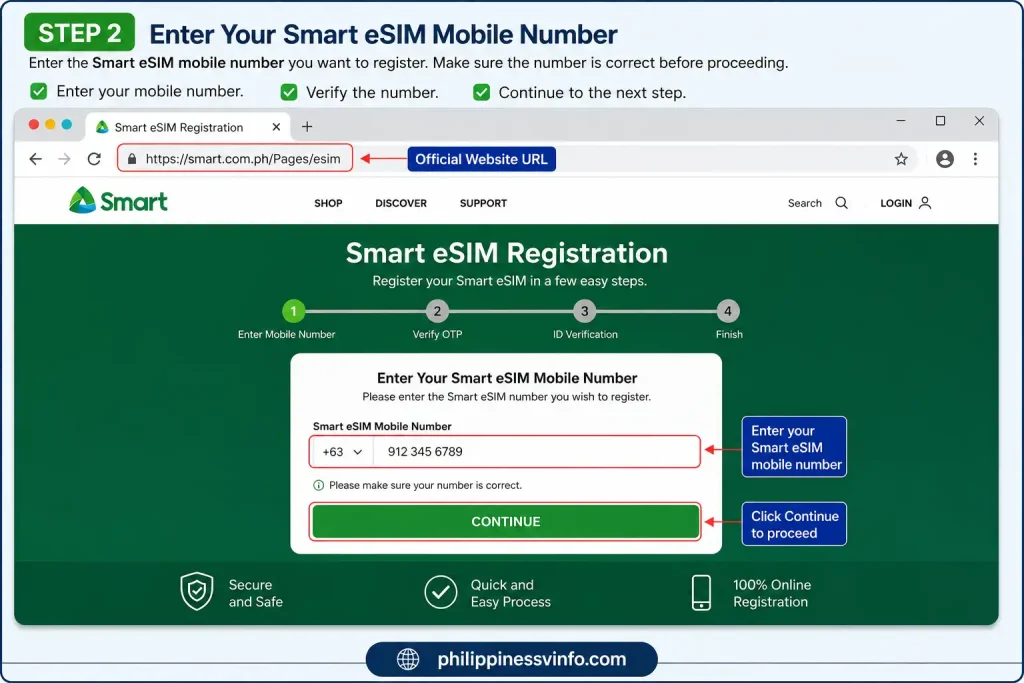
Step 2: Enter Your Mobile Number
Enter the eSIM Smart mobile number you want to register. Make sure the number is correct before proceeding.
Step 3: Verify the One-Time Password (OTP)
A six-digit OTP will be sent to your eSIM Smart via SMS. Enter the code to verify your mobile number.

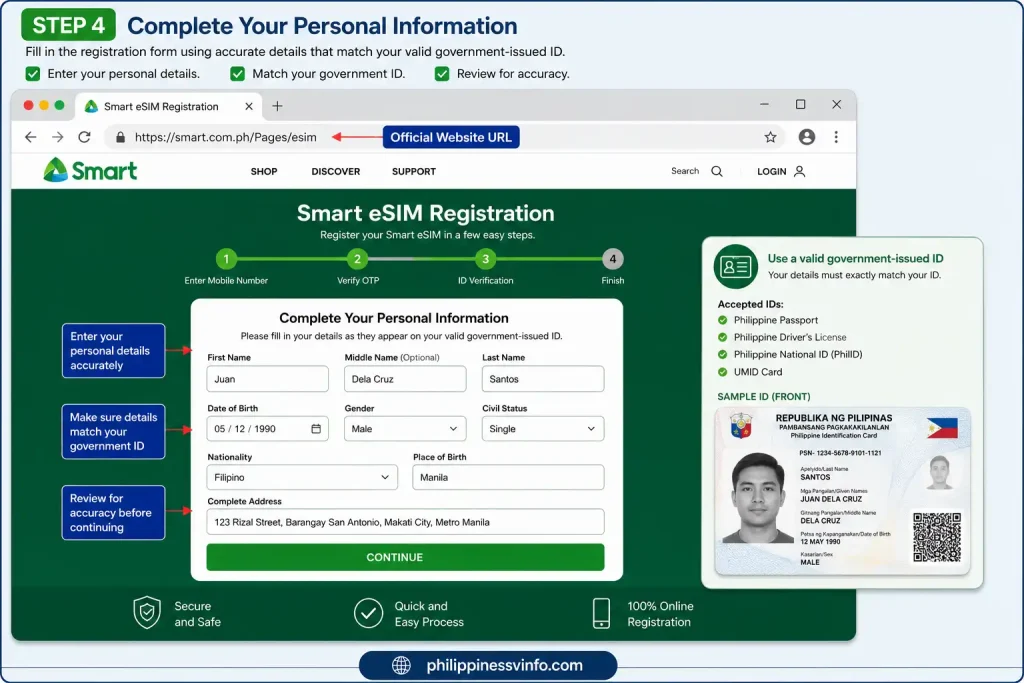
Step 4: Complete Your Personal Information
Fill in the registration form using accurate details that match your valid government-issued ID.
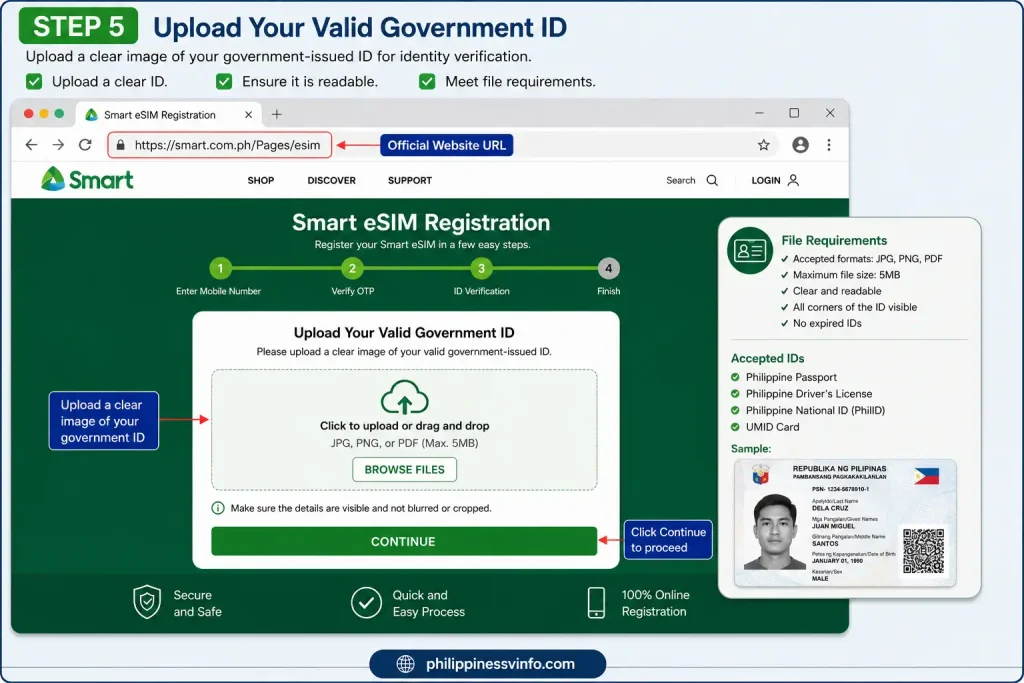
Step 5: Upload Your Valid Government ID
Upload a clear image of your government-issued ID for identity verification.
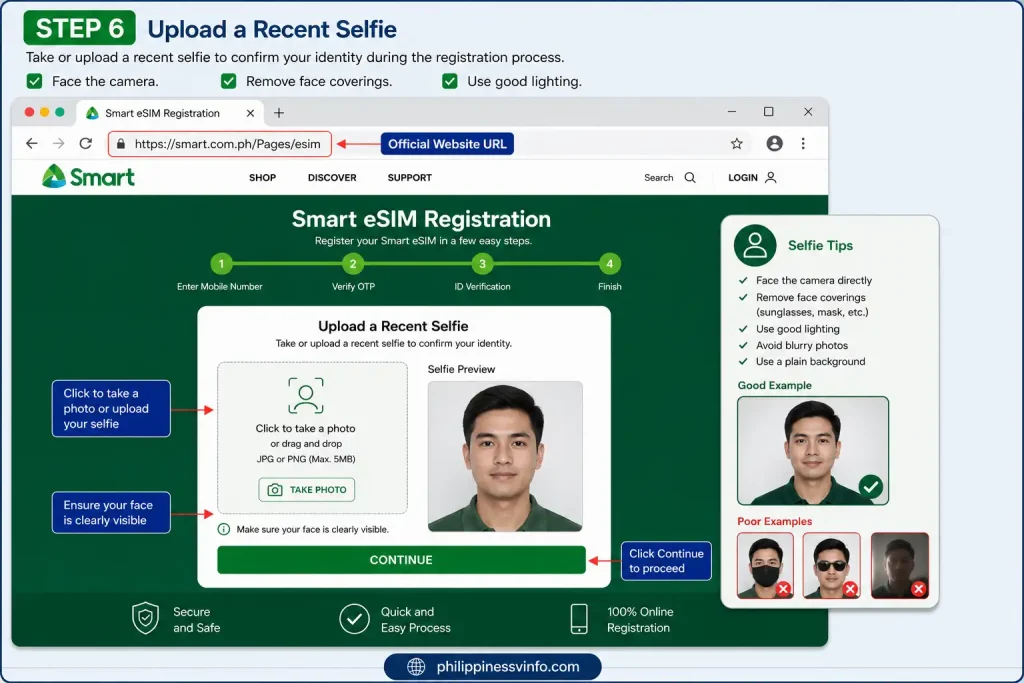
Step 6: Upload a Recent Selfie
Take or upload a recent selfie to confirm your identity during the registration process.
Step 7: Review and Submit Your Registration
Carefully review all the information before submitting your application. Once completed, save your confirmation or reference number for future use.

Register Your Smart eSIM (Required by Philippine Law)
Under Republic Act No. 11934 (SIM Registration Act), every Smart SIM and eSIM Smart must be registered before full activation. Registration helps improve user security, reduce fraud, and comply with Philippine telecommunications regulations.
Without completing SIM registration, your eSIM Smart may have limited functionality or could be deactivated according to applicable regulations.
Documents Required for Filipino Citizens
Prepare any valid government-issued ID, such as:
You will also need:
Documents Required for Foreign Visitors
Foreign nationals generally need:
Features at a Glance
Before activating aeSIM Smart, it’s helpful to understand the services and features currently supported.
| Feature | Availability |
|---|---|
| Smart Prepaid | ✔ Available |
| Smart Postpaid | ✔ Available |
| Mobile Data Services | ✔ Supported |
| Voice Calling | ✔ Supported |
| SMS Messaging | ✔ Supported |
| 5G Connectivity | ✔ Supported (on compatible 5G devices) |
| Dual SIM Functionality | ✔ Supported |
| Online Purchase | ✔ Available |
| QR Code Activation | ✔ Available |
| Physical SIM to eSIM Conversion | ✔ Supported |
| Mobile Number Portability (MNP) | ✔ Supported |
Smartphones That Support
Before purchasing a eSIM Smart, make sure your smartphone includes built-in eSIM functionality. While support continues to expand, availability may vary depending on your device model and the region where it was purchased.
| Brand | Compatible Devices |
|---|---|
| Apple | iPhone XS, XR, and all newer iPhone models |
| Samsung | Galaxy S20 Series and later |
| Samsung | Galaxy Note20 Series |
| Samsung | Galaxy Z Fold Series |
| Samsung | Galaxy Z Flip Series |
| Pixel 3 Series and newer | |
| Xiaomi | Selected flagship smartphones |
| OPPO | Selected premium models |
| vivo | Selected flagship devices |
| Huawei | Selected high-end smartphones |
| HONOR | Compatible supported models |
Important: eSIM support depends on your phone’s regional variant. Always confirm compatibility in your device settings or manufacturer specifications before purchasing a Smart eSIM.
Requirements Before Activating
Having everything ready before you begin can help you complete the activation process without delays.
You will generally need:
If you’re converting a physical Smart SIM to an eSIM, prepare:
For Mobile Number Portability (MNP)
If you’re transferring your number from another telecom provider, you’ll also need the Unique Subscriber Code (USC) issued by your previous mobile network.
Price in the Philippines
Smart offers its prepaid digital eSIM at an affordable price, making it easy for users to activate a mobile line without purchasing a physical SIM card.
Smart Prepaid Digital eSIM
Price: ₱99
Once your payment has been confirmed, Smart sends the eSIM activation package directly to your registered email address.
The package typically includes:
Note: Prices, bundled offers, and promotional packages may change. Always check the official Smart eSIM page for the latest information before purchasing.
How to Buy a Smart eSIM Online
Purchasing a eSIM Smart online is quick and convenient. Simply visit the official eSIM Smart website, choose the prepaid eSIM package that fits your needs, complete the payment using a supported payment method, and Smart will email your eSIM QR code along with the activation and installation instructions.
Convert Your Physical Smart SIM to a Smart eSIM
Existing Smart subscribers can switch from a physical SIM to a eSIM Smart without changing their mobile number. The conversion allows you to continue using the same number, active promos, and subscribed services while enjoying the convenience of a digital SIM. Before requesting the conversion, make sure your smartphone supports eSIM technology and is unlocked for use on the Smart network.
Requirements for Smart SIM to eSIM Conversion
Prepare the following before visiting a Smart Store:
How to Convert a Physical Smart SIM to an eSIM
Converting your existing Smart SIM is a simple in-store process. Visit an official Smart Store with the required documents, complete the identity verification, and once your request is approved, you’ll receive your eSIM QR code to activate your existing mobile number on your compatible device.
Important: If your contacts are stored on your physical SIM card, back them up before completing the conversion, as the physical SIM will no longer function once the eSIM is activated.
Switch to Smart eSIM Using Mobile Number Portability
If you’re currently using another Philippine mobile network but want to keep your existing number, Smart supports Mobile Number Portability (MNP). This allows eligible subscribers to transfer their mobile number to Smart without changing the number that family, friends, and businesses already know.
What You’ll Need
Before requesting the transfer, prepare the following:
Steps to Port Your Number to Smart eSIM
- Request a Unique Subscriber Code (USC) from your current mobile provider.
- Visit an official Smart Store with your USC and valid ID.
- Inform the representative that you want to transfer your existing number to a eSIM Smart.
- Complete the verification process and submit the required documents.
- Receive your QR code and activation instructions.
- Install the eSIM profile on your device and complete activation.
Once the process is finished, your existing number will begin operating on the Smart network.
How to Install Your Smart eSIM
After purchasing or receiving your eSIM Smart QR code, you can install the digital SIM directly on your smartphone. A stable Wi-Fi connection is required because the eSIM profile is downloaded from Smart’s servers during installation.
Before You Start
Take a few minutes to prepare:
How to Install on iPhone or Android
Installing a Smart eSIM follows a similar process on both iPhone and Android devices. Open your phone’s mobile network settings, choose the option to add an eSIM, scan the QR code you received, and complete the installation while connected to a stable Wi-Fi network. Once the setup is finished, you can configure the eSIM as your preferred line for calls, text messages, mobile data, and Dual SIM usage.
How to Manage
Once your SIM is activated and registered, you can manage your mobile services through the Smart App.
The Smart App allows you to:
The Smart App is available for both Android and iOS devices.
Common Problems and Solutions
Even though eSIM Smart activation is usually straightforward, some users may encounter minor issues. The following table covers the most common problems and practical solutions.
| Issue | Possible Cause | Recommended Solution |
|---|---|---|
| QR Code won’t scan | Dirty camera lens or low screen brightness | Increase brightness, clean the camera lens, or use manual activation. |
| No Smart network signal | eSIM disabled or installation incomplete | Enable thee SIM Smart in SIM settings and restart your phone. |
| OTP not received | Weak signal or temporary network delay | Wait a few minutes, toggle Airplane Mode, then request another OTP. |
| Activation code invalid | Incorrect manual entry | Verify the SM-DP+ Address and Activation Code before trying again. |
| QR Code already used | eSIM profile has already been downloaded | Visit a Smart Store to request a replacement eSIM profile. |
| Mobile data not working | Incorrect default data SIM | Set the SIM as the default mobile data line in your phone settings. |
Expert Tips for a Smooth Activation
Following a few best practices can help you avoid delays during setup.
Frequently Asked Questions (FAQs)
Conclusion
Smart eSIM offers a faster, more convenient, and secure way to stay connected without relying on a traditional physical SIM card. Whether you’re purchasing a new Smart Prepaid eSIM, activating a Smart Postpaid eSIM, converting your existing Smart SIM, or transferring your number through Mobile Number Portability (MNP), the process is straightforward when you follow the correct steps and meet the required requirements.
Before activating your eSIM Smart, make sure your smartphone supports eSIM technology, complete the installation using the official Smart QR code, and finish the mandatory SIM registration required under Philippine law. Once activated, you can enjoy reliable voice calls, SMS, mobile data, Dual SIM functionality, and easy account management through the Smart App.
By following this complete eSIM guide, you’ll be well prepared to purchase, activate, register, and manage your digital SIM with confidence. For the latest pricing, supported devices, promotional offers, and official announcements, always refer to Smart Communications’ official website before making any changes to your mobile service.