CDE Online Validation Exam 2026: Complete Registration, Login, Reviewer & Certificate Guide Philippines
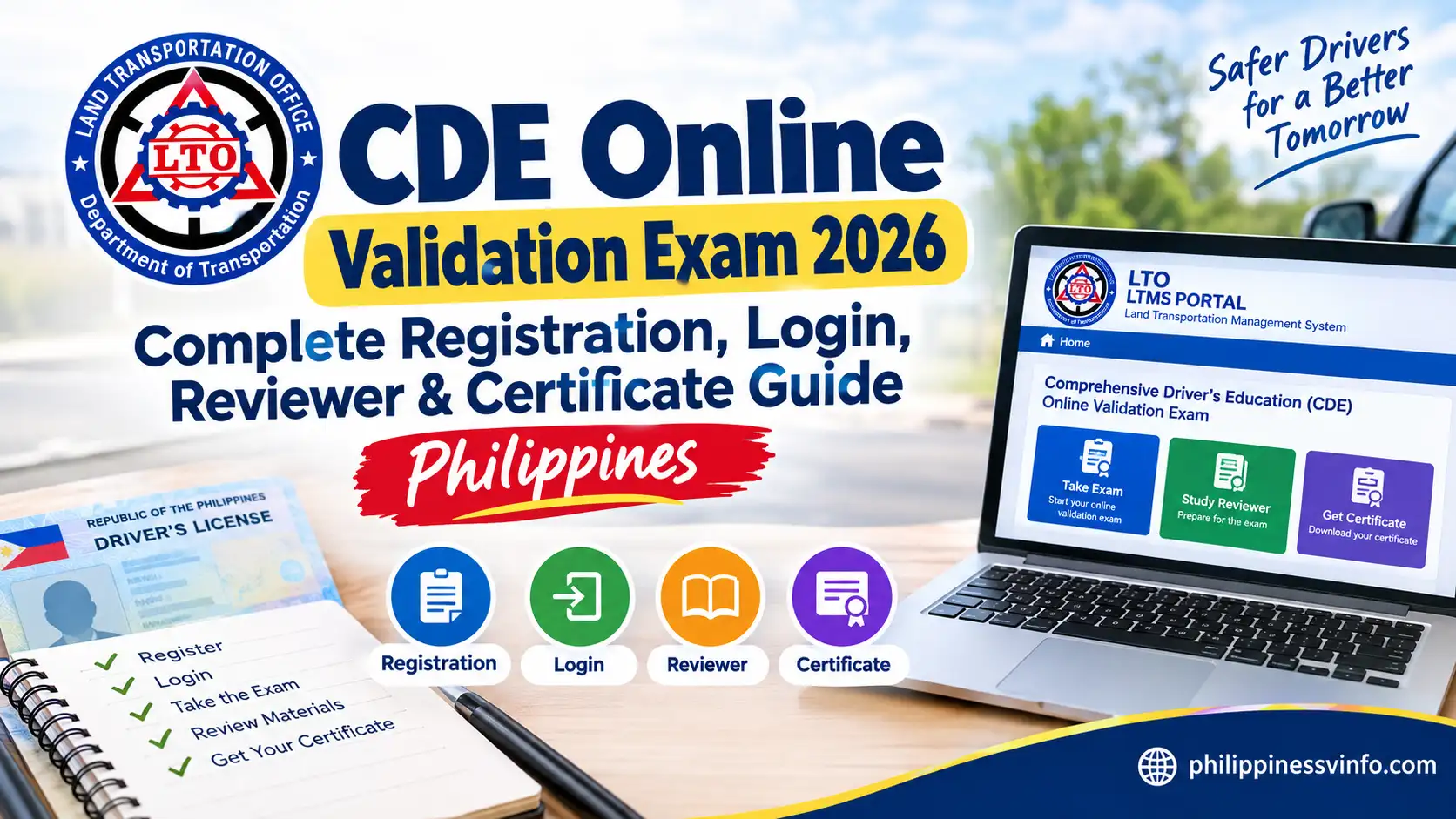
The CDE Online Validation Exam is an important requirement for many Filipino drivers who are planning to renew their driver’s licences. Implemented under Republic Act No. 10930, the Land Transportation Office (LTO) requires eligible Professional and Non-Professional licence holders to pass the CDE Online Validation Exam as part of the licence renewal process. The examination helps ensure that motorists remain knowledgeable about current traffic laws, road safety regulations, driving responsibilities, and proper road etiquette before receiving a renewed licence.
The good news is that the CDE Online Validation Exam can be completed entirely online through the official LTMS Portal, making the process more convenient and accessible for drivers across the Philippines. The examination is free of charge, has no time limit, and allows unlimited retakes for applicants who do not achieve the required passing score on their first attempt. In this guide, you will learn everything about the CDE Online Validation Exam, including registration requirements, LTMS account login procedures, examination steps, reviewer topics, passing score requirements, certificate download instructions, and common troubleshooting solutions.
What is the CDE Online Validation Exam?
The CDE Online Validation Exam is an official assessment provided by the Land Transportation Office (LTO) through the Land Transportation Management System (LTMS) Portal. It is designed to measure a driver’s understanding of road safety, traffic regulations, road signs, responsible driving behavior, and other important transportation laws in the Philippines. Through this examination, the LTO aims to ensure that drivers remain knowledgeable about current rules and safe driving practices before renewing their licences.
Under Republic Act No. 10930, the CDE Online Validation Exam has become a key requirement for many Professional and Non-Professional driver’s licence holders applying for licence renewal. The exam is completely free, can be taken online at any time through the LTMS Portal, and comes with unlimited retakes for applicants who do not reach the passing score on their first attempt. Once successfully completed, drivers can download their CDE Certificate, which serves as one of the supporting documents required for driver’s licence renewal. Visit Homepage.
Quick Facts About the CDE Online Validation Exam
| Particulars | Details |
|---|---|
| Exam Name | CDE Online Validation Exam |
| Administering Agency | Land Transportation Office (LTO) |
| Platform | LTMS Portal |
| Examination Fee | Free |
| Exam Format | Multiple Choice |
| Number of Questions | 25 Questions |
| Passing Score | 20 Correct Answers (80%) |
| Time Limit | No Time Limit |
| Retake Policy | Unlimited Attempts |
| Certificate Issued | Yes |
| Purpose | Driver’s Licence Renewal |
Who Should Take the CDE Online Validation Exam?
The CDE Online Validation Exam is primarily intended for drivers who need to renew their licences and comply with LTO renewal requirements.
The examination is commonly required for:
- Professional Driver’s Licence holders
- Non-Professional Driver’s Licence holders
- Drivers applying for licence renewal
- Motorists renewing expired licences subject to LTO regulations
Before renewing your licence, it is advisable to verify the latest LTO requirements to determine whether completing the CDE Online Validation Exam is necessary for your application.
Requirements Before Taking the CDE Online Validation Exam
Preparing the necessary information before accessing the exam can help make the process faster and more convenient.
Basic Requirements
To access the CDE Online Validation Exam, you should have:
- A valid Driver’s Licence
- An active LTMS Portal account
- A working email address
- A registered mobile number
- A stable internet connection
- A smartphone, tablet, laptop, or desktop computer
Preparation Tips
For a smooth examination experience, ensure that:
- Your LTMS account is fully activated
- Personal information in your profile is accurate
- Your internet connection is reliable
- Your web browser is updated to the latest version
- You have sufficient time to read and answer all questions carefully
Why the CDE Online Validation Exam Matters
The CDE Online Validation Exam serves a vital role in promoting safer roads and responsible driving throughout the Philippines. It encourages motorists to review important traffic rules and refresh their understanding of road safety principles before renewing their licences.
Key areas covered by the examination include:
- Traffic laws and regulations
- Road signs and markings
- Driver responsibilities
- Defensive driving techniques
- Road courtesy and discipline
- Updated transportation policies
By requiring drivers to complete the CDE Online Validation Exam, the LTO helps ensure that licence holders remain knowledgeable, responsible, and safety-conscious road users.
How to Create an LTMS Portal Account
Step 1: Open the LTMS Portal
Start by opening the official LTMS online Portal through a secure and updated web browser. Check the website address carefully before entering any personal information, then select the registration option.
- Open the official LTMS Portal
- Check the official LTO domain
- Click Register Now

Step 2: Accept the Terms and Agreement
After clicking Register Now, review the terms and privacy information shown on the screen. You need to accept the applicable agreement before moving to the next stage.
- Read the Terms of Agreement
- Review the privacy information
- Select the required agreement option

Step 3: Select Your LTO Status
The portal will ask whether you already have an LTO driver’s licence, conductor’s licence, or Client ID. Choose the option that correctly describes your current LTO status.
- Select the existing licence or Client ID option if applicable
- Choose the new-user option if you have no existing LTO record
- Confirm your selected status

Step 4: Enter Your Personal Information
Provide the personal information requested by the registration form. Make sure your details are accurate and match your official identification documents or existing LTO records.
- Enter your complete legal name
- Provide your date of birth and nationality
- Enter your address and contact information

Step 5: Verify Your Email and Mobile Number
Provide an active email address and mobile number that you can access during registration. Follow the verification instructions and enter the OTP or confirmation details when requested.
- Enter your active email address
- Provide a working mobile number
- Complete the required verification

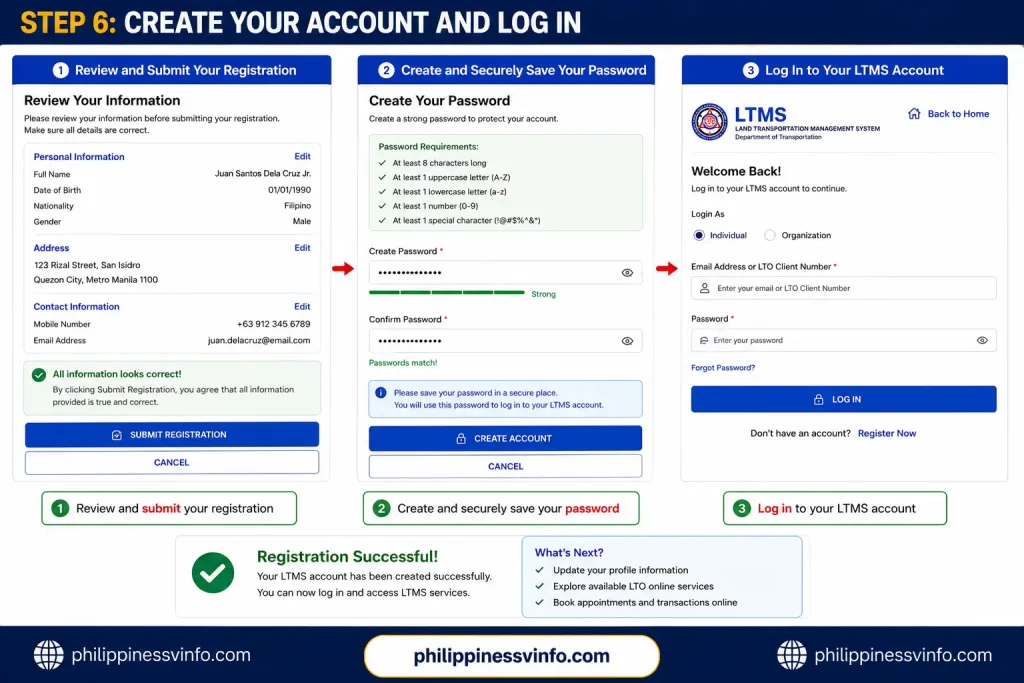
Step 6: Create Your Account and Log In
Review your information, create a strong password, and submit your registration. After your account is successfully created, use your registered email or LTO Client Number and password to log in.
- Review and submit your registration
- Create and securely save your password
- Log in to your LTMS account
How to Take the CDE Online Validation Exam
Once you have successfully logged into your LTMS account, you can access the CDE Online Validation Exam through the E-Learning section of the portal. The examination is designed to assess your knowledge of road safety, traffic laws, road signs, and responsible driving practices before licence renewal.
Step 1: Open the E-Learning Section
After logging into your LTMS account, navigate to the dashboard and locate the E-Learning module. This section contains learning materials and the CDE Online Validation Exam required for eligible drivers.
- Click the E-Learning icon from the dashboard
- View the available learning modules
- Select CDE Online Validation Exam
Step 2: Read the Examination Instructions
Before starting the exam, carefully review the guidelines displayed on the screen. Understanding the instructions helps ensure a smooth examination experience and prevents mistakes during the test.
- Read all examination rules and instructions
- Confirm your understanding of the guidelines
- Choose your preferred language (English or Filipino)
Step 3: Start the Examination
Once you are ready, begin the examination and wait for the first question to load. The exam consists of multiple-choice questions related to driving laws, road safety, and traffic regulations.
- Click the Start Exam button
- Wait for the first question to appear
- Read each question carefully before answering
Step 4: Complete All Questions
The CDE Online Validation Exam contains 25 multiple-choice questions. Take your time reviewing each question and choose the answer that best matches the situation presented.
- Read every question completely
- Review all answer choices carefully
- Select the most accurate answer before proceeding
Step 5: Submit the Examination
After answering all questions, review your responses to make sure nothing has been missed. Once satisfied, submit the exam for automatic evaluation.
- Check all your answers
- Ensure every question is answered
- Click Submit Exam
Step 6: View Your Results
The LTMS system immediately displays your score after submission. If you achieve the required passing score, you can proceed to download your certificate.
- View your examination score instantly
- Check whether you passed or failed
- Proceed to certificate download if successful
Passing Requirements
| Requirement | Details |
|---|---|
| Total Questions | 25 |
| Correct Answers Needed | 20 |
| Passing Percentage | 80% |
| Retake Allowed | Yes |
| Retake Limit | Unlimited |
One major advantage of the CDE Online Validation Exam is that applicants can retake the assessment as many times as necessary without paying any additional fee.
How to Download the CDE Certificate
After passing the CDE Online Validation Exam, the LTMS Portal automatically generates your CDE Certificate. This certificate serves as proof that you successfully completed the mandatory examination.
Step 1: Open Your Results Page
After completing the examination, remain on the results page where your passing score is displayed. The certificate download option is usually available immediately after passing.
- Access your exam results page
- Verify that you achieved a passing score
- Locate the certificate section
Step 2: Click Download Certificate
The system provides a download option that allows you to save the certificate directly to your device for future use.
- Find the Download Certificate button
- Click the button to generate the PDF
- Wait for the file to download
Step 3: Save and Print the Certificate
Store the certificate in a secure location and keep a printed copy available whenever required for licence renewal or verification purposes.
- Save the PDF file on your device
- Print a hard copy if needed
- Keep both digital and printed copies for reference
Understanding the CDE Online Validation Exam Coverage
Many drivers worry about passing the CDE Online Validation Exam, but the questions focus primarily on practical driving knowledge and road safety principles that every responsible motorist should understand.
The examination commonly covers:
- Traffic laws and regulations
- Road signs and symbols
- Driving etiquette and discipline
- Safety rules and defensive driving
- Road markings and lane usage
A brief review of these topics can greatly improve your chances of passing on the first attempt.
Traffic Laws Frequently Covered in the CDE Online Validation Exam
Republic Act No. 4136
The Land Transportation and Traffic Code forms the foundation of many questions in the CDE Online Validation Exam. Drivers should understand their responsibilities and legal obligations while operating a vehicle.
- Right-of-way regulations
- Speed limit requirements
- Vehicle registration rules
Republic Act No. 10586
This law focuses on preventing drunk and drug-impaired driving. Questions often test a driver’s awareness of the risks and penalties associated with driving under the influence.
- Driving under the influence is prohibited
- Violators may undergo testing procedures
- Serious penalties apply to offenders
Republic Act No. 10913
The Anti-Distracted Driving Act aims to reduce accidents caused by mobile phones and electronic devices while driving.
- Texting while driving is prohibited
- Social media use is restricted
- Hands-free options should be used when necessary
Road Signs You Should Review Before the Exam
Understanding road signs is essential because they frequently appear in the CDE Online Validation Exam and are crucial for safe driving.
Regulatory Signs
Regulatory signs indicate rules and restrictions that motorists must follow at all times.
- Stop
- No Entry
- Speed Limit
Warning Signs
Warning signs alert drivers to possible hazards ahead and help them prepare for changing road conditions.
- Sharp Curves
- School Zones
- Pedestrian Crossings
Informational Signs
Informational signs provide guidance and useful travel information rather than restrictions.
- Direction Signs
- Hospital Signs
- Fuel Station Indicators
Pavement Markings Explained
Questions involving pavement markings are common because road markings help regulate traffic flow and improve safety.
| Pavement Marking | Meaning |
|---|---|
| Solid White Line | Lane changes discouraged |
| Broken White Line | Lane changes permitted when safe |
| Solid Yellow Line | Overtaking prohibited |
| Broken Yellow Line | Passing allowed when safe |
| Double Solid Yellow Line | No overtaking from either direction |
Safe Driving Principles Included in the Exam
The Four-Second Rule
Maintaining a safe following distance gives drivers enough time to react to unexpected situations and avoid collisions.
- Provides more reaction time
- Improves stopping distance
- Reduces accident risk
Yielding the Right of Way
Understanding right-of-way rules is important for preventing accidents and maintaining smooth traffic flow.
- Yield to pedestrians
- Give way to emergency vehicles
- Respect vehicles already in roundabouts
Respecting Emergency Vehicles
Emergency vehicles must be given priority whenever they are responding to emergencies with active sirens and lights.
- Slow down safely
- Move to the side when possible
- Allow the vehicle to pass
Study Tips for Passing the CDE Online Validation Exam
Review Traffic Signs
Road signs make up a significant portion of the examination and should be reviewed thoroughly before taking the test.
- Regulatory signs
- Warning signs
- Informational signs
Focus on Safety Rules
Many questions assess your understanding of safe and responsible driving habits.
- Speed limits
- Right-of-way rules
- Defensive driving practices
Read Questions Carefully
Avoid rushing through the examination. Small details in the question can often determine the correct answer.
- Read every question fully
- Review all answer choices
- Avoid guessing too quickly
Use LTMS Learning Resources
The LTMS Portal provides educational materials that can help drivers prepare effectively before attempting the examination.
- Review available learning modules
- Study official road safety materials
- Practice before taking the exam
Common Problems During the CDE Online Validation Exam and Solutions
| Common Problem | Possible Cause | Solution |
|---|---|---|
| Lost Internet Connection | Unstable Wi-Fi or mobile data connection during the exam | Reconnect to the internet, log back into your LTMS account, and reopen the examination. |
| Forgot LTMS Password | Unable to remember login credentials | Click Forgot Password, enter your registered email address, and follow the password reset instructions. |
| Verification Email Not Received | Email delayed or filtered by the email provider | Check Spam, Junk, and Promotions folders, then verify that the registered email address is correct. |
| Unable to Log In to LTMS | Incorrect email address, Client ID, or password | Re-enter your credentials carefully and reset your password if necessary. |
| Examination Page Not Loading | Browser compatibility issues or slow internet connection | Refresh the page, clear browser cache, update your browser, or try another browser. |
| Cannot Access E-Learning Section | Account verification incomplete or temporary system issue | Verify your LTMS account and try logging in again after a few minutes. |
| Exam Submission Error | Internet interruption during submission | Reconnect to the internet and check your examination status in the LTMS Portal. |
| Failed the CDE Online Validation Exam | Score below the required passing mark of 80% | Review learning materials and retake the exam. Unlimited retakes are allowed free of charge. |
| Certificate Not Available for Download | Examination not successfully recorded or system processing delay | Refresh the page, check your results section, and try downloading the certificate again later. |
| Incorrect Information on Certificate | Outdated or incorrect profile information in LTMS | Update your LTMS profile details and contact LTO support if corrections cannot be made online. |
| Slow LTMS Portal Performance | High system traffic or maintenance activities | Wait a few minutes and access the portal during non-peak hours. |
| Browser Compatibility Issues | Using an outdated browser version | Update Chrome, Edge, Firefox, or Safari to the latest version before accessing the exam. |
Benefits of Completing the CDE Online Validation Exam
Completing the CDE Online Validation Exam offers several advantages beyond meeting the requirements for driver’s licence renewal. The examination helps drivers stay informed about road safety and promotes responsible driving habits.
Improves Driver Knowledge
The exam encourages motorists to review important driving concepts and refresh their understanding of road safety regulations.
- Current traffic laws and regulations
- Driver responsibilities and obligations
- Defensive driving techniques
Promotes Safer Roads
Well-informed drivers contribute to a safer transportation environment for everyone using public roads.
- Reduced risk of traffic accidents
- Better compliance with road rules
- Improved traffic discipline among motorists
Convenient Online Access
The examination can be completed entirely online, allowing drivers to study and take the test from virtually anywhere.
- Accessible from home or office
- Available on computers and mobile devices
- No separate LTO office visit required for the exam
Completely Free of Charge
One of the most appreciated features of the CDE Online Validation Exam is that qualified drivers can take the examination without paying any fee.
- No examination charges
- Unlimited retakes available
- Certificate generated at no additional cost
Important Reminders Before Taking the CDE Online Validation Exam
Before starting the CDE Online Validation Exam, take a few minutes to prepare and review the essential requirements. Proper preparation can help you avoid delays and increase your chances of passing on your first attempt.
Verify Your LTMS Account Information
Ensure that all personal information stored in your LTMS account is accurate and updated before taking the examination.
- Check your name and personal details
- Confirm your email address and mobile number
- Update any incorrect information immediately
Ensure a Stable Internet Connection
A reliable internet connection helps prevent interruptions while completing the examination.
- Use a stable Wi-Fi or mobile data connection
- Avoid switching networks during the exam
- Close unnecessary applications that may affect connectivity
Review Basic Traffic Rules and Road Signs
A quick review of common traffic laws and road signs can significantly improve your performance during the exam.
- Study regulatory road signs
- Review right-of-way rules
- Familiarize yourself with safety regulations
Prepare Your Driver’s Licence Information
Having your licence details readily available can make it easier to access LTMS services and verify your account.
- Keep your driver’s licence nearby
- Verify licence information in your LTMS profile
- Ensure all records match official LTO data
Use Only the Official LTMS Portal
Always access the CDE Online Validation Exam through the official LTMS website to protect your personal information and avoid fraudulent websites.
- Use the official LTMS Portal only
- Avoid unofficial links and third-party sites
- Verify the website address before logging in
Download and Save Your Certificate
After passing the examination, immediately download your certificate and keep copies for future use.
- Download the certificate PDF file
- Save a digital copy on your device
- Print a hard copy for backup purposes
Frequently Asked Questions (FAQs)
Conclusion
The CDE Online Validation Exam 2026 is an important requirement that helps ensure Filipino drivers remain knowledgeable about road safety, traffic regulations, defensive driving practices, and responsible vehicle operation. Through the LTMS Portal, drivers can conveniently take the examination online, review educational materials, receive instant results, and download their CDE Certificate without visiting an LTO office.
Since the CDE Online Validation Exam is free, accessible online, and allows unlimited retakes, drivers have every opportunity to prepare adequately and pass successfully. By understanding traffic laws, road signs, pavement markings, right-of-way rules, and safe driving principles, motorists can not only meet licence renewal requirements but also contribute to safer roads across the Philippines. Before taking the exam, remember to verify your LTMS account details, review key driving concepts, and download your certificate immediately after passing for future licence renewal transactions.