
NEUST Grades Viewer Portal 2026: Complete Student Login Guide, Online Grade Checking and student guide
The NEUST Grades Viewer Portal is an online platform designed to help students of Nueva Ecija University of Science and Technology (NEUST) access their academic results conveniently. Through this university-related grading system, students can check available semester grades, review subject performance, and stay informed about their academic progress without depending entirely on in-person enquiries. Whether you are a newly enrolled student, a returning student, or someone who wants to review previously released academic results, understanding how the NEUST Grades Viewer works can make managing your academic information much easier.
Students generally need an authorised student account, the correct login credentials, and a stable internet connection to access the system. Once logged in, they can explore the available academic records and review the results published for their respective academic periods.
This comprehensive guide explains how to access the NEUST Grades Viewer Portal, sign in to your student account, check semester grades, understand its important features, complete the Student Evaluation of Teachers (SET), and resolve common login problems. It also provides useful security recommendations and answers to frequently asked questions.
NEUST Grades Viewer Portal: Quick Access Details
Before accessing the online grading system, students should familiarise themselves with the portal’s basic information.
| Portal Information | Details |
|---|---|
| University | Nueva Ecija University of Science and Technology |
| Portal Name | NEUST Grades Viewer |
| Official Portal Address Provided | http://119.93.173.77:8000/gradesviewer/ |
| Main Purpose | Online access to available academic grades |
| Intended Users | NEUST students |
| Access Method | Web browser |
| Login Requirement | Authorised student credentials |
| Available Academic Information | Semester grades and available evaluation records |
Access the NEUST Grades Viewer
Students can use the following address to open the student grading interface:
http://119.93.173.77:8000/gradesviewer/
Before entering personal login information, verify that the address matches the one provided through an authorised university source.
Security notice: The supplied portal address uses HTTP instead of HTTPS and includes port 8000. This means the connection does not provide the standard encryption associated with HTTPS websites. Avoid submitting sensitive credentials through untrusted networks and confirm the university’s recommended access method.
What Is the NEUST Grades Viewer Portal?
The NEUST Grades Viewer Portal is an online academic information platform associated with Nueva Ecija University of Science and Technology. It provides authorised students with a convenient way to view academic results through an internet browser.
Traditionally, students may need to contact an academic department or visit a university office to enquire about their grades. An online grades-viewing system makes this process more accessible by providing a central location where available academic results can be reviewed.
Depending on the records released and the features enabled for an individual account, students may be able to view different grading categories, including midterm, conditional, and final grades.
The platform is primarily intended for checking academic information. Students should not assume that it allows them to modify grades, update enrolment details, or download certified academic documents. Requests involving incorrect marks, missing results, or official transcripts should be directed to the appropriate university department.
Who Can Access the NEUST Student Grades System?
The NEUST student grades system is primarily intended for individuals who have received authorised login credentials from the university or their respective academic department.
The following groups may find the platform useful:
- Currently enrolled students: Students who want to monitor their academic performance during the ongoing semester.
- Returning students: Individuals who need to review their results after completing another academic term.
- Students checking previous grades: Those who want to revisit academic results that have already been published.
- Students completing academic evaluations: Students who may need to finish the Student Evaluation of Teachers (SET) process before accessing certain grading information.
Parents and guardians can assist students with understanding the login procedure. However, individual academic accounts should remain under the student’s control. Login credentials and private academic information should never be shared with unauthorised individuals.
How to Access the NEUST Grades Viewer Login Page
Accessing the NEUST Grades Viewer is straightforward when you have the correct website address and authorised student credentials.
The portal can be opened through a compatible web browser on a desktop computer, laptop, tablet, or smartphone.
Step 1: Visit the NEUST Grades Viewer Official Address
First, open a web browser on your device. Google Chrome, Mozilla Firefox, and Microsoft Edge are commonly used options for accessing online university services.
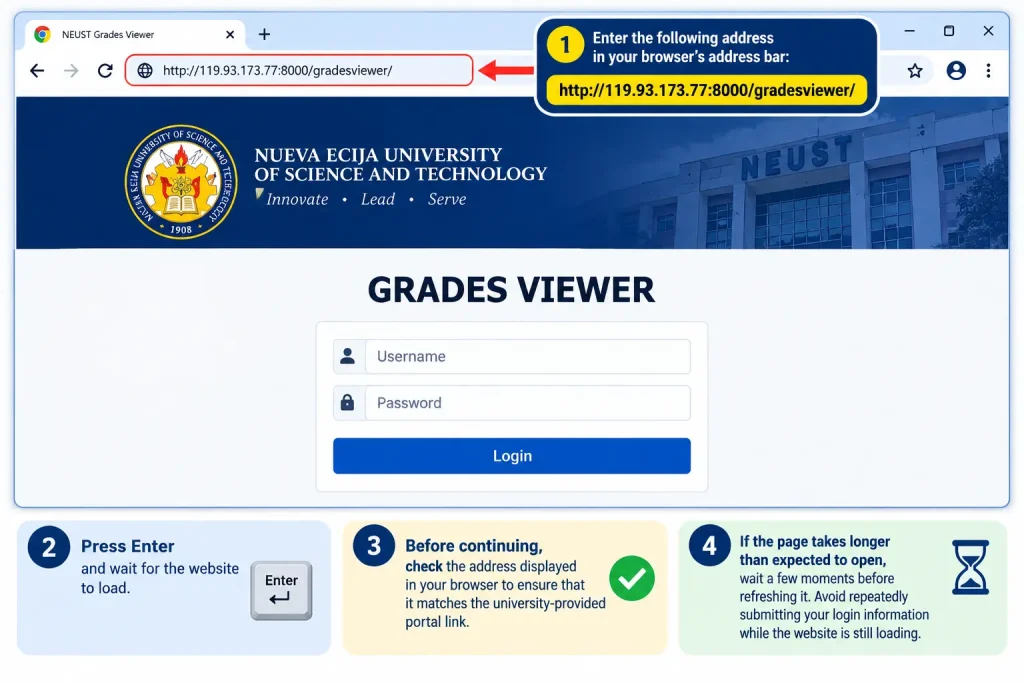
Enter the following address into the browser’s address bar:
http://119.93.173.77:8000/gradesviewer/
Press Enter and wait for the website to load.
Before continuing, check the address displayed in your browser to ensure that it matches the university-provided portal link.
If the page takes longer than expected to open, wait a few moments before refreshing it. Avoid repeatedly submitting your login information while the website is still loading.
Step 2: Locate the Student Login Section
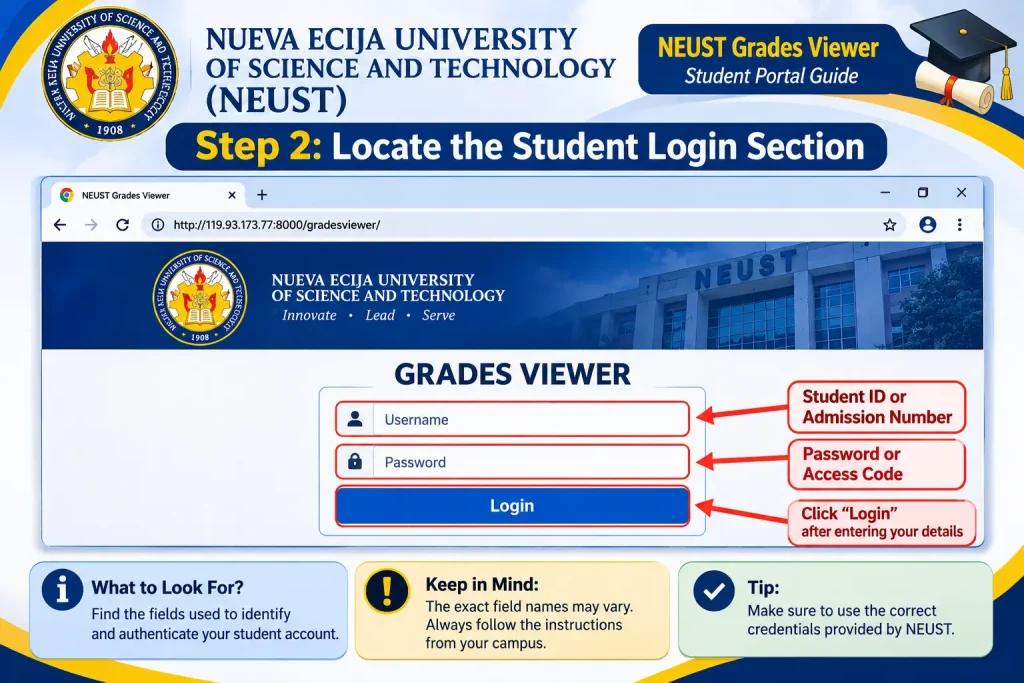
After the NEUST Grades Viewer page opens, examine the available login interface.
Look for the fields used to identify and authenticate your student account.
The supplied portal information indicates that students may be asked to provide a Student ID or admission number along with a corresponding password or access code. However, the exact field names and authentication requirements should be confirmed through the live portal or instructions issued by your campus.
Keep in mind that every student may not use an identical login format. Always follow the credentials and instructions provided by an authorised university representative.
Step 3: Enter Your Student Login Credentials
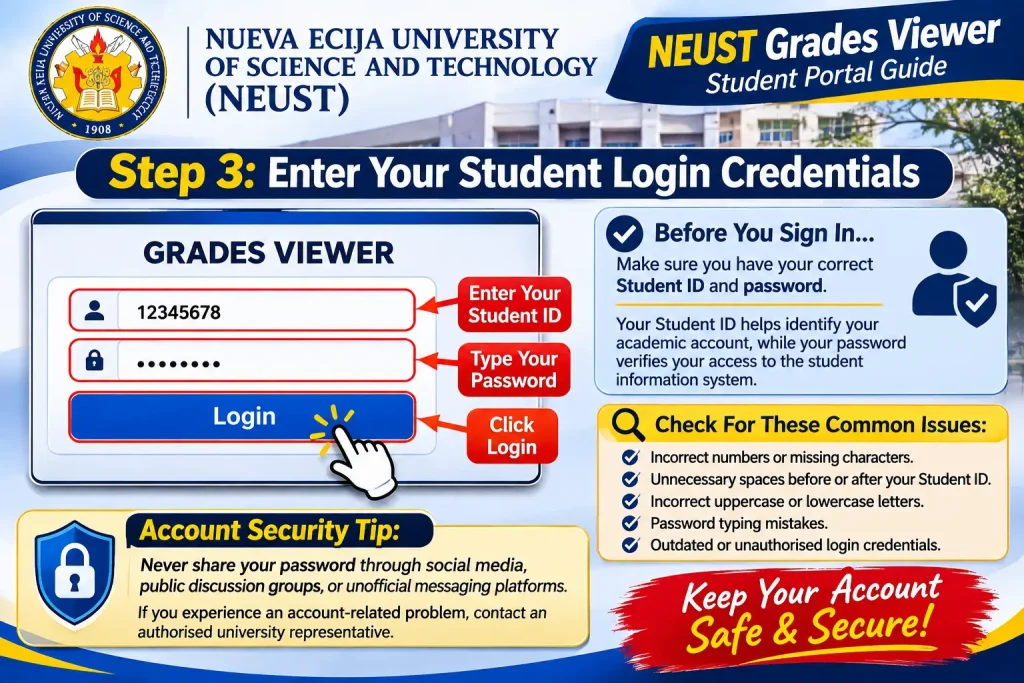
Before signing in, make sure you have your correct student identification number and password.
Your Student ID helps identify your academic account, while your password verifies that you are authorised to access the student information system.
Carefully enter the requested information and check for:
- Incorrect numbers or missing characters.
- Unnecessary spaces before or after your Student ID.
- Incorrect uppercase or lowercase letters.
- Password typing mistakes.
- Outdated or unauthorised login credentials.
Account security tip: Never share your password through social media, public discussion groups, or unofficial messaging platforms. If you experience an account-related problem, contact an authorised university representative.
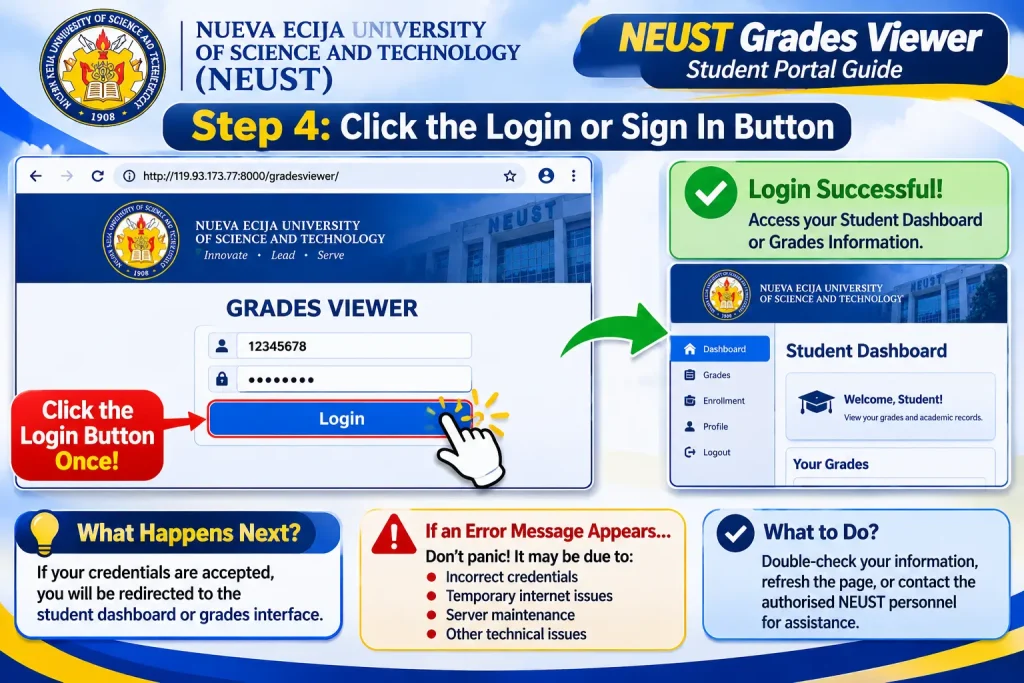
Step 4: Click the Login or Sign In Button
After entering the required information, locate the Login or Sign In button and select it once.
If your credentials are accepted, the portal should direct you to the available student dashboard or grades interface.
You can then explore the academic information accessible through your account.
If an error message appears, avoid assuming that your account has been permanently blocked. Incorrect credentials, temporary internet interruptions, server maintenance, and other technical issues can prevent successful authentication.
How to Check Your Grades Through the NEUST Grades Viewer
Successfully signing in is the first step. After reaching your student dashboard, you need to locate the appropriate academic section to review your available results.
The exact dashboard layout may vary depending on the portal version and the features enabled for your account.
Finding Your Semester and Subject Grades
Look for a section labelled Grades Viewer, Grades, Academic Records, or another similar option.
If the system provides an academic-period selection feature, choose the semester you want to review.
Depending on the information published by the university, the available records may include:
Midterm Grades: These are academic results associated with the midterm assessment period.
Final Grades: These represent the final subject results made available after the relevant assessment and approval procedures.
Conditional Grades: These are results displayed under a conditional academic status, where applicable.
Subject-Wise Results: This information allows students to review individual subject grades included in their academic programme.
Always verify the selected semester and subject information before interpreting your results.
If a particular grade is missing, it does not automatically mean that you have received a failing mark. The result may still be undergoing processing or may not have been officially released.
Main Features of the NEUST Grades Viewer Portal
The NEUST Grades Viewer provides access to several useful academic functions identified in the supplied portal information.
| Portal Feature | Purpose |
|---|---|
| Grades Viewer | Provides access to available midterm, conditional, and final grades. |
| Student Evaluation of Teachers (SET) | Supports the teacher evaluation process when required. |
| Server Selection | May provide access to a primary or alternative server. |
| Student Login | Restricts academic information to authorised users. |
| Semester Records | Helps students review results from different academic periods. |
The availability of individual features may depend on university procedures, account permissions, and the portal’s current configuration.
Students should remember that not every option will necessarily appear on every account. Visit Homepage
Student Evaluation of Teachers (SET): Understanding Its Importance
The Student Evaluation of Teachers (SET) is one of the processes mentioned in the supplied NEUST portal information.
It allows students to provide feedback about their classroom learning experience and teaching activities.
Some students may encounter an evaluation notification when signing in to the NEUST Grades Viewer. According to the supplied information, completing the required SET process may be necessary before access to certain grade-viewing functions becomes available.
How to Complete a Pending SET Evaluation
If the portal displays a notification asking you to complete an evaluation, follow the instructions provided on the screen.
- Sign in using your authorised student credentials.
- Check whether a pending teacher evaluation notification appears.
- Open the relevant evaluation section if it is available.
- Read the questions and instructions carefully.
- Provide honest and appropriate feedback.
- Review your answers before submitting the evaluation.
- Follow the on-screen confirmation instructions.
- Return to the Grades Viewer section to check whether academic results are accessible.
Important: The exact SET questions, submission requirements, and restrictions may vary. Confirm the applicable procedure through your live student account or academic department.
Completing the teacher evaluation does not guarantee that grades will appear immediately. Academic results may still need to be processed and officially released by the university.
Alternative Server Selection and Portal Availability
Students may occasionally experience problems accessing the NEUST Grades Viewer, especially when many users attempt to use the service simultaneously.
The supplied portal information mentions primary and alternative auxiliary servers.
If server-selection options appear on the portal’s main page, follow the university’s instructions when selecting an available server.
An alternative server may provide another access route when the primary server experiences technical difficulties. However, students should only use server addresses or selection options published through authorised university sources.
Avoid using random links circulated through social media or unofficial student groups. A website that resembles the original NEUST Grades Viewer is not automatically an authorised university platform.
Common NEUST Grades Viewer Problems and Their Solutions
Although the online grading system is designed to make academic information more accessible, students may occasionally encounter login errors, loading problems, or missing academic results.
Understanding the possible causes can help you identify the problem and choose an appropriate solution.
1. NEUST Grades Viewer Website Is Not Opening
If the portal displays an error message or continues loading without showing the login interface, begin by checking your internet connection.
Try these troubleshooting methods:
- Refresh the page after waiting briefly.
- Open the portal using another compatible browser.
- Switch between Wi-Fi and mobile data.
- Restart your browser if it becomes unresponsive.
- Verify that the complete portal address has been entered correctly.
- Make sure the address includes port 8000.
The NEUST Grades Viewer uses a specific IP address and a non-standard port. Certain network configurations may restrict access to websites operating through ports other than standard web ports.
If the problem continues across multiple devices and internet connections, the issue may be associated with the university server rather than your device.
2. Incorrect Student ID or Password
A login error may appear when the Student ID or password is entered incorrectly.
Before attempting another login, review the following details:
- Confirm that your complete Student ID has been entered.
- Remove any accidental spaces around your username.
- Check the uppercase and lowercase characters in your password.
- Make sure you are using the credentials assigned to the correct student system.
- Avoid repeatedly testing random password combinations.
If you have forgotten your password, contact your academic department or the Office of Admission and Registration (OAR) for guidance about the authorised recovery procedure.
3. Academic Grades Are Not Displaying
Sometimes students successfully access their accounts but cannot find the academic results they expected.
Several factors may explain this situation:
- The university has not yet released the relevant semester grades.
- Some subject results are still being processed.
- A required Student Evaluation of Teachers (SET) remains incomplete.
- The wrong academic period has been selected.
- The account does not currently have permission to access the requested records.
First, verify the selected semester and check for any outstanding notifications.
If the grades remain unavailable, contact the relevant university office for clarification instead of assuming that the system has recorded an incorrect result.
4. Portal Loads Slowly or Displays Technical Errors
Heavy website traffic, temporary server interruptions, and unstable internet connections can affect the performance of the NEUST Grades Viewer.
If the page responds slowly, avoid refreshing it repeatedly within a few seconds.
Instead:
- Close unnecessary browser tabs.
- Check your internet connection.
- Restart the browser if necessary.
- Wait for a short period before trying again.
- Follow the university’s instructions if an alternative server option is available.
If the problem continues, contact the appropriate university support office to ask whether maintenance or another technical issue is affecting the portal.
Where to Get Official NEUST Student Support
If you have followed the available troubleshooting instructions and still cannot access your academic information, contacting the university is the most appropriate next step.
The NEUST Office of Admission and Registration (OAR) is a suitable starting point for questions involving student registration and academic records.
Students can consult the university’s official resources for additional information and support.
Useful resources include:
- Official NEUST Website: Nueva Ecija University of Science and Technology.
- University Directory: NEUST Directory.
- University Services: NEUST Citizens’ Charter 2026.
- Student Grades Portal: NEUST Grades Viewer.
Always verify the current contact information through the university’s official website before sending personal academic details.
When Should You Contact the Office of Admission and Registration?
Consider contacting the OAR or your campus department if:
- You have forgotten your student account password.
- Your login credentials repeatedly produce an error.
- Your semester or subject grades are missing.
- Your student information appears incorrect.
- You need clarification about an academic record.
- The portal remains inaccessible despite having a stable internet connection.
When requesting assistance, explain the problem clearly and mention the affected academic period or any error message displayed on the website.
Provide student identification details only through an authorised university communication channel.
Never include your account password in an email or support request.
Important Security Tips for NEUST Students
Academic records contain private student information, making account security an important consideration when using the NEUST Grades Viewer.
Students should follow basic online safety practices whenever they access the university grading system.
1. Verify the Website Address
Always check the portal address before entering your Student ID or password. Avoid clicking suspicious links shared through unofficial websites or messaging groups.
2. Keep Your Password Confidential
Your student login credentials should remain private. Do not share your password with classmates, strangers, or individuals claiming to offer unofficial account assistance.
3. Avoid Using Public Computers
Whenever possible, access your academic account using a personal device.
If you must use a public computer, sign out completely after checking your results.
4. Do Not Save Passwords on Shared Devices
Avoid selecting automatic password-saving options when using computers that other people can access.
This reduces the possibility of unauthorised individuals entering your student account.
5. Pay Attention to Connection Security
The supplied NEUST Grades Viewer address uses HTTP rather than HTTPS. HTTP does not provide the standard transport encryption associated with HTTPS.
For this reason, students should avoid entering sensitive information over untrusted public networks and should confirm the university’s recommended access method.
6. Always Log Out After Checking Your Grades
After reviewing your academic results, sign out of the account, particularly when using a shared computer or device.
Following these precautions can help protect your academic information and reduce the risk of unauthorised account access.
Frequently Asked Questions About
1. Where Can I Find My NEUST Portal Login Password?
Students of Nueva Ecija University of Science and Technology (NEUST) can obtain or recover their login credentials through the university’s authorised student portals and academic offices. Newly admitted first-year students may receive their usernames and passwords through their registered email addresses on their scheduled enrolment dates. Returning students can generally use their existing student credentials.
If you forget your password, visit the relevant portal and look for the Forgot Password option. Enter your registered username or email address and follow the password recovery instructions. If the recovery option is unavailable, contact your campus department or the appropriate university office for assistance.
2. How Can I Calculate My GWA at NEUST?
You can calculate your General Weighted Average (GWA) by multiplying each subject’s final grade by its corresponding credit units, adding the results, and dividing the total by the number of credit units.
GWA Formula:
GWA = Total (Subject Grade × Credit Units) ÷ Total Credit Units
For example, if your combined weighted grades equal 25.50 and your total academic units are 14, your GWA will be 1.82.
Certain subjects, including NSTP and PE or PATH-Fit, may be excluded depending on the university’s academic regulations. Always check your department’s official guidelines for the correct computation method.
3. Until When Is NEUST Admission Open for AY 2027–2028?
According to the supplied admission information, applications for the NEUST College Admissions Test (CAT) for Academic Year 2027–2028 are scheduled to run from September 3, 2026, until November 30, 2026.
Eligible applicants include graduating Senior High School students and graduates who have not yet enrolled in college. The listed requirements include a Grade 11 Report Card or an accepted alternative and a Certificate of Good Moral Character.
Applicants to certain board-related programmes may also need a minimum Grade 11 GWA of 85%. Students should check the official NEUST Admission Portal for the latest application deadlines, eligibility conditions, and examination announcements.
4. How Much Is the Tuition Fee Per Semester at NEUST?
Qualified Filipino undergraduate students may benefit from free tuition and covered school fees under Republic Act No. 10931, also known as the Universal Access to Quality Tertiary Education Act.
The supplied information estimates that a typical undergraduate semester assessment before government subsidy may range from ₱6,500 to ₱8,100. Eligible students covered by the programme may receive a subsidy that reduces covered tuition and fees to ₱0.00.
However, certain additional expenses, such as Nursing RLE fees, OJT costs, and programme-specific affiliation charges, may still apply.
Graduate School fees are estimated at approximately ₱8,000–₱15,000 per semester, depending on the programme and enrolled units. International students may follow a separate fee structure. Contact NEUST directly for the latest official assessment.
5. Which Grade Is Better at NEUST: 1.50 or 1.75?
A grade of 1.50 is better than 1.75 under the Philippine grading format described in the supplied NEUST grading reference.
In this system, a lower numerical grade represents stronger academic performance. A 1.50 grade corresponds to approximately 91%–93.99%, while 1.75 represents approximately 89%–90.99%.
Therefore, students receiving 1.50 have achieved a higher academic result than those receiving 1.75 under this grading scale.
6. Does NEUST Follow a Zero-Based Grading System?
The supplied information describes NEUST as following a zero-based grading approach, with a reported passing standard of 70%. Under this method, students earn points based on their actual performance in quizzes, assignments, projects, examinations, and other course activities.
The information also mentions conditional grades and removal examinations. A conditional grade of 4.00 may require a removal examination, while 5.00 represents a failing result. According to the supplied description, passing the removal examination may convert the conditional result to 3.00, whereas failing it may result in 5.00.
Students should confirm these grading rules and the applicable passing threshold with their academic department.
7. What Is the Percentage Equivalent of a 2.25 GWA?
A 2.25 GWA generally corresponds to approximately 83%–85.99% according to the grading reference supplied for this article.
This result falls under the High Average category and represents satisfactory academic performance.
The exact percentage equivalent may vary depending on the university’s grading regulations. International letter-grade comparisons, such as B- or B, should also be treated as approximate because conversion standards differ between institutions.
8. Where Can I Check My Official NEUST Grades and Academic Records?
Students can use the NEUST Grades Viewer to access available academic results through a web browser.
To check your results, open the portal, enter your authorised student credentials, and navigate to the Grades Viewer or Academic Records section. Select the appropriate semester to review available subject results, including midterm, conditional, or final grades where provided.
If your grades are missing or your account does not allow access, check for pending Student Evaluation of Teachers (SET) requirements and contact your academic department or the Office of Admission and Registration (OAR) for assistance. Always verify that you are using the university-authorised portal before entering your login information.
Final Thoughts
The NEUST Grades Viewer Portal is a useful online platform that helps students access their academic records and stay updated on their educational progress at Nueva Ecija University of Science and Technology. By learning how to log in, check grades, calculate their General Weighted Average (GWA), and resolve common access problems, students can manage their academic information more conveniently. Whether you are a first-year student or a returning NEUST student, always use the official portal and follow the university’s latest instructions. For questions about missing grades, login credentials, enrollment, or academic records, contact the appropriate NEUST office for assistance. Keeping your login details secure and checking your academic information regularly can help you stay informed throughout your university journey.