NAPOLCOM Online Registration 2026 Philippines: Application, Requirements & Exam Guide

The NAPOLCOM Online Registration process allows applicants to arrange their examination filing and processing schedule before completing the required application procedures with the National Police Commission. Depending on the applicant’s eligibility and examination category, the process may be used for the PNP Entrance Examination or the PNP Promotional Examination.
NAPOLCOM publishes examination announcements, registration schedules, examination dates, and information about the applicable online registration system through its official website. For the examination information currently provided for 2026, NAPOLCOM lists an October 18, 2026 examination date, with online registration scheduled for August 17–21, 2026 for the PNP Entrance and Promotional Examinations.
Important: NAPOLCOM registration dates, online systems, documentary requirements, fees, and regional procedures can change from one examination cycle to another. Always check the latest official NAPOLCOM announcement before starting your application.
What Is NAPOLCOM Online Registration?
NAPOLCOM Online Registration is the first step in scheduling and processing an application for a NAPOLCOM examination. Depending on the current examination cycle, NAPOLCOM may provide an online scheduling platform such as OLEASS or another designated registration system where applicants can enter their required details and request an examination schedule.
Through the online registration process, applicants provide the information requested by NAPOLCOM and receive a notice or confirmation containing details about their scheduled on-site processing. Applicants should keep this notice and follow the instructions provided for proceeding to the appropriate NAPOLCOM Regional Office to complete the next stage of their application.
Which NAPOLCOM Exams Can Applicants Apply For?
The two major examination categories covered by the registration process are:
- PNP Entrance Examination (PNPEE) – Intended for qualified applicants seeking NAPOLCOM entrance eligibility applicable to appointment as Patrolman or Patrolwoman.
- PNP Promotional Examination (PROMEX) – Intended for qualified uniformed members of the Philippine National Police who are seeking the appropriate promotional eligibility.
NAPOLCOM regional information indicates that applicants for the PNP Entrance Examination must satisfy the applicable qualifications, including citizenship, age, height, and educational requirements. Promotional examinations are intended for qualified uniformed PNP personnel who meet the applicable qualification standards. Visit Homepage.
Before You Start NAPOLCOM Online Registration
Preparing your personal information and required documents before opening the registration system can make your NAPOLCOM Online Registration smoother and help prevent common errors.
Before starting your NAPOLCOM Online Registration, make sure you have the following ready:
The specific documents required may vary depending on the examination cycle and applicant category. For instance, a January 2026 NAPOLCOM advisory instructed civilian applicants to upload one valid government-issued ID showing their date of birth, while PNP personnel were required to provide their PNP ID.
How to Complete NAPOLCOM Online Registration
Step 1: Check the Official NAPOLCOM Announcement
Start by visiting the official NAPOLCOM website and checking the latest examination announcement before opening the registration system. Confirm the current examination schedule, registration period, applicant category, regional instructions, and documentary requirements because these details can change between examination cycles.
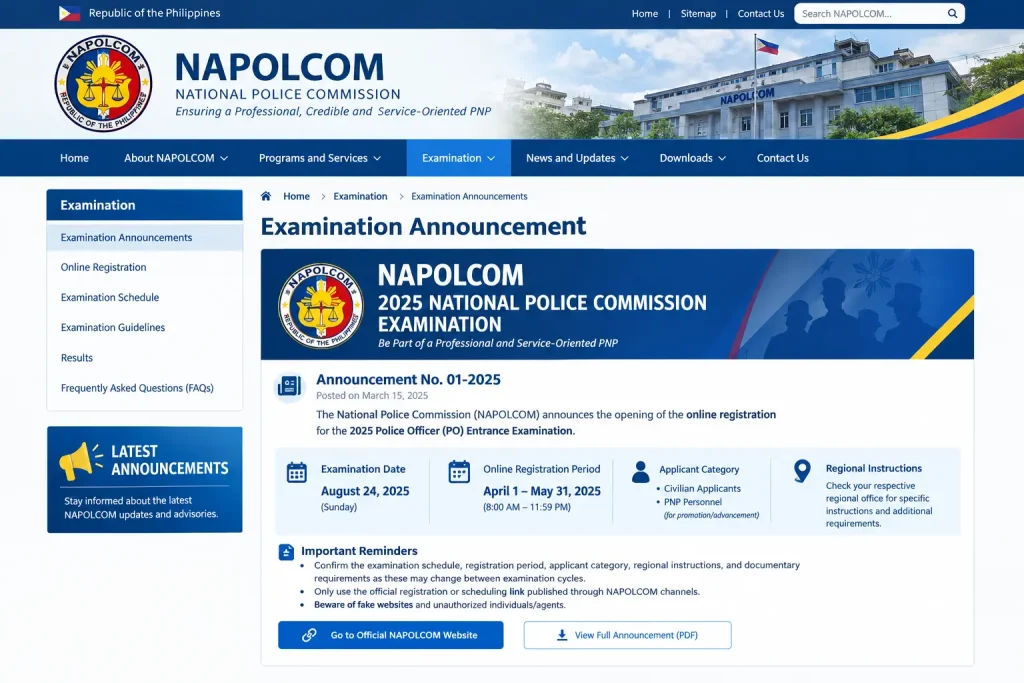
Step 2: Open the Online Scheduling System
After reviewing the announcement, open the online registration or scheduling system specified by NAPOLCOM. NAPOLCOM has historically used the Online Examination Application Scheduling System (OLEASS), although the platform or regional instructions may differ for a particular examination cycle.

Step 3: Enter Your Personal Information
Complete the registration form using accurate information that matches your official identification and supporting documents. Carefully check your entries before continuing because incorrect spelling, dates, contact details, or applicant information may cause problems during the later processing stages.
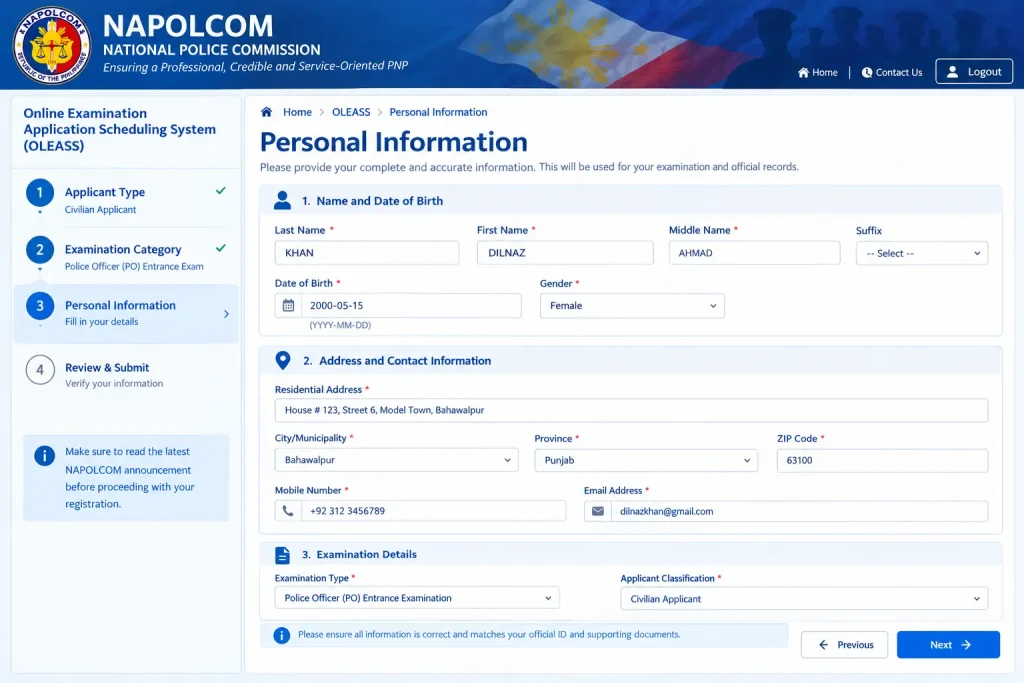
Step 4: Upload Required Documents and Submit
If the current registration system requires document uploads, prepare clear and readable copies that meet the specified format and file-size requirements. For example, the January 2026 NAPOLCOM advisory required civilian applicants to upload one valid government-issued ID showing their date of birth, while PNP personnel were instructed to provide their PNP ID.

Step 5: Save or Print Your Confirmation
After successfully submitting your application, keep the generated confirmation or notice in a secure place. NAPOLCOM’s published procedure instructs applicants to retain the notice showing their scheduled date for on-site processing, so saving both an electronic and printed copy can be useful.

Common NAPOLCOM Online Registration Mistakes
Applicants can reduce avoidable problems by carefully checking their personal information, examination category, schedule, documents, and confirmation before completing the NAPOLCOM Online Registration.
| Common Mistake | What You Should Do |
|---|---|
| Entering Incorrect Personal Information | Enter your complete legal name and date of birth accurately. Avoid nicknames, shortened names, or informal versions of your name. |
| Selecting the Wrong Examination | Confirm whether you are applying for the PNP Entrance Examination or the PNP Promotional Examination before submitting your application. |
| Missing the Registration Schedule | Check the latest official NAPOLCOM announcement for the registration opening and closing dates, as well as any scheduled processing arrangements. |
| Arriving Without Complete Documents | Prepare your complete document checklist before travelling to the Regional Office. Online scheduling does not necessarily eliminate the need for supporting documents during processing. |
| Forgetting Your Confirmation | Save and print your registration confirmation and reference information immediately after successfully completing the application. |
| Relying on Unofficial Information | Compare information from Facebook posts, old screenshots, videos, and third-party websites with the latest official NAPOLCOM announcement before taking action. |
What Happens After NAPOLCOM Online Registration?
Completing your NAPOLCOM online registration is generally the first stage of the examination application process. After successfully registering online, applicants may still need to complete additional requirements before their application is considered fully processed.
Once you receive your confirmed processing schedule, you may be required to personally visit the assigned NAPOLCOM Regional Office within the designated processing period. During this visit, NAPOLCOM personnel will verify your information and documents and guide you through the remaining application procedures.
According to the 2026 NAPOLCOM advisory, applicants with confirmed processing schedules should proceed to the concerned Regional Office during the specified processing period. Applicants may also be required to accomplish the Examination Application Form and Information Card provided by the Regional Office.
Why the Regional Office Visit Matters
The NAPOLCOM online registration process is mainly used to provide initial applicant information and secure a processing schedule. The subsequent Regional Office visit is an important part of completing the formal examination application.
During the in-person processing, NAPOLCOM personnel may review your documents, verify the information you submitted online, and confirm whether you meet the applicable examination requirements.
NAPOLCOM Entrance Exam vs Promotional Exam
Understanding the difference between the two examination categories is important before completing your NAPOLCOM Online Registration.
| Examination | Intended Applicants | Main Purpose |
|---|---|---|
| PNP Entrance Examination | Qualified civilian applicants and other eligible applicants under applicable rules | NAPOLCOM entrance eligibility for appointment as Patrolman/Patrolwoman |
| PNP Promotional Examination | Qualified uniformed PNP members | Eligibility associated with promotion to the applicable rank |
NAPOLCOM regional information describes the entrance examination as an examination for qualified applicants who satisfy the applicable requirements. The Promotional Examination, meanwhile, is intended for qualified uniformed PNP personnel who meet the relevant rank and eligibility requirements.
NAPOLCOM Entrance Examination Requirements
For the PNP Entrance Examination, NAPOLCOM instructions commonly identify requirements involving proof of online registration, identification, photographs, and educational records.
A recent official NAPOLCOM advisory lists the following requirements for civilian entrance applicants:
The same advisory specifies a legal-size window envelope with the applicable mailing stamp and an examination fee of ₱400.00 for the PNP Entrance Examination.
How to Check Your NAPOLCOM online Application Status
If you have completed NAPOLCOM Online Registration and want to verify your application, start with the official NAPOLCOM website. The available verification method may vary depending on the examination cycle, so always follow the latest instructions published by NAPOLCOM.
Step 1: Visit the Official NAPOLCOM Website
Open the official NAPOLCOM website and look for the latest examination announcement or application-related verification facility. Using the official website helps ensure that you are checking your information through an authorized NAPOLCOM source.
Step 2: Find the Verification Facility
Depending on the examination cycle, NAPOLCOM may provide an online facility or specific link for checking application, scheduling, or examination-related information. Use the verification method identified in the current official announcement.
Step 3: Enter Your Required Information
If an online verification form is available, enter the information requested by the system. Make sure every detail is accurate because an incorrect entry or mismatch may prevent the system from finding your application.
Step 4: Review Your Application Information
After completing the verification process, carefully review the information displayed by the system. Check whether your application and examination details appear correctly and whether any additional instructions are provided.
Step 5: Contact NAPOLCOM If There Is an Issue
If you cannot locate your application or notice incorrect information, do not assume that your registration was automatically rejected. Keep your registration confirmation and supporting documents available, then contact the appropriate NAPOLCOM office using the contact details provided through the official website or current examination announcement.
NAPOLCOM Requirements Checklist
The documents you need depend on whether you are applying for the PNP Entrance Examination or the PNP Promotional Examination. The following checklist summarizes the supplied NAPOLCOM requirements:
| Requirement | PNP Entrance Examination | Promotional Examination |
|---|---|---|
| Online registration proof | Printed confirmation or notice | Printed confirmation with reference number |
| Application documents | Application Form and Index Card | Application Form and Index Card |
| Photos | 2 identical recent colour photographs | 2 identical recent colour ID photographs |
| Identification | Valid government-issued ID | Valid government-issued ID or PNP ID, as applicable |
| Educational/service documents | TOR, Diploma, or applicable graduation document | Appointment, Plantilla, or Absorption Order, as applicable |
| Previous eligibility | Where applicable | Previous Certificate of Eligibility or Report of Rating |
| Envelope | Legal-size window envelope with postage | Legal-size window envelope with postage |
| Examination fee | ₱400.00 | ₱400.00–₱600.00 depending on rank tier |
The supplied NAPOLCOM information identifies these general categories of documents for application processing. However, the exact documents accepted can vary according to the applicant’s classification and the requirements published for the current examination cycle.
PNP Entrance Exam Documents
Applicants preparing for the PNP Entrance Examination should organize all required documents before visiting the designated NAPOLCOM Regional Office. Having your paperwork ready can help make the processing stage smoother and reduce the risk of delays.
1. Online Registration Confirmation
Bring the confirmation notice generated after completing your NAPOLCOM Online Registration. This document allows NAPOLCOM personnel to verify your application and scheduled processing details.
2. Valid Identification
Prepare the valid government-issued identification required under the current NAPOLCOM examination instructions. Make sure the information on your ID matches the details submitted during NAPOLCOM Online Registration.
3. Recent Photographs
Applicants should prepare the photographs required by the current examination instructions before their Regional Office appointment. The supplied requirements specify two recent and identical photographs with a white background and a complete name tag showing the applicant’s name.
4. Educational Records
Applicants may need to present educational records to verify their eligibility for the examination. Depending on the applicant’s qualification and the current NAPOLCOM requirements, these documents may include a Transcript of Records (TOR), diploma, or certificate of graduation.
5. Additional Supporting Documents
Some applicants may have additional documentary requirements depending on their applicant category, qualification, or the specific examination cycle. Before visiting the Regional Office, review the latest NAPOLCOM announcement and confirm whether any additional documents apply to your application.
Promotional Exam Documents
The PNP Promotional Examination has a different documentary focus because it is intended for serving PNP personnel.
Depending on the applicable NAPOLCOM instructions, applicants should prepare documents that may include:
Documents such as an Attested Appointment, Plantilla Appointment, or PNP Absorption Order may be relevant to the service-record portion of the application. The specific document should match the applicant’s circumstances and the requirements stated by NAPOLCOM for the applicable examination.
NAPOLCOM Examination Fees
The examination fees listed in the supplied information are shown below. Because fees may vary by examination cycle or applicant category, verify the current amount through the latest official NAPOLCOM announcement before making any payment.
| Examination | Fee |
|---|---|
| PNP Entrance Examination | ₱400.00 |
| PNP Promotional Examination | ₱400.00–₱600.00 |
The PNP Promotional Examination fee may vary depending on the applicable rank tier. Applicants should confirm the exact amount and approved payment procedure before travelling to the Regional Office.
Always use the payment instructions provided by NAPOLCOM. Do not send money to unofficial individuals, websites, or third parties claiming they can process your NAPOLCOM Online Registration or examination application.
What to Bring to the NAPOLCOM Regional Office
Once your online processing schedule has been confirmed, organise your documents before travelling to the Regional Office.
Use this practical checklist:
How to Check NAPOLCOM Exam Results
Checking your NAPOLCOM Exam Results can be done by following the official examination announcement for your specific examination date and category. Use NAPOLCOM’s official channels when verifying your result.
Step 1: Visit the Official NAPOLCOM Website
Begin by opening the official NAPOLCOM website and looking for the latest examination results announcement. Avoid using social media posts, unofficial websites, or third-party result lists as your final source of verification.
Step 2: Find Your Examination Announcement
Locate the results announcement that corresponds to the examination you took. NAPOLCOM may publish successful examinees through an official webpage, PDF, or other authorized announcement.
Step 3: Search for Your Name
If the successful examinees are published in a PDF or webpage, use your browser’s search function to find your name. Review the spelling and any other available identifying information carefully before assuming that a matching name belongs to you.
Step 4: Check the Result Carefully
After finding your name, read the surrounding information and any instructions included in the official announcement. If your name does not appear, do not rely on an unofficial list to determine your result.
Step 5: Follow the Instructions for Your Examination Documents
After the results are released, follow NAPOLCOM’s instructions regarding examination documents. Recent NAPOLCOM information states that Certificates of Eligibility are sent by mail to successful examinees, while Reports of Rating are sent to non-passers.
What If the NAPOLCOM Website Is Not Working?
If you experience technical problems while using the NAPOLCOM Online Registration system, use the troubleshooting steps below before contacting support.
| Problem | What to Do |
|---|---|
| Page does not load | Check your internet connection and try accessing the website again using a reliable connection. |
| Registration form is unresponsive | Refresh the page or try an updated browser. Avoid repeatedly submitting the same form. |
| Document upload fails | Check the required file format and size, then try uploading the document again. |
| Information displays incorrectly | Refresh the page and verify whether the issue continues before submitting your application. |
| Confirmation cannot be generated | First check whether your registration was already successfully recorded before attempting another submission. |
| Verification page is inaccessible | Try another updated browser, clear your browser cache, or use a private/incognito window. |
| Technical error continues | Take a screenshot of the error and note the date and time. Keep these details available when contacting NAPOLCOM support. |
Before Your Regional Office Appointment
Use the following checklist as a final preparation guide.
Online Stage
Document Stage
Appointment Stage
Proper preparation can make the in-person processing stage easier and help you avoid returning because of a missing document.
What If Your Name Is Not in the Results?
If you cannot find your name in the published NAPOLCOM Exam Results, do not immediately assume that your examination record is missing.
Check the following:
- Confirm that you are viewing the results for the correct examination date.
- Review the official NAPOLCOM examination results announcement.
- Check the spelling of your name carefully.
- Wait for the official rating or result document when applicable.
- Contact the appropriate NAPOLCOM office if you need further clarification.
Remember that searching a published list and formally verifying an examination rating are two different processes. Use the procedure that matches the type of information or document you need.
What If the NAPOLCOM Website Is Not Working?
If you experience technical problems while using the NAPOLCOM Online Registration system, use the troubleshooting steps below before contacting support.
| Problem | What to Do |
|---|---|
| Page does not load | Check your internet connection and try accessing the website again using a reliable connection. |
| Registration form is unresponsive | Refresh the page or try an updated browser. Avoid repeatedly submitting the same form. |
| Document upload fails | Check the required file format and size, then try uploading the document again. |
| Information displays incorrectly | Refresh the page and verify whether the issue continues before submitting your application. |
| Confirmation cannot be generated | First check whether your registration was already successfully recorded before attempting another submission. |
| Verification page is inaccessible | Try another updated browser, clear your browser cache, or use a private/incognito window. |
| Technical error continues | Take a screenshot of the error and note the date and time. Keep these details available when contacting NAPOLCOM support. |
Frequently Asked Questions About NAPOLCOM Online Registration
Conclusion
Completing NAPOLCOM Online Registration is an important first step for applicants preparing for the PNP Entrance or Promotional Examination. From checking the latest examination announcement and submitting your information online to saving your confirmation and completing the required Regional Office processing, each stage should be handled carefully.
Before your appointment, make sure your identification, photographs, educational or service documents, application forms, and applicable examination fee are ready. Since registration dates, requirements, fees, and procedures may change between examination cycles, always verify the latest information through the official NAPOLCOM website before proceeding. Proper preparation can help you avoid common registration mistakes and complete your examination application with fewer delays.