TIN Verification Online Philippines 2026: How to Verify, Check, and Recover Your TIN Number
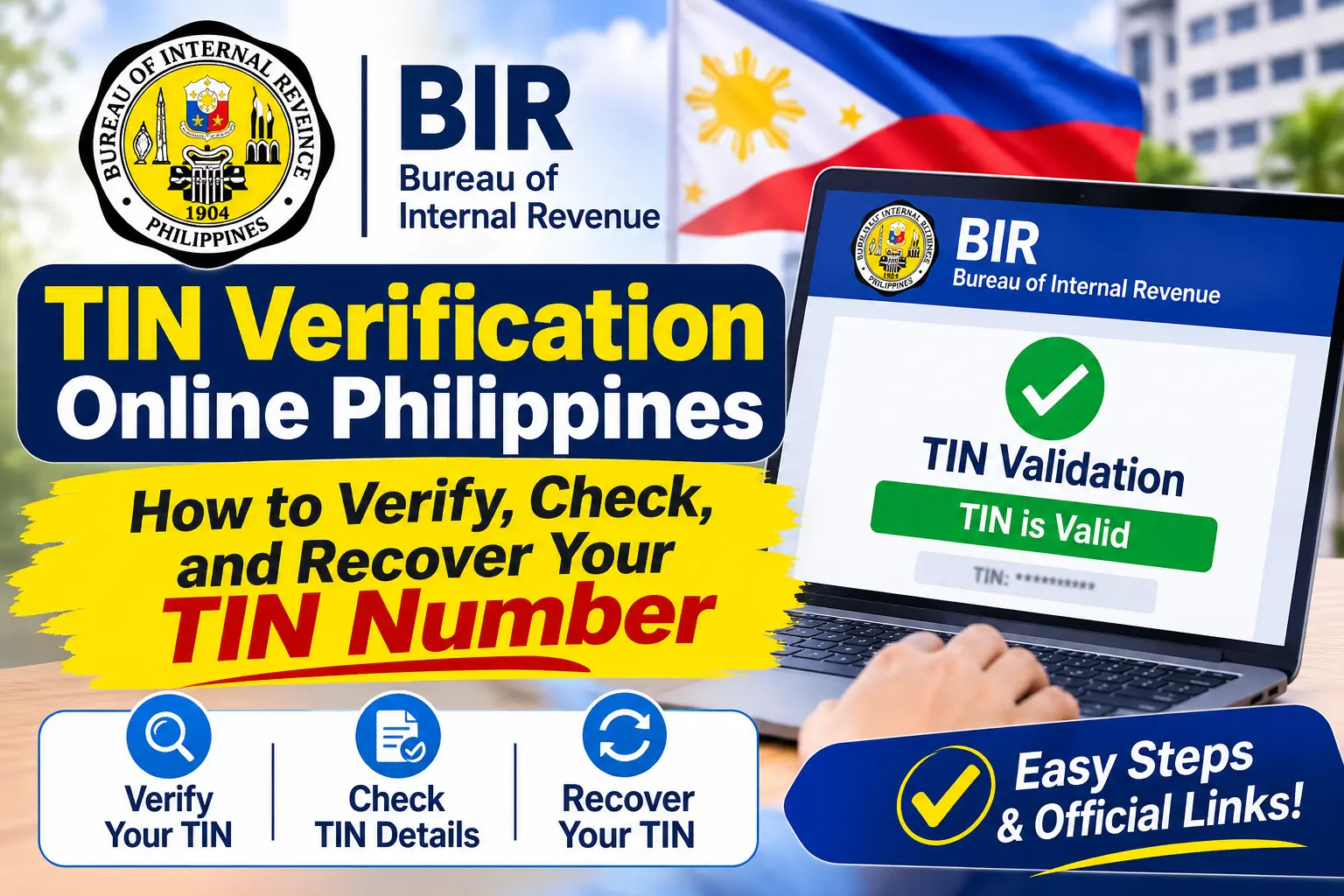
A Taxpayer Identification Number (TIN) is an important identification number issued by the Bureau of Internal Revenue (BIR) in the Philippines. Employees, job seekers, self-employed professionals, and business owners need a valid TIN for various tax-related activities. Whether you are starting a new job, opening a bank account, registering a business, or completing a government transaction, providing the correct TIN is essential. With TIN Verification Online, taxpayers can check their existing TIN details and confirm whether their information matches BIR records.
The Bureau of Internal Revenue provides online facilities that make TIN-related services more accessible. Through the official TIN Validation portal and the Online Registration and Update System (ORUS), eligible taxpayers can access verification, registration, and account-related services. This guide explains how to verify your TIN number online, check your registered information, understand validation results, and recover your TIN if you have forgotten it. It also covers common verification problems and the official BIR channels you can use for assistance.
What Is TIN Verification Online in the Philippines?
TIN Verification Online is a digital process that allows taxpayers to check whether their Taxpayer Identification Number is associated with the correct personal information in the Bureau of Internal Revenue database. It helps individuals confirm their existing TIN details without immediately visiting a physical BIR Revenue District Office (RDO).
The TIN is a unique identification number assigned to individuals and businesses for tax administration and related transactions. It is commonly required for employment documentation, business registration, tax filing, and other financial or government-related activities.
The BIR offers different online facilities for taxpayers who need to verify or manage their registration information. The two important platforms are:
- BIR TIN Validation Portal: Allows users to submit their TIN and personal information to check whether the details match BIR records.
- Online Registration and Update System (ORUS): Provides online registration and selected taxpayer account services, including registration information updates and other eligible transactions.
You can access the official BIR services through these links:
- BIR TIN Validation Portal
- BIR Online Registration and Update System (ORUS)
- Official Bureau of Internal Revenue Website
Quick Information About TIN Verification Online
| Details | Information |
|---|---|
| Government agency | Bureau of Internal Revenue (BIR) |
| Official verification portal | BIR TIN Validation |
| ORUS website | orus.bir.gov.ph |
| Main purpose | Verify existing TIN information |
| Required details | TIN and personal information |
| Eligible users | Employees, individuals, and taxpayers |
| Access method | Mobile phone, tablet, or computer |
| Service type | Official online government facility |
Important: Always use official BIR websites when submitting your TIN and personal information. Avoid unofficial websites that promise instant TIN verification or request unnecessary personal details.
Why Should You Verify Your TIN Number Online?
Checking your TIN number before using it for an important transaction can help prevent documentation errors and unnecessary delays. Incorrect personal information, typing mistakes, or confusion about an existing TIN may cause difficulties when an employer, financial institution, or government agency checks your details. Visit Homepage.
Here are some common reasons why taxpayers use TIN Verification Online in the Philippines.
1. TIN Verification for Employees and Job Seekers
Employers generally require the TIN details of newly hired employees to complete payroll registration and tax-related documentation. If you recently started a new job or received your TIN information from a previous employer, verifying the number can help you identify possible errors.
Under BIR Revenue Memorandum Circular No. 31-2024, employers are directed to use the online TIN verification facility or the BIR chatbot Revie to verify employee TIN information. This helps reduce the need for employees to obtain a separate manual TIN verification slip from their RDO.
2. TIN Verification for Business Owners and Self-Employed Professionals
Business owners, freelancers, and self-employed professionals need their TIN for tax registration, filing, and other official transactions. Checking your existing TIN helps ensure that the correct taxpayer information is used when completing BIR forms and business-related documents.
3. TIN Checking for Bank and Government Transactions
Banks and other authorised institutions may request your TIN when processing certain financial applications or official documents. Government agencies may also require accurate taxpayer information for eligible transactions.
Using the official TIN validation service before submitting your documents can help you confirm that you are providing the correct number.
4. Avoid Duplicate or Incorrect TIN Records
Every taxpayer should have only one TIN. Applying for another number because you forgot your previous TIN can create duplicate registration issues.
If you have changed employers, moved to another location, or stopped working for several years, your existing TIN does not automatically become invalid. You should verify or recover your original number instead of applying for a new one.
Important BIR reminder: Never request a second TIN simply because you cannot remember your existing number. Contact the BIR or use its official recovery and assistance channels to locate your original taxpayer record.
Requirements for TIN Verification Online
Before accessing the official BIR TIN Validation portal, prepare the personal information requested by the online form. Accurate information is important because the system uses the details you submit to match your TIN with the existing taxpayer record.
The official validation form requests the following information:
| Required Information | What You Need to Enter |
|---|---|
| TIN Number | Your existing Taxpayer Identification Number |
| First Name | Your registered first name |
| Middle Name | Your registered middle name, if applicable |
| Last Name | Your registered surname |
| Suffix | Your applicable suffix, such as Jr. or Sr. |
| Sex Assigned at Birth | Select the appropriate option |
| Birthdate | Your registered date of birth |
You should also prepare the following:
- A smartphone, tablet, laptop, or desktop computer.
- A stable internet connection.
- An updated internet browser, such as Google Chrome or Microsoft Edge.
- Your correct personal information.
- Your existing TIN, if available.
Helpful tip: Enter your personal information exactly as it appears in your BIR registration records. Differences in spelling, birthdate, or other details may prevent successful validation.
Verify Your TIN Number in the Philippines
If you have forgotten your Taxpayer Identification Number or want to confirm your existing TIN details, there are several ways to retrieve and verify your information. You can start by checking your personal documents, using official BIR online services, or requesting assistance from the appropriate Revenue District Office (RDO).
1. Check Your Existing Documents
The easiest way to find your TIN number is to review documents you have previously received from your employer or the Bureau of Internal Revenue. Your TIN may already be printed on official tax records, registration documents, or employment-related paperwork.
- Tax Returns: Check your previously filed income tax returns and other tax forms submitted to the BIR.
- BIR Documents: Review your Certificate of Registration, official receipts, and other tax-related documents.
- Employee Records: Check your payslips, BIR Form 2316, or payroll documents provided by your current or previous employer.
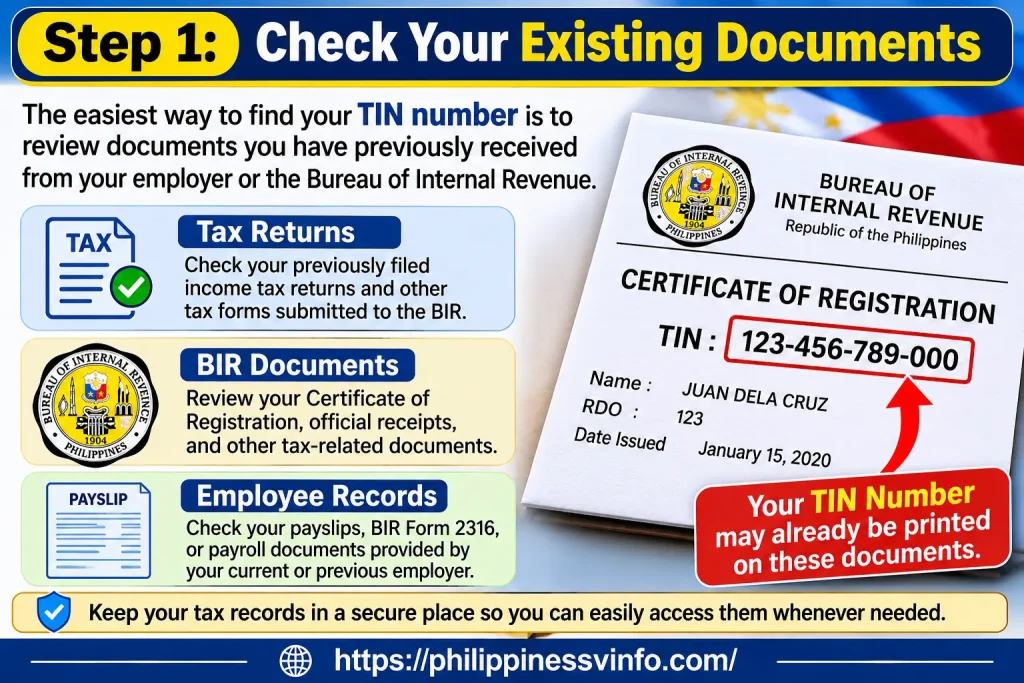
These documents can help you locate your existing TIN without submitting another registration application. Keep your tax records in a secure place so you can easily access them whenever needed.
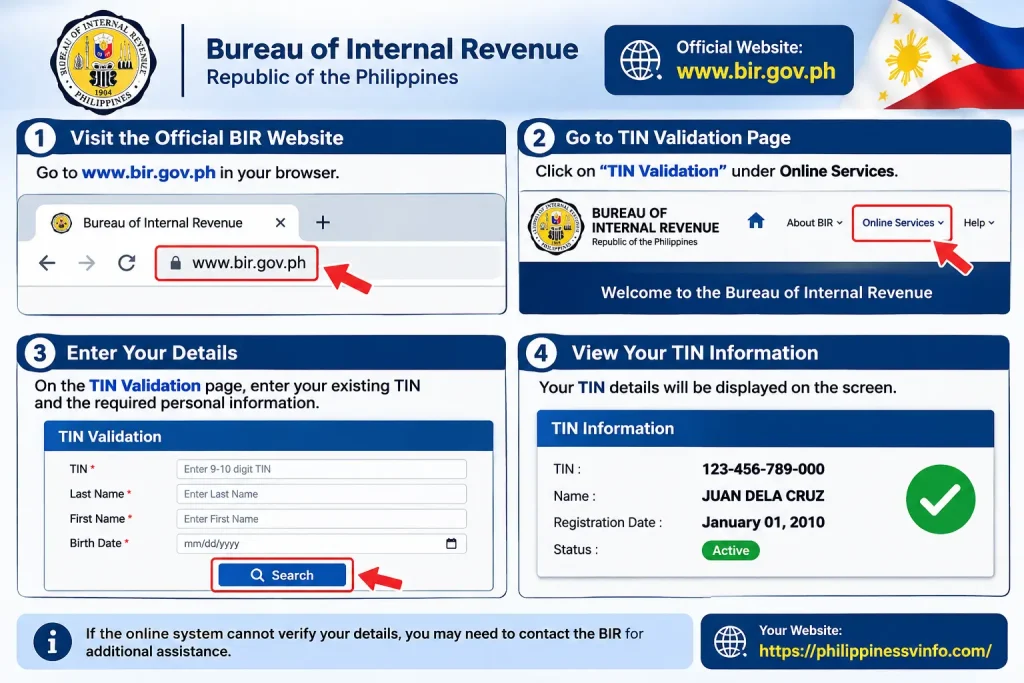
2. Visit the Official BIR Website
If you cannot find your TIN in your personal documents, visit the official Bureau of Internal Revenue website to explore available verification and recovery services. The BIR provides digital facilities that allow taxpayers to check their TIN information by submitting the required personal details.
- Official Website: Visit www.bir.gov.ph to access BIR services and announcements.
- TIN Validation Portal: Open the official BIR TIN Validation page and enter your existing TIN and requested personal information.
- ORUS Portal: Visit ORUS to access eligible taxpayer registration and account-related services.
The availability of online services may depend on your taxpayer information and the type of request. If the online system cannot verify your details, you may need to contact the BIR for additional assistance.
3. Visit a BIR Revenue District Office (RDO)
If you cannot verify or recover your TIN online, you can visit the appropriate BIR Revenue District Office for assistance. BIR personnel can guide you through the process of checking your taxpayer registration and identifying your existing TIN.
- Valid Identification: Bring a government-issued ID, such as a passport or driver’s licence, to establish your identity.
- Personal Information: Prepare your complete name, date of birth, residential address, and other details requested by the BIR.
- Existing Tax Records: Bring any available payslips, previous tax returns, or BIR registration documents that may help locate your record.
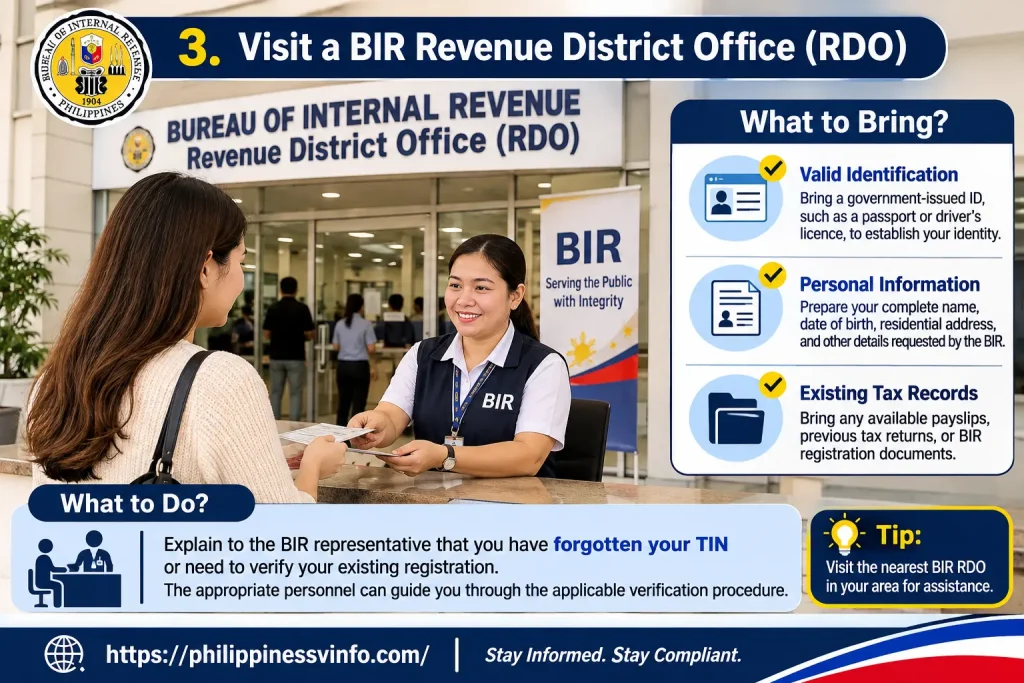
Explain to the BIR representative that you have forgotten your TIN or need to verify your existing registration. The appropriate personnel can guide you through the applicable verification procedure.
4. Request a BIR Certification
If you need official documentation confirming your taxpayer registration, you can ask the BIR whether a certification or other suitable document is available for your particular purpose. The requirements and processing arrangements may depend on the type of certification requested.
- Valid Government ID: Provide an acceptable identification document, such as a passport or driver’s licence.
- Proof of Registration: Bring previous tax returns, BIR receipts, or registration documents if available.
- Registration Information: Prepare relevant details from your previous BIR registration. The applicable forms will depend on your taxpayer classification and request.
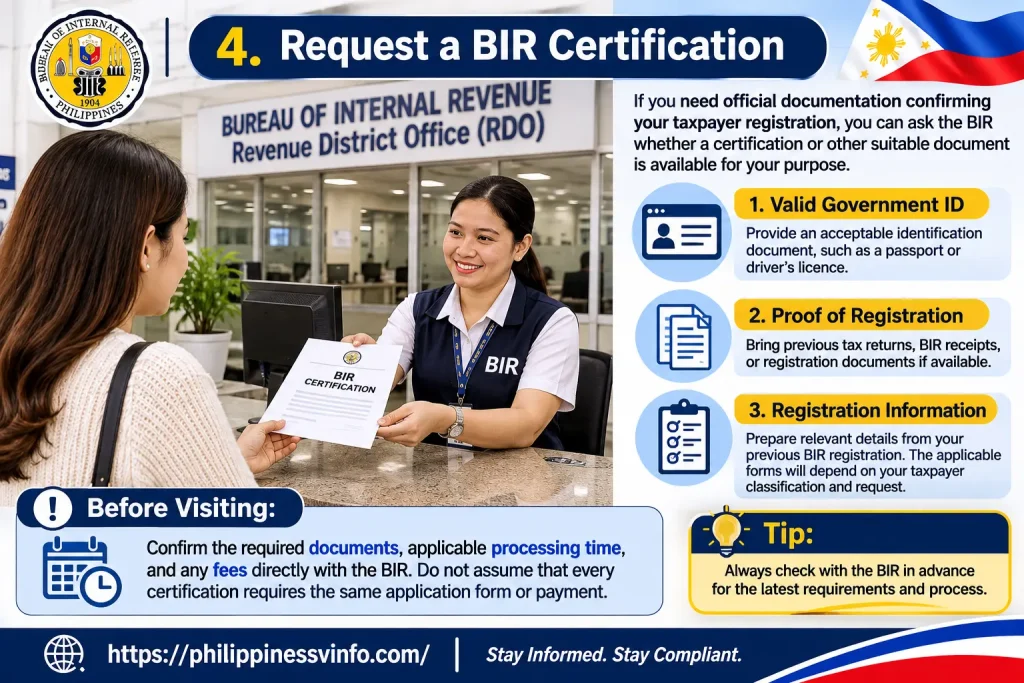
Before visiting the RDO, confirm the required documents, applicable processing time, and any fees directly with the BIR. Do not assume that every certification requires the same application form or payment.
5. Check With Your Current or Previous Employer
If you are employed or have worked for a company in the past, your employer’s Human Resources (HR) or payroll department may have your TIN recorded in its employment and tax documentation. This can be a convenient way to recover your number without immediately visiting a BIR office.
- HR Department: Contact your current or previous employer and request assistance in locating your TIN.
- Payroll Records: Review your payslips and other payroll documents where your TIN may be recorded.
- BIR Form 2316: Ask for a copy of your Certificate of Compensation Payment/Tax Withheld, which generally includes your TIN.
Your employer may help you retrieve the number used for payroll reporting and tax withholding. Once you recover it, you can use the official BIR TIN Validation portal to check whether your submitted information matches your taxpayer record.
Important Reminder: If you already have a TIN, do not apply for another one simply because you have forgotten the original number. The BIR allows only one TIN per taxpayer. Always try to recover and verify your existing TIN before starting a new registration process.
How to Check Your TIN Number Through BIR ORUS
The Online Registration and Update System (ORUS) is an official BIR platform that allows taxpayers to access eligible online registration services and manage certain taxpayer-related information.
ORUS is useful for individuals who need to complete registration-related transactions, review their available taxpayer information, or update details when the relevant service is available.
Follow these general steps to access the platform.
Step 1: Open the Official ORUS Website
First, visit the official BIR Online Registration and Update System using the link below:
Always check the website address before entering your personal information. Using the official BIR platform helps you avoid unofficial websites.
Step 2: Access Your ORUS Account
If you already have an ORUS account, select the login option and enter your registered account credentials.
- Use the email address or login details associated with your account.
- Enter your password carefully.
- Follow any additional verification instructions displayed on the website.
New users should follow the available registration instructions and provide the information requested by ORUS.
Step 3: Navigate to the Available Taxpayer Services
After logging in, review the services displayed on your ORUS dashboard.
- Check the available registration services.
- Look for the relevant taxpayer information or update option.
- Select a service that matches your requirements.
Keep in mind that available features may depend on your account status and eligibility.
Step 4: Review Your Registration Information
Check the taxpayer information displayed in your ORUS account and compare it with your existing BIR records or registration documents.
If you notice incorrect information, review the available update options and follow the instructions provided by the BIR. Avoid submitting changes unless you understand the requirements.
Step 5: Follow the System Instructions
If the service you need is available, complete the required fields and follow the instructions displayed on the platform.
Review your information before submitting any request. Save any confirmation or reference details provided by the system for future use.
Important: ORUS and the BIR TIN Validation facility serve different purposes. Use the dedicated BIR TIN Validation portal to check an existing TIN. ORUS is primarily designed for online registration and other eligible taxpayer services.
What Should You Do If Your TIN Verification Is Unsuccessful?
Sometimes, the BIR online system may not successfully validate the TIN information you submit. However, an unsuccessful verification does not automatically mean that your TIN is invalid.
The issue may be caused by incorrect TIN digits, differences between your submitted details and BIR records, incomplete information, or temporary technical problems.
The following table explains common TIN verification problems and the actions you can take to resolve them.
| Verification Problem | Possible Reason | Recommended Action |
|---|---|---|
| TIN not validated | Incorrect TIN digits | Review and carefully re-enter your existing TIN. |
| Personal information mismatch | Your name or birthdate differs from BIR records | Check your original registration documents and enter the correct details. |
| Incorrect middle name | Missing or incorrectly entered information | Review your registered details and follow the portal’s instructions. |
| TIN not found | Record-matching or registration issue | Contact the BIR or visit your Revenue District Office (RDO) for assistance. |
| Website not loading | Internet connection or temporary technical problem | Check your connection and try again using an updated browser. |
| Submission unsuccessful | Incomplete information or temporary system issue | Review the submitted details and try again when the service is available. |
| Forgotten TIN | Your TIN is not available in your documents | Contact your employer, if applicable, or request assistance from the BIR. |
Additional Tips for Resolving TIN Verification Problems
If your TIN verification remains unsuccessful, try the following actions:
- Check your personal details: Make sure your name, birthdate, and other required information match your BIR registration records.
- Avoid repeated incorrect submissions: Review your details before trying again.
- Use official BIR channels: Do not share your personal information with unofficial websites or individuals claiming to verify TINs.
- Contact your RDO: If the online facility cannot resolve the issue, ask your Revenue District Office for guidance.
If the problem continues after checking your information, contact the BIR or visit your RDO for further assistance. Do not apply for another TIN simply because your existing number cannot be verified.
How to Recover Your TIN Number (Lost or Forgotten) Using the BIR Mobile TIN Verifier App
The Bureau of Internal Revenue (BIR) introduced the Mobile Taxpayer Identification Number (TIN) Verifier app in 2021 to help taxpayers verify or recover their TIN without immediately visiting a BIR Revenue District Office. The application was designed to provide assistance through mobile devices by allowing individuals to submit their personal information and identification documents.
However, the BIR Mobile TIN Verifier app is currently unavailable, so taxpayers should not rely on the old application or assume that its previous features are still accessible. The following seven steps explain how the original application worked and what users were previously required to do.
1. Install the TIN Verifier Mobile Application
The first step was to download the official BIR Mobile TIN Verifier application onto an Android or iOS smartphone. The app was previously available through Google Play Store and Apple App Store, allowing taxpayers to access TIN-related services directly from their mobile devices.
- Android Users: The application was previously available through Google Play Store.
- iPhone Users: iOS users could access the application through Apple App Store.
- App Verification: Users were advised to check the application details to ensure they were downloading the official BIR application.
Since the mobile application is currently unavailable, use the official BIR website to check the latest available TIN verification services instead.
2. Open the Application and Review the Privacy Policy
After installing the application, users were required to open it and review the privacy policy before proceeding. This section explained how the application handled personal information submitted during TIN verification or recovery requests.
- Open the App: Launch the BIR TIN Verifier application on your smartphone.
- Read the Privacy Policy: Review the information about personal data collection and processing.
- Click Proceed: Continue to the next screen after reviewing the displayed information.
The privacy policy was an important part of the process because users needed to submit personal information and identification documents to request TIN-related assistance.
3. Select the TIN Verifier Button
After proceeding through the privacy policy screen, users could access the main interface of the application. The TIN Verifier option provided access to the available TIN-related services.
- Locate the Option: Find the TIN Verifier button on the application screen.
- Select the Service: Tap the button to open the verification interface.
- Continue: Wait for the available service options to appear.
This section allowed individual taxpayers to proceed with either a TIN inquiry or TIN validation, depending on their requirements.
4. Read the Disclaimer and Click Proceed
Before using the verification service, the application displayed a disclaimer explaining its availability and operating conditions. According to the original app instructions, the service was intended to assist individual taxpayers.
- Read the Disclaimer: Review the conditions and limitations displayed on the screen.
- Check Service Hours: The original instructions listed Monday to Friday, from 8:00 AM to 5:00 PM.
- Click Proceed: Continue to the service selection screen after reviewing the information.
Requests submitted during weekends or holidays were scheduled for processing on the next business or working day under the original app arrangements.
5. Select the TIN Inquiry Option
The application provided two different options: TIN Inquiry and TIN Validation. Choosing the correct option was important because each service had a different purpose.
- TIN Inquiry: Used by individuals who had forgotten or lost their existing TIN and wanted to retrieve it.
- TIN Validation: Used by taxpayers who already knew their TIN and wanted to check whether the number was valid.
- Select Your Option: Choose the service that matches your requirement before proceeding.
If your main purpose was to recover a forgotten TIN number, the TIN Inquiry option was the appropriate selection in the original application.
6. Provide Your Personal Information and Identification Documents
After selecting TIN Inquiry, users were required to provide personal information through the application’s chat or message interface. The details had to be submitted in the order requested by the system to help the BIR representative identify the taxpayer.
- Personal Details: Enter your first name, middle name, last name, birthdate, residential address, and civil status.
- Additional Information: Provide your spouse’s name if applicable.
- Identification Documents: Submit a selfie showing yourself holding a valid government-issued ID, followed by a separate photograph of the same ID.
For TIN Validation, users were also required to provide their existing TIN along with the requested personal information.
The submitted information was intended to help the BIR verify the taxpayer’s identity before responding to the inquiry. Always protect your identification documents and submit personal information only through official BIR channels.
7. Wait for the BIR Representative to Process Your Request
After submitting the required information and identification documents, users had to wait for a BIR representative to review their request. The original application was designed to provide assistance through a real-time chat service during its operating hours.
- Wait for a Response: Allow the BIR representative time to review your submitted information.
- Provide Additional Details: Respond if the representative requests further information or clarification.
- Check the Result: Follow the instructions provided regarding your TIN inquiry or validation request.
Under the original app instructions, responses could arrive within a few minutes, although waiting times could be longer when representatives were unavailable.
Important Update: The BIR Mobile TIN Verifier app is currently unavailable. These seven steps describe its previous process and should not be treated as instructions for a currently working application. For present-day TIN verification, use the official BIR TIN Validation portal or contact the BIR for assistance with recovering a forgotten TIN.
BIR TIN Verification Through the Revie Chatbot
Revie is the Bureau of Internal Revenue’s (BIR) digital assistant, designed to help taxpayers access online information and selected tax-related services. It provides another official channel for individuals and employers who need assistance with TIN verification, TIN validation, and other taxpayer inquiries.
The BIR introduced TIN verification and RDO Finder features through Revie under Revenue Memorandum Circular (RMC) No. 146-2022. This makes Revie a useful option when you need guidance about your taxpayer information or want to access the available verification service.
Steps to Access the BIR Revie Chatbot
Follow these steps to access Revie through the official BIR website:
- Visit the Official BIR Website: Open the BIR official website using your browser.
- Locate the Revie Chatbot: Look for the Revie chatbot option on the website.
- Open the Chatbot: Select the chatbot to start an online conversation.
- Choose the Relevant Service: Select the available TIN verification, TIN validation, or related taxpayer assistance option.
- Provide the Required Information: Enter the details requested by the chatbot, making sure they match your BIR registration records.
- Review the Response: Follow the instructions provided and check whether additional information or assistance is required.
Important: Always access Revie through the official BIR website. Do not submit your TIN, birthdate, or other sensitive taxpayer information through unofficial messaging accounts, social media pages, or third-party websites.
Important Information for Employers: How to Verify Employee TINs
Employers have an important responsibility to check the accuracy of the TIN information provided by newly hired employees. Correct taxpayer information helps maintain accurate payroll records, supports proper tax reporting, and reduces the risk of registration-related errors.
Under BIR Revenue Memorandum Circular No. 31-2024, employers can use the available online TIN verification facility and Revie as channels for checking employee TIN information.
Key points employers should understand include:
- Online TIN verification: Employers can use the BIR’s online verification facility to check the TIN information submitted by employees.
- Revie chatbot assistance: Revie provides another official digital channel for accessing available TIN verification services.
- Employment verification: Online verification results can support the process of confirming an employee’s TIN information.
- Manual verification: Newly hired employees should not routinely be required to obtain a separate manual TIN verification slip from their RDO when the available online verification channels can be used.
Manual assistance may still be necessary when the online facility is unavailable, the submitted information does not match BIR records, or the taxpayer’s registration requires further investigation.
Official reference: BIR Revenue Memorandum Circular No. 31-2024.
How to Get Your Digital TIN ID Through BIR ORUS
Taxpayers who already have a TIN may also be eligible to generate a Digital TIN ID through the BIR Online Registration and Update System (ORUS).
The Digital TIN ID is an electronic identification document containing the taxpayer’s registered information. It provides a convenient way to access and present TIN identification details without relying only on a physical document.
The BIR introduced the Digital TIN ID through Revenue Memorandum Circular No. 120-2023. It includes a QR code that can be scanned to help authenticate the document and verify its validity.
Steps to Generate Your Digital TIN ID
Follow these general steps to access the Digital TIN ID service:
- Open the Official ORUS Portal: Visit https://orus.bir.gov.ph/.
- Log In to Your Account: Enter your registered ORUS login credentials. If you do not have an account, follow the available registration instructions.
- Locate the Digital TIN ID Service: Review the available services in your account and select the Digital TIN ID option if it is available.
- Provide the Required Information: Follow the system instructions and provide or upload your photograph if requested.
- Review Your Details: Carefully check your registered name and other displayed taxpayer information.
- Generate Your Digital TIN ID: Proceed after confirming that the information is accurate.
- Download Your Document: Save the generated Digital TIN ID so you can access it when needed.
Important: Make sure your taxpayer information is accurate before generating your Digital TIN ID. If you notice incorrect details or cannot access the service, follow the instructions provided by ORUS or contact the BIR for assistance.
Official reference: BIR Revenue Memorandum Circular No. 120-2023.
Common TIN Verification Online Problems and Solutions
While using the BIR TIN Validation portal, Revie chatbot, or ORUS, taxpayers may encounter different technical and account-related problems. These issues can occur because of incorrect personal information, differences in BIR registration records, login difficulties, or temporary website errors.
The following table explains common TIN verification problems and the practical steps you can take to address them.
| Common Problem | Possible Reason | Recommended Solution |
|---|---|---|
| TIN verification unsuccessful | Incorrect TIN digits or submitted information | Recheck your TIN and carefully enter the required details again. |
| Name does not match | The submitted name differs from your BIR registration record | Use the name recorded in your original BIR registration documents. |
| Forgotten TIN number | You cannot find your TIN in your available documents | Check previous tax records or contact your employer or the BIR. |
| ORUS login problem | Incorrect password, email, or account credentials | Check your registered email and password, then follow the available account recovery instructions. |
| Account verification issue | Account registration or verification is incomplete | Follow the verification instructions provided by ORUS. |
| Website not loading | Browser, internet connection, or temporary technical issue | Check your internet connection, try an updated browser, or access the website again later. |
| Incorrect birthdate | The submitted birthdate does not match BIR records | Review your official documents and enter the correct information. |
| Existing TIN not recognized | Record-matching issue or differences in registration information | Contact your registered RDO or the BIR for assistance. |
What to Do When the Problem Continues
If your TIN verification still fails after following the recommended solutions, avoid repeatedly submitting incorrect information. Instead, review your original registration documents and contact the BIR through its official channels.
You may also visit your registered Revenue District Office (RDO) if your taxpayer information requires manual checking or correction. Never apply for another TIN simply because the online verification system cannot recognize your existing number.
What Should You Do If Your TIN Details Are Incorrect?
If the personal information you submit does not match your BIR registration record, identify the incorrect details before requesting an update. Even a small difference in your registered name, middle name, or birthdate may affect the online verification process.
Follow these steps to address incorrect TIN information:
- Review Your Original Registration Details: Check your BIR registration documents or previous tax records to identify the information originally submitted.
- Check Your Registered Name: Confirm the spelling of your first name, middle name, last name, and suffix, if applicable.
- Verify Your Birthdate: Compare the birthdate entered during TIN validation with your official records.
- Identify the Incorrect Information: Determine whether the problem involves your name, birthdate, address, or another taxpayer detail.
- Contact Your Registered RDO: Ask the appropriate RDO about the requirements and procedure for correcting your registration information.
- Use the Applicable BIR Update Service: If an online update facility is available for your transaction, follow its instructions and submit the required information.
For registration-related updates, you can also check the BIR’s official website and available eServices, including the Taxpayer Registration-Related Application (TRRA) facility where applicable.
Visit: BIR Official Website
Remember: Correcting an existing TIN record is different from applying for a new TIN. If you already have a TIN, do not submit another registration application to resolve incorrect personal information.
TIN Verification Online: Important Things to Remember
Before using the BIR TIN Validation portal, Revie chatbot, or ORUS, keep these important points in mind:
- Use official BIR platforms: Access TIN-related services through the official BIR website and its authorized online facilities.
- Check your existing TIN first: Confirm whether you already have a TIN before starting any new registration process.
- Avoid duplicate TINs: Every taxpayer should use their existing TIN rather than applying for another one.
- Enter accurate information: Make sure your name, birthdate, and other required details match your BIR registration records.
- Protect your taxpayer information: Do not share your TIN or personal details with unknown websites or unauthorized individuals.
- Keep your tax documents: Save copies of your BIR registration records and other relevant tax documents for future reference.
- Use the correct BIR service: Use the dedicated TIN Validation facility to check an existing TIN, while ORUS is intended for eligible registration and taxpayer-related services.
- Request official assistance: Contact the BIR or your registered RDO if online verification repeatedly fails or your information needs correction.
Following these precautions can make the TIN verification process easier and help protect your taxpayer information. Always rely on official BIR instructions when checking, recovering, or updating your TIN details.
Frequently Asked Questions About TIN Verification Online
Here are eight important FAQs about TIN verification online in the Philippines, including how to check your TIN, verify its status, recover a forgotten number, use Revie and ORUS, and resolve common verification problems.
Final Thoughts
TIN Verification Online in the Philippines makes it easier for taxpayers to check their existing Tax Identification Number and confirm whether their information matches BIR registration records. By using the official BIR TIN Validation portal, Revie chatbot, and ORUS services, individuals and employers can access the appropriate digital channels for TIN verification and other eligible taxpayer transactions.
Before submitting a verification request, make sure your TIN, full name, and birthdate are accurate. If your TIN cannot be verified, do not immediately assume that it is invalid or apply for another one. Instead, review your registration documents and contact your Revenue District Office (RDO) for assistance when necessary.
Whether you need to verify an existing TIN, recover a forgotten number, correct registration details, or generate a Digital TIN ID, always follow official BIR procedures. Keeping your taxpayer information accurate and secure can help you avoid unnecessary delays and make future tax-related transactions easier.