LERIS PRC Philippines 2026: Complete Registration, Password Reset, License Renewal & Verification Guide

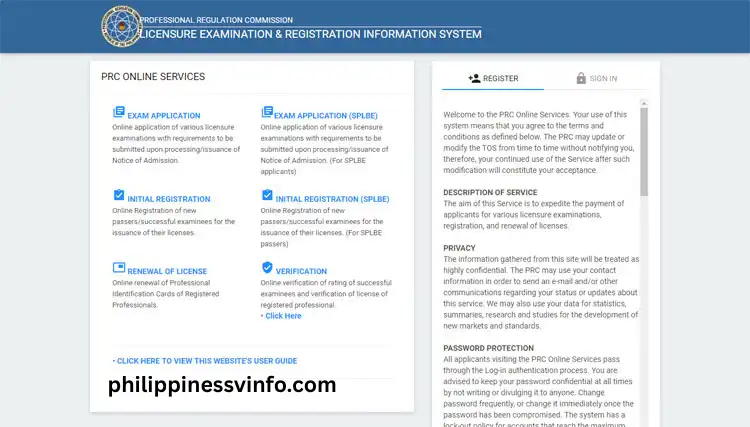
The LERIS PRC Philippines portal is the official online platform of the Professional Regulation Commission (PRC) that allows licensed professionals, board examination applicants, and newly licensed professionals to access a wide range of PRC services through a single digital system. Instead of visiting a PRC office for every transaction, users can conveniently manage applications, schedule appointments, renew licenses, request certifications, and update professional records online through their PRC LERIS account Philippines account.
As PRC continues to expand its digital services, PRC LERIS Philippines has become the primary online gateway for professional transactions across the country. Whether you need to complete a LERIS PRC Philippines registration, apply for a licensure examination, process a PRC license renewal, reset a forgotten password, verify professional credentials, or access other PRC online services, the platform provides a secure, convenient, and efficient way to manage these transactions anytime and anywhere with an internet connection.
What Is PRC LERIS account Login?
The LERIS PRC Login portal is the official online system developed by the Professional Regulation Commission (PRC) to provide convenient access to various professional services. Through this platform, users can create and manage a LERIS Account, submit applications, schedule appointments, renew licenses, request certifications, and verify professional credentials online.
The portal helps reduce in-person visits to PRC offices by allowing professionals and applicants to complete many transactions digitally. It serves thousands of Filipino professionals daily and remains the official platform for most PRC online processes.. Visit Homepage.
Key Features Available Through LERIS PRC Login
The PRC LERIS Login system offers a wide range of services that support professionals throughout their careers.
| Service | Purpose |
|---|---|
| Account Registration | Create a PRC online account |
| Licensure Examination Application | Apply for board examinations |
| Initial Registration | Registration for successful board exam passers |
| License Renewal | Renew Professional Identification Cards |
| Appointment Scheduling | Book appointments with PRC offices |
| Certification Requests | Request official PRC certifications |
| Online Verification | Verify professional records and credentials |
| Password Recovery | Restore account access |
| Profile Management | Update personal information |
Maintaining an active LERIS Account is important because most PRC transactions are now processed through this platform.
Requirements Before Creating a LERIS Account
Before starting your PRC LERIS Registration, prepare the necessary information to avoid delays during account creation.
You should have:
- Active email address
- Stable internet connection
- Complete legal name
- Date of birth
- Mobile phone number
- Secure password
- Personal information matching official records
- Government-issued identification details when required
Always ensure that the information entered matches your official documents to prevent verification issues later.
How to Register for a New LERIS PRC Account
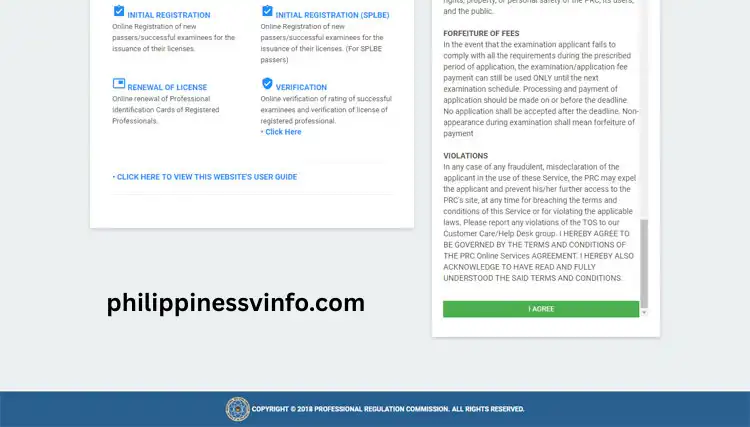
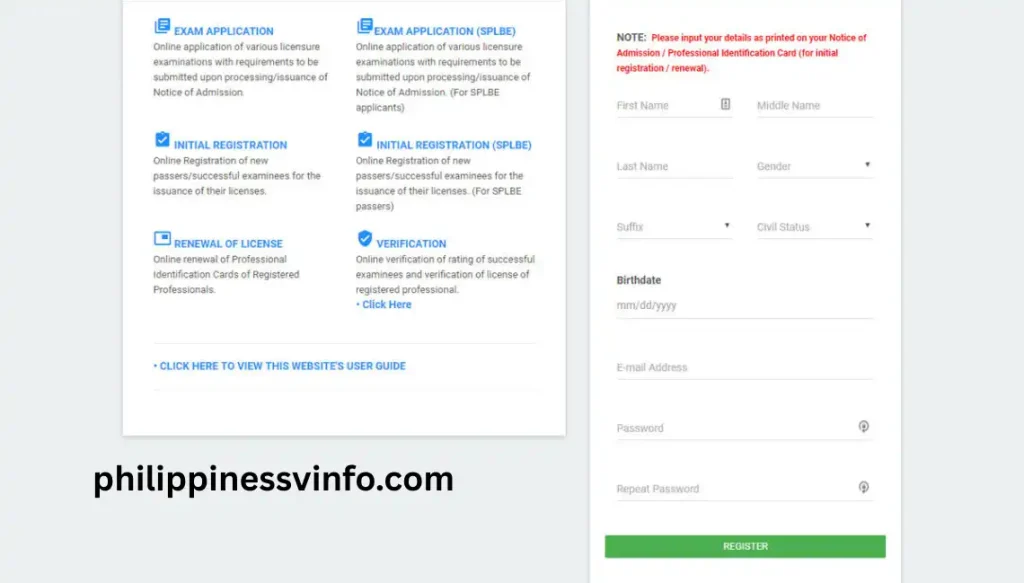
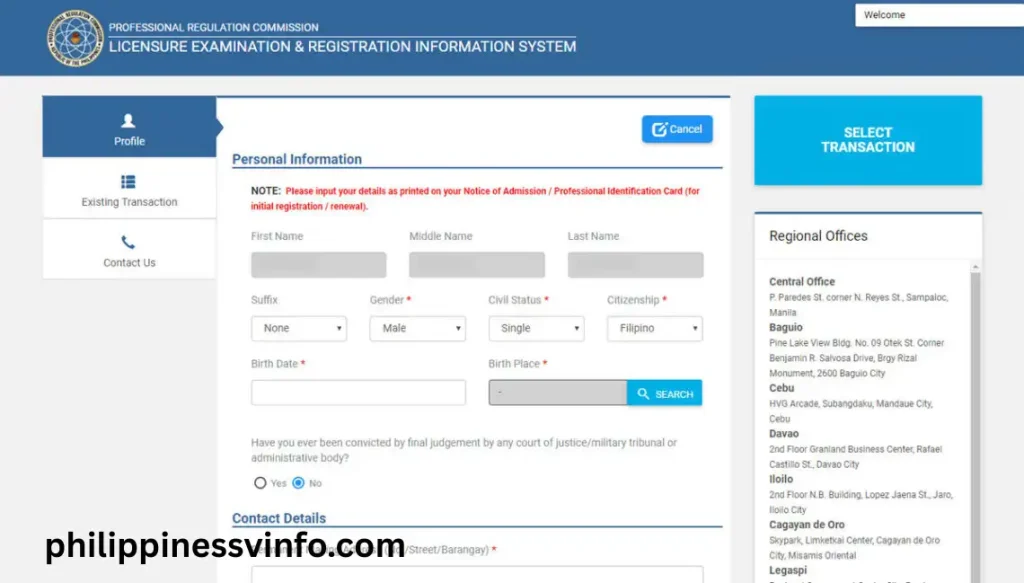
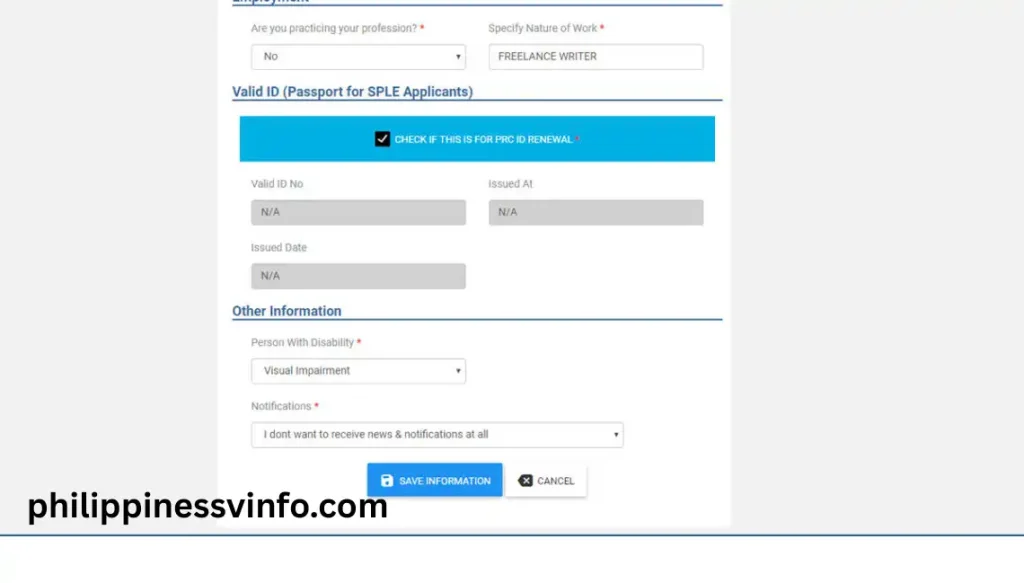
Creating a PRC LERIS account is the first step before you can apply for a licensure examination, renew your PRC ID, or use any online PRC service. The registration process only takes a few minutes, but you must enter accurate information and prepare the required documents in advance to avoid delays.
Your password must:
Your photo should meet these specifications:
Adjust the image within the preview frame before uploading it.
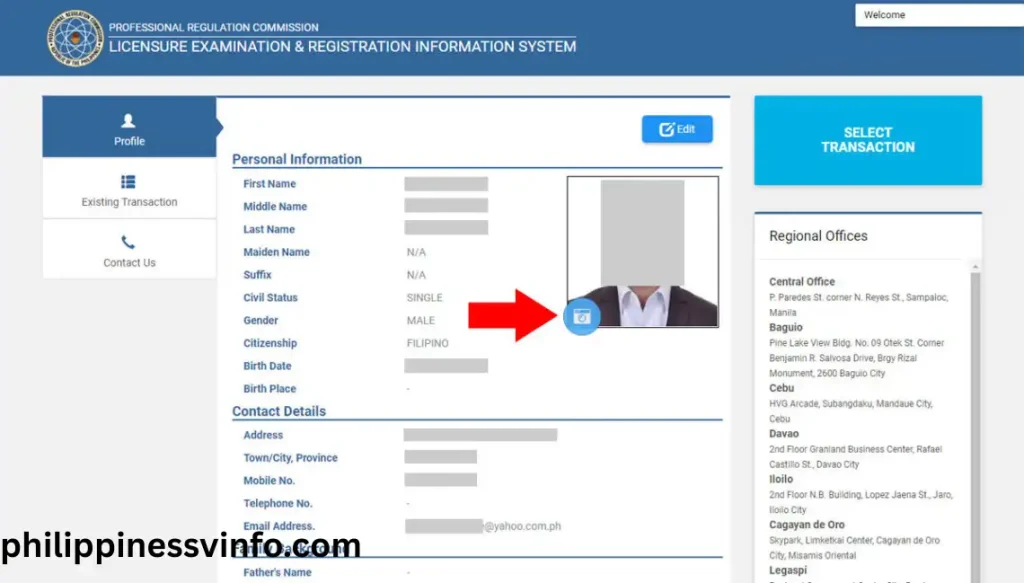
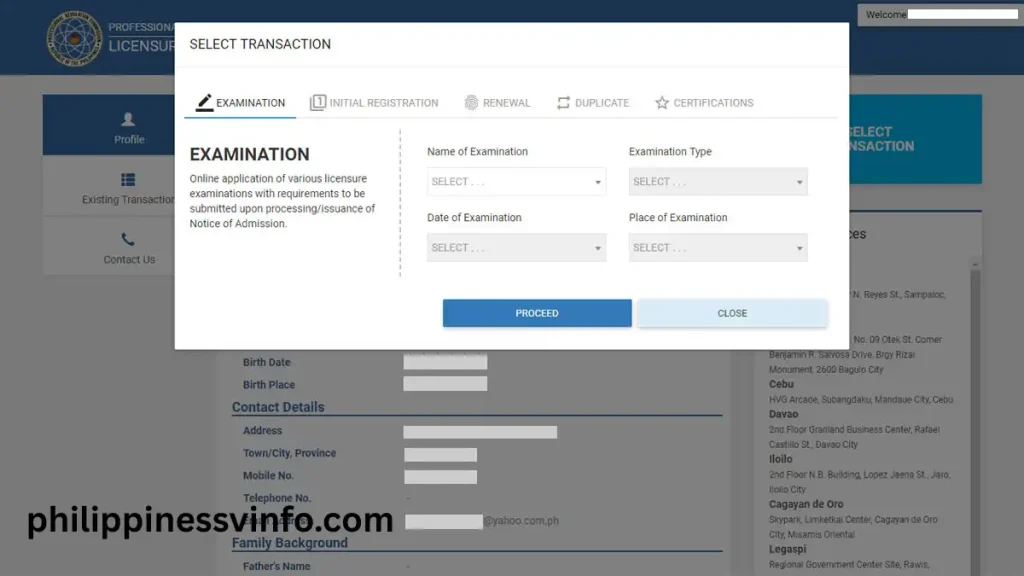
Once you’ve selected your transaction, you can proceed with appointment scheduling, payment, and document submission through your LERIS account.
How to Sign In to Your LERIS Account
After successfully completing your PRC LERIS Registration, you can access your account through the login page.
Login Procedure
- Visit the official LERIS portal.
- Enter your registered email address.
- Type your password.
- Complete any captcha verification if required.
- Click Sign In.
After a successful login, you will be redirected to your personal dashboard where all PRC services can be accessed.
Understanding the LERIS Dashboard
The dashboard serves as the main control panel for managing your professional transactions and account information.
Depending on your account status, you may access:
- Examination Applications
- Existing Licenses
- Appointment Management
- Initial Registration
- License Renewal
- Certification Requests
- Personal Information
- Transaction History
- Payment Records
It is recommended to regularly update your contact details and review your account information for accuracy.
How to Recover a Forgotten LERIS Password
The LERIS Password Reset feature helps users regain access to their account when they forget their login credentials. The recovery process is completed online through your registered email address and can usually be finished within a few minutes.
Step 1: Open the Password Recovery Page
Visit the official LERIS PRC Login portal and proceed to the login page. Below the sign-in fields, click the Forgot Password option to start the account recovery process.
- Visit the official LERIS portal
- Open the login page
- Click Forgot Password
Step 2: Enter Your Registered Email Address
Provide the email address linked to your LERIS Account. The system uses this information to identify your account and send password reset instructions.
- Enter your registered email
- Verify the email is correct
- Continue to the next step
Step 3: Submit the Password Reset Request
Complete any captcha or security verification shown on the screen. Once verified, submit your password recovery request.
- Complete security verification
- Confirm account details
- Submit the request
Step 4: Check Your Email Inbox
PRC will send a password reset email containing a secure recovery link. If you do not see the email immediately, check other folders as well.
- Check your inbox
- Review spam or junk folders
- Locate the password reset email
Step 5: Open the Recovery Link
Click the password reset link provided in the email. This will redirect you to a secure page where you can create a new password.
- Open the reset email
- Click the recovery link
- Access the password reset page
Step 6: Create a New Password
Choose a strong password that meets PRC security requirements. A secure password helps protect your account from unauthorized access.
- Use uppercase and lowercase letters
- Include numbers and special characters
- Create a unique password
Step 7: Sign In to Your Account
After successfully updating your password, return to the LERIS PRC Login page and sign in using your new credentials. You can then access all available PRC online services.
- Return to the login page
- Enter your new password
- Access your account dashboard
Common Login Problems and Solutions
| Common Login Problem | Solution |
|---|---|
| Incorrect Password | Password fields are case-sensitive. Make sure you enter the correct uppercase letters, lowercase letters, numbers, and special characters used when creating your password. |
| Email Not Recognized | Verify that you are using the same email address that was registered during your LERIS PRC Login account creation. |
| Verification Email Not Received | Check your Inbox, Spam, Junk, and Promotions folders. Wait a few minutes for delivery before requesting another verification email. |
| Account Temporarily Locked | Multiple unsuccessful login attempts may temporarily lock your account. Wait until the security lock period expires before trying to sign in again. |
Applying for PRC Licensure Examinations Through LERIS
One of the most important functions of the LERIS PRC Login portal is the online licensure examination application system. Applicants can conveniently submit examination requirements, schedule appointments, and manage their applications through a single online platform.
The examination application process generally includes:
- Selecting the desired examination
- Completing the online application form
- Providing required personal information
- Scheduling a PRC appointment
- Paying examination fees
- Printing application documents
By using the PRC Online Services platform, applicants can complete most requirements digitally, making the process faster, more organized, and more convenient than traditional manual applications.
How to Renew Your Professional License Through PRC LERIS account
One of the most commonly used services in the LERIS PRC Login portal is professional license renewal. The system allows qualified professionals to submit renewal applications online, schedule appointments, and complete payment transactions before visiting a PRC office if necessary. Renewing your license on time helps maintain active professional status and prevents issues related to expired credentials.
Requirements Before License Renewal
Before starting your PRC License Renewal application, make sure you have the following:
- Active LERIS account
- Current Professional Identification Card (PIC)
- CPD compliance records (if applicable)
- Active email address
- Available payment method
- Updated personal information
Specific requirements may vary depending on your profession and current PRC regulations.
Step-by-StepPRC LERIS Renewal License Process
Step 1: Access Your LERIS Dashboard
Sign in to your PRC LERIS Renewal account using your registered email address and password. After logging in successfully, you will be directed to your account dashboard where all available PRC services can be accessed.
What You’ll Need:
- Registered email address
- LERIS password
- Stable internet connection
Step 2: Select Your Existing License
From the dashboard, locate your current professional license information. The system will display your registered profession and license details that are eligible for renewal.
Review the Following:
- License number
- Profession details
- License expiration date
Step 3: Choose the License Renewal Option
Click the Renew Professional Identification Card service. The portal will automatically generate the renewal application and display any applicable requirements.
Prepare to Review:
- Renewal application form
- Professional details
- Renewal requirements
Step 4: Verify and Update Information
Carefully check all personal and professional information before proceeding. If necessary, update any outdated contact details to ensure smooth processing.
Information to Confirm:
- Personal information
- Contact details
- License information
- CPD compliance records
Step 5: Schedule Your Appointment
Select your preferred PRC office and choose an available appointment schedule that is most convenient for you.
Appointment Details:
- Preferred PRC office
- Available appointment date
- Processing schedule
Step 6: Complete the Payment
The system will display available payment options and instructions. Follow the payment process and save your receipt after completing the transaction.
Payment Requirements:
- Valid payment method
- Reference number
- Payment confirmation receipt
Step 7: Download and Print Your Documents
Once your payment has been validated, download and print the generated application documents. Bring all required paperwork during your appointment if personal appearance is required.
Documents to Prepare:
- Printed application form
- Payment receipt
- Supporting documents (if applicable)
Requesting a Duplicate Professional Identification Card
The LERIS PRC Login portal also allows professionals to process requests for a replacement Professional Identification Card when the original card has been lost, stolen, or damaged.
Situations That Require a Duplicate Card
You may need a replacement card if:
- Your card was lost
- Your card was stolen
- Your card was damaged
- Card details are unreadable
- The card has deteriorated over time
Step-by-Step Duplicate Card Request
Step 1: Log In to Your Account
Access your PRC LERIS account Login account through the official portal.
Required Credentials:
- Registered email
- Password
- Verified account
Step 2: Select Duplicate Card Service
Locate and choose the duplicate card transaction from the available services.
Service Information:
- Card replacement option
- Application requirements
- Processing details
Step 3: Submit Supporting Documents
Upload any required documents requested by the system.
Possible Documents:
- Affidavit of Loss
- Identification documents
- Supporting records
Step 4: Schedule an Appointment
Choose your preferred PRC office and appointment schedule.
Appointment Requirements:
- Office location
- Available date
- Confirmation schedule
Step 5: Complete Payment
Pay the required processing fee through the available payment channels.
Payment Information:
- Applicable fees
- Payment method
- Receipt confirmation
Step 6: Print Application Documents
Download and print the generated forms for your appointment.
Documents to Print:
- Application form
- Payment receipt
- Supporting documents
How to Verify a Professional License Online
The PRC Verification feature allows employers, schools, government agencies, and the public to verify the authenticity of professional licenses online. This service helps confirm whether a professional’s credentials remain active and valid.
Information Needed for Verification
Prepare the following information before performing a verification search:
- License Number
- First Name
- Last Name
- Profession
Using the license number generally provides the most accurate results.
Verification Process
Step 1: Access the PRC Online Services Website
Visit the official PRC online services platform.
Requirements:
- Internet connection
- Browser access
- Accurate information
Step 2: Open the Verification Section
Locate the professional verification feature within the portal.
Available Services:
- License verification
- Credential checking
- Professional record search
Step 3: Enter Required Information
Provide all requested details exactly as they appear in official records.
Verification Details:
- License number
- Full name
- Profession
Step 4: Complete Security Verification
Complete any captcha or security validation displayed by the system.
Security Requirements:
- Captcha verification
- Human verification checks
- Search confirmation
Step 5: Review Verification Results
After processing, the system will display available professional information.
Results May Include:
- Professional name
- Profession
- Registration details
- License status
- Expiration date
Benefits of Using PRC LERIS account Login
The PRC LERIS account system provides a more convenient and efficient way for professionals to manage PRC transactions online.
| Benefit | Description |
|---|---|
| Online Access | Complete transactions anytime with internet access |
| Faster Processing | Reduces paperwork and manual procedures |
| Appointment Scheduling | Book appointments online |
| Secure Account Management | Manage records through a personal dashboard |
| Payment Integration | Supports online payment processing |
| License Monitoring | Track license validity and expiration |
| Record Verification | Verify professional credentials electronically |
Using a single LERIS Account allows professionals to access multiple PRC services without repeatedly visiting PRC offices.
Common Mistakes to Avoid
Many application delays occur because of simple mistakes that can easily be prevented.
Avoid the following errors:
- Entering incorrect personal information
- Using an inactive email address
- Missing scheduled appointments
- Forgetting account credentials
- Providing inaccurate license information
- Ignoring account verification emails
- Accessing unofficial websites instead of the official PRC portal
By maintaining accurate information and regularly monitoring your LERIS PRC Login account, you can complete PRC transactions more efficiently and avoid unnecessary processing delays.
Faqs
Conclusion
The PRC LERIS account portal has transformed the way Filipino professionals access and manage PRC services by providing a centralized online platform for registration, examination applications, license renewal, appointments, certifications, and professional verification. Through a single LERIS Account, users can complete important transactions more efficiently while reducing the need for repeated visits to PRC offices. The platform also offers convenient features such as LERIS Password Reset, online scheduling, and digital record management, making professional transactions faster and more accessible.
Whether you are creating a new account, applying for a licensure examination, renewing your Professional Identification Card, requesting a duplicate license, or performing PRC Verification, the PRC LERIS Login system provides a secure and reliable solution. By keeping your account information updated, monitoring appointments, and following official PRC procedures, you can maximize the benefits of the portal and ensure smooth processing of your professional transactions.