CRS Appointment System Philippines 2026: Appointment Booking, Requirements, Fees & Complete User Guide
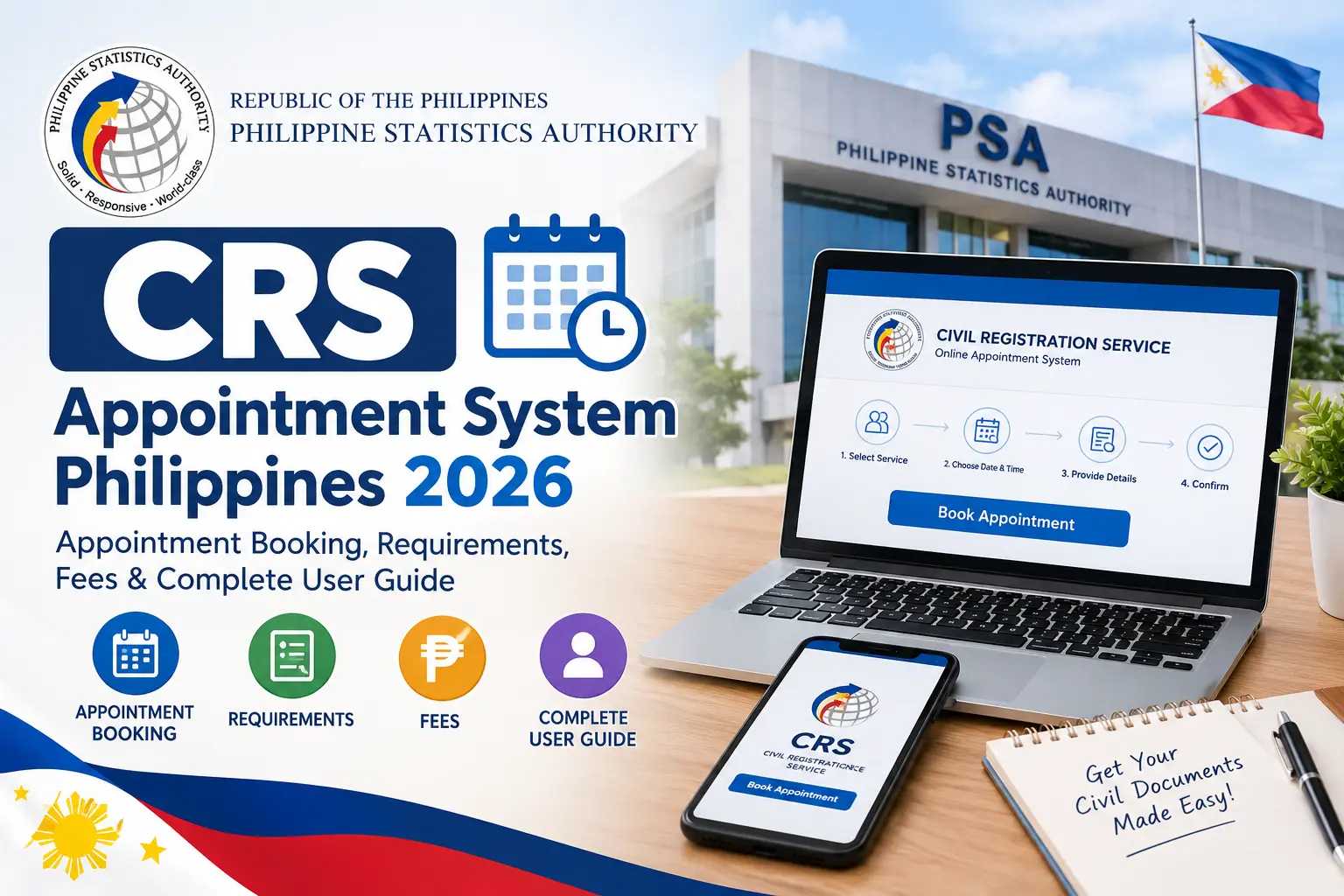
The CRS Appointment System Philippines 2026 is the official online appointment platform of the Philippine Statistics Authority (PSA), allowing individuals to schedule civil registry transactions at PSA Civil Registration Service (CRS) outlets nationwide. Through the CRS Appointment System, applicants can conveniently book appointments for important documents such as PSA Birth Certificates, Marriage Certificates, Death Certificates, and Certificates of No Marriage (CENOMAR). The platform simplifies the appointment process by enabling users to select their preferred PSA branch, appointment date, and available time slot before visiting the outlet.
Using the CRS Appointment System helps reduce long waiting times, improves transaction efficiency, and provides a more organized experience for applicants. Whether you need a PSA document for passport applications, employment requirements, school enrollment, government services, legal transactions, or personal record verification, securing an appointment in advance can save valuable time and prevent unnecessary delays. Appointment booking is completely free, and applicants should only use the official CRS Appointment System website to avoid scams, unauthorized fees, and fraudulent appointment services.
What Is the CRS Appointment System?
The CRS Appointment System is the official online appointment scheduling platform used by the Philippine Statistics Authority (PSA) to manage civil registry transactions at PSA Civil Registration Service outlets nationwide. The system allows applicants to secure an appointment before visiting a PSA branch, helping streamline document requests and reduce waiting times at service centers.
Through the CRS Appointment System, users can conveniently schedule appointments, choose their preferred PSA outlet, select available dates and time slots, and specify the civil registry document they need. The platform also provides appointment verification through email authentication and generates an appointment confirmation slip with a QR code that serves as proof of reservation. Visit Homepage
Key features of the CRS Appointment System include:
- Online appointment booking for PSA transactions.
- Selection of preferred PSA outlets and schedules.
- Request scheduling for various civil registry documents.
- Email verification for appointment confirmation.
- Generation of a QR code appointment slip.
- Access to appointment details and booking information.
Using the CRS Appointment System before visiting a PSA Civil Registration Service outlet is highly recommended, as it helps ensure a more organized, efficient, and convenient transaction experience for applicants.
Requirements Before Booking Through the CRS Appointment System
Before starting your CRS Appointment System application, it is important to prepare all required information and resources. Having everything ready beforehand can help you complete the booking process faster, avoid verification issues, and reduce the chances of appointment delays.
Accurate Personal Information
Make sure the following details are available and entered exactly as they appear on your official records:
- Full legal name
- Active mobile phone number
- Valid and accessible email address
The CRS Appointment System uses this information to verify your identity, send appointment confirmations, deliver OTP verification codes, and provide important appointment updates. Incorrect details may prevent you from receiving your appointment slip or confirmation notifications.
Stable Internet Connection
A reliable internet connection is essential when using the CRS Appointment System. Connectivity interruptions during booking may cause incomplete submissions or difficulty selecting available appointment slots.
For the best experience:
- Use a stable Wi-Fi or mobile data connection.
- Avoid refreshing pages during the booking process.
- Complete the appointment in one session whenever possible.
- Ensure your device has sufficient battery power if using a smartphone or tablet.
Access to Your Email Account
Email verification is a mandatory step when booking through the CRS Appointment System. A One-Time Password (OTP) will be sent to the email address you provide during registration.
Before proceeding:
- Confirm that you can log in to your email account.
- Check your Inbox, Spam, and Junk folders for the OTP message.
- Ensure your email address is entered correctly.
- Keep your email account open while completing the booking process.
Without successful OTP verification, the appointment request cannot be completed.
Valid Identification Documents
Although identification cards are typically presented during your actual PSA visit, preparing them ahead of time can help ensure a smooth transaction and avoid last-minute problems.
Recommended documents include:
- Philippine National ID
- Passport
- Driver’s Licence
- UMID Card
- PRC ID
- Postal ID
- Other government-issued IDs accepted by PSA
Make sure your identification documents are valid, readable, and consistent with the information entered in the CRS Appointment System.
Quick Preparation Checklist
Before booking, confirm that you have:
✔ Full legal name ready
✔ Active mobile number
✔ Valid email address
✔ Access to your email inbox
✔ Stable internet connection
✔ Valid government-issued ID
✔ Smartphone, tablet, laptop, or desktop computer
✔ Sufficient time to complete the booking process without interruption
Being fully prepared before using the CRS Appointment System can make the appointment process faster, smoother, and more convenient while helping you avoid common registration and verification issues.
How to Book an Appointment Through the CRS Appointment System
Follow the steps below to successfully schedule an appointment through the CRS Appointment System. The process is straightforward and can be completed online in just a few minutes. By providing accurate information and carefully reviewing your appointment details, you can secure a confirmed schedule for your PSA transaction and avoid unnecessary delays during your visit.
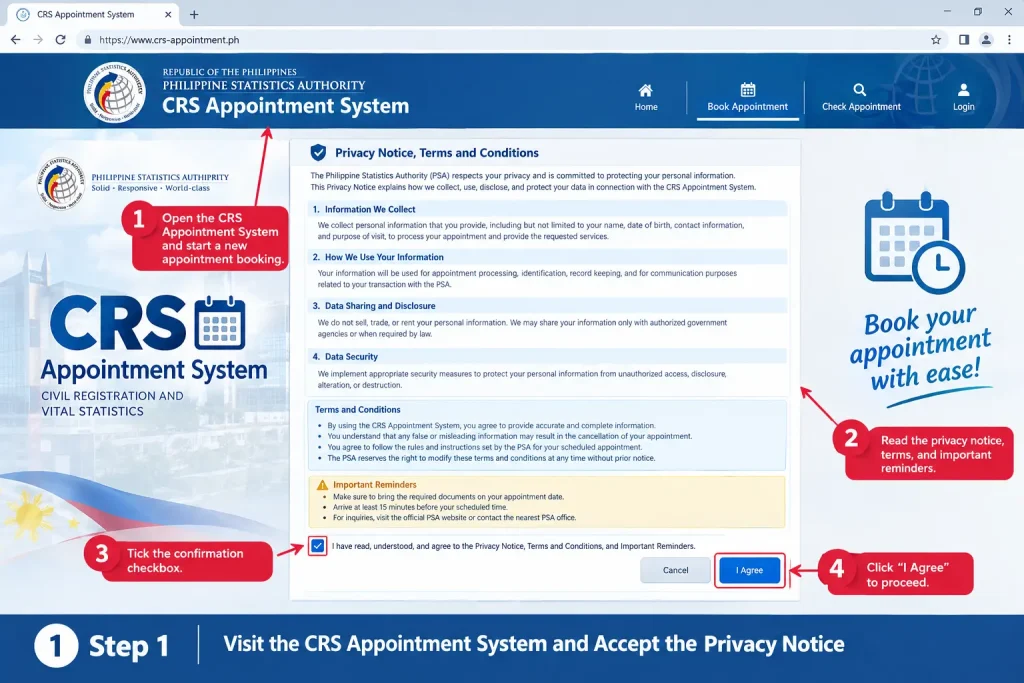
Step 1: Visit the CRS Appointment System and Accept the Privacy Notice
Start by accessing the CRS Appointment System through your preferred web browser. Before you can proceed with the appointment booking process, the system will display its privacy notice, terms, and conditions. Carefully review the information provided and accept the agreement to continue with your reservation.
- Open the CRS Appointment System and start a new appointment booking.
- Read the privacy notice, terms, and important reminders.
- Tick the confirmation checkbox and click “I Agree” to proceed.
Step 2: Select Your Preferred PSA Outlet
After accepting the privacy notice, choose the PSA Civil Registration Service outlet where you would like to process your request. Selecting the most convenient branch can help reduce travel time and ensure a smoother appointment experience. Some specialized transactions may only be available at designated PSA outlets.
- Choose your preferred PSA outlet or branch location.
- Review available schedules and outlet-specific instructions.
- Confirm your selected branch before moving to the next step.

Step 3: Enter Your Personal and Contact Information
Provide your personal details accurately, as these will be used for appointment verification and communication. The information entered during this step will appear on your appointment record and confirmation documents.
- Enter your full legal name and contact details.
- Provide a valid email address and active mobile number.
- Review all information carefully before proceeding.

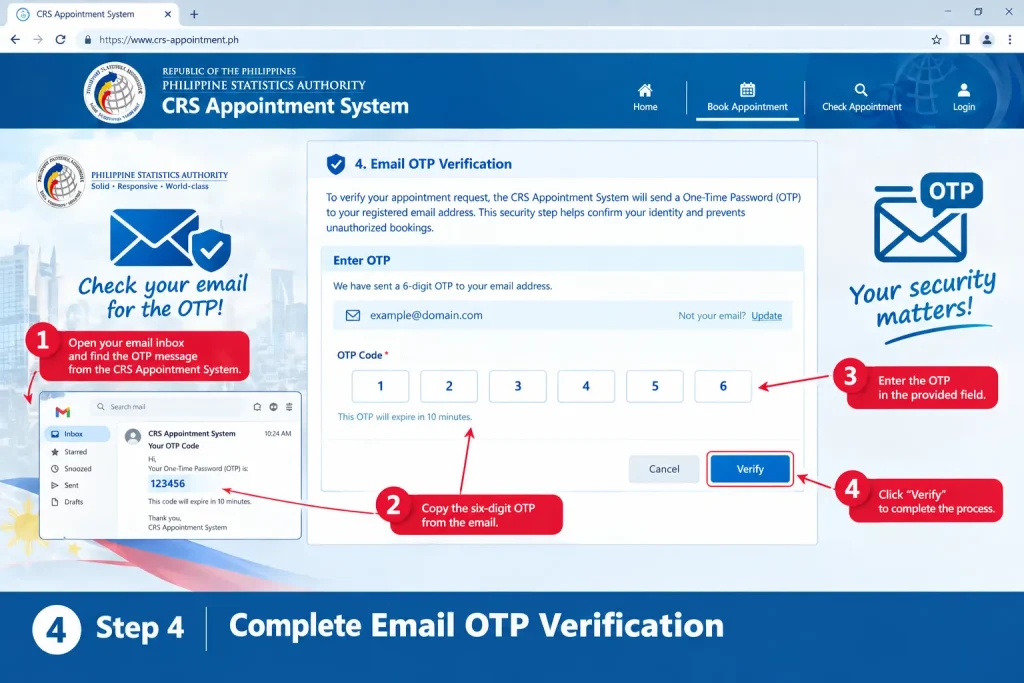
Step 4: Complete Email OTP Verification
To verify your appointment request, the CRS Appointment System will send a One-Time Password (OTP) to your registered email address. This security step helps confirm your identity and prevents unauthorized bookings.
- Open your email inbox and locate the verification message.
- Copy the six-digit OTP provided by the system.
- Enter the OTP and complete the verification process.
Step 5: Select the Document and Choose an Appointment Schedule
Once your email has been verified, select the civil registry document you wish to request and indicate your relationship to the document owner when required. The system will then display available appointment dates and time slots for your chosen PSA outlet.
- Select the required document type and relationship category.
- Choose an available appointment date and time slot.
- Review the selected schedule and confirm your preference.
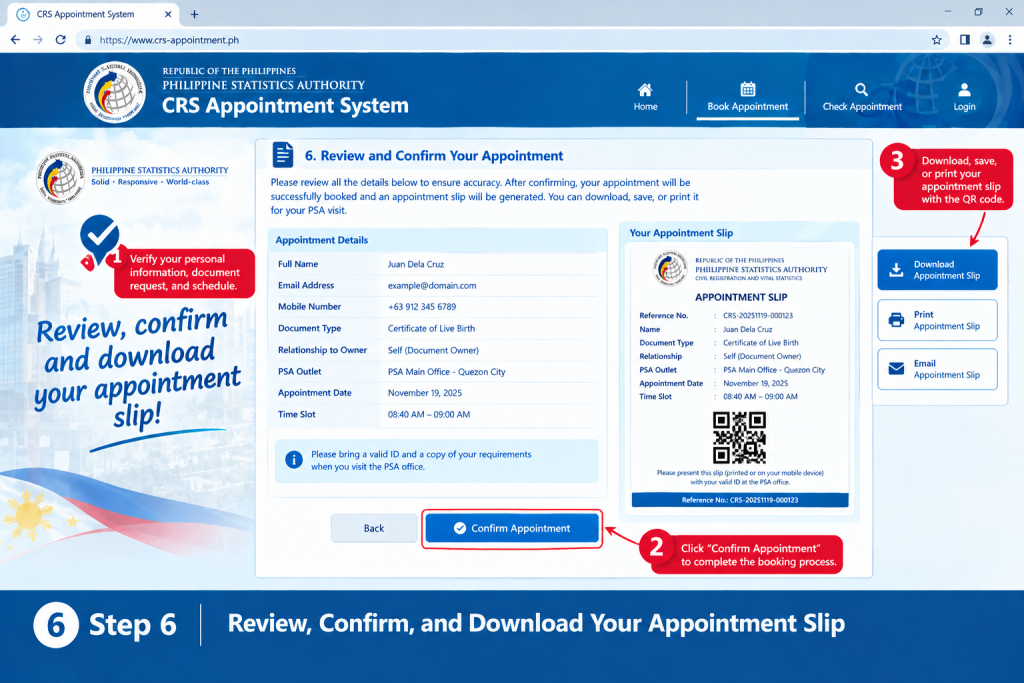
Step 6: Review, Confirm, and Download Your Appointment Slip
Before finalizing your reservation, carefully review all appointment details to ensure accuracy. After confirmation, the CRS Appointment System will generate an appointment slip containing your reference number, appointment information, and QR code, which you must present during your PSA visit.
- Verify your personal information, document request, and schedule.
- Click “Confirm Appointment” to complete the booking process.
- Download, save, or print your appointment slip with the QR code for future use.
Requirements for Your PSA Appointment
Before visiting your selected PSA outlet, make sure you have all the necessary documents and materials prepared. Bringing the correct requirements can help prevent delays, reduce waiting time, and ensure a smoother transaction at the PSA Civil Registration Service outlet.
| Requirement | Description |
|---|---|
| Appointment Slip with QR Code | Bring your confirmed appointment slip generated by the CRS Appointment System. Accepted formats may include a printed copy, downloaded PDF, or a clear mobile screenshot showing the QR code. |
| Valid Government-Issued ID | Present an original valid ID that matches the information used during appointment booking. Accepted IDs may include the National ID, Passport, Driver’s License, UMID, Postal ID, PRC ID, and other PSA-recognized identification documents. |
| Photocopies of IDs | Some transactions may require photocopies of identification documents for verification purposes. Preparing copies in advance is recommended. |
| Authorization Documents (If Applicable) | Applicants requesting documents on behalf of another person may need a signed authorization letter, valid IDs of both parties, and supporting proof of relationship when required. |
| Supporting Documents | Certain transactions may require additional records or documentary requirements depending on the type of request being processed. |
| Writing Materials | Bringing a black or blue pen can help you complete forms and other documentation quickly during your visit. |
PSA Civil Registry Document Fees
Applicants should prepare the appropriate processing fees before visiting their appointment. The fees below are commonly charged for PSA civil registry documents and related services.
| Document Requested | Processing Fee |
|---|---|
| PSA Birth Certificate | PHP 155.00 |
| PSA Marriage Certificate | PHP 155.00 |
| PSA Death Certificate | PHP 155.00 |
| Authentication or Annotation Services | PHP 155.00 |
| Certificate of No Marriage (CENOMAR) | PHP 210.00 |
Payment Reminders
| Reminder | Details |
|---|---|
| Bring Sufficient Funds | Ensure you have enough money to cover all applicable document processing fees. |
| Verify Accepted Payment Methods | Payment options may vary by PSA outlet, so verify available methods before your visit. |
| Keep Official Receipts | Always retain your payment receipt as proof of transaction. |
| Check for Fee Updates | Processing fees may change based on future PSA announcements and policy updates. |
How to Verify Your Appointment
- Check the appointment confirmation message or email after completing your CRS booking.
- Review the appointment date, time, and selected PSA CRS outlet carefully.
- Make sure your name and personal information are correct.
- Keep your appointment reference number or confirmation details for your records.
- Save or print the appointment confirmation if a copy is provided.
- Check your email or phone for any additional instructions from the appointment system.
- Bring the required valid ID and appointment details when visiting the CRS outlet.
- If you cannot find your confirmation, check your spam or junk email folder before making another appointment.
Benefits of Using the CRS Appointment System
The CRS Appointment System offers several benefits that help make PSA transactions more efficient, organized, and convenient for applicants. By scheduling an appointment in advance, users can save time, avoid unnecessary delays, and enjoy a smoother experience when requesting civil registry documents.
| Benefit | Description |
|---|---|
| Faster Processing at PSA Outlets | Applicants with confirmed appointments can follow a scheduled processing workflow, helping reduce waiting times and improve overall transaction efficiency. |
| Better Schedule Management | Users can choose an available appointment date and time that matches their personal schedule instead of waiting in long queues. |
| Improved Crowd Control | The system distributes visitors across different appointment slots, allowing PSA outlets to manage daily transaction volumes more effectively. |
| Convenient Online Access | Appointments can be booked anytime using desktop computers, laptops, tablets, or smartphones with an internet connection. |
| Secure Appointment Confirmation | Users receive appointment verification and a QR code confirmation slip that serves as proof of their scheduled transaction. |
| Reduced Waiting Time | Advance scheduling helps minimize congestion at PSA outlets and allows applicants to complete transactions more efficiently. |
| Easy Appointment Management | Applicants can review appointment details and, when available, manage their booking information through the system. |
| More Organized Transactions | Scheduled appointments help create a smoother and more structured processing environment for both applicants and PSA personnel. |
Civil Registry Documents Available Through the CRS Appointment System
The CRS Appointment System supports appointment scheduling for several PSA-issued civil registry documents commonly required for legal, educational, and government transactions.
| Document Type | Common Uses |
|---|---|
| PSA Birth Certificate | Passport applications, school enrollment, employment requirements, identity verification |
| PSA Marriage Certificate | Marriage documentation, legal and financial transactions |
| PSA Death Certificate | Estate settlement, insurance claims, and official reporting |
| CENOMAR | Proof of no registered marriage for employment, marriage licensing, and immigration purposes |
Depending on the nature of the request, PSA personnel may require additional supporting documents or authorization letters during processing.
Common Mistakes to Avoid When Using the CRS Appointment System
Many appointment-related issues result from simple but avoidable errors. To ensure a smooth booking experience, avoid the following common mistakes:
❌ Entering an incorrect email address
❌ Providing an inactive or incorrect mobile number
❌ Forgetting to save or print the appointment QR code
❌ Selecting the wrong PSA outlet location
❌ Missing the scheduled appointment date and time
❌ Arriving without a valid identification document
❌ Booking appointments through unofficial or unauthorized websites
For your security and protection, always use the official CRS Appointment System when scheduling PSA appointments. Using legitimate channels helps safeguard your personal information and reduces the risk of appointment-related fraud.
Rescheduling and Cancelling a CRS Appointment System Booking
There may be situations where you need to change or cancel an existing CRS Appointment System reservation. Depending on the options available for your booking, the system may allow you to manage your appointment without creating an entirely new reservation.
If you need to modify your schedule, begin by reviewing the appointment confirmation email or notification you received after completing your booking. This message typically contains important appointment management information.
How to Reschedule an Appointment
If the rescheduling feature is available for your appointment, follow these steps:
- Open your appointment confirmation email.
- Locate the reschedule link provided in the notification.
- Access the appointment management page.
- Select a new available appointment date and time.
- Confirm the updated schedule.
- Download or save the revised appointment slip.
Before finalizing any changes, carefully review the updated appointment details to ensure all information is correct.
How to Cancel an Appointment
If you no longer require your scheduled appointment, you may cancel it through the appointment management options provided in your confirmation message.
To cancel your appointment:
- Open the original appointment confirmation email.
- Click the cancellation link or appointment management option.
- Confirm your cancellation request.
- Save any cancellation reference number or confirmation details provided by the system.
Cancelling appointments that will no longer be used helps free up available slots for other applicants utilizing the CRS Appointment System.
What to Expect on Your Appointment Day
Knowing what happens during your scheduled visit can help make your PSA transaction faster and more convenient. Arriving prepared, bringing the necessary documents, and following the proper procedures can help minimize delays and ensure a smooth experience at your selected PSA Civil Registration Service outlet.
| Stage | What You Need to Do |
|---|---|
| Arrive Before Your Schedule | Applicants are encouraged to arrive at least 15 minutes before their appointment time and up to 30 minutes early during busy periods. Early arrival provides enough time for verification and security procedures before processing begins. |
| Present Your Appointment QR Code | Upon arrival, present your appointment slip or QR code together with a valid government-issued ID. Security personnel or designated staff may verify your appointment details before allowing entry into the facility. |
| Appointment Verification | PSA personnel will review your appointment information, QR code, and identification documents to confirm your scheduled transaction. |
| Receive Your Queue Number | After successful verification, you may be issued a queue number and directed to the appropriate waiting area for processing. |
| Wait for Your Turn | Monitor announcement screens, queue displays, or staff instructions while waiting for your number to be called. |
| Proceed to the Service Window | When your queue number is called, proceed to the assigned service counter and submit the required information and documents. |
| Pay the Required Fees | Complete payment for the requested PSA document or service based on the applicable processing fees. |
| Receive Release Instructions | After processing, PSA personnel will provide instructions regarding document release, claim procedures, or any additional requirements that may apply. |
Typical PSA Appointment Process
| Step | Transaction Flow |
|---|---|
| 1 | Appointment and QR code verification |
| 2 | Queue number issuance |
| 3 | Waiting area assignment |
| 4 | Processing at the designated service window |
| 5 | Payment of applicable fees |
| 6 | Document release instructions or claim information |
Important: Arriving late may result in delays, additional verification procedures, or the need to book a new appointment, depending on the policies and appointment capacity of the PSA outlet you selected.
Troubleshooting Common CRS Appointment System Issues
Although the CRS Appointment System is designed to be user-friendly, applicants may occasionally encounter technical or booking-related concerns. Understanding the most common issues and their solutions can help prevent unnecessary delays.
| Problem | Recommended Solution |
|---|---|
| OTP not received | Check your spam or junk folder and verify that your email address was entered correctly. |
| No available appointment slots | Try selecting a different date, time, or PSA outlet. |
| Incorrect booking information | Review all details before confirmation or use available appointment management options if applicable. |
| Missing QR code | Reopen the confirmation email and download the appointment slip again. |
| Unable to access the website | Try another web browser, clear your cache, or verify your internet connection. |
| Confirmation email not received | Search all inbox folders and confirm that the registered email address is correct. |
| Missed appointment schedule | Create a new reservation through the official CRS Appointment System. |
Helpful Tips for a Faster PSA Transaction
Applicants who prepare in advance often enjoy a smoother and more efficient experience during their PSA appointment.
Before Leaving Home
✔ Save a digital copy of your appointment slip.
✔ Print a physical copy whenever possible.
✔ Prepare all required valid identification documents.
✔ Bring sufficient funds for applicable document fees.
✔ Carry a black or blue pen.
✔ Double-check your appointment date and time.
During Your Visit
✔ Follow all instructions provided by PSA personnel.
✔ Keep your queue number secure.
✔ Monitor announcement boards and display screens.
✔ Retain all official receipts and transaction records.
✔ Carefully verify document details before leaving the outlet.
FAQs
Conclusion
The CRS Appointment System makes it easier for Filipinos to arrange PSA appointments for essential civil registry documents without the inconvenience of long queues and uncertain waiting times. By securing an appointment online, applicants can choose a suitable schedule, receive appointment confirmations electronically, and complete their transactions in a more organised and efficient manner. This streamlined process helps individuals obtain important records such as Birth Certificates, Marriage Certificates, Death Certificates, and CENOMAR documents through official PSA channels.
To ensure a hassle-free experience, always use the official CRS Appointment System website, provide accurate personal information, and prepare all required documents before your scheduled visit. Keeping a copy of your appointment slip and QR code readily available can help speed up verification and entry procedures at the PSA outlet. With proper preparation and timely attendance, the CRS Appointment System remains a dependable and convenient solution for accessing vital PSA civil registry services throughout the Philippines.