AIMS Portal Philippines 2026: Login, Student Portal, LMS, Admissions & Complete User Guide
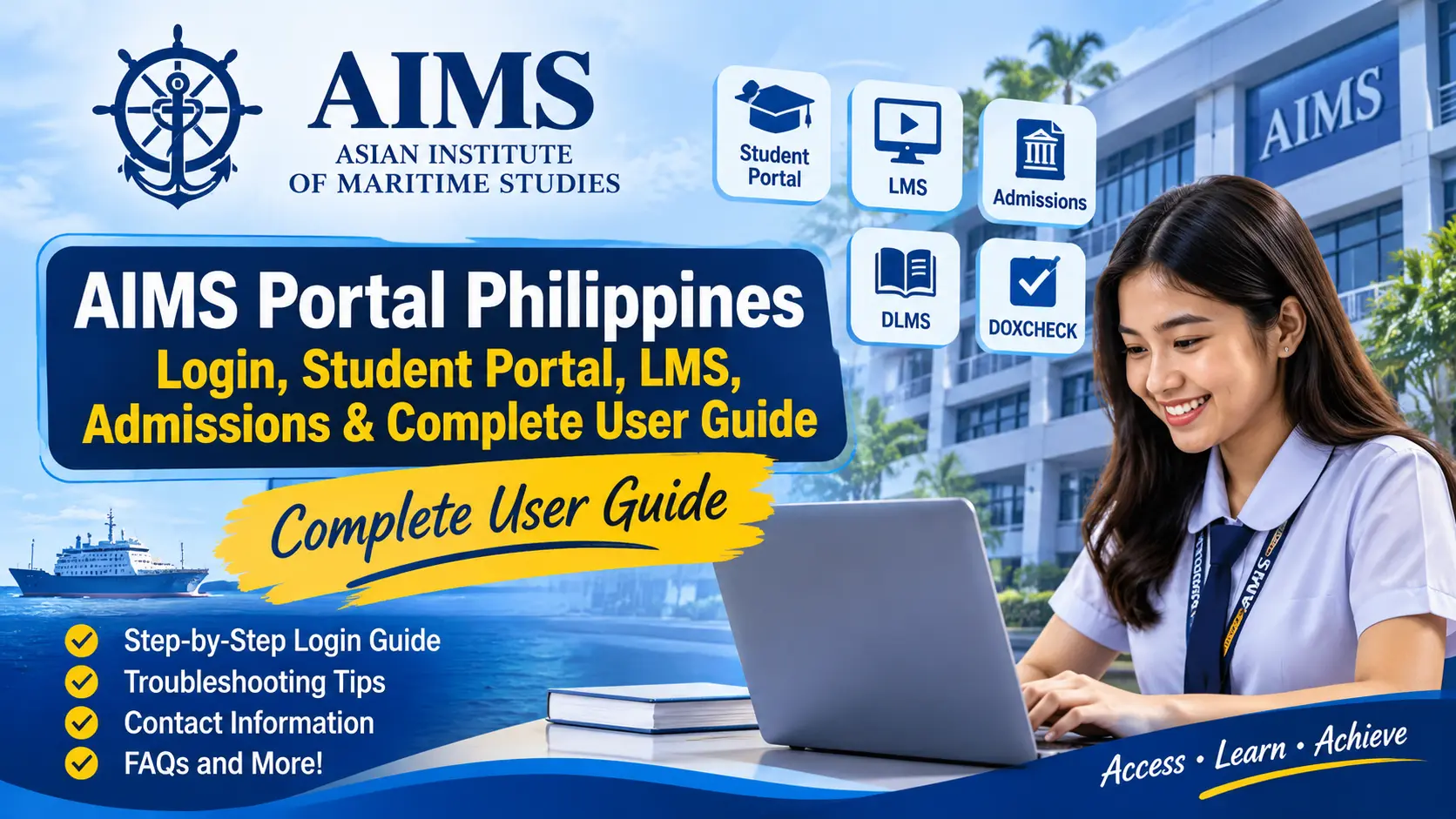
The AIMS Portal Philippines provides students, faculty members, graduates, applicants, and other members of the academic community with convenient access to the online services of the Asian Institute of Maritime Studies (AIMS). Through its official website, users can explore student-related services, online learning platforms, admission information, library resources, and other institutional systems designed to support academic and administrative activities.
For students in the Philippines, understanding how the AIMS Portal works is essential because the institution provides different online platforms for specific purposes. These include the Student Portal, Learning Management System (LMS), Destiny Library Management System (DLMS), and Alumni Connect. Each platform serves a particular group of users, offers different features, and may require separate login credentials.
The official AIMS website serves as the primary access point for these digital services. Whether you need to access your student account, participate in online classes, review educational materials, explore admission opportunities, or obtain academic information, selecting the correct portal can help you complete your tasks more efficiently.
This comprehensive AIMS Portal Philippines 2026 guide explains how to access the available online platforms, complete the login process, understand student services, explore admission-related resources, and resolve common account access problems.
What Is the AIMS Portal?
The AIMS Portal is a collection of online platforms and institutional services provided through the official website of the Asian Institute of Maritime Studies. Instead of offering all academic and administrative functions through a single login system, AIMS maintains separate digital platforms to accommodate the different requirements of its students, faculty members, graduates, applicants, and authorised personnel.
The official website acts as a central information hub where visitors can find relevant services and navigate to the appropriate online systems. For instance, officially enrolled students can use the designated Student Portal to access available academic services, while students attending online classes can access their learning materials and coursework through the Learning Management System (LMS).
Similarly, authorised users can explore library resources through the Destiny Library Management System, while graduates can access alumni-related services through Alumni Connect.
This organised system makes it easier for different users to find the services relevant to their academic or institutional responsibilities. It also helps prevent confusion between student accounts, employee systems, learning platforms, and alumni services.
Image placement: Asian Institute of Maritime Studies (AIMS), Philippines – institutional website or campus image.
Who Can Use AIMS Online Services?
The AIMS online services are designed to support different members of the institution’s academic and professional community. However, the available features depend on the user’s relationship with AIMS, account status, and assigned permissions.
The following groups may access the relevant AIMS platforms:
- Enrolled Students: Officially registered students can use designated student services and learning platforms to access available academic information, coursework, and educational resources.
- Prospective Applicants: Individuals interested in studying at AIMS can explore admission requirements, application information, and online enrolment guidance.
- Faculty Members: Teaching personnel may use authorised learning and institutional platforms to manage academic activities, support students, and access educational materials.
- AIMS Graduates: Former students can access available graduate services, networking opportunities, and alumni-related information through the designated Alumni Connect platform.
- Employers and Third Parties: Authorised external users may access the appropriate document verification service to verify eligible academic credentials.
- Administrative Employees: Institutional staff members can use internal systems according to their assigned roles and access permissions.
Important: Access to the main AIMS website does not automatically provide an active account for every online platform. Your eligibility, account activation, and login credentials depend on your user category and the specific services assigned to your account.
AIMS Portal Login: Understanding the Available Platforms
Before starting the AIMS Portal login process, it is important to identify which online system you need. Since AIMS provides multiple platforms for different academic and administrative purposes, selecting the correct one can help you avoid unnecessary login errors.
For example, an enrolled student looking for academic information may need the Student Portal, whereas someone attending online classes should access the Learning Management System. Visit Homepage.
The following table provides an overview of the main AIMS online platforms, their intended users, and their primary functions.
| Portal / Online System | Intended Users | Primary Purpose |
|---|---|---|
| Student Portal | Enrolled students | Provides access to student records, academic information, and other student-related services. |
| Learning Management System (LMS) | Students, faculty members, and scheduled applicants | Supports online learning, coursework, educational activities, and admission testing. |
| Destiny Library Management System (DLMS) | Students, faculty members, and authorised users | Provides access to the library catalogue, learning materials, and educational resources. |
| Alumni Connect | AIMS graduates and alumni | Facilitates alumni networking, communication, and graduate-related services. |
| AIMS / School Information System (SIS) | Employees and authorised administrative personnel | Supports internal academic operations, institutional records, and administrative management. |
| DOXCHECK | Employers and authorised third parties | Enables online verification of academic documents and related credentials. |
Student Portal
The AIMS Student Portal is intended for individuals officially enrolled at the Asian Institute of Maritime Studies. It provides access to student-related information and academic services available through an authenticated student account.
Students should always use the portal associated with their academic records instead of attempting to sign in through an employee or administrative system.
If you have recently received admission confirmation, make sure your enrolment has been completed and your student account has been activated before attempting to access the Student Portal. If your credentials have not yet been issued, contact the appropriate AIMS office for further instructions.
Learning Management System (LMS)
The AIMS Learning Management System is an online educational platform that supports academic activities, online learning, coursework, and access to digital learning materials.
Students and faculty members can use the LMS to access the educational resources and activities made available through their respective accounts. Depending on the assigned programme and permissions, the platform may also support online admission testing.
Official LMS address: https://lms.aims.edu.ph/
According to the provided AIMS information, scheduled online admission examinations are conducted on weekdays, Monday to Friday, between 0800H and 1800H. Applicants should carefully follow their official examination instructions because access may depend on their assigned examination schedule.
Destiny Library Management System (DLMS)
The Destiny Library Management System (DLMS) is designed to provide access to library-related services and educational resources for authorised members of the AIMS community.
Students, faculty members, and eligible library users can explore available catalogue information and other learning resources through the designated library platform.
If you experience difficulties accessing the DLMS, check whether your institutional account has the necessary library permissions. You can also contact the relevant library or administrative office for assistance.
Alumni Connect
Alumni Connect is a designated online platform for graduates of the Asian Institute of Maritime Studies. It supports available alumni-related services and provides opportunities for former students to remain connected with the institution.
Unlike the Student Portal, which is intended for currently enrolled students, Alumni Connect focuses on the needs of AIMS graduates.
If you are a former student and cannot access your account, contact the appropriate AIMS office to confirm your eligibility and obtain assistance with account-related concerns.
AIMS School Information System (SIS)
The AIMS School Information System (SIS) is associated with internal institutional and administrative operations. It is intended for authorised employees and administrative personnel who require access to designated academic or management functions.
Regular students should not assume that the internal SIS login page is the correct destination for accessing their personal academic accounts.
Always follow the login instructions and portal links provided for your specific institutional role to ensure that you are using the appropriate system.
How to Access the AIMS Portal Philippines
Accessing the AIMS Portal Philippines begins with visiting the institution’s official website. From there, you can explore the available online services and select the platform that corresponds to your requirements.
Whether you are a currently enrolled student, prospective applicant, faculty member, or graduate, following the correct navigation process can help you reach the appropriate AIMS online system.
Follow these steps to access the official website and locate your required portal.
Step 1: Visit the Official AIMS Website
First, open Google Chrome, Microsoft Edge, Mozilla Firefox, or another updated web browser on your desktop computer, laptop, or smartphone.
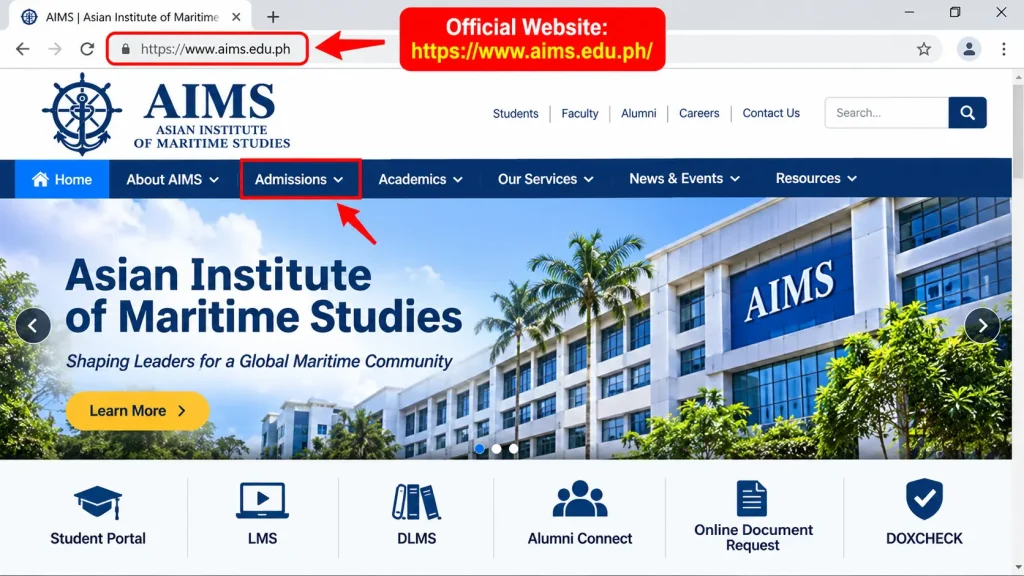
Enter the official AIMS website address into the browser’s address bar:
Official website: https://www.aims.edu.ph/
Image placement: AIMS official homepage displayed in a desktop browser.
Wait for the homepage to load completely before proceeding. Check the website address carefully to ensure that the domain is spelled correctly and that you are accessing the institution’s official website.
Using the correct website helps you avoid unofficial pages, outdated login links, and potentially unsafe websites.
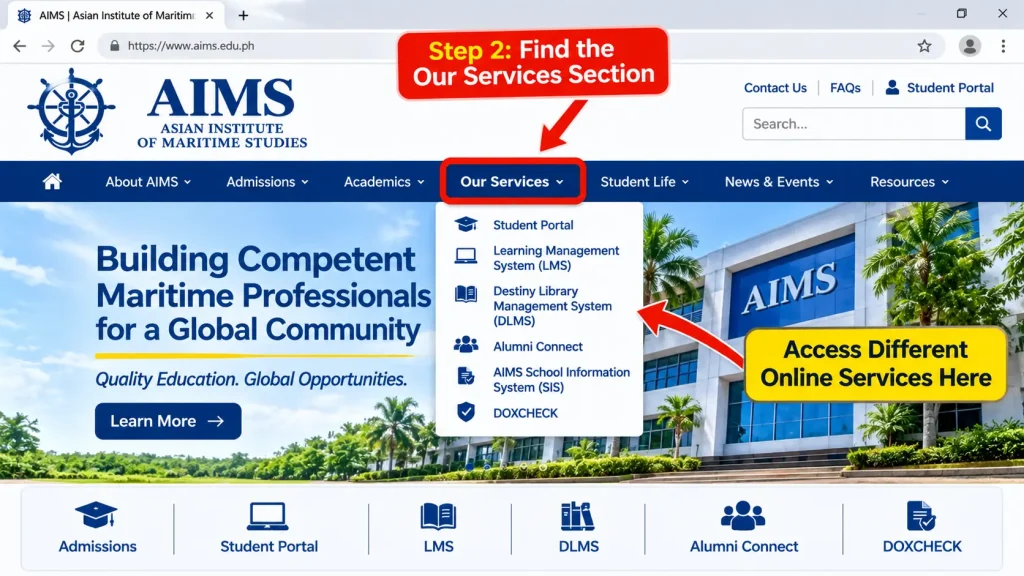
Step 2: Find the Online Services Section
After opening the official AIMS homepage, review the navigation menu and locate the section labelled Our Services.
This section provides access to different institutional platforms and online services. Depending on your requirements, look for the relevant option, such as Student Portal, Learning Management System (LMS), Destiny Library Management System (DLMS), or Alumni Connect.
If you are using a smartphone, you may need to open the website’s navigation menu or scroll down the homepage to locate the available service links.
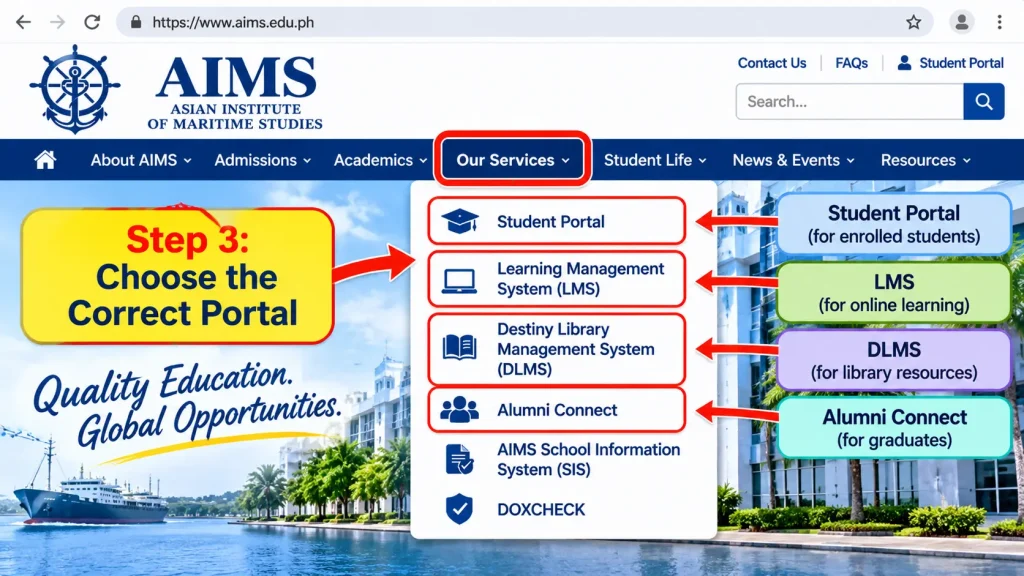
Step 3: Choose the Correct Portal
Once you locate the available online services, select the platform that matches your academic or institutional role.
For example:
- Student Portal: Select this option if you are an officially enrolled student looking for student-related information and academic services.
- Learning Management System (LMS): Choose this platform if you need to access online learning activities, coursework, or available educational materials.
- Destiny Library Management System (DLMS): Open this option if you require access to authorised library resources and catalogue information.
- Alumni Connect: Select this service if you have graduated from the Asian Institute of Maritime Studies and need alumni-related services.
Before proceeding, carefully review the portal name to ensure that you have selected the correct system. Choosing an unrelated platform may prevent successful access, even if your username and password are correct.
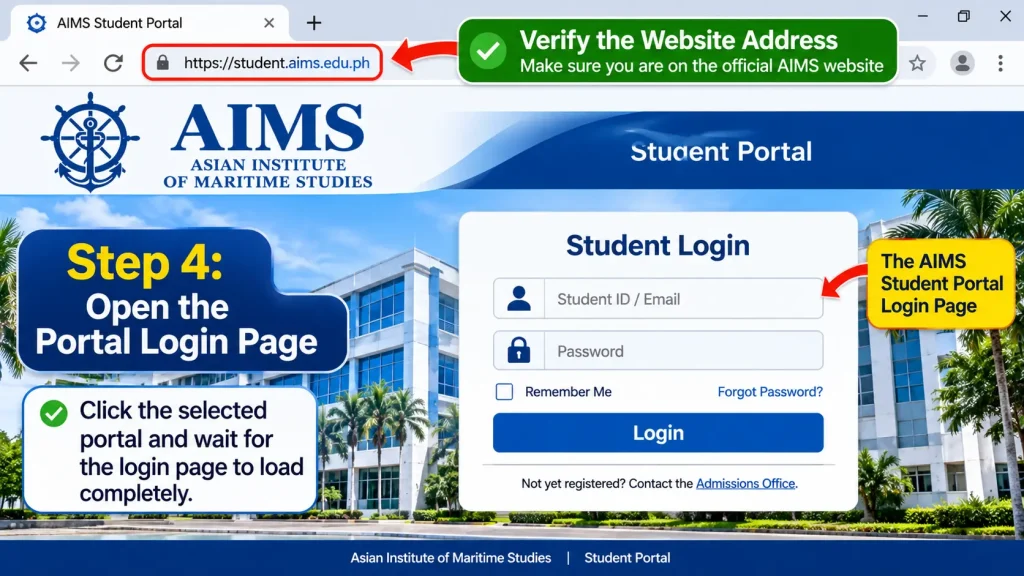
Step 4: Open the Portal Login Page
After identifying the appropriate online service, click its corresponding Enter Portal link or access option.
The website should redirect you to the selected AIMS platform. Allow the page to load completely until the relevant login screen appears.
Before entering your personal information, check the browser’s address bar again to confirm that you have reached the expected AIMS online service.
This additional verification helps ensure that you are entering your credentials on the correct website.
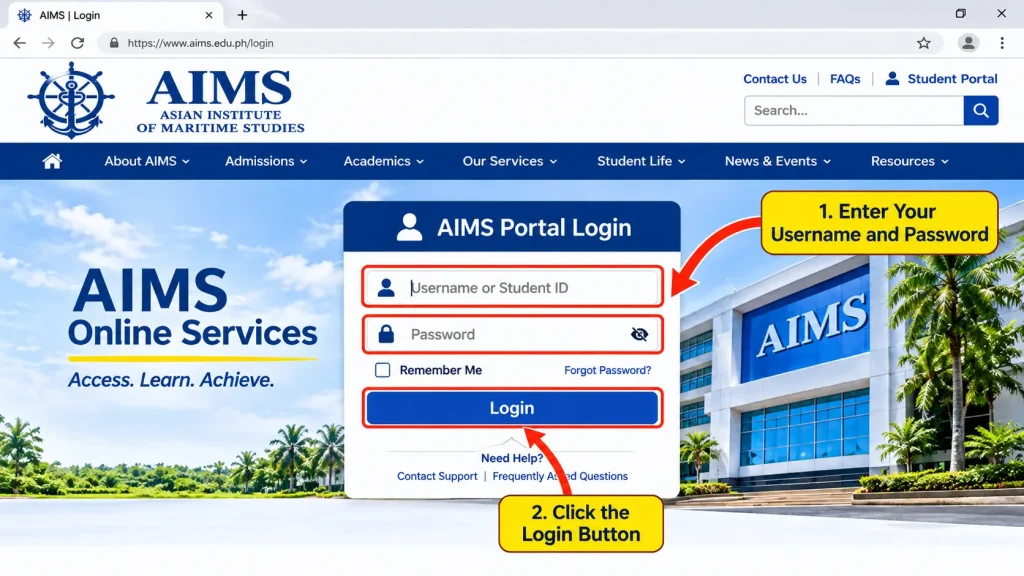
Step 5: Enter Your Assigned Login Credentials
Once the portal login page appears, enter the information requested by the selected system. Depending on the platform and your account type, this may include your username, student identification number, employee ID, or password.
Before submitting your details, make sure that:
- Your username or identification number is entered correctly.
- You are using the password assigned to your particular AIMS account.
- There are no unnecessary spaces before or after your login information.
- The Caps Lock key is not affecting your password entry.
- You are using the credentials associated with the selected online platform.
Remember that login credentials issued for one AIMS system may not necessarily work on another. If you have access to multiple institutional platforms, follow the specific login instructions provided for each account.
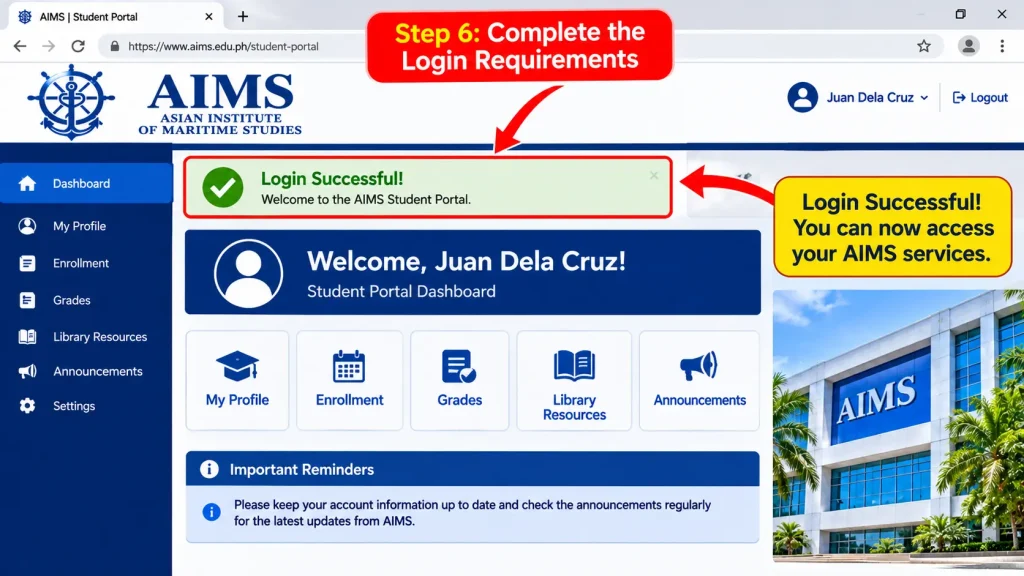
Step 6: Complete the Login Requirements
After entering your credentials, review the information and follow any additional instructions displayed by the platform.
Depending on the selected system, you may encounter a security notice, session message, terms of use, or additional verification requirement. Read the displayed instructions carefully and complete the requested action.
Once your login information has been accepted, the system should provide access to the services available under your account.
The appearance of the dashboard and the features you can use may vary according to your institutional role, enrolment status, account activation, and assigned permissions.
Step 7: Sign Out After Using Your Account
After completing your activities, locate and select the available Logout or Sign Out option to securely end your AIMS Portal session.
This step is particularly important if you access your account using a shared computer, school laboratory, internet café, or another public device.
For additional account protection:
- Always sign out before leaving a shared computer.
- Avoid saving your password on public or shared browsers.
- Do not share your login credentials with other individuals.
- Close the browser window after completing the logout process.
- Bookmark the official AIMS website for convenient future access.
Login tip: Save the official AIMS website in your browser bookmarks instead of relying on random search results whenever you need to access your student account or other institutional online services.
AIMS Admissions and Online Enrolment Guide
The Asian Institute of Maritime Studies welcomes prospective students who are interested in pursuing maritime education and other academic programmes offered by the institution. Through its official website, AIMS provides admission-related information to help applicants understand the application process, review eligibility requirements, and explore available enrolment services.
The AIMS Portal Philippines also serves as a useful starting point for individuals looking for admission information, online enrolment guidance, and scheduled admission assessments. However, applicants should understand the difference between publicly available admission information and online services that require an assigned or activated account.
Whether you are applying as a freshman, transferring from another institution, pursuing graduate studies, or applying as an international student, reviewing the official admission instructions can help you prepare the necessary requirements and follow the appropriate application procedures.
How to Find AIMS Admission Information
If you are planning to apply to the Asian Institute of Maritime Studies, you can use the official website to locate admission details and explore the available online enrolment information.
Follow these steps to find the relevant admission resources.
Step 1: Open the Official AIMS Website
Open an updated internet browser on your computer, laptop, or smartphone and visit the official AIMS website:
Official website: https://www.aims.edu.ph/
The homepage provides access to institutional information, academic resources, and available online services. Make sure you are visiting the correct official domain before proceeding.
Image placement: AIMS official homepage showing the main navigation menu.
Step 2: Navigate to the Admissions Section
After opening the homepage, review the website navigation menu and locate the Admissions option.
Click the relevant section to explore information intended for prospective students. This area can help applicants understand the institution’s admission process and find instructions related to applying for available academic programmes.
Read the information carefully before starting your application.
Step 3: Review the Admission Requirements
Check the admission requirements applicable to your applicant category. AIMS provides admission information for different types of prospective students, including:
- Freshman Applicants: Individuals applying for admission to college or another available entry-level academic programme.
- Transferee Applicants: Students who have previously studied at another educational institution and wish to continue their education at AIMS.
- Graduate Applicants: Individuals interested in pursuing an eligible graduate-level academic programme.
- International Applicants: Students applying from outside the Philippines who need to review the applicable international admission procedures.
Admission requirements may vary depending on the programme and applicant category. Therefore, review the official instructions and prepare the applicable documents before submitting your application.
Step 4: Explore Online Enrolment Information
After reviewing the admission requirements, locate the Online Enrollment section if available on the official website.
This section provides relevant enrolment guidance to help applicants understand the next steps. Follow the instructions published by the institution and complete the applicable requirements.
If you have questions about your application status or enrolment eligibility, contact the AIMS Admissions Office for clarification.
Step 5: Check Admission Assessment Instructions
Some applicants may be required to complete an online admission assessment through the AIMS Learning Management System.
Official LMS website: https://lms.aims.edu.ph/
According to the provided AIMS information, scheduled online admission examinations operate from Monday to Friday, between 0800H and 1800H.
Applicants should carefully review their examination instructions and confirm their assigned schedule before attempting to access the assessment.
Important: Visiting the LMS does not automatically register you for an admission examination. Follow the instructions provided by the Admissions Office to confirm your eligibility, examination schedule, and access requirements.
AIMS Online Document Request for Students and Alumni
Students and graduates may occasionally need official academic documents for employment applications, further education, government transactions, or other administrative purposes.
The AIMS Portal provides an Online Document Request option to help users locate the appropriate document-request service. This facility is particularly useful for graduates who may no longer have regular access to student-related online services.
Depending on your academic history and the purpose of your request, you may need to contact the Registrar’s Office to obtain the relevant records or clarify the document processing requirements.
How to Request Academic Documents
If you need an official academic document from the Asian Institute of Maritime Studies, follow the general steps below to locate the available request facility.
- Open the official AIMS website at https://www.aims.edu.ph/.
- Explore the available online services displayed on the homepage.
- Locate the Online Document Request option.
- Open the corresponding service and review the instructions provided.
- Enter the information requested by the institution.
- Follow any additional instructions concerning document processing, verification, and release.
Image placement: AIMS Online Document Request service or request information page.
The available documents, processing arrangements, applicable fees, and release schedules should be confirmed through the official online service or the Registrar’s Office.
Avoid relying on unofficial information about processing times or document charges because these arrangements may depend on the type of document and the institution’s current procedures.
Which Documents May Require a Registrar Request?
Depending on your academic background and the reason for requesting documentation, you may need assistance from the AIMS Registrar’s Office.
Common reasons for contacting the Registrar include:
- Enquiries about academic records and student information.
- Verification of student or graduate details.
- Requests for official school documents.
- Questions about document processing and release arrangements.
- Assistance with academic records requiring additional verification.
If you are unsure which document-request procedure applies to your situation, contact the Registrar’s Office directly.
Official Registrar’s Office Contact Information
- Email: [email protected]
- Telephone: (+632) 8556-1840
When contacting the office, include your full name, student identification number (if available), academic programme, and a clear explanation of the document you need.
Providing accurate information can help the relevant staff understand your request and guide you towards the appropriate procedure.
AIMS DOXCHECK: Online Document Verification
DOXCHECK is an online document verification service associated with the Asian Institute of Maritime Studies. It is intended to help employers, agencies, and other authorised third parties verify eligible academic credentials.
This service is different from the regular AIMS Student Portal. Students generally use their designated academic platforms to access student-related information, whereas employers and other verification requesters may use DOXCHECK for credential-related enquiries.
The availability of online verification can make it more convenient for authorised parties to check academic documents without treating the process as a regular student account login.
Image placement: AIMS DOXCHECK online document verification service.
How to Access the AIMS Document Verification Service
If you need to verify an academic document associated with AIMS, follow these general instructions to locate the relevant online service.
Step 1: Visit the AIMS Website
Open your preferred internet browser and visit the official Asian Institute of Maritime Studies website:
Wait for the homepage to load before exploring its available services.
Step 2: Locate DOXCHECK
Review the online services section and look for the option labelled Online Document Verification (DOXCHECK).
This is the relevant service for authorised users who need to access the institution’s document verification facility.
Step 3: Open the Verification Service
Select the corresponding DOXCHECK option to access the document verification platform.
Allow the website to load completely and check that you have reached the intended verification service.
Step 4: Follow the Verification Instructions
Review the information requested by the system and provide the necessary document or verification details.
Make sure the information you submit is accurate and follows the instructions displayed by the official service.
Step 5: Review the Available Result
After completing the requested process, follow the platform’s instructions to review the available verification outcome.
If the document cannot be verified online or you encounter difficulties using the service, contact AIMS through its official communication channels for further assistance.
Note: The exact verification fields, document requirements, and result format are not specified in the provided information. Always follow the instructions displayed by the official DOXCHECK service instead of assuming that every document follows the same verification procedure.
AIMS Portal Login Requirements
Before accessing an AIMS online platform, make sure you have the necessary information, account credentials, and compatible device for your particular service.
The AIMS Portal login requirements may differ depending on whether you are accessing the Student Portal, LMS, DLMS, Alumni Connect, or an internal institutional system.
The following table summarises the general requirements for accessing the available online services.
| Requirements | Purpose |
|---|---|
| Active internet connection | Loads the AIMS website and online platforms |
| Updated web browser | Supports website pages and login functions |
| Username or assigned ID | Identifies your institutional account |
| Password | Authenticates your account access |
| Active or authorised account | Confirms eligibility to use the selected service |
| Compatible device | Allows access through a computer, laptop, or smartphone |
| Additional verification details | Provides extra authentication when requested by the platform |
Keep your assigned login information secure and make sure your account has been activated before attempting to sign in.
Newly admitted students should follow the account activation instructions provided by the institution rather than assuming that their admission confirmation automatically activates every online service.
Recommended Devices and Browsers
The official AIMS website can be accessed using commonly available internet-enabled devices. However, your experience may vary depending on the platform, browser compatibility, and type of academic activity.
The following devices and browsers are suitable options:
- Desktop Computer: Useful for reviewing academic information, managing online activities, and completing longer administrative tasks.
- Laptop: Convenient for accessing online classes, completing coursework, and participating in admission assessments.
- Smartphone: Provides convenient access to website information and online services that support mobile browsing.
- Updated Web Browsers: Google Chrome, Microsoft Edge, and Mozilla Firefox are recommended options for accessing modern websites.
For scheduled online examinations, coursework, and other activities that require extended screen time, using a desktop computer or laptop may provide a more convenient experience.
Common AIMS Portal Login Problems and Solutions
Although the AIMS online platforms are designed to provide convenient access to institutional services, users may occasionally experience technical difficulties when attempting to sign in or navigate different systems.
These problems can result from incorrect login credentials, incomplete account activation, browser settings, unstable internet connections, or temporary platform interruptions.
Understanding the possible causes can help students, applicants, and other authorised users resolve common access problems more efficiently.
Common Login Issues and Their Solutions
The following troubleshooting table highlights common problems associated with the AIMS Portal and practical steps you can take to address them.
| Common Problem | Possible Reason | Recommended Solution |
|---|---|---|
| Incorrect username or password | Typing error or outdated credentials | Re-enter your assigned login information carefully |
| Student Portal access denied | Account not activated or enrolment incomplete | Confirm your enrolment and account status |
| Wrong login page | Incorrect portal selected | Return to the official AIMS website and select the correct service |
| LMS not opening | Connection or temporary platform issue | Check your internet connection and try again later |
| Login page keeps refreshing | Browser cookies or session problems | Open the portal in a Private or Incognito window |
| Page loads slowly | Weak internet connection | Switch to a more stable network |
| Library access unavailable | Missing account permissions | Contact the appropriate AIMS office |
| Admission assessment unavailable | Incorrect schedule or access instructions | Confirm your examination schedule with Admissions |
| Document request difficulty | Missing information or additional verification required | Contact the Registrar’s Office |
How to Fix AIMS Login Errors
If you cannot access your account, try the following troubleshooting methods before contacting the institution.
1. Confirm That You Are Using the Correct Portal
One of the most common reasons for unsuccessful login attempts is selecting the wrong online platform.
For example, an enrolled student should access the appropriate student-facing service instead of an internal employee system. Similarly, prospective applicants should not assume that a regular student account is available before completing the required enrolment and account issuance procedures.
Return to the official AIMS homepage and select the correct online service according to your user category.
2. Check Your Login Credentials
Incorrect login information can prevent successful access even when the correct AIMS platform has been selected.
Before submitting your credentials again, carefully check the following:
- Incorrect letters, characters, or numbers.
- Unnecessary spaces before or after your username.
- Incorrect capitalisation or lowercase letters.
- Confusion between similar characters.
- Passwords saved from an older or different account.
Make sure you are using the credentials assigned to the specific platform you want to access.
If your login information continues to fail, contact the relevant AIMS department for account assistance.
3. Clear Browser Cache and Cookies
Stored browser information can sometimes interfere with website loading and login sessions.
To identify whether this is causing your AIMS Portal access problem, try opening the website in an Incognito or Private browsing window.
If the platform works correctly in private browsing mode, the issue may be related to cached website files, cookies, or browser extensions.
You can then clear the relevant browsing data for the AIMS website and its associated subdomains before attempting to sign in again.
4. Update Your Browser
An outdated browser may not support all the functions used by modern online platforms.
Check whether an update is available for your current browser and install the latest supported version. After updating, reopen the AIMS website and try accessing the relevant service.
If the problem continues, test the portal using another supported browser, such as Google Chrome, Microsoft Edge, or Mozilla Firefox.
5. Check Your Internet Connection
An unstable internet connection can cause the AIMS login page to load slowly, time out, or repeatedly redirect you to the sign-in screen.
Try the following steps:
- Restart your internet connection.
- Switch from public Wi-Fi to mobile data if available.
- Avoid downloading large files during an online examination.
- Reload the login page after your connection becomes stable.
A reliable internet connection is particularly important when accessing the LMS for online classes, coursework, and scheduled admission assessments.
6. Check Whether Your Account Is Active
Newly admitted students may need to complete specific enrolment procedures before receiving or activating their portal credentials.
If your account has not yet been activated, repeatedly entering your login details is unlikely to resolve the issue.
Contact the Admissions Office or the relevant administrative department to confirm your account status and ask whether additional activation steps are required.
7. Allow for Possible Maintenance or Service Interruptions
AIMS online platforms may occasionally become unavailable because of scheduled maintenance, technical problems, or temporary service interruptions.
If the same issue occurs across multiple devices and browsers, wait for some time before attempting another login.
Avoid repeatedly submitting incorrect passwords because certain systems may temporarily restrict account access after multiple unsuccessful attempts.
If the problem persists, contact the appropriate AIMS department and explain the issue you are experiencing.
AIMS Portal Security Tips for Students and Applicants
Your AIMS account may provide access to academic information, educational resources, and other institutional services. Protecting your login credentials is therefore an important part of using the online platforms responsibly.
Whether you access the Student Portal, LMS, or another AIMS service, follow these security practices to help protect your account:
- Keep Your Password Private: Never share your login password with another person, even if they claim to provide technical assistance.
- Use Official Website Links: Avoid entering your credentials through unfamiliar messages, suspicious emails, or unofficial websites.
- Verify the Website Address: Check the browser’s address bar before submitting personal or account information.
- Avoid Saving Passwords on Shared Devices: Do not store your login credentials on public computers, internet cafés, or shared school devices.
- Sign Out After Every Session: Always use the available logout option when you finish your online activities.
- Protect Your Login Information: Avoid sending passwords through ordinary email messages or unsecured communication channels.
- Handle Screenshots Carefully: Remove or crop sensitive personal information before sharing screenshots of technical errors.
If you believe that someone has accessed your account without permission, contact the appropriate AIMS office for guidance and follow its instructions to secure your account.
Official AIMS Contact Information and Support
If you experience difficulties accessing the AIMS Portal even after following the recommended troubleshooting steps, contacting the appropriate department is the best way to obtain assistance. The Asian Institute of Maritime Studies provides dedicated communication channels for admission enquiries, academic records, financial concerns, and graduate studies.
Choosing the correct department can help ensure that your enquiry reaches the relevant personnel and is handled more efficiently.
AIMS Department Emails and Telephone Numbers
The following table provides the available contact information for the main AIMS offices. Students, applicants, and graduates can use these details when requesting assistance with online services, account access, or administrative procedures.
| Department / Office | Official Email Address | Contact Number |
|---|---|---|
| Main Trunkline | Not specified | (+632) 8831-2467 / 8832-2467 / 8833-2467 / 8834-2467 |
| Admissions Office | [email protected] | (+632) 8834-5783 / (+632) 8831-2467 loc. 1125 or 1123 |
| Registrar’s Office | [email protected] | (+632) 8556-1840 |
| Finance Office | [email protected] | (+632) 8831-2467 loc. 1133 |
| School of Graduate Studies | [email protected] | (+632) 8831-2467 loc. 10081 |
Note: Contact details are based on the information supplied for this guide. Confirm current office availability and contact information through the official AIMS website before contacting the institution.
Which AIMS Office Should You Contact?
Different AIMS Portal problems and administrative enquiries require assistance from different departments. Contacting the appropriate office can help you avoid unnecessary delays and receive more relevant guidance.
- Admissions Office: Contact the Admissions Office for application enquiries, admission requirements, applicant concerns, online enrolment guidance, and admission assessment arrangements.
- Registrar’s Office: Approach the Registrar for academic records, student information, official document requests, and academic verification concerns.
- Finance Office: Contact this department regarding financial transactions, payment-related concerns, and other finance enquiries.
- School of Graduate Studies: Use this office’s communication channel for graduate programme information, application enquiries, and related academic concerns.
- Main Trunkline: Call the main institutional telephone number if you are unsure which department is responsible for handling your concern.
How to Write an Email to AIMS for Login Assistance
If you cannot access your AIMS Student Portal, LMS, DLMS, or another institutional platform, you can contact the relevant department through its official email address.
When reporting a login problem, provide sufficient information to help the support team understand the issue and identify the appropriate solution.
Your email should include:
- Your full name.
- Student or applicant identification number, if already assigned.
- Academic programme and year level.
- Name of the online platform you are trying to access.
- Exact website address where the problem occurs.
- A clear description of the login error.
- A screenshot of the error message, if available.
Never include your password or confidential authentication information in an ordinary email.
The following sample email can help you communicate your login problem professionally.
Dear AIMS Support Team,
I am writing to request assistance with accessing my AIMS online account. I am currently experiencing difficulties logging in to the portal and would appreciate your guidance in resolving this issue.
My account details are provided below:
- Full Name: [Your Full Name]
- Student/Applicant ID: [Your ID, if available]
- Programme/Year Level: [Your Programme]
- Portal Name: [Student Portal / LMS / DLMS / Other]
- Portal URL: [Website Address]
Whenever I attempt to sign in, I encounter the following issue: [Describe the Error Message].
I have already checked my login credentials and internet connection, but the problem continues. I would appreciate your assistance in checking my account status and advising me on the necessary steps to restore access.
I have also attached a screenshot of the error message for your reference.
Thank you for your time and assistance. I look forward to your response.
Kind regards,
[Your Full Name]
Benefits of Using the AIMS Online Portal
The different AIMS online platforms provide practical ways for students, applicants, faculty members, and graduates to access institution-related information and services.
Although each platform serves a specific purpose, together they make it easier for users to locate relevant academic resources and administrative services without relying entirely on in-person enquiries.
Convenient Access to Student Services
The AIMS Portal provides access points to different student-related services and institutional information. Students can identify the appropriate online platform for their academic requirements without navigating through unrelated systems.
This organised approach makes it easier to find the services associated with their institutional accounts.
Support for Online Learning
The Learning Management System (LMS) provides a digital environment for available coursework, online learning activities, and educational materials.
Students can use the platform to access relevant learning resources through an internet-connected device, subject to their account permissions and course arrangements.
Easier Access to Admissions Information
Prospective students can explore admission information, application requirements, and online enrolment guidance through the official AIMS website.
This allows applicants to understand the available procedures and prepare the necessary information before contacting the Admissions Office.
Access to Library Resources
The Destiny Library Management System (DLMS) provides an online access point for library catalogue information and educational resources.
Authorised students and faculty members can use the relevant platform to support their academic activities and locate available learning materials.
Assistance with Academic Documents
The Online Document Request facility provides a starting point for current students and former graduates who need official academic records.
For document requests involving additional verification, processing requirements, or release arrangements, users can contact the Registrar’s Office for further assistance.
Support for Alumni and Graduates
Alumni Connect provides a designated online service for graduates of the Asian Institute of Maritime Studies.
By maintaining a separate platform for alumni-related services, AIMS helps distinguish graduate services from the online systems intended for currently enrolled students.
Important Tips for a Better AIMS Portal Experience
To make your experience with the AIMS online platforms more convenient and secure, follow these practical recommendations before accessing your account.
- Use the Official Website: Always start from https://www.aims.edu.ph/ to locate the appropriate institutional service.
- Choose the Correct Platform: Remember that the Student Portal, LMS, DLMS, and Alumni Connect serve different purposes.
- Keep Your Credentials Secure: Never share your assigned username or password with unauthorised individuals.
- Check Account Activation: Newly admitted students should confirm that their enrolment and account issuance procedures have been completed.
- Use an Updated Browser: Keep your browser updated to improve compatibility with online services.
- Maintain a Stable Internet Connection: Reliable connectivity is particularly important for online classes, coursework, and scheduled admission assessments.
- Check Examination Schedules: Applicants should follow the admission assessment schedule and instructions communicated by AIMS.
- Contact the Relevant Department: Seek assistance from the appropriate office for account activation, document requests, financial concerns, and administrative enquiries.
- Log Out Properly: Always sign out after completing your activities, particularly when using a shared computer or public device.
Frequently Asked Questions About AIMS Portal Philippines
Final Thoughts
The AIMS Portal Philippines provides students, applicants, and other members of the Asian Institute of Maritime Studies (AIMS) community with convenient access to important academic and administrative services. Through the available online platforms, users can explore student information, access learning resources, check enrolment-related updates, request academic documents, and complete other institution-related tasks.
To make the most of the AIMS online services, always use the correct official website and platform for your purpose. Keep your login credentials secure, check your account information regularly, and follow the instructions provided by the relevant AIMS department. If you experience login difficulties, enrolment concerns, document-request delays, or other technical issues, contact the appropriate office through the official contact details provided in this guide.
Whether you are a new applicant, a currently enrolled student, or a graduate, understanding how the AIMS Portal and its related systems work can help you manage your academic responsibilities more efficiently. Bookmark the official AIMS website and AIMS Learning Management System so you can access the relevant services whenever needed.