
NetAcad Login Philippines 2026: Student Account, Dashboard, Courses & Complete User Guide

Cisco Networking Academy, widely known as NetAcad, is an online learning platform that provides educational resources and technology training for students, beginners, and IT professionals. Through Cisco’s educational programmes, learners can develop valuable skills in computer networking, cybersecurity, programming, artificial intelligence, and other technology-related fields.
The NetAcad login portal allows registered students and independent learners to access their Cisco Networking Academy accounts. After signing in, users can explore enrolled courses, continue unfinished lessons, complete assessments, access learning materials, and monitor their educational progress. Whether your account was provided by an educational institution or created independently, using the correct login credentials is essential for uninterrupted access.
For students in the Philippines, cisco netacad offers an opportunity to strengthen technical knowledge and develop practical IT skills. Learners from universities, colleges, schools, and authorised Cisco Networking Academy institutions can use the platform to participate in assigned training programmes. Independent learners can also explore available self-paced courses and improve their understanding of different technology subjects.
NetAcad Login Philippines – Official Website and Important Links
Before signing in, make sure you are accessing the genuine Cisco Networking Academy website. Using the official portal helps protect your account credentials and ensures that you are accessing the correct learning services.
The following table provides direct links to the main cisco netacad website and related Cisco learning resources.
| Portal or Service | Official Website |
|---|---|
| Netacad login | https://www.netacad.com/login |
| Cisco Networking Academy Homepage | https://www.netacad.com |
| Student Learning Dashboard | https://www.netacad.com/dashboard |
| Cisco Packet Tracer | https://www.netacad.com/cisco-packet-tracer |
Important: Always verify the website address before entering your registered email address or password. Avoid unofficial websites that claim to offer Cisco NetAcad login services or request your account information. If a link redirects you to another Cisco authentication page, make sure the destination is part of the official Cisco sign-in process.
NetAcad Login Requirements for Students
Before accessing the NetAcad login portal, prepare the necessary information and make sure your device meets the basic access requirements. Having the correct credentials and an active account can make the sign-in process easier.
The exact requirements may vary depending on how your account was created. For example, students enrolled through an educational institution may receive account instructions from their instructor, while independent learners generally use the email address associated with their own registration.
| Requirements | Description |
|---|---|
| Registered Email Address | The email address associated with your Cisco Networking Academy account |
| Password | Your current NetAcad account password or the password required by the Cisco sign-in process |
| Internet Connection | A stable internet connection for accessing courses, lessons, and other online learning resources |
| Web Browser | An updated version of Google Chrome, Microsoft Edge, Mozilla Firefox, or Safari |
| Active Account | A registered account that is ready for login |
| Activation Email | An activation or verification email, if required during account setup |
| Computer or Mobile Device | A compatible desktop computer, laptop, tablet, or smartphone |
Students should always sign in using the same email address associated with their NetAcad registration or course enrolment. If an instructor has assigned a course to your account, using a different email address may prevent the course from appearing on your learning dashboard.
It is also recommended that you keep your login information secure and avoid sharing your password with other students. If you have not activated your account or completed the required registration process, follow the instructions provided by Cisco or your academy instructor before attempting to access your courses. Visit Homepage.
How to Access the NetAcad Login Portal in the Philippines
The Netacad login process allows registered learners to access their Cisco Networking Academy accounts online. Students in the Philippines can complete the sign-in process using a supported web browser without visiting a physical Cisco office.
Before proceeding, ensure that your account has been successfully registered or activated. If your institution created your account, check your email for any registration or activation instructions provided by your instructor.
Follow the steps below to access your cisco netacad student account.
Step 1: Visit the Official Cisco NetAcad Website
Start by opening Google Chrome, Microsoft Edge, Mozilla Firefox, Safari, or another updated web browser on your desktop computer, laptop, or smartphone. For a better learning experience, using a computer or laptop is recommended, particularly when accessing networking lessons and working with Cisco Packet Tracer.
Next, enter the official Netacad login address in your browser:
Alternatively, you can visit the Cisco Networking Academy official homepage and locate the available login option.
Once the website loads, check the page carefully to ensure that you are accessing Cisco’s official platform. Avoid clicking suspicious advertisements or third-party links that claim to provide direct access to NetAcad student accounts.
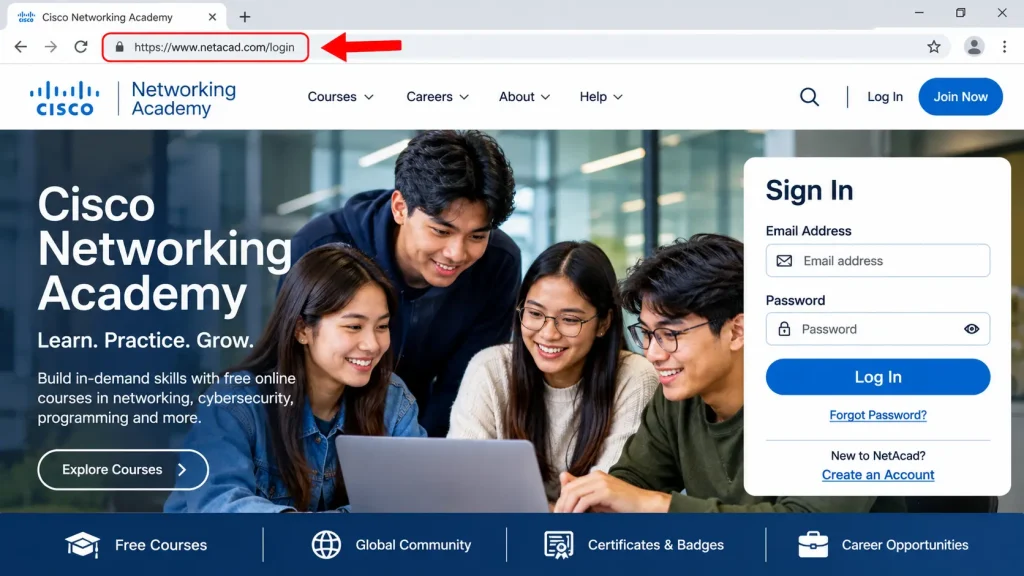
Opening the correct login page is the first step towards accessing your courses, learning materials, and other available account services.
Step 2: Enter Your NetAcad Account Credentials
After opening the official Netacad login page, proceed to the sign-in section. You will need to provide the email address and password associated with your Cisco Networking Academy account.
Carefully complete the following instructions:
- Enter your registered email address in the appropriate email field.
- Type your current account password in the password field.
- Review both entries and check for spelling mistakes or unwanted spaces.
- Select the Log In button to submit your account information.
- Wait while Cisco processes your credentials and verifies your account.
If your login information is correct and your account is active, the authentication process should allow you to access the available learning environment.
Login Tip: Students enrolled through a school, college, university, or authorised Cisco Networking Academy institution should use the exact email address connected to their course registration. If you sign in using another email address, your assigned classes and learning activities may not appear.
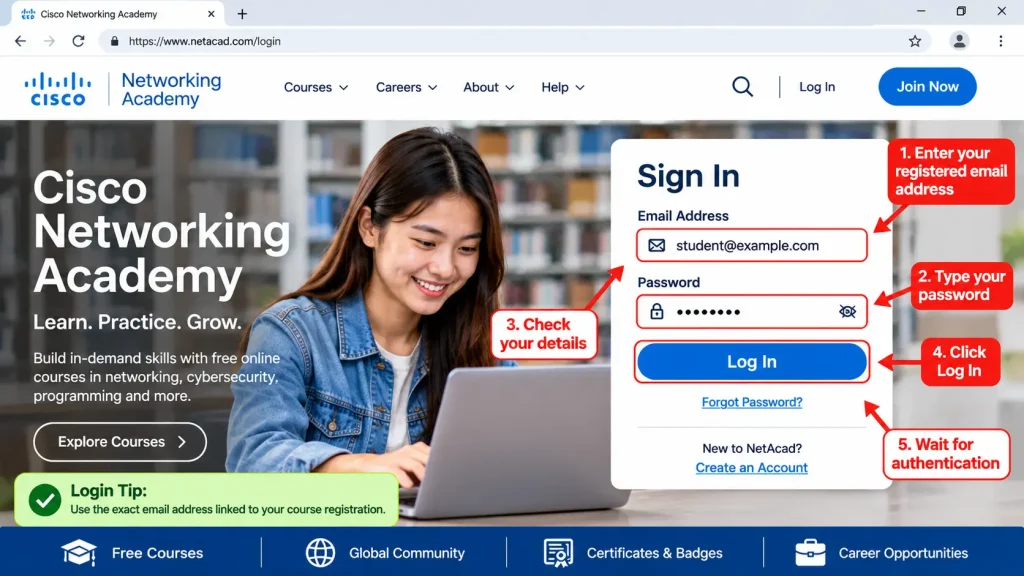
If the platform displays an error message, check your credentials and make sure that your account registration or activation has been completed.
Step 3: Open Your Student Learning Dashboard
After successfully completing the cisco netacad login process, you can proceed to your student learning dashboard. This area provides access to the courses, learning activities, and educational resources associated with your account.
You can also try opening the dashboard directly through the following address:
Once the page loads, review the information available in your account. Depending on your registration status, course enrolments, and account permissions, the dashboard may provide access to:
- Enrolled Courses: View the learning programmes associated with your account.
- Learning Materials: Access available lessons, modules, and educational resources.
- Course Progress: Review your progress through supported learning activities.
- Assessments: Access quizzes, tests, or other assessment activities when available.
- Course Activities: Continue unfinished lessons and explore assigned learning tasks.
- Completion Information: Review available course completion records or achievements.
The dashboard serves as your central learning area, helping you organise your educational activities and continue your technology training.
If a course assigned by your instructor is missing, first confirm that you have signed in using the correct registered email address. You can then contact your instructor or academy administrator to verify your enrolment status and account details.
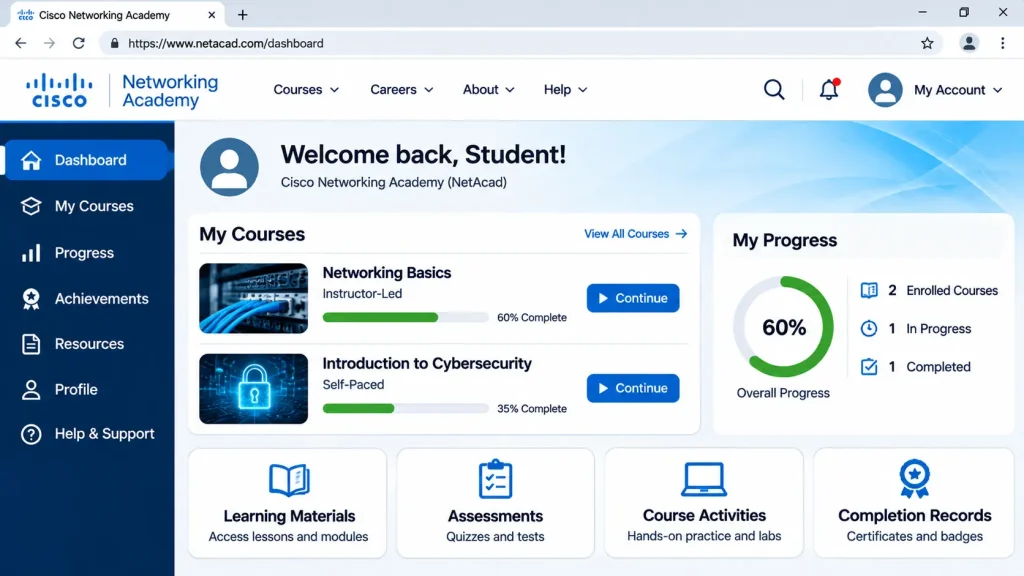
Understanding the NetAcad Student Dashboard
The cisco netacad student dashboard provides a centralised overview of your learning activities after successfully signing in to your Cisco Networking Academy account. It helps students access their enrolled courses, review available learning materials, continue unfinished lessons, and monitor their educational progress from one place.
Instead of searching for individual courses separately, learners can use the available dashboard sections to organise their studies and access course-related information more conveniently.
Depending on your account, course enrolments, and the platform interface, different learning features may be available. The following sections explain the main areas students should understand when using the NetAcad dashboard.
Active Courses and Enrolment Information
The active courses section helps students identify the learning programmes associated with their accounts. If you are enrolled through a university, college, school, or authorised Cisco Networking Academy instructor, your assigned course may appear in your learning activities.
Through this section, students can:
- View their available enrolled courses.
- Open individual courses and explore their learning materials.
- Continue lessons that have not yet been completed.
- Check available course activities and assignments.
- Identify learning modules associated with their enrolments.
Regularly reviewing your enrolled courses can help you stay organised and keep track of your educational responsibilities.
If an expected course does not appear on your dashboard, first check whether you have signed in using the same email address provided during registration. If the problem continues, contact your instructor or academy administrator to verify your enrolment.
Course Modules and Assessments
Cisco NetAcad courses are organised into different learning modules and activities designed to help students develop knowledge in their selected subjects. Depending on the programme, these resources may include reading materials, interactive lessons, knowledge checks, practical exercises, and assessments.
Students should follow the recommended learning sequence to understand each topic before moving to more advanced lessons. Some courses also include quizzes, practical activities, or final assessments to evaluate how well learners understand the material.
Before attempting an assessment, carefully review the instructions and complete the required learning activities. This approach can help you prepare properly and avoid missing important course requirements.
Course Progress and Completion
The cisco netacad learning dashboard can help students monitor their progress through available courses. This feature is particularly useful for learners who are studying multiple subjects or completing an online programme over several days or weeks.
Check your course status regularly to identify unfinished lessons, pending assessments, and other activities that still require attention. Maintaining a clear understanding of your progress can help you manage your study schedule more effectively.
Remember that course completion requirements may differ between programmes. Always follow the instructions displayed on the platform and any additional guidance provided by your instructor.
How to Access and Continue NetAcad Courses
After completing the cisco Netacad net login process, students can open their enrolled courses and continue learning directly from their dashboard. The platform provides access to available lessons, educational resources, and course activities associated with their accounts.
Follow these instructions to find and continue your learning activities.
Step 1: Sign In to Your Student Account
First, visit the official NetAcad Login Portal using an updated web browser. Enter the registered email address and password associated with your Cisco Networking Academy account.
After submitting your credentials, wait for the authentication process to finish. Once you have successfully signed in, open your student learning dashboard.
Make sure you are using the same account connected to your course enrolment. This is particularly important for students whose accounts were created or managed through an educational institution.
Step 2: Find Your Enrolled Course
After opening your dashboard, review the available courses displayed in your learning area. Identify the programme you want to study and select it to access its course page.
Students participating in instructor-led programmes should find their assigned courses through the account associated with their academy or educational institution.
If you cannot locate a particular course, verify your registered email address and check your enrolment details. You may also contact your instructor to confirm whether the course has been successfully assigned to your account.
Step 3: Open Learning Materials and Activities
Once you have selected a course, open its learning page and review the available modules. Choose the lesson or activity you want to complete and follow the instructions provided on the platform.
Depending on the selected programme, learning materials may include:
- Topic Explanations: Educational content covering important concepts and subject-related information.
- Interactive Activities: Learning exercises designed to improve understanding through participation.
- Knowledge Checks and Quizzes: Questions that help evaluate your understanding of individual topics.
- Practical Networking Exercises: Hands-on activities that allow students to practise networking concepts.
- Course Assessments: Evaluations used to measure progress and understanding of course materials.
Complete each activity according to the instructions displayed in your cisco netacad account. If a lesson includes a practical exercise, make sure you understand its requirements before submitting your work.
Step 4: Review Your Learning Progress
After completing a lesson, quiz, or other learning activity, return to the course area and review your progress. Check whether the platform has updated your activity status and identify any remaining requirements.
If certain lessons or assessments are still marked as incomplete, open them again and review what needs to be finished.
Students enrolled in instructor-led courses should also follow their teacher’s schedule and assessment instructions. Some programmes may have specific deadlines or activities that must be completed within a designated period.
How to Register for NetAcad Courses in the Philippines
Students who do not currently have an enrolled course can explore the Cisco Networking Academy learning catalogue to discover educational opportunities that match their interests and career goals.
Cisco provides learning resources in several technology-related fields, including computer networking, cybersecurity, programming, and artificial intelligence. These subjects can help Filipino students build foundational IT knowledge and develop skills that may support their future education or professional careers.
Follow these general steps to get started:
- Visit the official Cisco Networking Academy website.
- Explore the available learning catalogue and course categories.
- Select a course that matches your educational background or professional interests.
- Read the course description and review its available enrolment options.
- Follow the registration or sign-in instructions displayed on the website.
- Use your existing Cisco or cisco netacad account, or complete the registration process if required.
- After successful enrolment, access your selected course through the learning dashboard.
The available registration process may vary depending on the course and enrolment method. Some programmes may allow independent learning, while others may require participation through an educational institution or authorised Cisco Networking Academy.
For Filipino Students: If your university, college, school, or training academy provides an instructor-led NetAcad course, contact the relevant instructor before creating another account. This helps ensure that your course enrolment is connected to the correct student profile and prevents unnecessary account-related problems.
Cisco Packet Tracer Access Through NetAcad
Cisco Packet Tracer is a network simulation application that allows learners to practise networking concepts without requiring a complete physical networking laboratory. It provides a virtual environment where students can create network topologies, connect devices, and examine how communication takes place between different network components.
Many Cisco Networking Academy programmes use Packet Tracer to support practical learning activities. Students can work with virtual routers, switches, computers, and other supported network devices to understand networking configurations and practise technical concepts.
The application is particularly useful for beginners studying networking fundamentals and students preparing for more advanced Cisco networking education. By practising in a simulated environment, learners can explore different configurations and develop practical experience alongside their theoretical studies.
How to Download Cisco Packet Tracer
Students can access Packet Tracer information and available download resources through Cisco’s official website.
Follow these instructions to get started:
- Visit the official Cisco Packet Tracer page.
- Review the available download information and access instructions.
- Sign in using your Cisco or cisco netacad account if requested.
- Follow the instructions provided to obtain the supported software version.
- Open the downloaded installer on your computer.
- Complete the installation by following the on-screen instructions.
- Launch Cisco Packet Tracer after the installation process is finished.
Before installing the application, review the software and system requirements to confirm that your computer supports the selected version.
Using the official Cisco website is recommended because it helps you access legitimate software resources and the relevant installation instructions.
How to Log In to Cisco Packet Tracer Using NetAcad
After installing Cisco Packet Tracer, you may need to complete an authentication process to access its connected learning features. The available sign-in method can depend on the installed software version.
Follow these general instructions:
- Open Cisco Packet Tracer on your desktop or laptop.
- Locate the sign-in option displayed on the application screen.
- Select the Worldwide login server if that option is available, or follow the designated NetAcad or Skills for All sign-in option shown in your version.
- If prompted, complete the authentication process using your cisco netacad credentials in the browser window.
- Wait for the application to display an authentication confirmation.
- Return to the Packet Tracer application.
- Start using the available networking exercises and simulation features.
Once authentication is successful, you can proceed with the practical networking activities available to you.
Important: The Packet Tracer login screen and authentication options may change between software versions. Always follow the sign-in method displayed in your installed application rather than relying on outdated screenshots or instructions.
Certificates and Digital Badges on NetAcad
Completing eligible Cisco Networking Academy courses can provide students with a record of their educational achievements. Depending on the selected programme and its completion requirements, learners may receive a course completion certificate or a digital badge.
These achievements can help students demonstrate their learning activities when preparing a CV, applying for internships, or building a professional portfolio. They can also provide evidence of the subjects and skills covered during their online training.
However, students should understand the difference between course completion certificates, digital badges, and professional industry certifications.
Course Completion Certificates
A course completion certificate provides evidence that a learner has successfully fulfilled the requirements of an eligible educational programme.
Students should review the completion criteria for their selected course before expecting a certificate. These requirements may include completing the necessary lessons, submitting activities, and passing any required assessments.
After finishing the required activities, check the relevant course or achievement section of your account for available certificate information. Follow the instructions displayed on the platform to access your certificate, if one is provided.
Digital Badges
Digital badges offer another way to represent specific learning achievements or completed educational activities. They can provide information about the course, subject, or skills associated with the award.
Depending on the badge and its available sharing options, students may be able to display their achievements on professional profiles or include them in their online portfolios.
Digital badges can be useful when presenting your learning progress to potential employers, educational institutions, or other professional contacts.
Difference Between Course Certificates and Professional Certifications
It is important to understand that completing a cisco netacad course does not automatically mean that you have earned an industry-recognised professional certification, such as Cisco Certified Network Associate (CCNA).
Although these achievements are related to technology education, they represent different levels and types of learning recognition.
| Achievement | Meaning |
|---|---|
| Course Completion Certificate | Confirms that a learner has completed the requirements of an eligible educational course. |
| Digital Badge | Represents a particular learning achievement, course, or skill. |
| Professional Certification | A separate industry credential earned by meeting the relevant certification requirements. |
For example, completing a Networking Basics course can help you develop foundational knowledge of computer networking. However, it is not equivalent to passing the official CCNA certification examination.
Students planning to pursue a professional networking career should understand the requirements of their desired certification and prepare accordingly.
Recommended Study Habits for NetAcad Students
Students can get more value from the cisco Netacad net login learning platform by developing a consistent study routine and actively participating in their courses. These practices are particularly helpful for Filipino learners balancing university classes, online training, and other responsibilities.
Consider following these useful study habits:
- Study Modules in Sequence: Follow the recommended course order instead of skipping important introductory topics. A strong understanding of the basics makes advanced lessons easier to follow.
- Practise Networking Concepts: Use Cisco Packet Tracer activities whenever they are included in your course. Practical exercises can help you understand networking configurations more effectively.
- Review Difficult Lessons: Revisit challenging topics and learning materials before attempting quizzes or assessments.
- Track Unfinished Activities: Check your cisco netacad dashboard regularly to identify incomplete modules, pending assignments, and remaining course requirements.
- Save Practical Work: Keep copies of your Packet Tracer lab files in an organised folder so you can review your previous exercises when needed.
- Protect Your Account: Never share your password with other students. If you use a shared or public computer, always sign out after completing your learning activities.
Following these habits can help you maintain steady progress, improve your understanding of technical subjects, and make your Cisco Networking Academy learning experience more productive.
Common NetAcad Login Problems and Solutions
Although the Cisco Networking Academy platform provides convenient access to online courses and learning resources, students may occasionally experience problems when signing in or using their accounts. These issues can result from incorrect login credentials, incomplete account activation, browser settings, internet connectivity, or temporary platform-related difficulties.
Understanding the possible causes can help students resolve common problems without unnecessary delays. The following table highlights some frequently encountered cisco Netacad net login problems and their recommended solutions.
| Common Problems | Possible Causes | Recommended Solutions |
|---|---|---|
| Incorrect Email or Password | Incorrect login credentials, typing mistakes, or using an unregistered email address | Recheck your registered email address and password before attempting to sign in again. |
| Forgot NetAcad Password | Forgotten password or an existing password that is no longer recognised | Select the Forgot Password option on the official login page and follow the password recovery instructions. |
| Activation Email Not Received | Email delivery delays or messages filtered into spam folders | Check your Spam, Junk, and Promotions folders and verify the email address used during registration. |
| Login Page Not Loading | Browser cache, cookies, or internet connection problems | Refresh the page, clear browser data, check your connection, or try another updated browser. |
| Login Redirects Repeatedly | Browser session problems or cookie conflicts | Open a private browsing window and attempt to sign in again. |
| Enrolled Course Missing | Incorrect account or incomplete course enrolment | Verify the email address associated with your course and contact your instructor if necessary. |
| Packet Tracer Login Failure | Authentication problems or account compatibility issues | Follow the sign-in instructions displayed in your installed Packet Tracer version. |
| Dashboard Not Updating | Temporary loading or synchronisation issues | Refresh the dashboard and check your course information again after some time. |
Identifying the cause of a login problem is the first step towards restoring access to your student account. If the recommended solutions do not work, contact your instructor, academy administrator, or the appropriate Cisco support channel for further assistance.
How to Reset a Forgotten NetAcad Password
If you cannot remember your Cisco Networking Academy account password, use the official password recovery option instead of repeatedly entering incorrect credentials. The password reset process allows eligible users to create a new password and regain access to their accounts.
Follow these instructions:
- Open the official NetAcad Login Portal.
- Locate and select the Forgot Password option, if displayed.
- Enter the email address associated with your registered account.
- Submit the password recovery request.
- Check your email inbox for the password reset instructions.
- Open the recovery link provided in the message and follow the instructions to create a new password.
- Return to the cisco netacad login portal and sign in using your updated credentials.
If you do not receive the recovery email, check your Spam or Junk folder and make sure that you entered the correct registered email address.
Important: Only use password recovery links from legitimate Cisco communications. Never share your password or recovery link with another person.
What to Do If Your NetAcad Activation Email Is Missing
Students who receive an account invitation from an instructor or educational institution may need to activate their accounts before accessing assigned courses.
If the activation message does not appear in your inbox, try the following solutions:
- Check Email Folders: Review your Spam, Junk, and Promotions folders because automated messages may sometimes be filtered incorrectly.
- Search Your Inbox: Search for Cisco Networking Academy or other relevant registration-related messages.
- Verify Your Email Address: Confirm that your instructor used the correct email address when creating or inviting your account.
- Resend the Activation Message: Use an available resend activation option if the platform provides one.
- Contact Your Instructor: Ask your instructor or academy administrator to verify your account status and resend the invitation if necessary.
Avoid creating another account immediately because doing so may cause confusion between your original student profile and a newly registered account. First, confirm whether your existing account is already associated with your course enrolment.
Fix NetAcad Login Issues on Chrome
Sometimes, problems accessing the cisco Netacad net login portal are related to browser settings rather than incorrect account credentials. Outdated browser versions, stored cookies, extensions, or temporary browsing data may interfere with website authentication.
If the login page continues loading or repeatedly redirects you to another page, try these troubleshooting steps:
- Update Google Chrome to the latest available version.
- Open a new Incognito window using the browser menu or the Ctrl + Shift + N keyboard shortcut.
- Visit the official NetAcad login page again.
- Temporarily disable browser extensions that may interfere with website authentication.
- Clear the browser cache and cookies associated with the website if necessary.
- Check your internet connection and reload the page.
If the issue continues, try accessing your account through Microsoft Edge, Mozilla Firefox, or another supported and updated browser.
How to Keep Your NetAcad Account Secure
Your Cisco Networking Academy account may contain important educational information, including course enrolments, learning progress, and available achievements. Protecting your login credentials is essential for maintaining secure access to these resources.
This is particularly important for students who use shared computers at schools, universities, libraries, or training centres.
Consider following these account security practices:
- Create a Strong Password: Use a unique password that is difficult for other people to guess.
- Protect Your Login Credentials: Never share your netacad login email address and password combination with classmates or unknown individuals.
- Avoid Saving Passwords on Public Devices: Do not store your login information on computers used by multiple people.
- Sign Out After Every Session: Always log out of your student account when using a shared or public computer.
- Use the Official Cisco Website: Access your account through the genuine Cisco Networking Academy website.
- Avoid Suspicious Emails: Do not click unknown links claiming to offer account verification, certificate upgrades, or other account-related services.
- Secure Your Registered Email: Protect the email account associated with your netacad login profile because it may be required for password recovery.
If you notice unexpected account activity or cannot access your account despite entering the correct credentials, seek assistance through the appropriate Cisco support channels or your academy administrator.
Benefits of Using Cisco Networking Academy
Cisco Networking Academy provides educational opportunities for students, beginners, and professionals who want to develop technology-related knowledge and practical skills. Its learning resources cover several important areas of the IT industry and can help learners build a foundation for further education and career development.
For students in the Philippines, the platform offers an opportunity to explore technology subjects, practise networking concepts, and improve their understanding of digital technologies through available online learning programmes.
Here are some notable benefits of using cisco netacad.
1. Learn Networking Fundamentals
Cisco Networking Academy allows students to explore essential computer networking concepts, including network devices, connectivity, IP addressing, and basic network communication.
Understanding these fundamentals can help beginners build a strong technical foundation before progressing to more advanced networking subjects.
2. Explore Cybersecurity
cisco Netacad net login provides learning opportunities related to cybersecurity and digital safety. Students can develop an understanding of common security concepts, potential online threats, and basic protective practices.
These topics can help learners become more familiar with the importance of securing computer systems, networks, and digital information.
3. Develop Practical Technical Skills
Some Cisco Networking Academy courses include interactive activities and practical exercises that allow students to apply their knowledge.
Networking learners can use Cisco Packet Tracer to create simulated network environments, connect virtual devices, and practise different configurations without requiring a complete physical networking laboratory.
4. Study Through Online Learning Resources
Students can access available learning materials through their cisco netacad accounts, making it easier to continue their studies outside traditional classroom sessions.
This flexibility can be particularly helpful for learners balancing university studies, personal responsibilities, and additional technical training.
5. Build a Professional Learning Portfolio
Eligible course completion certificates and digital badges can help learners document their educational achievements.
Students may use these records when preparing a CV, updating a professional profile, applying for internships, or demonstrating their participation in technology-related training programmes.
6. Explore Different Technology Subjects
Beyond computer networking, learners can explore other technology-related subjects, including programming, artificial intelligence, and cybersecurity, depending on the courses available through the platform.
This variety allows students to discover different IT fields and identify subjects that match their educational interests and future career goals.
Important Tips for NetAcad Students in the Philippines
Students can avoid several common account and learning problems by following a few practical recommendations. Developing good study habits and keeping account information organised can make the netacad login learning experience more convenient and productive.
Consider these important tips:
- Use One Primary Email: Keep your Cisco Networking Academy registration and course enrolment information connected to the correct email address.
- Check Course Requirements: Review all instructions provided by your instructor before starting lessons, assignments, or assessments.
- Maintain a Stable Internet Connection: A reliable connection helps reduce interruptions when accessing online lessons and completing learning activities.
- Use a Suitable Device: A desktop computer or laptop is generally preferable for practical networking exercises and Cisco Packet Tracer activities.
- Save Packet Tracer Projects: Keep backup copies of your practical lab files in an organised folder so you can review your previous work.
- Monitor Your Learning Progress: Check your cisco Netacad net login dashboard regularly to identify unfinished lessons and remaining course activities.
- Keep Achievement Records: Save information about eligible course completion certificates and digital badges after completing the relevant requirements.
- Contact Your Instructor When Necessary: Ask your academy administrator or instructor for assistance with missing classes, enrolment problems, account invitations, or instructor-managed assessments.
Following these recommendations can help Filipino students maintain an organised learning routine, protect their accounts, and make better use of Cisco Networking Academy resources.
Frequently Asked Questions (FAQs)
Final Thoughts
Cisco Networking Academy is a valuable online learning platform for students, beginners, and IT professionals who want to develop their knowledge of networking, cybersecurity, programming, and other technology-related subjects. Through the cisco netacad login portal, registered learners can access their student accounts, explore enrolled courses, continue educational activities, and monitor their learning progress.
For students in the Philippines, understanding the correct NetAcad login process is important for making the most of available learning opportunities. Using the correct registered email address, keeping account credentials secure, and regularly checking the student dashboard can help prevent common access problems. Learners can also strengthen their practical understanding through eligible course activities and Cisco Packet Tracer exercises.
Whether you are beginning your IT education, participating in an instructor-led programme, or exploring independent online courses, Cisco Networking Academy provides resources that can support your technical learning journey. Make sure you use the official website, follow the requirements of your selected courses, and maintain a consistent study routine to get the best possible value from your cisco netacad account.