SSS Registration Online 2026: Complete My.SSS Account Creation, Login & Verification Guide

The SSS Registration Online process makes it easier for Filipinos and eligible workers to access Social Security System services without having to visit an SSS branch for every transaction. Whether you are a first-time job seeker, private-sector employee, self-employed professional, voluntary member, household worker, or Overseas Filipino Worker (OFW), having an SSS Number and an active My.SSS account can help you manage your membership more conveniently.
The My.SSS Portal provides online access to several member services. Depending on your membership and eligibility, you can use the portal to review contribution records, check loan information, generate Payment Reference Numbers (PRNs), monitor certain benefit-related transactions, and manage available account information.
This guide explains the first part of the SSS Registration Online process, including what SSS registration means, who can register, the information to prepare, how to apply for an SS Number online, verification requirements, common mistakes, and the checklist you should complete before moving to My.SSS account creation.
What Is SSS Registration Online?
SSS Registration Online refers to the digital process of applying for an SSS Number and subsequently registering for online access through the My.SSS member portal. Visit Homepage.
For a new member, the process can generally be understood as two main stages:
| Registration Stage | Purpose |
|---|---|
| SS Number Application | Obtain your SSS Number for membership and SSS transactions |
| My.SSS Account Registration | Create online credentials for accessing available SSS member services |
The SS Number is the foundation of your SSS membership. After obtaining it, you can proceed with My.SSS registration and establish online access to eligible services.
Why Should You Create a My.SSS Account?
Creating a My.SSS account gives members a convenient way to access SSS services online. Instead of relying on branch visits for routine account checks, members can use the portal to view information and complete selected transactions through the internet.
Depending on your membership type and available SSS services, My.SSS may allow you to:
- View your SSS contribution records
- Check membership information
- Review loan details and balances
- Apply for eligible SSS loans
- Access available benefit-related services
- Generate Payment Reference Numbers (PRNs)
- Review transaction information
- Update certain account details
- Monitor selected application or transaction statuses
- Receive important SSS-related notifications
The services available to you may depend on your membership category, account status, and current SSS online features.
Who Can Register for SSS Online?
The SSS online system serves different types of members and applicants. People who may need to complete SSS registration include:
- First-time applicants
- Students preparing to enter the workforce
- Private-sector employees
- Self-employed individuals
- Voluntary members
- Overseas Filipino Workers (OFWs)
- Household workers
- Business owners
- Professionals and other eligible workers
If you already have an SS Number, you can generally proceed to My.SSS account registration once you have the information required for identity verification.
If you do not have an SS Number yet, you should complete the SS Number application first. The SS Number is required before you can establish your My.SSS online account.
Important Things to Prepare Before Starting
Preparing your information before starting the SSS Registration Online process can help reduce errors and prevent unnecessary delays.
The information you enter should match your official records. Before submitting the application, carefully check your personal details and make sure there are no spelling or date errors.
Personal Information
Keep the following information available:
- Complete legal name
- Date of birth
- Place of birth
- Mother’s maiden name
- Sex or gender information, as requested by the SSS system
- Civil status
- Contact information
Make sure your details are entered exactly as required. Even a small difference in your name, birth information, or other identifying details may create verification problems when your records are checked.
Email Address Requirements
An active email address is important during the online registration process because SSS may use it to send registration instructions, verification messages, and other account-related communications.
Before starting, make sure that:
- You can access the email account
- The inbox has enough available storage
- You check your spam or junk folder if necessary
- You use an email address you regularly monitor
- The email address meets the registration requirements shown by SSS
Avoid using an email account that you cannot access because you may need the verification or activation message to continue the process.
Mobile Number Requirements
You should also have access to an active mobile number when completing your registration.
Depending on the SSS service or security process, your mobile number may be associated with:
- Account verification
- One-time passwords (OTPs)
- Security notifications
- Transaction alerts
- Account recovery or verification procedures
Using an active number that you can access helps ensure that you do not miss important security messages.
Verification Information Needed for My.SSS Registration
When you create a My.SSS account, SSS may ask for information that can be used to verify that you are the actual member associated with the SS Number.
The available verification choices may depend on your membership records. Examples of information that may be used include:
| Verification Option | Purpose |
|---|---|
| UMID Card / CRN | Used as an identification or verification reference when applicable |
| Registered Mobile Number | Helps verify the member’s registered contact information |
| UnionBank Quick Card | May be used as a verification reference for eligible members |
| Employer ID Number | May be relevant to employed members |
| PRN or SBR Number | May be used for applicable voluntary or self-employed members |
| Previous Loan Information | Certain previous SSS loan details may be used for verification |
The exact options presented to you can depend on your SSS records and the current registration system. Select the verification method that matches your available information and follow the instructions displayed on the official portal.
How to Register an SSS Online Account
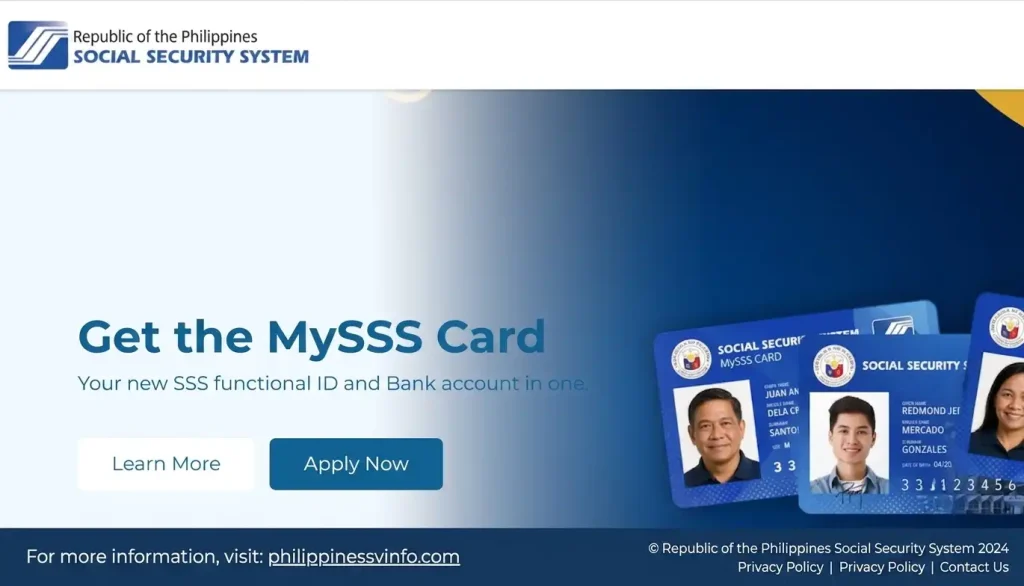
Step 1: Visit the Official SSS Member Portal
To begin your online registration, open a secure web browser and visit the official Member Portal. Always use the official SSS website to protect your personal information and avoid fraudulent websites.
Step 2: Choose Your Registration Option
Click the Register button and select the registration option that matches your Social Security System membership details. Read the instructions carefully, choose the correct account type, and continue to the next page.

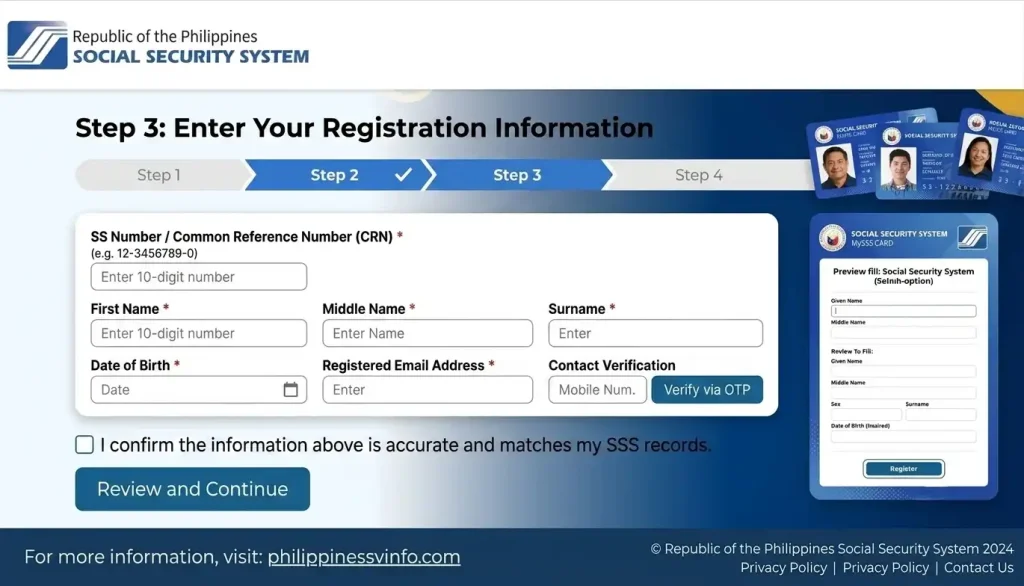
Step 3: Enter Your Registration Information
Provide the required personal details exactly as they appear in your Social Security System records. Accurate information helps the system verify your identity and prevents registration errors.
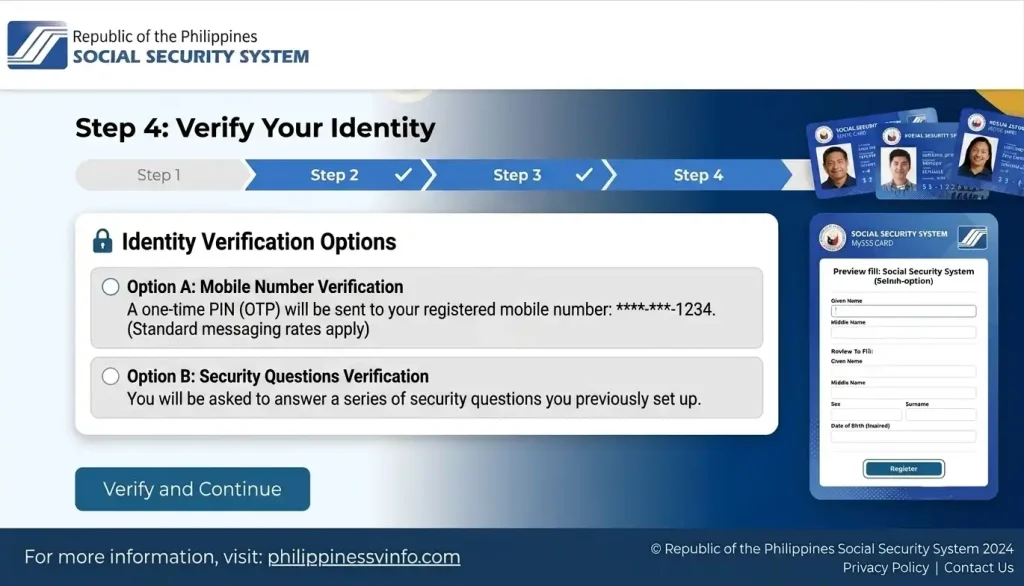
Step 4: Verify Your Identity
The Social Security System system will verify your identity using the information you provided. Make sure all details are correct before submitting.
Step 5: Create Your My.SSS Login Credentials
After your information is verified, create your My.SSS account credentials. Choose a secure username and password to keep your account protected.

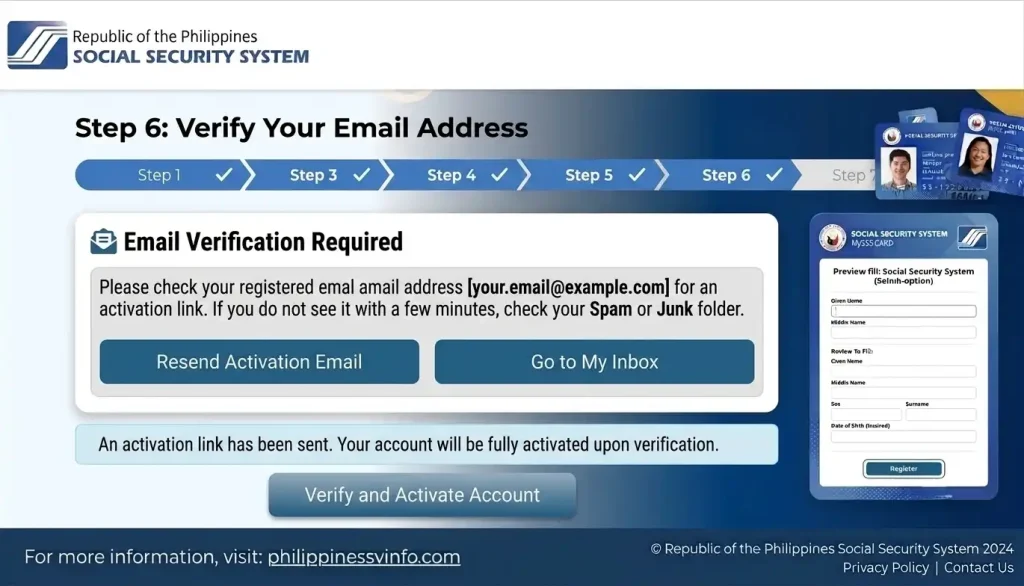
Step 6: Verify Your Email Address
Check your registered email address for the Social Security System activation message. Open the email, click the activation link, and follow the instructions to verify and activate your account.
Step 7: Log In to Your My.SSS Account
Once your account is activated, you can sign in and access all available online services.
Common Mistakes During SSS Registration Online
Applicants can experience registration or verification problems when the information they submit does not match their existing records or when they overlook an important step.
Common mistakes include:
| Common Mistake | Why It Can Cause Problems |
|---|---|
| Incorrect birth information | Details may not match official SSS records |
| Wrong email address | Verification messages may not reach you |
| Misspelled name | Personal information may not match existing records |
| Incorrect mobile number | Security or verification messages may not be received |
| Unverified email | Registration may remain incomplete |
| Outdated personal information | Submitted details may differ from official records |
| Incorrect verification details | The system may not be able to verify the member |
Before submitting your application, carefully compare your information with your official documents and SSS records whenever possible.
Quick SSS Registration Online Checklist
Before moving on to My.SSS account creation, make sure you have the essential information and access needed for the next stage.
Registration Checklist
- ✅ Permanent SS Number
- ✅ Active email address
- ✅ Active mobile number
- ✅ Correct personal information
- ✅ Required verification information
- ✅ Reliable internet connection
- ✅ Access to your email inbox
- ✅ Secure place to save your SS Number
Once these items are ready, you can proceed to the next stage of the process: creating and activating your My.SSS account.
Creating Your My.SSS Account Online
After obtaining your permanent SS Number, the next stage of the SSS Registration Online process is to create your My.SSS account. This online account gives members a secure way to access available SSS services, review membership information, and manage eligible transactions without having to visit an SSS branch for every request.
The My.SSS portal is designed to make SSS services more accessible and convenient. Once your account has been successfully registered and activated, you can use your login credentials to access your member information online and check services available to your account.
Before You Register for My.SSS
Before starting the My.SSS registration process, prepare the information you may need for identity verification and account activation.
| Requirement | Purpose |
|---|---|
| SS Number | Main identifier for your SSS membership |
| Active Email Address | Used for registration, activation, and account notifications |
| Registered Mobile Number | May be used for verification and security |
| Verification Reference | Helps confirm your identity |
| Internet Connection | Required to access the online registration system |
Having these details ready can make the registration process easier and reduce the chance of interruptions or incorrect entries.
How to Create a My.SSS Member Account
Step 1: Open the My.SSS Registration Page
Start by opening a browser and visiting the official SSS registration portal:
Make sure the website address is correct before entering your personal information. Avoid providing your SS Number, password, or other sensitive information on unofficial websites.
Step 2: Select Member Registration
After opening the registration page, select the option provided for members who want to create a My.SSS account.
This registration option is intended for individuals who already have an SS Number. Carefully read the instructions displayed on the page before continuing.
- Select the appropriate member registration option.
- Read the instructions shown on the screen.
- Make sure you have your SS Number available.
- Continue only after confirming that the information is correct.
Step 3: Enter Your SS Number and Email Address
Enter the account information requested by the registration system. This normally includes your SS Number and an active email address, along with any additional information requested on the form.
You should carefully review each field before continuing.
- Enter your 10-digit SS Number correctly.
- Provide an active email address that you can access.
- Enter any additional identification details requested.
- Check the information for spelling or number errors.
Your email address is particularly important because registration and activation instructions may be sent there.
Step 4: Choose a Verification Method
SSS uses identity verification to help ensure that the person registering for the account is the legitimate member.
The verification options displayed may vary depending on your SSS records and membership information. Possible references may include:
- UMID Card or CRN
- Registered mobile number
- UnionBank Quick Card
- SSS-enrolled savings account
- Employer ID Number
- PRN Number
- SBR Number
- Previous loan application information
Select the verification option that applies to your account and enter the requested information carefully.
If the information you provide does not match the records held by SSS, the registration may not proceed successfully.
Step 5: Complete Security Verification
The registration system may require additional security checks before your request can be submitted.
These checks may include:
- Completing a CAPTCHA challenge
- Confirming information you entered
- Reviewing your registration details
- Agreeing to applicable terms and conditions
These security measures help protect the registration system against automated or unauthorized activity.
Before moving forward, carefully review the information displayed on the screen.
Step 6: Submit Your Registration
Once all required information has been entered and reviewed, submit your My.SSS registration.
Before clicking the submission button:
- Select the required consent or agreement boxes.
- Review the information you entered.
- Accept the applicable terms and conditions.
- Click Submit to send your registration request.
After submission, follow any instructions provided by the SSS system. If your registration is accepted, you should monitor the email address associated with your application for further instructions.
Understanding the Account Verification Process
Account verification is an important part of creating a My.SSS account. It helps SSS confirm the identity of the person registering and provides an additional layer of protection for member information.
After submitting your registration, check the email address you provided. If an activation message is sent, follow the instructions and use the provided activation link as directed.
Do not share your activation link, password, OTP, or other security information with another person.
What Happens After Submission?
The registration process generally follows a sequence similar to the one below:
| Registration Stage | What You Need to Do | Expected Result |
|---|---|---|
| Registration Submission | Complete and submit the online form | Registration request is submitted |
| Email Notification | Check your email inbox and spam folders | Activation message is received |
| Activation Link | Open the link provided by SSS | Registration is confirmed |
| Password Creation | Create your login password | Account setup continues |
| Security Setup | Complete any required security options | Additional account protection is established |
Follow the instructions provided by SSS at each stage because the exact screens or requirements may change as the online system is updated.
Checking Your Activation Email
After completing registration, regularly check the email address you used for your My.SSS account.
If you cannot find the activation message in your main inbox, check other folders where automated messages may be filtered.
Check the following:
- Inbox
- Spam
- Junk
- Promotions
- Updates
If the message still does not appear, verify that you entered the correct email address during registration and follow the available instructions on the official SSS portal.
Activation Link Expiration Period
The activation email contains a unique link for completing the account activation process.
The link has a limited validity period. Based on the registration guidance referenced for this process, members should activate their account within five working days after receiving the email. If the activation link expires, you may need to repeat part of the registration process.
For this reason, it is best to complete activation as soon as you receive the official email rather than leaving the process unfinished.
Creating a Strong My.SSS Password
During account activation, you may be asked to create a password for your My.SSS account.
Choose a password that is difficult for other people to guess. Where permitted by the system, a strong password should contain a combination of:
- Uppercase letters
- Lowercase letters
- Numbers
- Special characters
- A sufficient password length
Avoid using information that can easily be connected to you.
Do not use:
- ❌ Your birthdate
- ❌ Your mobile number
- ❌ Your SS Number
- ❌ Your family member’s name
- ❌ Simple keyboard patterns such as
123456orqwerty
Use a unique password that you do not reuse for other important accounts.
Setting Up Security Questions
Depending on the current My.SSS registration process, you may also be asked to provide security questions or other account-recovery information.
These security details can help with certain account verification or recovery procedures.
When selecting your answers:
- Choose information you can remember.
- Avoid answers that are publicly available.
- Keep your answers consistent.
- Store them securely if you need a personal record.
Never send your security answers or password to another person through social media, email, or messaging apps.
Benefits of Activating Your My.SSS Account
After successfully activating your account, you can sign in to My.SSS and access the services available to your membership.
The portal can provide access to several useful areas.
Membership Information
Depending on the services currently available, members can use their account to:
- View membership information
- Review account details
- Check available registration information
- Access their online member records
Contribution Monitoring
My.SSS can also make it easier to review contribution-related information.
Members may be able to:
- View posted contributions
- Review payment records
- Check employer-reported contributions
- Monitor contribution history
Regularly checking your contribution records can help you identify information that may need clarification with SSS.
Loan Services
Eligible members may also access online loan-related services through their My.SSS account.
Available functions can include:
- Applying for eligible loans
- Checking loan balances
- Reviewing repayment information
- Monitoring loan application status
Eligibility requirements and available loan services depend on current SSS rules and your membership records.
Benefit Services
My.SSS may also provide access to selected benefit-related services and information.
Depending on your eligibility and the service involved, you may be able to:
- Monitor benefit applications
- Review claim-related information
- Check available benefit details
- View relevant transaction records
The exact services available can vary according to your membership status and SSS’s current online features.
Important Security Reminders
Your My.SSS account contains sensitive membership information, so protecting your login credentials is important.
Follow these basic security practices:
- Never share your password with anyone.
- Do not disclose OTPs or verification codes.
- Avoid signing in through public or shared computers whenever possible.
- Log out after using a shared device.
- Keep your registered contact information updated.
- Use a strong and unique password.
- Do not save your password on an unfamiliar computer.
- Only access your account through the official SSS website.
If you suspect that someone has accessed your account without permission, use the official SSS support channels and follow the appropriate account-security instructions.
Common Registration Problems and Solutions
Some applicants encounter problems when registering or activating their My.SSS account. In many cases, the issue is related to incorrect information, email delivery, or verification details.
| Problem | Possible Cause | Recommended Solution |
|---|---|---|
| Activation email not received | Email delay or filtering | Check your inbox, spam, junk, promotions, and updates folders |
| Invalid SS Number | Number entered incorrectly | Recheck your SS Number and enter it exactly as required |
| Verification mismatch | Information does not match SSS records | Review your records and use the correct verification information |
| Registration rejected | Inconsistent or incorrect information | Check all submitted details and correct any errors |
| Activation link expired | Link was not used within its validity period | Follow the current SSS instructions to restart or repeat the activation process |
| Account already exists | My.SSS registration may have been completed previously | Use the available password or account-recovery option instead of creating another account |
If an issue continues after checking your information, use the official SSS support channels for assistance rather than repeatedly submitting incorrect registration details.
Final Check Before Your First My.SSS Login
Before attempting your first login, make sure you have completed the required registration and activation steps.
Your basic checklist should include:
- ✅ Permanent SS Number
- ✅ Registered email address
- ✅ My.SSS registration completed
- ✅ Email verification completed
- ✅ Account activated
- ✅ Secure password created
- ✅ Required security information completed
- ✅ Login details stored safely
Once your account is activated, you can proceed to the My.SSS login page and explore the online services available to your account.
What Can You Do Inside My.SSS?
Once your My.SSS account has been successfully activated, you can use the portal to access various SSS services online. The exact features available may depend on your membership category, eligibility, and the services currently offered by SSS.
Instead of visiting a branch for every routine inquiry, members can use their online account to review important membership information and monitor eligible transactions.
Contribution Monitoring
One of the most useful features of My.SSS is the ability to review your contribution information online.
Members may be able to:
- Check their contribution history
- View posted contribution payments
- Review employer-reported remittances
- Monitor contribution-related account activity
Checking your records regularly can help you identify missing
Frequently Asked Questions About SSS Registration Online
1. How do I complete SSS Registration Online?
To complete SSS Registration Online, you generally need an existing SS Number, a valid email address, an active mobile number, and appropriate verification information. Visit the official SSS registration portal, enter your member details, select a registration preference for identity verification, create your User ID and password, and submit the form. After submission, check your email for the activation link and follow the instructions to complete your My.SSS account registration.
2. How long does SSS online registration take?
The initial online application can generally take around 15 to 30 minutes, depending on how quickly you can provide the required information. Email verification and account activation may take from a few hours to several days. The source material also notes that the initial confirmation link has a limited validity period, so applicants should complete the activation process promptly.
3. How can I know if I am already registered with SSS online?
You can check your registration status by trying to log in to your My.SSS account using your existing User ID and password. If you cannot remember your login details, you can use the available password-recovery option. You may also try the My.SSS registration page, where the system can indicate if your SS Number or email address is already associated with an account. For further assistance, the source material lists the SSS hotline 1455.
4. Why can’t I register for SSS online?
Registration problems can occur when your SSS records are incomplete, your information does not match existing records, or the verification details you provide are incorrect. The supplied material also identifies issues such as a missing Date of Coverage and incomplete membership records as possible reasons for registration difficulties.
To resolve an issue, review your information carefully, leave fields blank when information does not apply rather than entering “NONE,” and contact SSS at 1455 if your membership status or coverage information needs clarification. A branch visit may also be required for certain record updates or verification matters.
5. Is SSS Registration Online free?
Yes. The supplied material states that SSS registration and the creation of a My.SSS account are free. You should not pay an individual or unofficial website simply to obtain an SS Number or create an online account.
Regular SSS contributions are separate from the registration process, and certain optional services may have their own applicable charges.
6. What should I do after registering for SSS online?
After completing your online registration, keep copies of the documents and confirmation information sent to your email. The supplied material specifically mentions saving or printing the SS Number Slip, ePersonal Record Form, and Transaction Number Slip. You should also activate your My.SSS account using the email link provided by SSS. Depending on your membership status and verification requirements, you may need to submit supporting documents or visit an SSS branch to complete further verification.
7. Can I go directly to an SSS branch without an appointment?
The supplied material states that SSS branches can accommodate walk-in clients, although members with scheduled appointments may receive priority. Waiting times can therefore vary for walk-in visitors. Branch procedures and schedules may differ, so it is advisable to check the current instructions of the specific SSS branch before visiting, particularly if you need to complete document submission or membership verification.
8. What is SSS online verification?
SSS online verification can refer to the process used to confirm your identity and activate your My.SSS account. During registration, SSS may send a confirmation or activation link to your registered email address. Other online transactions may also use security checks or one-time passwords (OTPs) associated with your registered contact information.
9. Can I apply for SSS online anytime?
The supplied material states that the initial online SS Number application can be started through the SSS website 24/7. However, completing the entire process may involve email verification and, depending on your circumstances, supporting-document submission or additional membership verification.
Conclusion
The SSS Registration Online process makes it easier for Filipinos to obtain an SS Number, create a My.SSS account, and access essential Social Security System services through a secure online platform. Whether you are an employee, self-employed professional, voluntary member, student, household worker, or OFW, having an active My.SSS account allows you to conveniently monitor contributions, review loan information, track benefit-related transactions, generate PRNs, and manage important membership records without frequent branch visits. By providing accurate personal information, completing email verification on time, using strong account security practices, and keeping your contact details updated, you can enjoy a smooth and secure online experience. Always use the official SSS website for registration and account management, and regularly review your records to ensure your membership information remains accurate and up to date.