OEC Online Philippines 2026: How to Apply, Get Exemption & Check Requirements
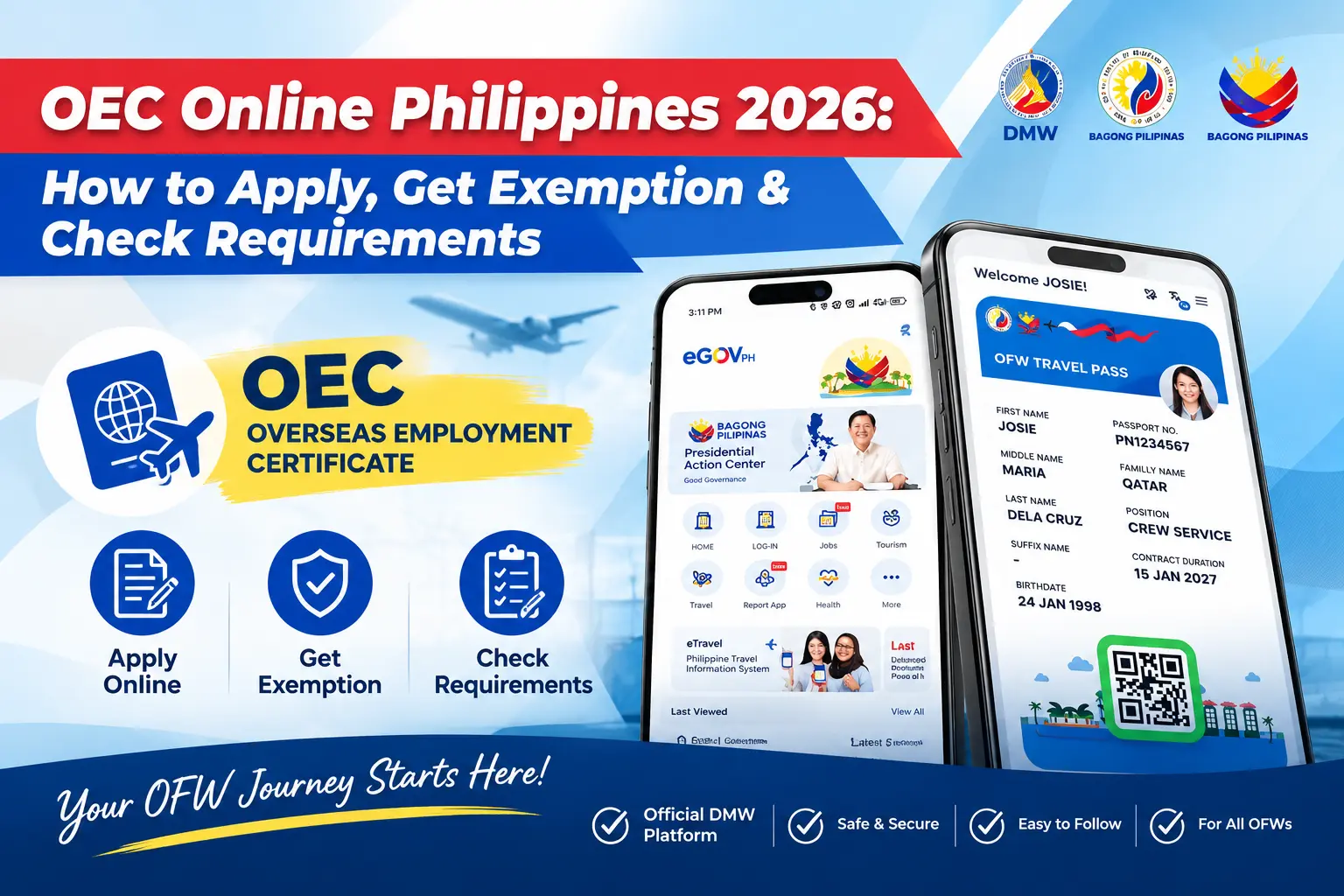
For Filipinos working overseas, the OEC Online process is an important part of preparing for departure from the Philippines. The Overseas Employment Certificate (OEC) serves as an exit clearance for eligible Overseas Filipino Workers (OFWs), including Balik-Manggagawa workers returning to their overseas jobs. Through the Department of Migrant Workers (DMW) online system, eligible workers can check their employment records, access available services, and determine whether they qualify for an OEC exemption or need to complete additional requirements before travelling.
For OFWs working in Germany, Belgium, Luxembourg, the Netherlands, and Russia, the Philippine Embassy in Berlin provides guidance on OEC processing and employment-contract verification through the Migrant Workers Office (MWO-Berlin). The process can vary depending on your employment record and circumstances, particularly if your employer or jobsite has changed. Checking your DMW account first and following the current instructions for your specific situation can help you complete the required OEC documentation before your flight.
What Is the OEC and Why It Exists
The Overseas Employment Certificate (OEC) is a government-issued exit clearance for Filipino workers departing the Philippines for overseas employment. It confirms that the worker’s overseas employment has been processed and documented through the appropriate government system. The OEC helps authorities identify workers who are properly documented for overseas employment and distinguish them from individuals who may be travelling abroad without the required employment documentation.
The OEC is part of the Philippine government’s efforts to promote the deployment of qualified and documented overseas workers and help protect Filipinos from illegal recruitment, contract substitution, and trafficking. The Department of Migrant Workers (DMW), which succeeded the former Philippine Overseas Employment Administration (POEA), administers the relevant overseas employment documentation processes. It is important to understand that an OEC is different from a work visa, work permit, or employment contract. A visa or work permit is issued by the destination country and governs entry and employment there, while the OEC serves as an exit-clearance document for a properly documented worker departing the Philippines.
Who Needs an OEC?
Most Filipino workers leaving the Philippines for overseas employment need the appropriate OEC documentation. First-time OFWs generally need an OEC before departure, while returning Balik-Manggagawa workers may qualify for an OEC exemption when returning to the same employer. Workers with a changed employer, jobsite, position, or employment details may need to update their DMW record and complete additional OEC processing. Visit Homepage.
| Worker Category | OEC Requirement |
|---|---|
| First-Time OFW | Generally needs to secure an OEC before departure. |
| Same Employer | May qualify for an OEC exemption if eligible. |
| Balik-Manggagawa | Should check the DMW system for OEC or exemption availability. |
| Changed Employer | May need a new OEC and updated employment record. |
| Changed Jobsite or Position | Additional verification may be required. |
| Updated Employment Details | DMW information should be reviewed and updated before travel. |
How to Apply for OEC Online in the Philippines
Applying for an OEC Online starts with accessing the official Department of Migrant Workers (DMW) platform and reviewing your employment information. The exact process can vary depending on whether you are a first-time OFW, a returning Balik-Manggagawa worker, or a worker whose employer, jobsite, or employment details have changed. Before starting, prepare your documents and make sure the information in your DMW account is accurate and current.
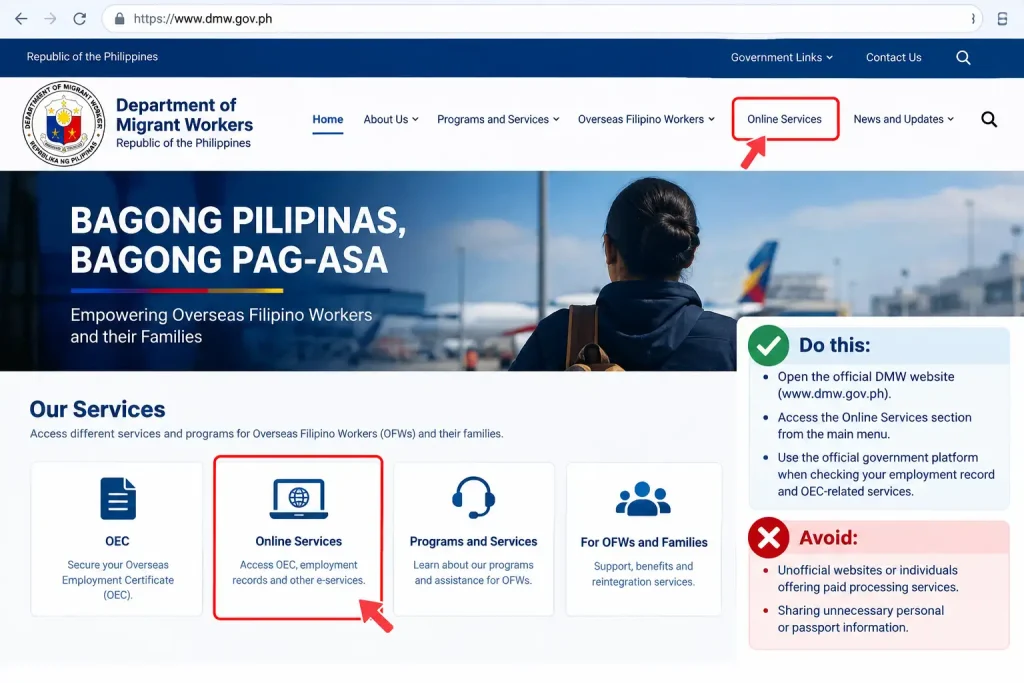
Step 1: Visit the Official DMW Online Services
Begin by opening the official DMW website and accessing its online services section. Use the government platform when checking your employment record and available OEC-related services. Be careful with unofficial websites or individuals offering paid processing services, particularly those requesting personal or passport information.
- Open the official DMW online services platform.
- Use the official website when accessing your OEC-related services.
- Avoid unofficial websites requesting unnecessary personal or employment information.
Step 2: Sign In or Create Your DMW Account
If you already have a DMW eRegistration account, sign in using your existing credentials. If you do not have an account, complete the registration process provided by DMW. Once you access your account, review your personal information and employment details before continuing with the application.
- Sign in using your existing DMW account credentials.
- Complete registration if you are a new DMW user.
- Check your personal and employment information for accuracy.

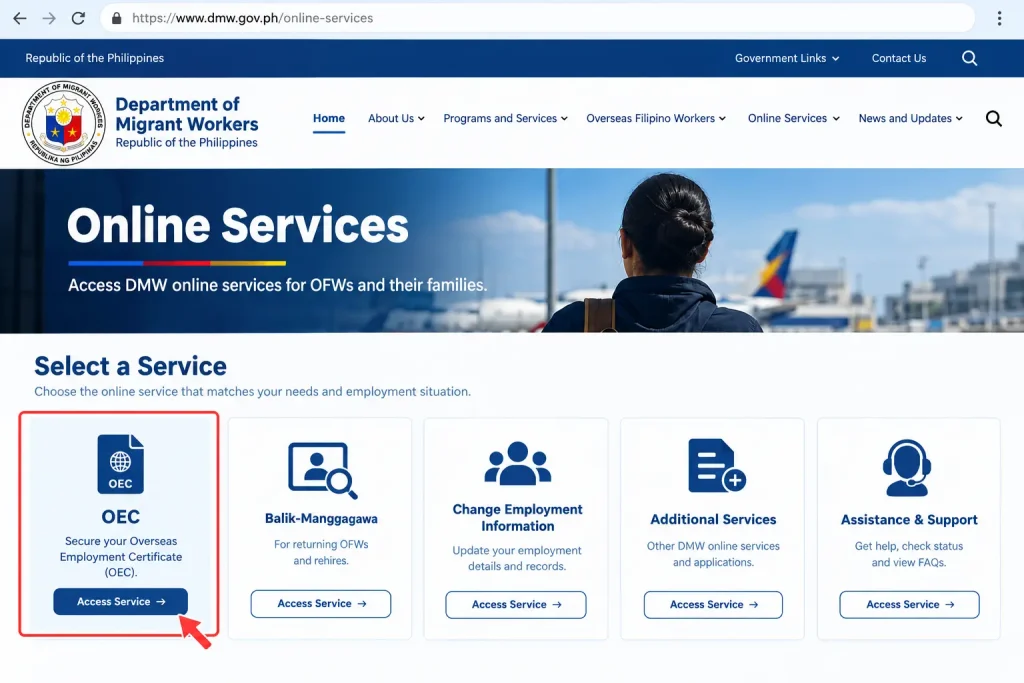
Step 3: Select the Appropriate OEC Service
After signing in, look for the service applicable to your circumstances as an OFW. Returning Balik-Manggagawa workers may see different options from first-time OFWs or workers with changed employment information. Because DMW may update its online services and menus, follow the options and instructions currently displayed in your account.
- Select the service applicable to your current employment situation.
- Returning workers should check for the applicable Balik-Manggagawa or OEC option.
- Follow the current DMW instructions rather than relying solely on older screenshots or guides.
Step 4: Review and Confirm Your Employment Record
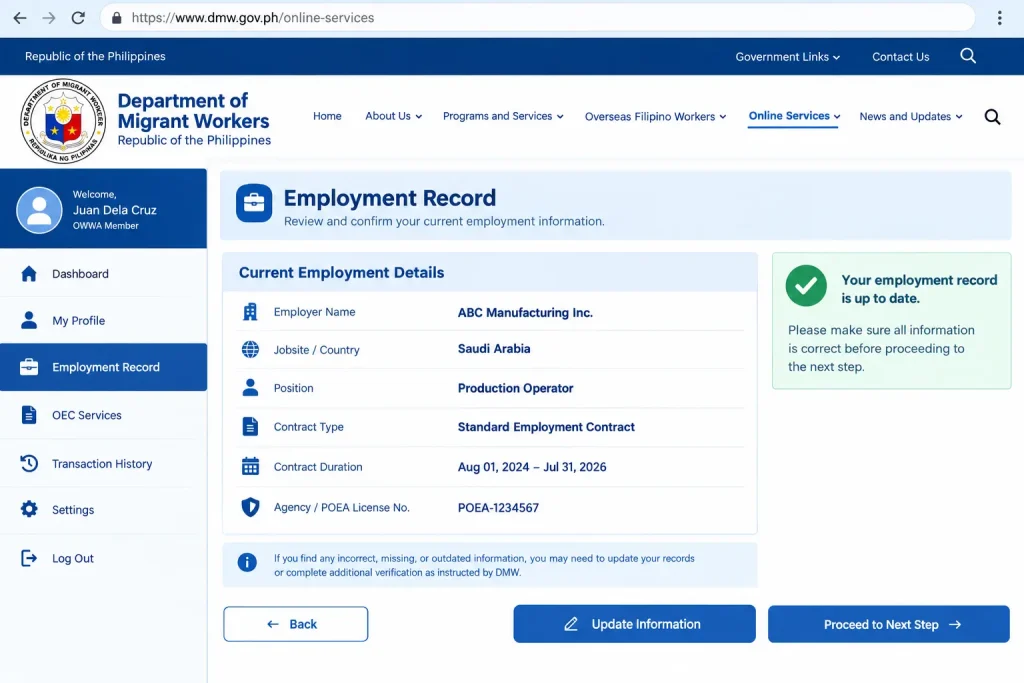
Before continuing, carefully review the employment information recorded in your DMW account. Check details such as your employer, jobsite or country, position, and relevant contract information. If your record is missing, incorrect, or outdated, you may need to update the information or complete additional verification before proceeding.
- Check your employer name and current jobsite or country of employment.
- Review your position and other employment information.
- Update incorrect or outdated details when instructed by DMW.
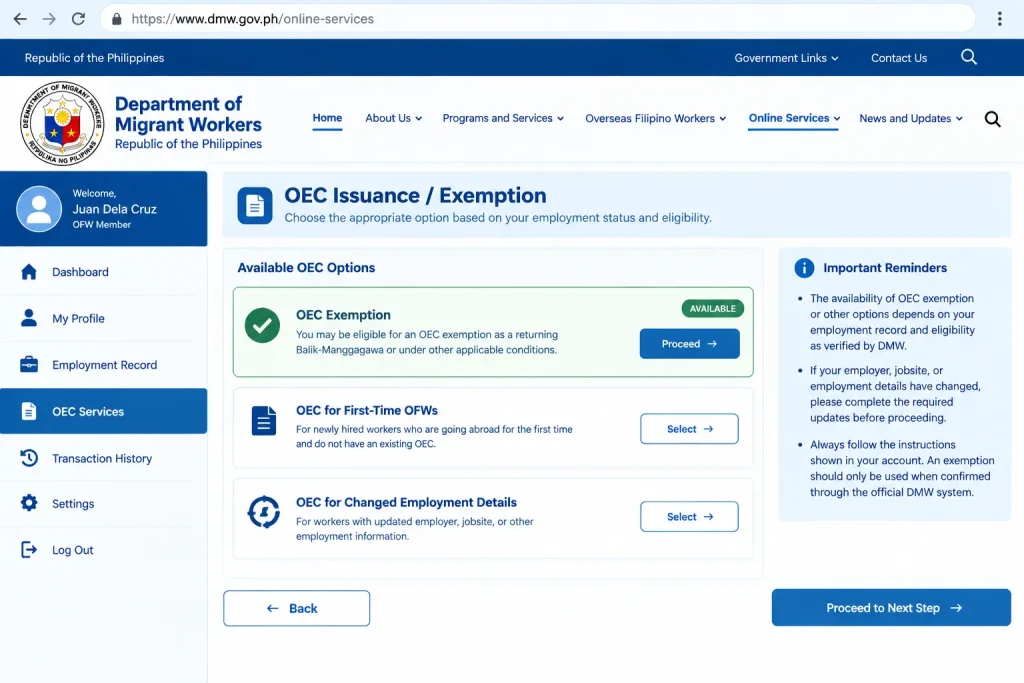
Step 5: Check for OEC Issuance or Exemption
Once your employment record has been reviewed, check which OEC option is available in your account. Eligible returning workers may be presented with an OEC exemption, while workers who do not meet the applicable conditions may need to complete the regular OEC process or additional requirements. An exemption should only be used when it is confirmed through the official DMW system.
- Check whether an OEC exemption option appears in your account.
- Follow any additional requirements or verification instructions provided by DMW.
- If your employer, jobsite, or employment details have changed, check whether further processing is required.
Step 6: Complete the Process and Keep Your Confirmation
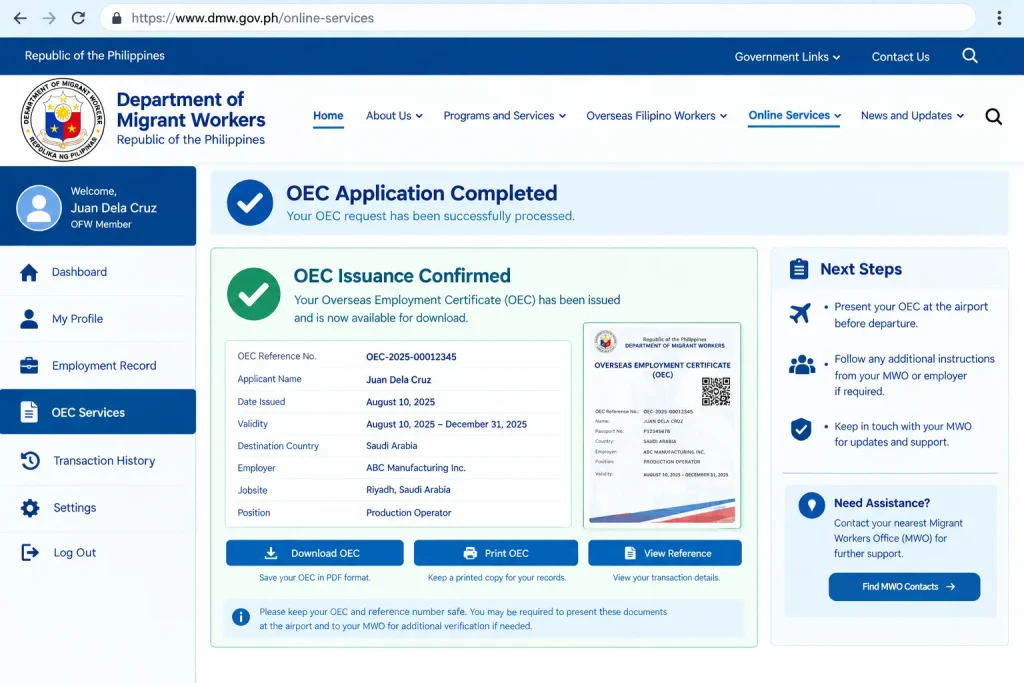
Complete the remaining instructions displayed by the DMW system for your specific situation. Depending on your application, you may receive a confirmation, reference number, digital document, OEC, or other transaction record. Keep these records safely and follow any instructions to contact the appropriate Migrant Workers Office (MWO) if additional verification is required before your departure.
- Complete all remaining OEC-related requirements shown in your account.
- Save your confirmation, reference number, OEC, exemption record, or other available transaction document.
- Follow DMW or MWO instructions if additional verification or processing is required.
How to Get an OEC Exemption Online
Eligible Balik-Manggagawa workers returning to an existing overseas job may qualify for an OEC exemption online instead of completing the full OEC process required for a new hire. The exemption process generally requires the worker to access their existing DMW record, confirm their current employment information, and follow the instructions provided by the official system. Eligibility can depend on whether the worker is returning to the same employer and jobsite and whether the employment record can be verified through DMW.
Step 1: Log In to Your DMW Account
Begin by accessing your existing DMW account through the appropriate official online service. Returning OFWs should use the employment and deployment information already connected to their account when checking whether an exemption option is available. Make sure you are using the official DMW platform before entering personal, passport, or employment information.
- Sign in to your DMW account.
- Open the returning-worker service.
- Check your deployment record.
Step 2: Confirm Your Employment Details
After signing in, carefully review the employment information displayed in your account. Your employer, jobsite, passport details, and visa or work-permit information should match your current overseas employment. If important information has changed or the record is incomplete, the system may require you to update your details or complete additional processing before an exemption can be confirmed.
- Confirm your employer and jobsite.
- Review your passport details.
- Check your visa or work permit.
Step 3: Provide Supporting Documents
If the DMW system requires additional proof that you are continuing to work for the same employer, prepare and submit the documents requested. Depending on your circumstances, supporting evidence may include your current employment contract, Certificate of Employment, valid employment ID, or recent payslip. Providing current information can help address gaps in the employment record when additional verification is required.
- Prepare your employment contract.
- Keep a current Certificate of Employment.
- Prepare an employment ID or recent payslip.
Step 4: Confirm Your OEC Exemption
Once your employment information has been reviewed, check the DMW system for the applicable exemption status. If the system confirms that you qualify, keep the electronic confirmation, reference details, or applicable digital travel document provided through the official process. If an OFW Travel Pass applies to your category, follow the instructions shown in the relevant digital system.
- Check your exemption status.
- Save the confirmation.
- Review Travel Pass instructions if applicable.
Step 5: Complete Additional Verification if Required
If DMW cannot automatically verify your continuing employment, you may be instructed to update your record or complete additional verification before travelling. This may be necessary when your contract has expired, your employer or jobsite has changed, or required employment information is missing. Follow the instructions provided by DMW and contact the appropriate Migrant Workers Office (MWO) if further assistance is required.
- Check for missing information.
- Contact the appropriate MWO if instructed.
- Complete required verification before departure.
OEC Requirements for First-Time OFWs
First-time OFWs generally need to complete both online and in-person processing before their OEC can be issued. The process may begin with online registration and submission of the required documents, followed by an in-person appointment where the original documents can be presented for verification. Once the required checks and applicable payments have been completed, the OEC may be issued according to the current DMW processing requirements.
OEC Requirements for First-Time OFWs
| Requirement | Details |
|---|---|
| Valid Philippine Passport | A valid passport is required as proof of identity and travel documentation. |
| Work Visa or Work Permit | Submit the appropriate visa or work permit required for employment in the destination country. |
| Employment Contract | Provide the employment contract containing the relevant terms and conditions of your overseas employment. |
| POLO Endorsement Letter | An endorsement letter may be required depending on the worker’s employment situation and destination. |
| Country- and Role-Specific Documents | Additional documents may apply depending on the destination country, employer, or type of work. |
| Medical Certificate | May be required when applicable to the worker’s employment or destination-country requirements. |
| PEOS Certificate | A Pre-Employment Orientation Seminar (PEOS) certificate may be required as part of the applicable process. |
| PDOS Certificate | A Pre-Departure Orientation Seminar (PDOS) certificate may be required before deployment. |
| POEA Clearance | May be required in specific circumstances, depending on the applicable employment process. |
| Proof of Insurance | Proof of the required insurance coverage may be requested when applicable. |
Requirements can vary depending on the worker’s employment arrangement, destination country, job position, and current DMW rules. Before submitting your application, check the latest instructions provided by DMW and prepare both digital copies and original documents when an in-person verification is required.
How to Check Your OEC Online Status
OFWs can check their OEC Online status by accessing the appropriate Department of Migrant Workers (DMW) digital service and reviewing the information linked to their account. Checking your status before travelling can help you confirm whether your OEC has been processed, whether an OEC exemption is available, or whether the system requires you to complete additional steps. Always review the information shown in your official account because the available options can depend on your employment record and current circumstances.
Step 1: Access the Official DMW Platform
Start by opening the official DMW online services platform and accessing your account. Use the official government website when checking your employment record or OEC-related information, and avoid entering your personal details on unofficial websites.
- Open the official DMW website.
- Select the appropriate online service.
- Sign in to your account.
Step 2: Review Your Employment Record
After signing in, review the employment information connected to your DMW account. Check your employer, jobsite, position, and other relevant details to make sure they reflect your current overseas employment.
- Check your employer.
- Review your jobsite.
- Confirm your employment details.
Step 3: Check Your OEC Status
Look for the OEC-related service or status information available in your account. Depending on your circumstances, the system may show an OEC option, an exemption status, or instructions to complete additional processing.
- Check your OEC status.
- Look for an exemption option.
- Read any system instructions.
Step 4: Check for Additional Requirements
If your status does not show the expected OEC or exemption, carefully review any messages displayed by DMW. You may need to update your profile, correct employment information, or complete additional verification before continuing.
- Review account notifications.
- Update incorrect information.
- Complete required verification.
Step 5: Keep Your Confirmation
Once your OEC, exemption, or applicable digital travel document has been confirmed, save the available confirmation or reference details for your records. Keep your supporting employment documents available as well in case additional verification is requested during your departure process.
- Save your confirmation.
- Keep your reference details.
- Prepare supporting documents.
OEC Online Fees and Processing Time
The fees and processing time for OEC Online can vary depending on the worker’s category and the type of processing required. Returning Balik-Manggagawa workers who qualify for an OEC exemption may follow a different process from first-time OFWs or workers who need employment-contract verification. Always check the current DMW instructions for the applicable fees and processing requirements before completing your transaction.
| OEC Online Item | Fees / Processing Information |
|---|---|
| OEC Exemption | Eligible returning workers may qualify for an exemption instead of obtaining a new OEC. |
| Regular OEC Processing | Applicable fees may depend on the worker’s processing requirements and current DMW rules. |
| Contract Verification | Additional processing may be required when employment details need verification or have changed. |
| First-Time OFW | Processing may take longer because employment documents and other requirements may need to be reviewed. |
| Online Processing Time | The time required can vary depending on account information, document verification, and system processing. |
| Additional Verification | Missing, outdated, or inconsistent employment information can result in additional processing time. |
| Payment | Only pay applicable charges through authorised DMW or official processing channels. |
| Before Travelling | Complete the required process early and check your OEC or exemption status before your scheduled departure. |
Common OEC Online Problems and What They Mean
OFWs may sometimes sign in to the DMW system and find that an expected OEC Online service or exemption option is not immediately available. This does not necessarily mean that the worker is unable to obtain the required OEC documentation. In many cases, the message may indicate that the employment record needs to be reviewed, updated, or verified before the worker can continue.
Instead of repeatedly submitting information or assuming that there is a system error, carefully read the message and instructions displayed in your DMW account. The next step can depend on your employment record, current employer, jobsite, and other information associated with your account.
“Record Not Found”
A “Record Not Found” message may appear when the DMW system cannot locate the expected employment record. Start by checking that you are accessing the correct account and that the personal information in your profile corresponds with your official records. If the record remains unavailable after checking your details, follow the instructions provided by DMW or contact the appropriate MWO for assistance.
- Verify your name, passport information, and other personal details in your DMW profile.
- Check that your employment information is entered correctly and reflects your current situation.
- If the record still cannot be located, follow DMW instructions for updating your information or seek assistance from the appropriate MWO.
“Update Profile”
An “Update Profile” message generally indicates that some information in your DMW account requires review or updating before you can continue with the available service. Carefully check the fields identified by the system and provide your current and accurate information. Depending on your account, the requested information may relate to your personal details, passport, employer, jobsite, or employment record.
- Review your personal and passport information and correct any outdated details.
- Check your employer, jobsite, and other employment information.
- Enter your current and accurate information rather than relying on outdated details from previous employment records.
No OEC Exemption Appears
If an OEC exemption option does not appear in your DMW account, do not immediately assume that the system is malfunctioning. The availability of an exemption can depend on the information recorded in your account and whether your employment details can be verified. Changes involving your employer, jobsite, or other important employment information may require additional processing.
- Carefully review the employment information shown in your DMW account.
- Follow any instructions provided by the system regarding updating or verifying your employment record.
- If DMW directs you to complete manual processing or seek assistance, contact the appropriate MWO for current guidance.
OEC Exemption and Consequences of Traveling
An OFW who cannot present a valid OEC, a verifiable exemption, or another applicable digital travel document may face additional verification at the airport before departure. Depending on the circumstances, this can result in offloading, meaning the traveller is not permitted to proceed with the flight while the relevant authorities verify the worker’s documents and employment status. Offloading is a departure and documentation-verification measure rather than, by itself, a criminal penalty, but it can result in a missed flight, additional expenses, lost work time, and disruption for the worker and their family.
More serious concerns can arise when missing or fraudulent employment documents are connected to illegal recruitment. Under Republic Act No. 8042, illegal recruitment covers certain recruitment and placement activities conducted without the required authority or licence, while large-scale or syndicated illegal recruitment may be subject to more severe legal penalties. Workers who receive fraudulent documents or are deployed through an unauthorised recruitment arrangement may face difficulties proving their employment status and accessing appropriate protection abroad. If you suspect illegal recruitment or document falsification, keep relevant records such as receipts, employment contracts, messages, recruitment communications, and OEC or exemption confirmations, and report the matter to the appropriate DMW office or anti-illegal-recruitment authorities for guidance.
OEC Online vs. Manual Processing
The two routes can generally be understood as follows:
| OEC Online / Exemption Route | Manual or Verification Route |
|---|---|
| May apply to eligible returning workers | May apply to direct hires or workers requiring verification |
| Uses an existing DMW employment record | Requires review of employment documentation |
| Completed through the DMW online system | May involve communication with the appropriate MWO |
| May provide a digital clearance or exemption | May require additional instructions or an appointment |
| Worker follows the instructions displayed online | Worker follows the MWO’s instructions after document review |
This table provides a general comparison and does not guarantee eligibility. Your current DMW account status and the instructions issued by the responsible MWO should take priority.
What to Do Next
If You Are an OFW
- Identify Your Worker Category
First, determine which situation applies to you. You may be a first-time OFW, a Balik-Manggagawa worker returning to the same employer and jobsite, or a worker whose employer, jobsite, or position has changed. Knowing your category helps you identify the applicable DMW process. - Check Your DMW Employment Record Early
Sign in to the appropriate DMW online service or relevant digital platform well before your scheduled flight. Review your employment record and make sure the information matches your current visa, work permit, employer, and jobsite details. - Prepare Supporting Proof of Employment
Even when your OEC Online exemption or digital documentation has been processed, it is useful to keep current proof of employment with you when travelling. Documents such as a Certificate of Employment, employment ID, or recent payslip may help support your employment information if verification is required. - Complete PDOS When Required
If you are a new hire or your circumstances require participation in the Pre-Departure Orientation Seminar (PDOS), complete the required seminar before departure. Keep your PDOS certificate or other proof of completion for your records. - Use Only Official DMW Channels
Be cautious of individuals or websites requesting payment in exchange for an OEC or exemption. Use official DMW channels for applicable OEC services and verify any fees or charges directly through official government information before making a payment. - Report Suspected Illegal Recruitment
If you encounter suspected illegal recruitment, unusual payment demands, potentially altered documents, or deployment without the required employment documentation, preserve your records and report the matter to the appropriate DMW anti-illegal-recruitment office or authority for further ass
How to Finish Your OEC Online Process
Once you have identified the correct route for your situation, the final stage of the OEC Online process is mainly about reviewing your records, completing the instructions shown by DMW, and keeping proof of your transaction.
Eligible returning OFWs may use the applicable Balik-Manggagawa services available through the DMW online system. Digital processing has also expanded through the OFW Travel Pass, which forms part of the government’s efforts to streamline overseas deployment services.
Because DMW procedures and digital services can be updated, always follow the instructions currently displayed in your DMW account or the latest guidance issued by the relevant MWO.
Final OEC Online Checklist
Before travelling, review the following:
- Your DMW account information is accurate.
- Your passport details are current.
- Your employer and jobsite information are correct.
- Your employment contract has been verified if required.
- Your OEC exemption or applicable travel clearance has been processed.
- You have saved your confirmation or reference information.
- Any required appointment has been completed.
- Applicable fees or OWWA-related requirements have been addressed.
- You have reviewed the latest official travel instructions.
Do not wait until the day of your flight to discover that your DMW employment record needs to be updated or verified.
OEC Online and the OFW Travel Pass
The Department of Migrant Workers (DMW) has introduced the OFW Travel Pass as part of the digitalisation of overseas employment and deployment services. For eligible returning OFWs, the Travel Pass is connected with the newer digital process, so workers using OEC Online services should also check whether Travel Pass instructions or options are available through their official account.
OFW Travel Pass and OEC Online
| Situation | What It Means |
|---|---|
| Returning OFW | The OFW Travel Pass may be part of the digital process for eligible returning workers. |
| Rehire or Balik-Manggagawa worker | Initial coverage under DMW Advisory No. 38, Series of 2025 included eligible rehire and returning workers. |
| Balik-Manggagawa with OEC exemption | Workers who obtained an OEC exemption through DMW online systems were included in the initial coverage. |
| Accessing the Travel Pass | OFWs can access the Travel Pass through the eGovPH application and its DMW section. |
| Active employment contract | If an active contract is recorded in the system, the application may generate the applicable Travel Pass. |
| Expired employment contract | The system may require the worker to update employer or jobsite information before proceeding. |
OFWs should check the current digital process rather than relying entirely on older OEC instructions or screenshots published on other websites. DMW procedures and online services may change, and the options available to each worker can depend on their employment record and circumstances.
If your DMW account displays instructions related to the OFW Travel Pass, follow the instructions currently shown in the official system and make sure your employment inf
OEC Online 2026 — Quick Summary
| Topic | Key Information |
|---|---|
| OEC | Overseas employment exit-clearance document for applicable OFWs |
| Online service | Managed through the DMW digital system |
| Returning workers | May use the Balik-Manggagawa route when eligible |
| OEC exemption | Available only when applicable conditions are met |
| Changed employer | May require additional processing or verification |
| Direct hire | May require employment-contract verification |
| MWO-Berlin | Handles relevant OEC and verification cases within its coverage |
| Travel Pass | Digital OFW travel documentation introduced through DMW |
| Main advic | Check your current DMW record and follow official instructions |
Frequently Asked Questions About OEC Online
Final Thoughts
The OEC Online system makes it easier for Overseas Filipino Workers (OFWs) to manage their overseas employment documentation through the Department of Migrant Workers (DMW). Whether you are a first-time OFW, a Balik-Manggagawa worker returning to the same employer, or someone whose employment details have changed, it is important to review your DMW records carefully and follow the instructions provided in the official system. Completing the required steps early, keeping your employment information updated, and securing your OEC, exemption, or applicable Travel Pass before your flight can help prevent delays, verification issues, and possible offloading at the airport. Always use official DMW channels, keep copies of your confirmations and supporting documents, and check the latest guidance before travelling to ensure a smooth and hassle-free departure process.