PasaLoad Smart Philippines 2026: Complete Guide to Sending Load, Sharing Data & Promos
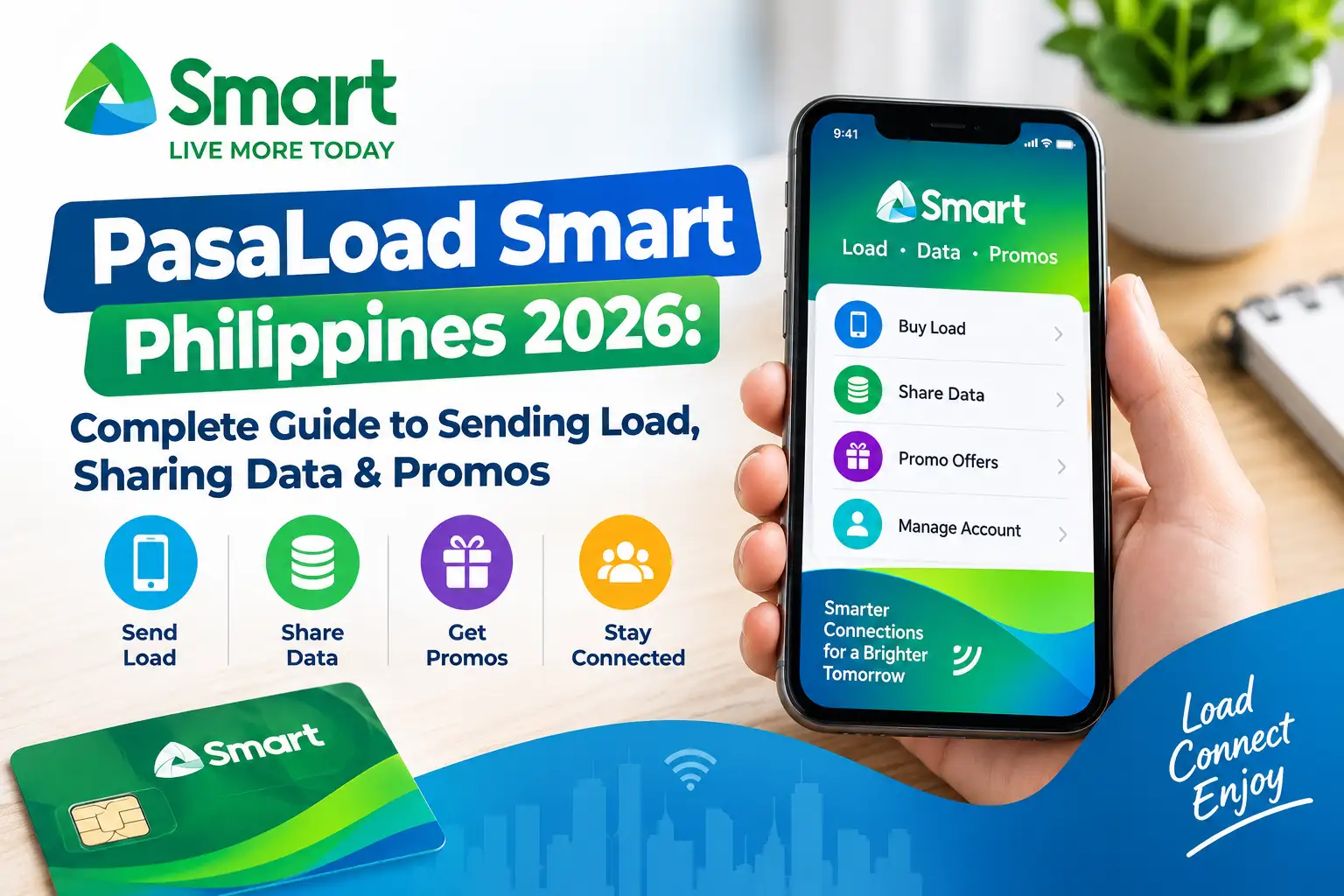
PasaLoad Smart Philippines 2026 is a convenient option for eligible Smart subscribers who want to send prepaid load to family members, friends, classmates, or other mobile users. Instead of purchasing a separate load voucher, you may be able to transfer available prepaid credit or send an eligible promo through a supported Smart service. Smart also provides options for sharing certain mobile data packages, subject to the availability and requirements of each service.
For Smart Prepaid users in the Philippines, understanding how PasaLoad Smart works can help prevent unsuccessful transactions, incorrect recipient numbers, and unexpected balance deductions. Whether you want to send regular load, help someone access a promo, or share eligible mobile data, it is important to check the applicable instructions, confirmation process, transaction fees, and service limitations before proceeding.
What Is PasaLoad Smart?
PasaLoad Smart is a load-sharing service associated with Smart Communications in the Philippines. Depending on the currently supported service and your account’s eligibility, it allows subscribers to transfer prepaid load or send eligible promo packages to another mobile number. Certain data-sharing options may also be available through services designed for sharing mobile data.
The service can be helpful when someone runs out of prepaid credit and needs to make calls, send text messages, or access mobile internet. Rather than asking the recipient to purchase load immediately, an eligible subscriber may be able to provide assistance using an available transfer or promo-sharing method.
What Can You Do With PasaLoad Smart?
- Send regular load: Transfer an eligible amount of prepaid credit to another supported mobile number.
- Share promos: Help another subscriber access an eligible promo through an available purchase or sharing option.
- Share mobile data: Use a supported data-sharing service when your account and data package qualify.
- Help family and friends: Provide prepaid credit or an eligible service package when someone needs mobile connectivity.
Keep in mind that regular load transfers, promo purchases, and data sharing are not necessarily the same service. Not every promo or data package can be transferred, and available options may vary according to Smart’s current rules. Visit Homepage.
PasaLoad Smart Philippines 2026 at a Glance
| Feature | Details |
|---|---|
| Service provider | Smart Communications |
| Service purpose | Sending eligible prepaid load and accessing supported sharing options |
| Potentially supported subscribers | Smart Prepaid, TNT, and Smart Bro Prepaid, subject to current eligibility |
| SMS destination mentioned in supplied instructions | 808 |
| Minimum transfer amount mentioned | ₱2 |
| Transaction fee mentioned | ₱1 per successful transaction |
| Confirmation method mentioned | Reply YES when prompted |
| Confirmation period mentioned | 15 minutes |
| Internet requirement for SMS | Not required for the SMS method |
| Digital alternative | Smart App, if the relevant feature is available |
Important: The transfer amount, SMS destination, fee, confirmation period, and supported account types listed above are based on the information supplied for this guide. These details may change and should not be treated as independently verified current service terms. Check the official Smart PasaLoad instructions before making a transaction.
Requirements Before Using PasaLoad Smart
Before using PasaLoad Smart Philippines 2026, check your prepaid balance, confirm the recipient’s mobile number, and make sure your account is eligible for the service. Preparing these details in advance can help reduce failed transactions and avoid sending load to the wrong person.
You may need the following:
- An eligible Smart, TNT, or Smart Bro Prepaid account, depending on the specific service.
- Sufficient available load to cover the intended transfer and any applicable transaction fee.
- The recipient’s correct Philippine mobile number.
- Access to SMS if you intend to use the text-message method.
- The ability to read and respond to a transaction confirmation message, when required.
- An eligible promo or shareable data allowance if you plan to use a promo or data-sharing option.
Check Your Available Load Balance
Make sure your account has enough load to cover the amount you intend to send and any applicable service charges. For example, if a ₱1 transaction fee applies to a ₱20 transfer, you would need at least ₱21 in available load, assuming no additional charges apply.
Before confirming a PasaLoad Smart transaction, double-check the recipient’s mobile number. A single incorrect digit can cause a transfer to fail or potentially send the load to an unintended recipient. If you are unsure about the number, confirm it directly with the person receiving the load.
You should also check the current Smart service instructions to determine whether your account and the recipient’s number qualify for the selected transfer or sharing option.
How to Send Regular Load Using PasaLoad Smart
Sending regular load through PasaLoad Smart can be a convenient way to help another eligible subscriber when they need prepaid credit. The SMS method may work without mobile data, provided the service is available for your account. Follow the steps below carefully, and verify the latest SMS format and destination through the official Smart PasaLoad help page before sending your request.
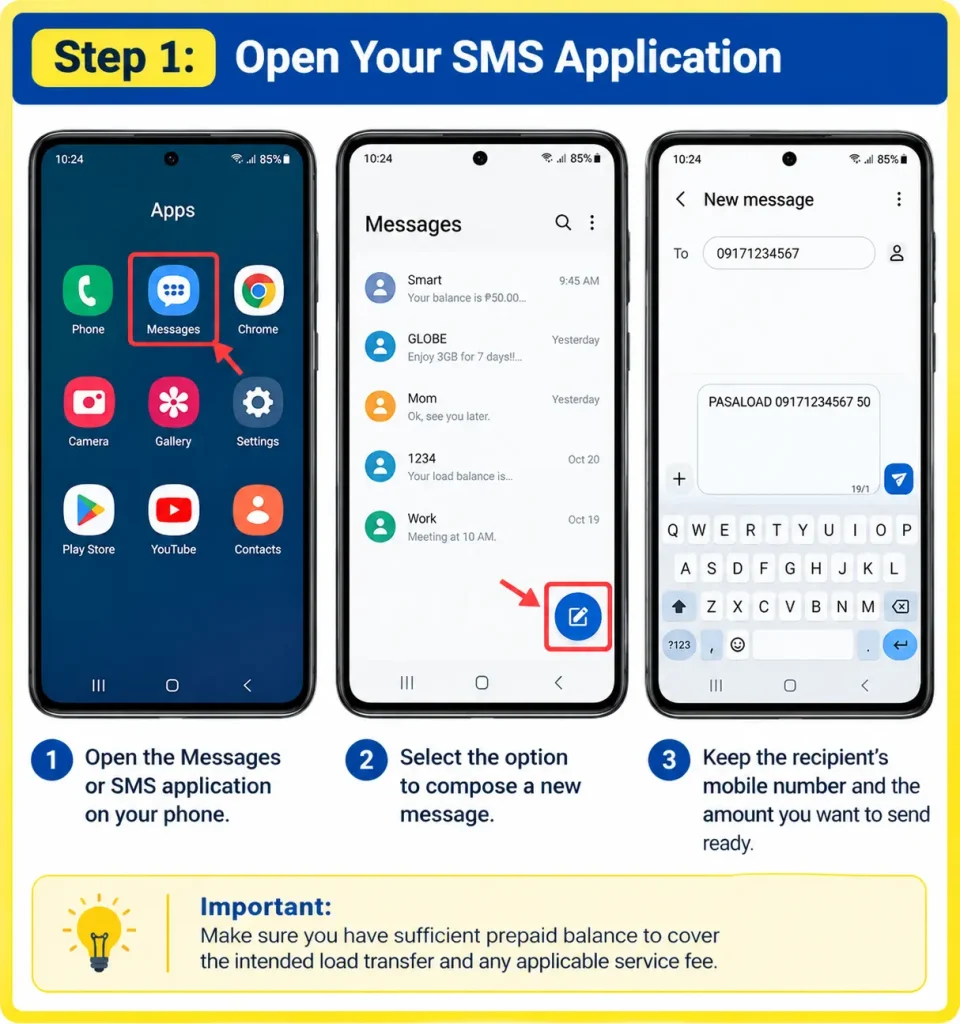
Step 1: Open Your SMS Application
Open the messaging application on your mobile phone and create a new text message. Make sure you have sufficient prepaid balance to cover the intended load transfer and any applicable service fee.
- Open the Messages or SMS application on your phone.
- Select the option to compose a new message.
- Keep the recipient’s mobile number and the amount you want to send ready.
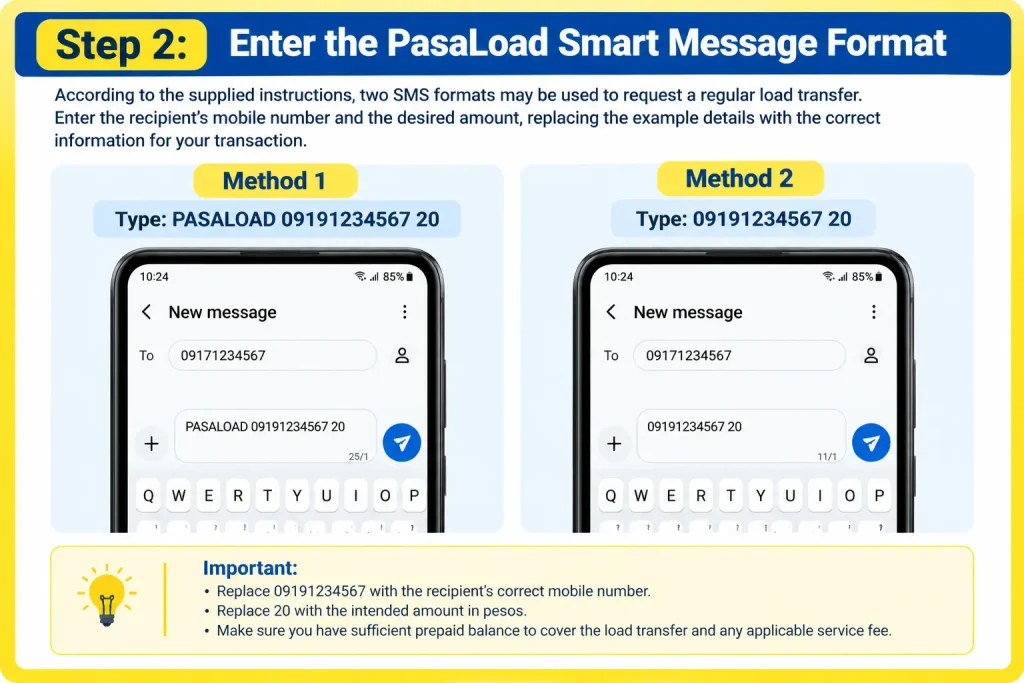
Step 2: Enter the PasaLoad Smart Message Format
According to the supplied instructions, two SMS formats may be used to request a regular load transfer. Enter the recipient’s mobile number and the desired amount, replacing the example details with the correct information for your transaction.
- Method 1: Type
PASALOAD 09191234567 20. - Method 2: The alternative format provided is
09191234567 20. - Replace
09191234567with the recipient’s correct mobile number and20with the intended amount in pesos.
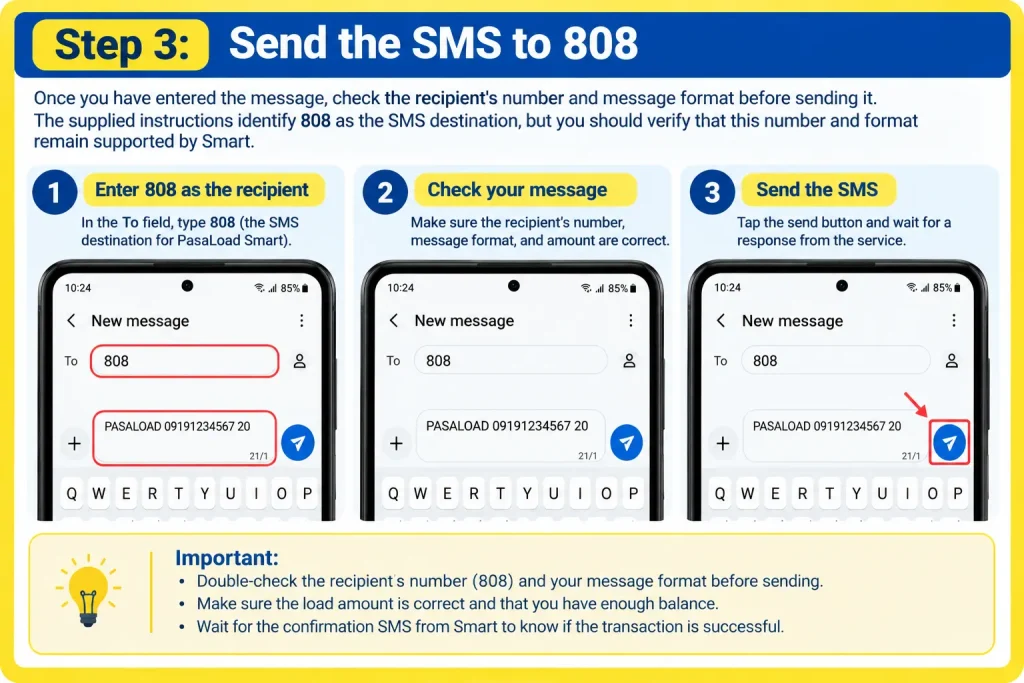
Step 3: Send the SMS to 808
Once you have entered the message, check the recipient’s number and message format before sending it. The supplied instructions identify 808 as the SMS destination, but you should verify that this number and format remain supported by Smart.
- Enter
808in the message recipient field if confirmed by the current official instructions. - Review the message to ensure the recipient’s number and load amount are correct.
- Send the SMS and wait for a response from the service.
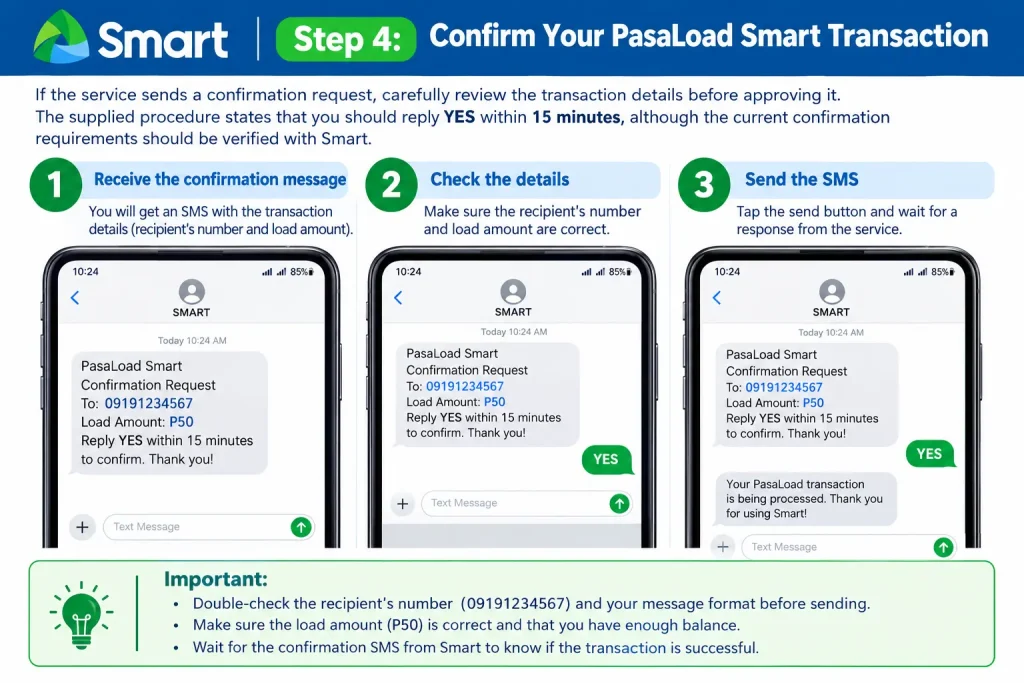
Step 4: Confirm Your PasaLoad Smart Transaction
If the service sends a confirmation request, carefully review the transaction details before approving it. The supplied procedure states that you should reply YES within 15 minutes, although the current confirmation requirements should be verified with Smart.
- Check the confirmation message for the recipient’s mobile number and requested load amount.
- Reply
YESonly if the transaction details are correct and the message instructs you to do so. - Respond within the stated confirmation period; otherwise, the request may expire or be cancelled.
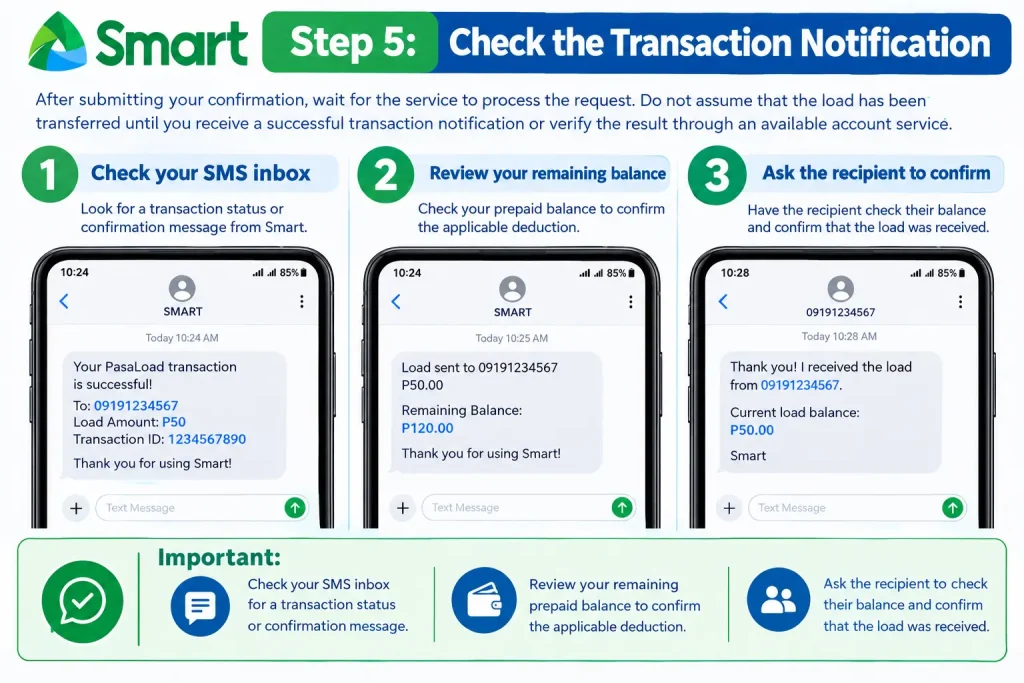
Step 5: Check the Transaction Notification
After submitting your confirmation, wait for the service to process the request. Do not assume that the load has been transferred until you receive a successful transaction notification or verify the result through an available account service.
- Check your SMS inbox for a transaction status or confirmation message.
- Review your remaining prepaid balance to confirm the applicable deduction.
- Ask the recipient to check their balance and confirm that the load was received.
Important: The SMS destination, message formats, ₱2 minimum transfer, ₱1 transaction fee, and 15-minute confirmation period mentioned in the supplied information may not reflect Smart’s current service rules. Always check the official Smart PasaLoad help page before attempting a transfer.
How to Send a Promo Using PasaLoad Smart
PasaLoad Smart can help eligible subscribers provide a promo to another mobile user when regular load credit is not the recipient’s main requirement. Depending on Smart’s currently available services, you may be able to request an eligible promo using your available balance. Before sending a request, check the promo’s current availability, price, keyword, and registration requirements on the official Smart website.
Step 1: Choose an Eligible Smart Promo
Start by identifying the promo that matches the recipient’s needs, such as calls, text messages, or mobile internet. Check the official promo details before using a keyword because package names, prices, and registration methods can change.
- Visit the official Smart website to review available promos.
- Check the promo’s price, inclusions, validity, and eligibility requirements.
- Confirm the correct keyword and whether it can be sent to another subscriber.
Step 2: Compose the Promo Request
If Smart currently supports promo requests through PasaLoad, open your messaging application and enter the required format. The following example is based on the supplied instructions and should only be used after confirming that the format remains valid.
- Enter the example command:
PASALOAD 09181234567 GIGA99. - Replace
09181234567with the recipient’s correct mobile number. - Replace
GIGA99with the verified keyword for an eligible promo, if the service supports this method.
Step 3: Send the Request to the Confirmed Destination
After composing the message, check the recipient’s number and promo keyword before submitting your request. The supplied instructions identify 808 as the destination, but verify the current SMS destination and procedure through Smart Help first.
- Enter the officially confirmed destination in the SMS recipient field.
- Review the message to ensure the recipient’s number and promo keyword are correct.
- Send the request and wait for a response from Smart.
Step 4: Confirm the Promo Transaction
If Smart sends a confirmation request, review the transaction details before approving it. Follow the instructions in the actual service message rather than assuming every request requires the same confirmation keyword or time limit.
- Check the recipient’s mobile number and the selected promo.
- Reply with the requested confirmation only if all details are correct.
- Make sure you have sufficient balance to cover the promo price and any applicable charges.
Step 5: Verify the Promo Registration
After confirming the request, wait for the transaction result before assuming the promo has been activated. A successful notification can help you determine whether the request was processed correctly.
- Check your SMS inbox for a success or failure notification.
- Ask the recipient to verify the promo’s registration and included benefits.
- If the transaction fails, consult Smart Help before trying again.
Important: The GIGA99 keyword and SMS procedure above are illustrative examples from the supplied information, not confirmation that Smart currently supports promo transfers using this format. Verify the available method before sending a transaction.
How to Share Mobile Data Through PasaData
PasaData is a Smart data-sharing service that allows eligible subscribers to share a specified amount of mobile data from qualifying offers. Unlike regular PasaLoad, which transfers peso-denominated prepaid credit, PasaData is intended for sharing eligible data allowances in megabytes.
Smart’s published instructions describe PasaData availability for qualifying offers, subject to the applicable promo and account requirements. Your total promo data allowance may differ from the amount available for sharing, so check your remaining shareable data before submitting a request.
Step 1: Check Your Available Shareable Data
Before starting a PasaData transaction, verify that your active promo includes data eligible for sharing. Some offers have separate allocations for specific applications or services, and these allowances may have different sharing restrictions.
- Check your active promo and remaining data balance.
- Confirm that the data allowance you want to share is eligible for PasaData.
- Review any minimum transfer, fee, and validity requirements listed by Smart.
Step 2: Enter the Recipient’s Number and Data Amount
Open your SMS application and prepare the PasaData command using the format confirmed by Smart. Carefully enter the recipient’s number and the amount of data you intend to share.
- Type the verified
PASADATAcommand in a new text message. - Enter the recipient’s correct mobile number.
- Specify the requested data amount in the required format, such as
50MB, if supported.
Step 3: Send the PasaData Request
Once the message is ready, submit it using the destination specified in Smart’s current instructions. Wait for a response before assuming the transfer has been completed.
- Verify the SMS destination through the official PasaData guide.
- Review the message one last time before sending it.
- Follow any additional instructions provided by Smart, including confirmation requirements if applicable.
Step 4: Verify the Data Transfer
After submitting the request, check its status and confirm that the intended amount was successfully shared. The recipient should also review the received data’s validity and applicable restrictions.
- Check your SMS inbox for the transaction result.
- Confirm that the appropriate data amount was deducted from your shareable allowance.
- Ask the recipient to check the received data and its expiration time.
PasaData Rules You Should Know
According to the supplied information about Smart’s published guidance, the following conditions may apply. Verify the current rules before making a transfer.
- Minimum data transfer: The supplied information states a minimum of 50 MB.
- Transaction fee: A ₱1 fee per successful transaction is stated in the supplied information.
- Data validity: The supplied information states that shared data is valid for 24 hours.
- Further sharing: Received data may not be eligible for another transfer.
- Restricted allowances: Certain app-specific or promo-specific data allocations may not be shareable.
For the latest requirements and limitations, consult Smart’s official PasaData help page.
PasaLoad Smart Fees, Minimum Amounts, and Data Validity
Before sending prepaid credit or mobile data, check the amount that will be deducted from your account. The cost of a transaction may include the amount transferred, the promo price where applicable, and any service fee. The following table summarizes the figures provided for this guide; current terms should be verified with Smart.
| Transaction detail | Information supplied |
|---|---|
| Minimum regular load transfer | ₱2 |
| Regular PasaLoad SMS fee | ₱1 per successful transaction |
| PasaData fee | ₱1 per successful transaction |
| Minimum PasaData transfer | 50 MB |
| PasaData validity | 24 hours |
| Regular load validity | Depends on the applicable denomination and service rules |
| Confirmation requirements | Follow the instructions in the service message |
For regular load transfer details, see the official Smart PasaLoad guide. For data-sharing conditions, see the official Smart PasaData guide.
Example: Calculate the Cost Before Sending Load
Suppose you plan to transfer ₱20 to another eligible subscriber and the stated ₱1 transaction fee applies.
| Item | Amount |
|---|---|
| Regular load transfer | ₱20.00 |
| Illustrative transaction fee | ₱1.00 |
| Total estimated deduction | ₱21.00 |
This example assumes that the ₱1 fee applies and that no additional charges are imposed. Check the transaction details before confirming.
Regular PasaLoad vs. PasaData: What’s the Difference?
| Feature | Regular PasaLoad | PasaData |
|---|---|---|
| What you share | Prepaid load credit | Eligible mobile data |
| Keyword in supplied instructions | PASALOAD | PASADATA |
| SMS destination in supplied instructions | 808 | 808 |
| Minimum stated in supplied information | ₱2 | 50 MB |
| Main requirement | Sufficient available load | Eligible shareable data |
| Validity | Depends on applicable load rules | 24 hours, according to the supplied information |
Choose regular PasaLoad when the recipient needs prepaid credit. Consider PasaData when the recipient needs internet access and you have an eligible data allowance to share. Always confirm current availability, fees, and requirements before proceeding.
Can You Use the Smart App Instead of SMS?
The Smart App may provide a convenient digital alternative for managing prepaid services and accessing available offers. However, the availability of a specific PasaLoad or data-sharing feature can depend on Smart’s current app functions and your account eligibility.
How to Check for Available Sharing Options
- Visit the official Smart website to find information about the Smart App and supported services.
- Open the official app and look for the relevant load, promo, or data-sharing option if available.
- Review the recipient’s details, selected service, cost, and applicable conditions before confirming a transaction.
If the required feature does not appear, consult Smart Help for the current supported method. Do not assume that a service available through SMS is also available in the app, or that every promo can be transferred to another number.
Common PasaLoad Smart Problems and Their Solutions
Even when you follow the correct PasaLoad Smart instructions, a transaction may fail because of an incorrect recipient number, insufficient prepaid balance, an unsupported promo, or a temporary network issue. Understanding these common problems can help you identify the cause, avoid duplicate transfers, and resolve issues more efficiently.
The following troubleshooting table explains common PasaLoad Smart problems, their possible causes, and the recommended solutions.
| Problem | Possible Cause | Recommended Solution |
|---|---|---|
| No response after sending an SMS | Network delay or incorrect message format | Check your message and wait for a response before retrying. |
| Confirmation request expired | The required confirmation was not sent within the specified period | Check the transaction status before submitting a new request. |
| Invalid recipient number | The number is incomplete or incorrectly formatted | Verify the recipient’s mobile number carefully. |
| Insufficient balance | Your available load does not cover the transfer and applicable fee | Check your balance and top up if necessary. |
| Promo request rejected | Incorrect keyword or unavailable offer | Verify the promo’s current availability and registration instructions. |
| PasaData request fails | Ineligible data allowance or unsupported transfer amount | Check your active promo and shareable data balance. |
| Load has not arrived | The transaction is pending or unsuccessful | Review the transaction notification and confirm the status. |
| Repeated transaction errors | Account restrictions or a service-related problem | Contact Smart through its official support channels. |
1. What to Do If Nothing Happens After Texting 808
If you receive no response after sending a PasaLoad Smart request to 808, check your sent message and wait briefly for a reply. A network delay or incorrect SMS format may prevent the request from being processed, and sending the initial message does not necessarily mean the transfer is complete.
- Check that the SMS destination and message format match Smart’s current instructions.
- Review your inbox for a confirmation request or transaction notification.
- If there is still no response, check the transaction status before sending another request to avoid duplicate deductions.
If the confirmation period has expired, follow Smart’s current instructions for submitting a new request. Do not repeat a transaction until you have checked whether the original request was successful.
2. How to Fix an Invalid Mobile Number
An incorrect recipient number can prevent a PasaLoad Smart transaction from going through. Before submitting a request, verify the number directly with the intended recipient and make sure it follows the required format.
- Check all 11 digits of the Philippine mobile number, such as
09181234567. - Remove unnecessary spaces, hyphens, or extra characters from the SMS command.
- Confirm that the recipient’s number is eligible for the particular load-transfer service.
For supported recipient types and current requirements, consult the official Smart PasaLoad help page.
3. What to Do When Your Balance Is Insufficient
A PasaLoad Smart transaction may fail if your available prepaid balance cannot cover both the transfer amount and the applicable service fee. Check your balance before sending the request so you know whether you have enough credit.
- Check your available prepaid load before starting the transaction.
- Include any applicable service fee in your calculation.
- Top up your account or select a smaller transfer amount if your balance is insufficient.
For example, if you intend to transfer ₱20 and a ₱1 transaction fee applies, you would need ₱21 in available balance, assuming no other charges apply.
4. How to Handle a Failed Promo or Data Transfer
A promo or PasaData request may fail if the selected offer is unavailable, the command is incorrect, or your account does not meet the service requirements. Before trying again, check the official instructions for the specific service you intend to use.
- For a promo request, verify the package’s availability, price, keyword, and registration method.
- For PasaData, confirm that your active offer includes eligible shareable data and that the requested amount meets the current requirements.
- If the request continues to fail, consult the official Smart Help website for assistance.
Do not assume that an older promo keyword or data-sharing command remains valid. Smart’s available offers and service requirements may change over time.
5. What to Do If the Load Has Not Arrived
If your balance has been deducted but the recipient has not received the load, check the transaction notification before taking further action. The request may still be processing, may have failed, or may require assistance from Smart’s support team.
- Review your SMS inbox for the transaction’s confirmation or failure status.
- Ask the recipient to check their prepaid balance and recent notifications.
- If the deduction occurred without a successful transfer, contact Smart Help and provide the relevant transaction details.
Avoid repeatedly sending the same amount while the transaction status remains unclear. This can help prevent additional deductions.
Best Practices for Safe PasaLoad Smart Transactions
Following a few simple precautions can help you use PasaLoad Smart more safely and reduce the risk of failed transfers or unnecessary charges.
- Verify the recipient: Confirm the mobile number directly with the person receiving the load or data.
- Review your message: Double-check the recipient’s number, transfer amount, and promo keyword before sending.
- Maintain sufficient balance: Make sure your account can cover the transfer and any applicable service fee.
- Read confirmation messages: Approve a transaction only when the displayed details match your request.
- Keep transaction notifications: Save confirmation and completion messages until the recipient verifies receipt.
- Avoid duplicate requests: Check your balance and transaction status before submitting the same request again.
- Use official support channels: If a transaction fails or your balance is deducted unexpectedly, contact Smart through its official help website rather than relying on unofficial recovery services.
By following these practices, you can reduce common PasaLoad Smart errors and make better-informed decisions when transferring prepaid credit or sharing eligible mobile data.
Frequently Asked Questions About PasaLoad Smart
PasaLoad Smart is a convenient service for eligible subscribers who want to transfer prepaid load to supported mobile numbers in the Philippines.
Final Thoughts on PasaLoad Smart
PasaLoad Smart is a convenient option for sharing prepaid load with family, friends, and other eligible subscribers in the Philippines. Whether you need to transfer regular load, send an eligible promo, or share mobile data through PasaData, understanding the correct process can help you complete transactions with greater confidence. Before sending anything, double-check the recipient’s mobile number, ensure your balance covers the transfer and applicable service fees, and follow the confirmation instructions carefully.
For a smooth experience, always check the latest requirements, transaction limits, and available sharing options through the official Smart PasaLoad guide. Taking a few seconds to verify the details can help you avoid failed transactions, unnecessary deductions, and delays. With the right information and careful preparation, PasaLoad Smart can make staying connected and helping other prepaid users easier and more convenient.