BSU Student Portal Philippines 2026: Login, Registration, Grades & Complete User Guide
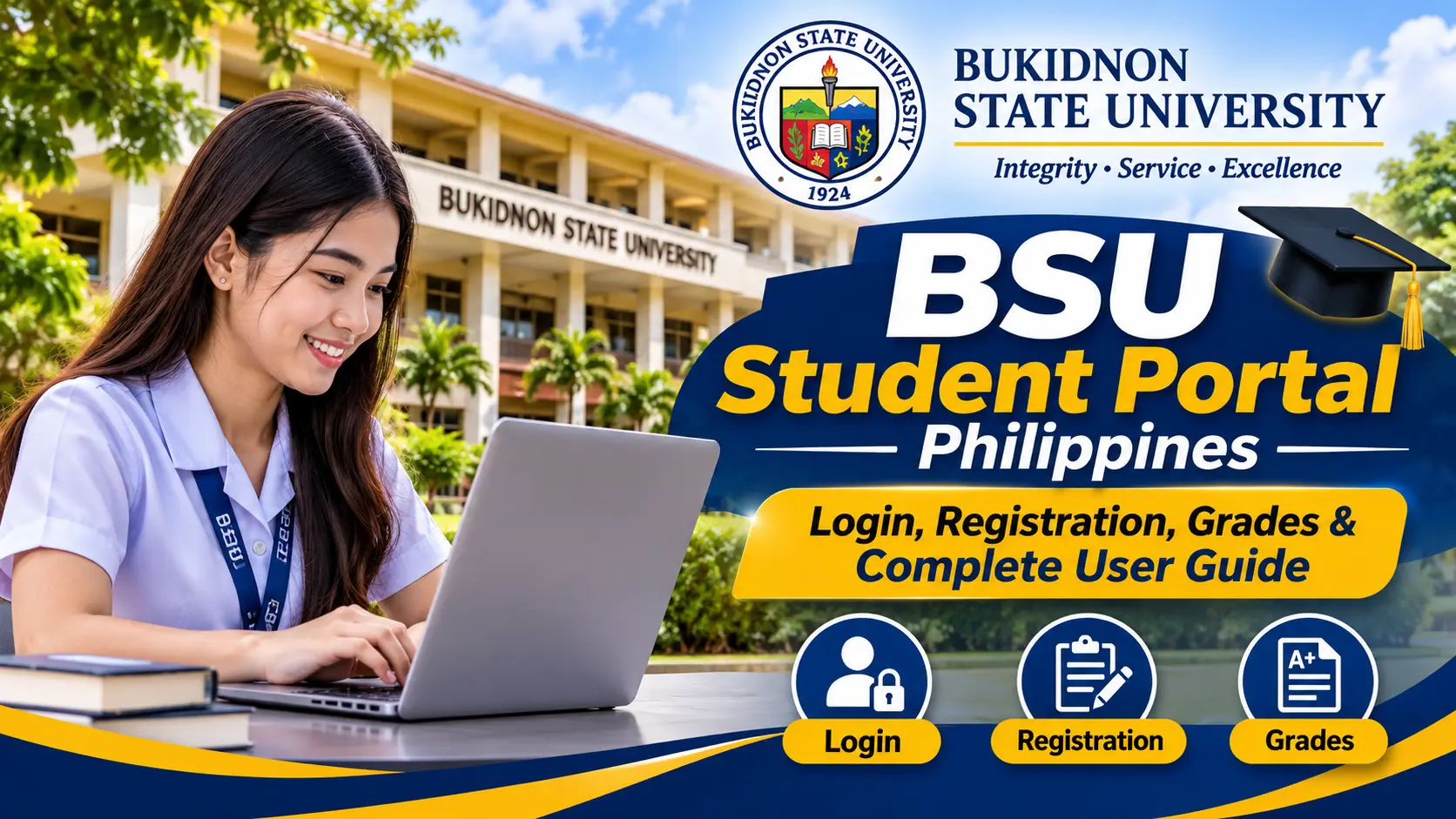
Batangas State University (BatStateU – The National Engineering University) provides an online student portal designed to make academic and administrative services more accessible to students. Whether you are a newly admitted freshman, a continuing student, or a returning learner, the BSU Student Portal offers a convenient way to access your student account and manage important university-related information online.
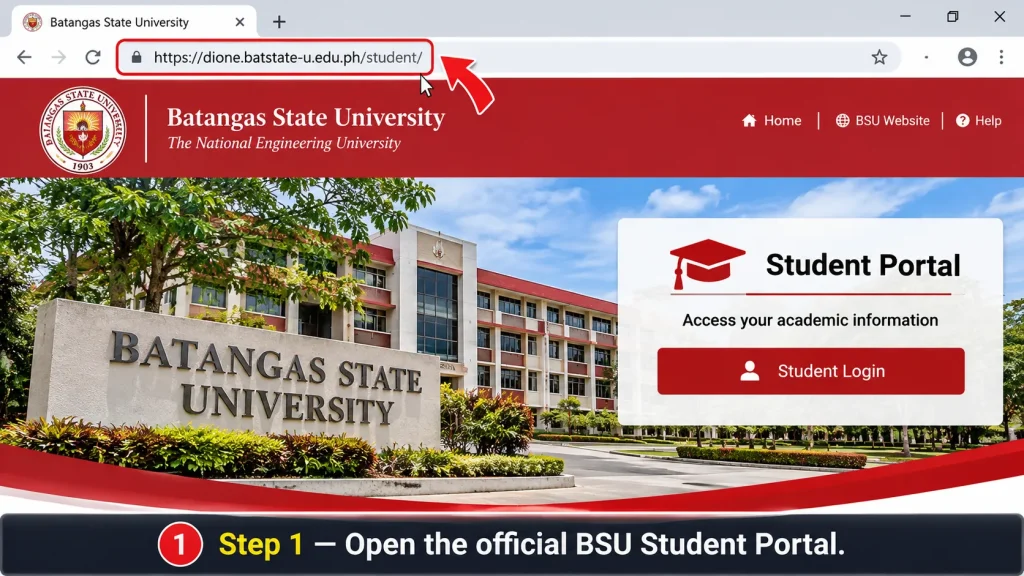
The official BSU Student Portal is accessible at https://dione.batstate-u.edu.ph/student/. Students can sign in using their assigned Student Reference (SR) Code and password. The login page also provides a password recovery option, while campus-specific ICT support contacts are available to assist students experiencing account access or technical issues.
This comprehensive guide explains how to access the BSU Student Portal, log in with your student credentials, understand the initial username and password format, recover a forgotten password, and navigate the available academic services. It also covers important account security practices and practical tips to help BatStateU students use the university’s online platform effectively.
Understanding the BatStateU Student Portal
The BatStateU Student Portal is an online university platform that provides students with access to selected academic and administrative services through a centralised digital system. It allows authorised students to review relevant university information and access available student services using an internet-connected device.
Through the portal, students can manage selected academic activities without depending entirely on in-person enquiries. This makes the platform particularly useful during enrolment periods, throughout the academic year, and whenever students need to check their university-related information.
The official student portal is part of Batangas State University’s digital services, supporting the university’s broader efforts to improve access to information and streamline student-related processes.
What Can Students Access Through the Portal?
The services available through the BSU Student Portal may vary depending on the student’s campus, academic programme, account permissions, and current university system configuration. However, the platform is intended to provide access to several important student-related functions.
Its key purposes include:
- Student Account Access: Log in using your assigned SR-Code and password to access your personal student account.
- Academic Information: Review available academic details and student records associated with your account.
- Class Schedules: Check your timetable and class schedule information when these services are available.
- Enrolment Information: Access relevant enrolment details through the university’s online student services.
- Grades and Academic Records: View available grade information and other academic records published through the system.
- Student Services: Navigate selected university services connected to your student account.
- Password Recovery: Use the available account recovery facility to request assistance when you cannot remember your password.
Students should remember that not every service is necessarily available to all accounts at all times. Some academic information may only become accessible after the relevant university department updates or publishes the records.
BSU Student Portal Login: How to Access Your Account
Accessing the BSU Student Portal is a straightforward process when you already have your university-issued login credentials. Before starting, prepare your assigned SR-Code and account password to avoid unnecessary login errors.
Follow the steps below to access your BatStateU student account.
Step 1: Visit the Official BSU Student Portal
First, open Google Chrome, Microsoft Edge, Mozilla Firefox, or another updated web browser on your desktop computer, laptop, or smartphone.
Navigate to the official student portal using the following link:
BSU Student Portal – Official Login Page
Wait for the login page to load completely. Before entering your personal information, check the website address to ensure that you are using the official Batangas State University domain.
Avoid accessing unofficial websites that claim to provide student login services. Using the correct university portal helps protect your account credentials and academic information.
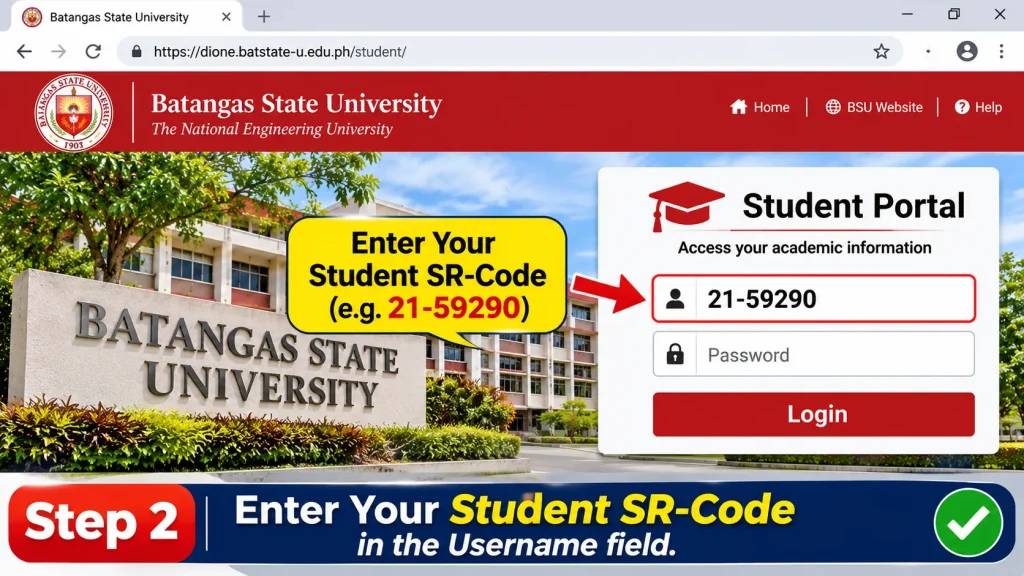
Step 2: Enter Your Student SR-Code
Once the login page appears, locate the Username field. Enter your officially assigned Student Reference (SR) Code, which serves as your username for accessing the BSU Student Portal.
For example:
Sample Username: 21-59290
This is an illustrative SR-Code provided for demonstration purposes only.
Carefully check all numbers and the hyphen before proceeding. Make sure you enter your own assigned SR-Code rather than another student’s identification number.
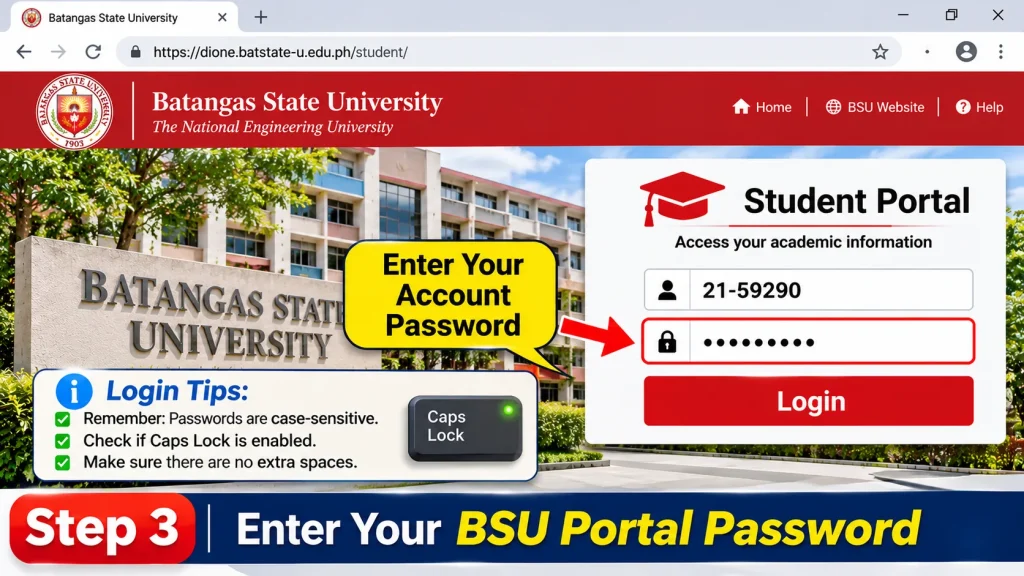
Step 3: Enter Your Account Password
Next, locate the Password field and enter the password associated with your BSU Student Portal account.
Remember that passwords are case-sensitive. This means uppercase and lowercase letters are treated differently by the login system. If your password contains capital letters, you must enter them exactly as originally assigned or configured.
Login tip: Check whether Caps Lock is enabled and ensure that there are no accidental spaces before or after your password. If you use a password manager, verify that it has inserted the correct credentials.
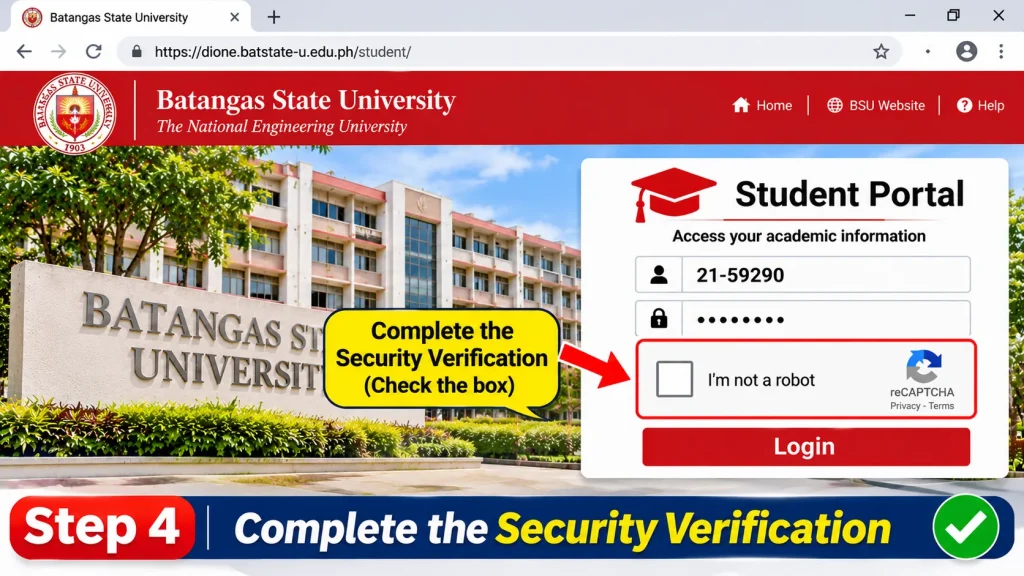
Step 4: Complete the Security Verification
If the login page displays a security verification feature, such as an I’m not a robot reCAPTCHA checkbox, complete the verification as instructed.
This security measure helps protect the university’s login system against automated access attempts. Depending on the verification process, you may also be asked to identify specific images or complete an additional security check.
Follow the instructions displayed on your screen before continuing.
Default BSU Student Portal Username and Password for Freshmen
Newly admitted students often have questions about their first login, particularly if they have not yet created or changed their personal portal password.
The initial login credentials are generally provided through the university’s student account arrangements. According to the credential format supplied for this guide, the initial username and password follow the structure below.
| Credential | Format |
|---|---|
| Username | Assigned SR-Code |
| Default Password | SR-Code + First Name Initial + Last Name Initial |
| Example Username | 21-59290 |
| Example Password | 21-59290VB |
For example, consider a student with the following illustrative details:
- SR-Code: 21-59290
- First Name Initial: V
- Last Name Initial: B
Using the supplied format, the example login credentials would be:
Username: 21-59290
Default Password: 21-59290VB
Important: This is the default credential format supplied for this guide and should not be treated as a universally confirmed password policy for every newly admitted student. Initial credentials may vary according to university instructions, account configuration, or campus-specific procedures. Always follow the latest guidance provided by BatStateU admissions or your campus ICT office.
What Should You Do After Your First Successful Login?
After successfully accessing your BSU Student Portal account for the first time, take a few minutes to review your account and confirm that everything is working correctly.
The following actions are recommended:
- Verify Your Student Information: Check whether your name, SR-Code, and other displayed student details are correct.
- Review Your Dashboard: Explore the available sections to understand which academic and administrative services you can access.
- Check Your Registered Email: Make sure you know which email address is associated with your student account, particularly if it is required for password recovery.
- Update Your Password: If the portal provides a password-change option, replace your initial password with a strong and unique password.
- Protect Your Credentials: Never share your SR-Code and password with unauthorised individuals.
- Keep Your Account Information Secure: Avoid saving your password on public or shared computers, and always sign out after using the portal.
Creating a strong password and maintaining good account security habits can help protect your academic information against unauthorised access.
By completing these initial checks, you can prepare your account for regular use and make accessing the BSU Student Portal more convenient throughout your academic journey at Batangas State University.
How to Reset Your BSU Student Portal Password
Forgetting your password can prevent you from accessing your academic records, enrolment information, and other university services. Fortunately, the BSU Student Portal provides a password recovery option that allows students to request a password reset using the email address associated with their student account.
If you cannot remember your existing password, there is no need to create another student account. Instead, follow the recovery procedure below to regain access to your account.
Step-by-Step Password Recovery Process
Step 1: Visit the Official Login Page
Open your preferred web browser and navigate to the official Batangas State University Student Portal:
Wait for the login page to load before proceeding to the next step.
Step 2: Select the Forgot Password Option
On the login screen, locate the Forgot password? Click here link, which is generally displayed below the sign-in section.
Click this link to open the account recovery form.
Step 3: Enter Your Registered Email Address
The password recovery page will prompt you to provide the email address associated with your student account.
Enter your registered email address carefully. Make sure the spelling is correct because the password recovery confirmation will be sent to the email address you provide.
Step 4: Submit Your Recovery Request
After entering your registered email address, click the Submit button to send your password recovery request.
The portal will process your submitted information and send a password reset confirmation email if the request is successfully processed.
Step 5: Check Your Email Inbox
Open the email account associated with your BSU Student Portal profile and look for a message from the BatStateU portal system.
If you cannot find the message in your primary inbox, check the following folders:
- Spam
- Junk
- Promotions
- All Mail
Sometimes, automated university emails may be filtered into these folders instead of appearing directly in your inbox.
Step 6: Follow the Password Reset Instructions
Open the recovery email and carefully follow the instructions provided to update your password.
After completing the password reset process, return to the official BSU Student Portal and sign in using your SR-Code and newly updated password.
Important Notice: The official BatStateU portal displays an advisory indicating that some Gmail users may experience difficulties receiving emails from its domain. The university has indicated that it is working to address this issue. If your password recovery email does not arrive, contact your campus ICT support team for assistance instead of repeatedly submitting recovery requests.
How to Use the BSU Student Portal Dashboard
After successfully logging in, students can access the available features and services through their BSU Student Portal dashboard. The dashboard serves as the central navigation area for accessing academic information, student records, registration details, and selected administrative services.
Depending on your account permissions and the university’s current system configuration, different sections may be displayed on your dashboard.
The exact dashboard layout and available functions may also change according to the academic year, semester, and student account status.
Important Dashboard Sections
The following table highlights some of the important sections and their general purposes within the student portal.
| Portal Section | Purpose |
|---|---|
| Student ID | Access student identification information. |
| Certificate of Registration (COR) | Review available registration details. |
| Subjects | View enrolled subjects. |
| Grades | Access available subject grades. |
| All Grades | Review available academic grade records. |
| Curriculum | Check programme and curriculum information. |
| Scholarships | Access available scholarship information. |
| Assessment of Fees | Review applicable assessment and fee details. |
| Payments | Access available payment information. |
| Liabilities | Review outstanding student account obligations. |
| Copy of Grades | Access grade-copy services where available. |
The visibility of these sections depends on the services activated for your account. Certain functions may only become accessible during specific university processes or after the relevant academic information has been updated.
How to Check Grades Using the BSU Student Portal
Checking academic performance is one of the most useful features for students accessing the BSU Student Portal. The online system provides access to available subject grades and academic results, helping students monitor their progress throughout the semester.
Instead of relying entirely on in-person enquiries, students can use their portal accounts to review grade information once it has been published by the university.
If your academic results are already available, follow these instructions to check your grades.
Step-by-Step Guide to Viewing Your Grades
- Visit the official BSU Student Portal.
- Enter your assigned SR-Code and account password.
- Complete any security verification displayed on the login page.
- Click Sign In to access your student dashboard.
- Locate the Grades or All Grades section.
- Select the relevant academic information or semester, if a selection option is available.
- Review your displayed subject grades and academic results.
Make sure you select the correct academic period when reviewing your records. This will help you avoid confusion between grades from different semesters.
What If Your Grades Are Not Showing?
Sometimes, students may log in successfully but find that their expected grades are not yet displayed. This does not necessarily mean there is a problem with their account.
Several factors may explain why academic results are temporarily unavailable.
| Common Issue | Possible Explanation and Solution |
|---|---|
| Grades Not Yet Posted | Your instructor or academic department may not have released the final grades. Wait for the official posting schedule. |
| Incomplete Academic Records | Some subject results may still be undergoing processing. Contact the concerned department if the delay continues. |
| Incorrect Semester Selection | You may be viewing a different academic period. Select the correct semester if the option is available. |
| System Maintenance | Temporary portal maintenance or technical interruptions may affect access to academic information. Try again later. |
If your grades remain unavailable after the expected release period, contact your instructor or the appropriate Registration Services Office for clarification.
Student Tip: Whenever the portal provides a download or print option, save a personal copy of your academic results. Keeping these records can be helpful when monitoring your academic progress or preparing documents for future applications.
Understanding Enrolment and Registration Through the Portal
The BSU Student Portal also connects students with university registration services. Enrolment is an important academic process because it determines the subjects and classes a student is officially registered to take during a particular semester.
Batangas State University provides online registration facilities to support student enrolment. However, the exact procedure and requirements may differ depending on whether a student is classified as regular, irregular, returning, or newly admitted.
Students should always follow the registration instructions issued by their respective colleges and university offices.
How to Access Online Enrolment
Students can follow these general instructions to locate the available online registration services:
- Visit the official BatStateU Student Portal.
- Sign in using your assigned SR-Code and password.
- Open your student dashboard after successful authentication.
- Look for the Enrolment or Online Registration option, if available.
- Review the academic information and registration instructions displayed.
- Follow the university’s requirements for your particular student category.
- Check your registration status after completing the required process.
Before submitting any registration information, carefully review the displayed details to ensure that your selected academic programme and other student information are correct.
Requirements to Check Before Enrolment
Before beginning the online registration process, students should review their academic standing and confirm that they have completed the necessary requirements.
Common items to verify include:
- No unresolved student account liabilities.
- No incomplete grades that may affect enrolment eligibility.
- Correct academic programme and curriculum information.
- Required academic approvals, where applicable.
- Supporting documents requested by the relevant college or department.
According to BatStateU campus registration guidance, irregular students may need an approved Proposal Slip and Programme of Study before proceeding with online enrolment.
These requirements may vary depending on the student’s academic situation and campus. Therefore, confirm the latest instructions with your concerned college before starting the registration process.
Regular vs Irregular Student Enrolment
Different student categories may follow different enrolment procedures. Understanding your classification can help you prepare the correct documents and avoid unnecessary delays.
| Student Category | Important Consideration |
|---|---|
| Regular Students | May follow the standard online registration procedure through the student portal. |
| Irregular Students | May need an approved Proposal Slip and Programme of Study before proceeding with enrolment. |
| Returning Students | Should confirm their academic status and resolve any outstanding requirements. |
| Newly Admitted Students | Should follow the admission and initial registration instructions provided by the university. |
For official university announcements, academic policies, and registration updates, visit the Batangas State University Official Website.
Other Services Available Through BatStateU Online Systems
Apart from accessing academic records and enrolment information, Batangas State University provides additional digital services through its integrated online platforms.
These systems are designed to make selected university processes more accessible for students and graduates. However, it is important to understand that not every service is available directly within the main student login dashboard. Some functions require students to access separate official university systems.
1. Student Information and Support Services
BatStateU provides student support resources through its Student Hub. These resources offer information about student affairs, campus services, counselling, and other forms of university-related assistance.
Students can use the available resources to learn about support services and identify the appropriate university office for their concerns.
Visit the official BatStateU Student Hub to explore the available information and student support resources.
2. Online Document Requests
Students and graduates who need official university documents can access the separate Online Document Request System.
This service provides information about requesting different academic and administrative documents, including:
- Transcript of Records (TOR).
- Academic and other certifications.
- Authentication documents.
- Honorable Dismissal or Transfer Credentials.
Students should visit the official BatStateU Online Document Request Portal to review the latest application requirements, submission instructions, and processing procedures.
Note: Document requests may be subject to university office hours, supporting document requirements, and applicable institutional procedures. Always review the current instructions before submitting a request.
3. Registration and Academic Documents
The student portal also supports access to selected registration-related documents and academic forms.
According to the university’s Citizen’s Charter, certain documents, including the Report of Grades Request Slip and Cross-Campus Enrolment Form, can be obtained through the student portal dashboard.
Students who need these documents should check their dashboard for availability and follow the instructions provided by the university.
For the latest requirements and submission procedures, contact the Registration Services Office or the appropriate campus department.
Benefits of Using the BSU Student Portal
The BSU Student Portal offers several practical advantages by providing students with convenient access to selected university services through an online platform.
Whether you need to review your academic information, check available grades, or access registration-related services, the platform helps simplify various student activities.
| Benefit | How It Helps Students |
|---|---|
| Online Account Access | Allows students to access available university information through an internet-connected device. |
| Academic Tracking | Helps students review available grades and academic records. |
| Registration Support | Connects students with online enrolment and registration services. |
| Schedule Information | Makes available class schedule information easier to access. |
| Password Recovery | Provides an online option for requesting account password recovery. |
| Digital Convenience | Reduces the need for in-person enquiries for certain university services. |
| Centralised Information | Brings several student-related functions together in a digital environment. |
By using the available services effectively, students can save time, stay informed about their academic activities, and manage selected university-related tasks more conveniently.
Important Tips for BSU Student Portal Users
To maintain uninterrupted access to your account and avoid common technical problems, follow these recommendations when using the BatStateU student portal.
- Always Use the Official Website: Access your account through the official BatStateU domain to avoid unofficial or misleading login pages.
- Keep Your SR-Code Available: Remember your assigned SR-Code because it is required whenever you sign in.
- Protect Your Password: Never share your login credentials with classmates, unknown individuals, or unauthorised parties.
- Use a Reliable Internet Connection: A stable connection can help prevent interruptions during login and other online activities.
- Review Your Academic Information Regularly: Check available grades, registration details, and other important student records.
- Maintain an Active Registered Email: Keep access to the email address associated with your account, especially when password recovery is required.
- Contact Campus ICT Support: If login errors, email delivery problems, or other technical issues continue, contact your campus ICT office for assistance.
Following these simple practices can help you use the BSU Student Portal more safely and efficiently throughout your studies at Batangas State University.
Common BSU Student Portal Login Problems and Solutions
Although the BSU Student Portal is designed to provide convenient access to university services, students may occasionally experience technical difficulties when logging in or using specific portal features.
These issues can occur for several reasons, including incorrect login credentials, email delivery problems, browser compatibility, unstable internet connections, or temporary system interruptions.
Understanding the possible causes of these problems can help students resolve common errors without unnecessary delays. The following troubleshooting guide explains frequently encountered issues and provides practical solutions for restoring access to your account.
BSU Student Portal Troubleshooting Guide
The table below highlights common login and account-related problems that students may encounter while using the Batangas State University Student Portal.
| Common Problem | Possible Solution |
|---|---|
| Incorrect SR-Code | Verify your assigned SR-Code and enter it carefully, including the correct numbers and hyphen. |
| Invalid Password | Check your password and ensure that uppercase and lowercase letters are entered correctly. |
| Forgotten Password | Use the Forgot Password option on the official login page to request a password reset. |
| Reset Email Not Received | Check your Spam, Junk, Promotions, and All Mail folders. |
| CAPTCHA Verification Error | Refresh the login page and complete the security verification again. |
| Portal Not Loading | Check your internet connection and reload the official website. |
| Dashboard Not Opening | Sign out, close your browser, reopen the portal, and try signing in again. |
| Grades Not Displayed | Confirm whether your instructor or academic department has released the grades. |
| Enrolment Option Unavailable | Check the registration period and confirm your eligibility with the concerned college. |
| Account-Related Technical Issue | Contact the ICT support office responsible for your campus. |
Practical Ways to Resolve BSU Student Portal Login Errors
If you cannot access your account, try the following troubleshooting methods before requesting technical assistance.
1. Verify Your Student Credentials
Start by checking your SR-Code and password. Even a minor typing error can prevent the BSU Student Portal from accepting your login request.
Make sure your SR-Code matches the information assigned by the university. If your password is not accepted, check its spelling, capitalisation, and any special characters.
2. Use an Updated Web Browser
An outdated browser may cause compatibility problems, incomplete page loading, or difficulties accessing certain portal features.
Update your preferred browser, such as Google Chrome, Microsoft Edge, or Mozilla Firefox, to its latest available version. Then reopen the official student portal and try again.
3. Clear Your Browser Cache
If the portal displays an outdated page, becomes unresponsive, or fails to load properly, clearing your browser cache may help resolve the issue.
Open your browser settings, locate the privacy or browsing data section, and clear cached images and files. Close and reopen the browser before visiting the portal again.
4. Check Your Internet Connection
An unstable or slow internet connection can interrupt the login process and prevent the dashboard from loading correctly.
Try reconnecting to your Wi-Fi network or switching to a more reliable mobile data connection. Once your connection is stable, refresh the official portal page and sign in again.
5. Contact University ICT Support
If the login problem continues after trying the recommended solutions, contact the ICT support team assigned to your campus.
Explain the issue clearly and provide relevant details, such as your SR-Code, campus, and the error message displayed on the screen. Avoid sharing your password or other confidential account information.
BSU Student Portal ICT Support Contact Information
Students experiencing persistent login errors, password recovery difficulties, account access problems, or other technical issues can request assistance from the appropriate BatStateU campus ICT support team.
Since Batangas State University operates multiple campuses, students should contact the support address corresponding to their respective campus.
Official Campus ICT Support Email Directory
The following email addresses are reproduced from the campus ICT directory supplied for this guide.
| Campus | ICT Support Email |
|---|---|
| Pablo Borbon (Main) | [email protected] |
| Alangilan | [email protected] |
| Malvar | [email protected] |
| Nasugbu | [email protected] |
| Lipa | [email protected] |
| Balayan | [email protected] |
| Lemery | [email protected] |
| San Juan | [email protected] |
| Rosario | [email protected] |
| Lobo | [email protected] |
Important: These contact addresses are reproduced from the supplied campus ICT directory. Their current availability has not been independently verified. Confirm the latest contact information through the official Batangas State University website before sending your request.
How to Write an Email to BSU ICT Support
When contacting your campus ICT support team, provide sufficient information to help the technical staff identify and understand your problem.
Include the following details in your email:
- Full Name: Provide your complete name as registered with the university.
- Student Reference Code: Include your assigned SR-Code for account identification.
- Campus or College: Specify your campus or academic college.
- Problem Description: Explain the login error or technical issue you are experiencing.
- Date and Time: Mention approximately when the problem occurred.
- Screenshot: Attach a screenshot of the error message, if available.
Keep your message clear and professional so the support team can understand your concern and provide appropriate assistance.
Never include your account password or other confidential login credentials in your email.
Important Security Practices for BSU Students
Your BSU Student Portal account may contain personal details, academic records, and other university-related information. Protecting these details is essential to maintaining account security and preventing unauthorised access.
Whether you access the portal from your personal computer, smartphone, university laboratory, or a public internet facility, follow these important security recommendations.
- Protect Your Password: Never share your portal password with classmates, unknown individuals, or unauthorised parties.
- Avoid Using Shared Devices: If you access your account through an internet café or public computer, always sign out after completing your activities.
- Use the Official Website: Access your student account through the official BatStateU domain rather than unfamiliar third-party websites.
- Update Your Password: If the portal provides a password-change facility, replace your initial password with a strong and unique one.
- Secure Your Registered Email: Protect the email account associated with your student profile because it may be required for password recovery.
- Check Your Account Information: Regularly review your displayed student details and report incorrect information to the appropriate university office.
- Avoid Suspicious Links: Do not open unexpected messages or websites requesting your SR-Code, password, or other confidential information.
Following these precautions can help minimise security risks, protect your academic information, and ensure safer access to the BSU Student Portal throughout your studies at Batangas State University.
Frequently Asked Questions (FAQs)
Final Thoughts
The BSU Student Portal Philippines 2026 is a convenient online platform that helps Batangas State University students access important academic information and selected university services. From logging in with an assigned SR-Code to checking available grades, reviewing enrolment details, and recovering a forgotten password, the portal makes several student-related activities easier to manage.
Whether you are a freshman, continuing student, irregular student, or returning learner, understanding how the BSU Student Portal works can help you stay organised throughout your academic journey. Always use the official university website, keep your login credentials secure, and regularly check your academic information for updates. If you encounter technical difficulties, contact the appropriate campus ICT support office for assistance.