NCAP Checker Philippines 2026: May Huli Ka MMDA Portal, Login, Plate Number Search, Violation Check & Complete User Guide
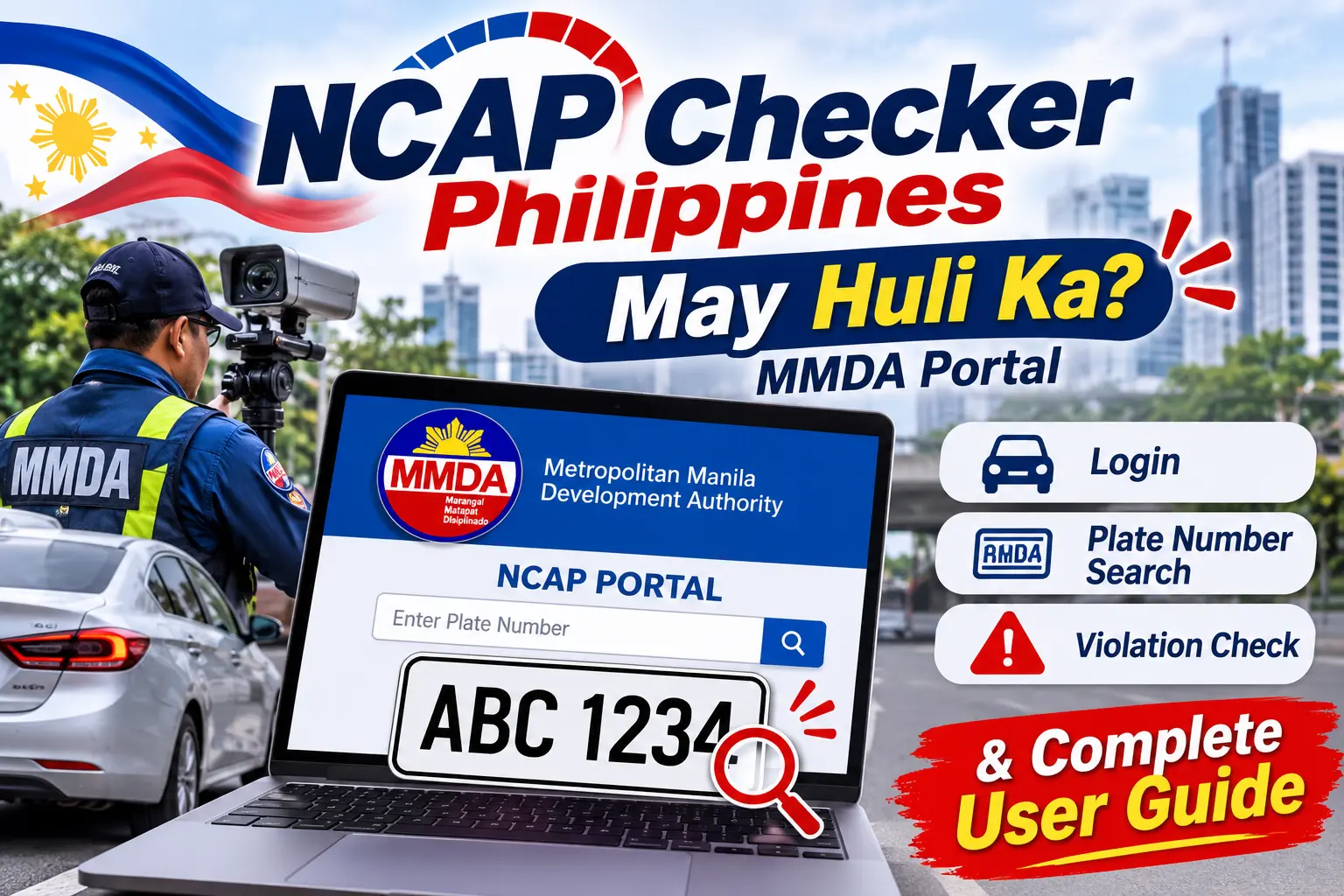
Have you recently travelled along a major road in Metro Manila and wondered whether a traffic camera recorded a violation involving your vehicle? The Metropolitan Manila Development Authority (MMDA) provides an online service called the May Huli Ka NCAP Checker, which allows motorists and registered vehicle owners to check traffic violations recorded under the Non-Contact Apprehension Policy (NCAP).
The official NCAP Checker Philippines portal is accessible at https://mayhulika.mmda.gov.ph/. Through this online platform, vehicle owners can search available traffic violation records, review citation information, and follow the official instructions for paying or contesting a violation. Instead of depending entirely on in-person enquiries, motorists can conveniently access the May Huli Ka website using a desktop computer, laptop, tablet, or smartphone.
The May Huli Ka portal is an official MMDA service rather than an independent third-party website. Its upgraded verification process includes additional vehicle information to improve security and help prevent unauthorised access to traffic violation records. Depending on the selected search method, vehicle owners generally need their plate number or conduction sticker number together with the required Motor Vehicle (MV) file information.
What Is the May Huli Ka NCAP Checker?
The May Huli Ka NCAP Checker is an online traffic violation verification platform operated by the Metropolitan Manila Development Authority (MMDA). It helps registered vehicle owners search for traffic violation records associated with the Non-Contact Apprehension Policy. The system uses cameras, CCTV installations, digital imaging equipment, and other technologies to document certain traffic violations without requiring an enforcer to stop the vehicle physically.
The name May Huli Ka comes from a Filipino expression that means a person has been caught committing a violation. Through this online service, motorists can check relevant NCAP records without initially visiting an MMDA office.
The platform became particularly important following the introduction of the upgraded May Huli Ka 2.0 system in June 2025. This updated platform introduced an additional security requirement involving the vehicle’s MV file number, making the verification process more protective of registered vehicle information.
Understanding the Non-Contact Apprehension Policy (NCAP)
The Non-Contact Apprehension Policy (NCAP) is a traffic enforcement approach that uses technology to identify and document certain road violations without requiring a traffic enforcer to physically stop a vehicle when the violation occurs.
For example, a CCTV camera installed near a road intersection may capture a vehicle committing a traffic violation. The recorded images or video evidence can then be reviewed through the applicable enforcement and adjudication process.
Here are some important points about the NCAP system:
- It uses CCTV cameras, digital cameras, and other approved technologies to record traffic violations.
- It supports and supplements the work of traffic enforcers.
- It allows authorities to document certain road violations through photographic or video evidence.
- Vehicle owners can use the May Huli Ka portal to check relevant NCAP violation records.
- Motorists who disagree with a citation can follow the prescribed contest procedure.
NCAP implementation and traffic enforcement procedures are governed by applicable MMDA and local government regulations. The Supreme Court’s July 2026 decision also addressed legal challenges involving earlier NCAP ordinances and the subsequent adoption of a more uniform Metro Manila traffic enforcement framework.
Key Features of the MMDA NCAP Checker Portal
The MMDA NCAP Checker portal provides several useful features that help motorists verify vehicle records, review available citations, and understand the appropriate actions after a traffic violation has been recorded. Visit Homepage
1. Online Vehicle Violation Search
The main purpose of the NCAP Checker is to help registered vehicle owners search for traffic violations online. Users can enter the required vehicle information through the official search interface and submit their details for verification.
The current portal provides different search options, including:
- Plate number and MV file number.
- Plate number and ticket number.
- MV file number through the alternative search option.
These search methods allow vehicle owners to locate available violation records using the information they have.
2. Additional Vehicle Information for Security
Vehicle information plays an important role in the May Huli Ka verification process. The upgraded platform requires the MV file number as an additional security detail when searching through a vehicle’s plate number.
The MV file number is available on the vehicle’s Land Transportation Office (LTO) registration documents. Requiring this additional information helps restrict unauthorised access to vehicle violation records and provides better protection for registered owners.
3. Violation Verification and Notice Information
When the NCAP Checker identifies a valid record, the portal provides instructions for verifying the corresponding citation.
Vehicle owners may request a copy of the Notice of Violation (NOV) through email. The notice is also sent through registered mail using the Philippine Postal Corporation (PHLPost).
It is important to review the official Notice of Violation carefully instead of relying only on an informal text message or information obtained from an unverified website.
4. Online and Physical Payment Guidance
The May Huli Ka platform also provides information about settling confirmed NCAP fines. Depending on the available instructions, vehicle owners can use digital payment channels or designated physical payment locations.
The applicable payment option is displayed after the system identifies a valid violation record. Motorists should always follow the payment instructions provided through the official MMDA platform.
5. Violation Contest and Appeal Information
Not every recorded apprehension is necessarily accepted by the vehicle owner. If you believe that an NCAP citation was issued incorrectly, the MMDA provides a procedure for submitting a contest to the Traffic Adjudication Division (TAD).
According to the portal’s published guidance, a contest must be filed within ten working days from receiving the Notice of Violation.
This procedure is particularly relevant in situations where the vehicle has already been sold, reported stolen, incorrectly identified, or involved in another circumstance that may affect the validity of the citation.
6. Multiple Vehicle and Fleet Management
The upgraded May Huli Ka platform also introduced features for managing multiple vehicles. This functionality is useful for businesses, transport operators, ride-hailing services, and logistics companies that need to monitor traffic records associated with several registered vehicles.
Instead of checking every vehicle separately without a central management process, eligible users can register multiple vehicles under one account and monitor their available records through the platform.
7. E-Contest for Online Disputes
Another important feature of the MMDA NCAP Checker is E-Contest, which allows verified account holders to challenge an NCAP citation remotely.
Through this facility, users can provide relevant information, upload supporting documents, and receive email notifications regarding the decision of the MMDA Traffic Adjudication Division.
This online process helps reduce unnecessary physical enquiries when the available E-Contest service can be used to submit and monitor a dispute.
Who Can Use the NCAP Checker Philippines?
The May Huli Ka NCAP Checker Philippines is intended for individuals and organisations that need to verify traffic violation records associated with vehicles covered by the MMDA’s NCAP enforcement system.
The online platform can be useful for the following groups:
- Private Vehicle Owners: Car owners can check whether their registered vehicles have any recorded NCAP citations.
- Motorcycle Owners: Motorcycle owners can verify available traffic violation records associated with their registered motorcycles.
- Public Utility Vehicle Operators: PUV operators can monitor relevant traffic apprehensions involving their vehicles.
- Transport Companies: Businesses operating multiple vehicles can manage and review available violation records.
- Ride-Hailing Drivers and Fleet Managers: Drivers and fleet administrators can check citations associated with vehicles used for transport services.
- Second-Hand Vehicle Buyers: Prospective buyers can check relevant traffic records before or after completing a vehicle ownership transaction.
Important: The May Huli Ka portal covers MMDA NCAP violations only. If your search displays no record, it does not necessarily mean that your vehicle has no other traffic tickets issued by the Land Transportation Office (LTO) or local government units (LGUs).
Requirements Before Using the May Huli Ka Portal
Before accessing the NCAP Checker, it is helpful to prepare the required vehicle information and make sure you have a reliable internet connection. Providing the correct details can make the verification process easier and help you avoid errors when submitting your search.
The current May Huli Ka portal requires specific vehicle information depending on the search method you select.
| Requirement | Purpose |
|---|---|
| Vehicle Plate Number | Identifies the registered vehicle. |
| MV File Number | Provides additional vehicle verification. |
| Ticket Number | Provides an alternative search detail when available. |
| Conduction Sticker Number | Identifies a newly registered vehicle before its permanent plate is available. |
| Internet Connection | Allows access to the online NCAP Checker portal. |
| Updated Browser | Helps the website load and function properly. |
Where Can You Find Your MV File Number?
The Motor Vehicle (MV) file number is an important part of the NCAP Checker verification process. Vehicle owners can find this number on their vehicle’s Land Transportation Office (LTO) Certificate of Registration (CR).
Before submitting your vehicle information, carefully review your registration document and enter the complete MV file number in the appropriate field.
Make sure you do not confuse the MV file number with other vehicle identification details, such as the plate number, engine number, or chassis number. Entering the correct information helps you complete the NCAP Checker verification process more accurately.
Recommended Devices and Browsers
The official May Huli Ka website is accessible through different internet-connected devices. You can use:
- Desktop computers and laptops.
- Android smartphones.
- iPhones and iPads.
- Tablets with an updated web browser.
Google Chrome, Mozilla Firefox, Microsoft Edge, and Safari are suitable browser options for accessing the MMDA NCAP Checker.
A stable internet connection and an updated browser are recommended to help the website load correctly and prevent interruptions while checking vehicle violation records.
How to login the May Huli Ka NCAP Checker Portal
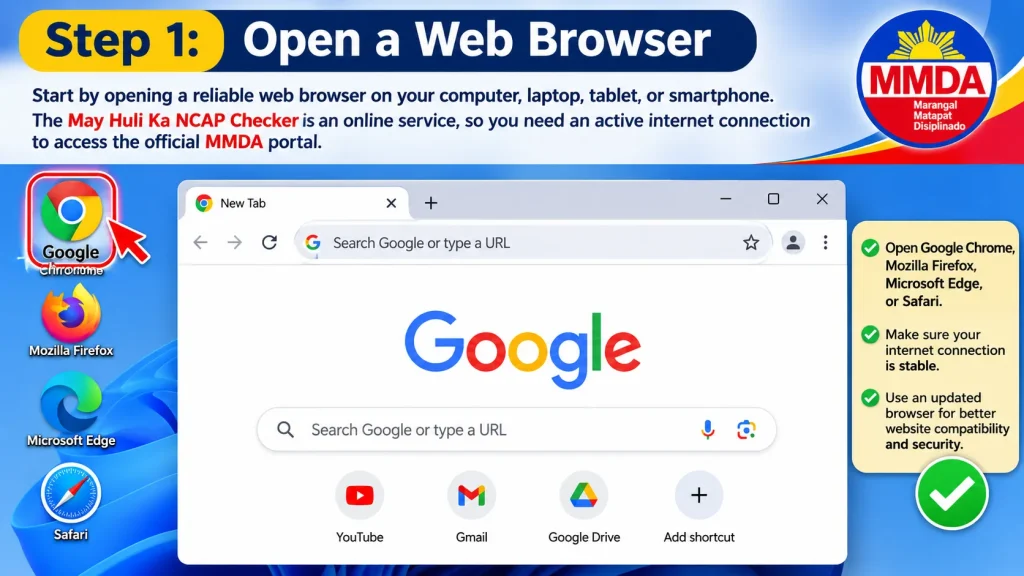
Step 1: Open a Web Browser
Start by opening a reliable web browser on your computer, laptop, tablet, or smartphone. The May Huli Ka NCAP Checker is an online service, so you need an active internet connection to access the official MMDA portal.
- Open Google Chrome, Mozilla Firefox, Microsoft Edge, or Safari.
- Make sure your internet connection is stable.
- Use an updated browser for better website compatibility and security.
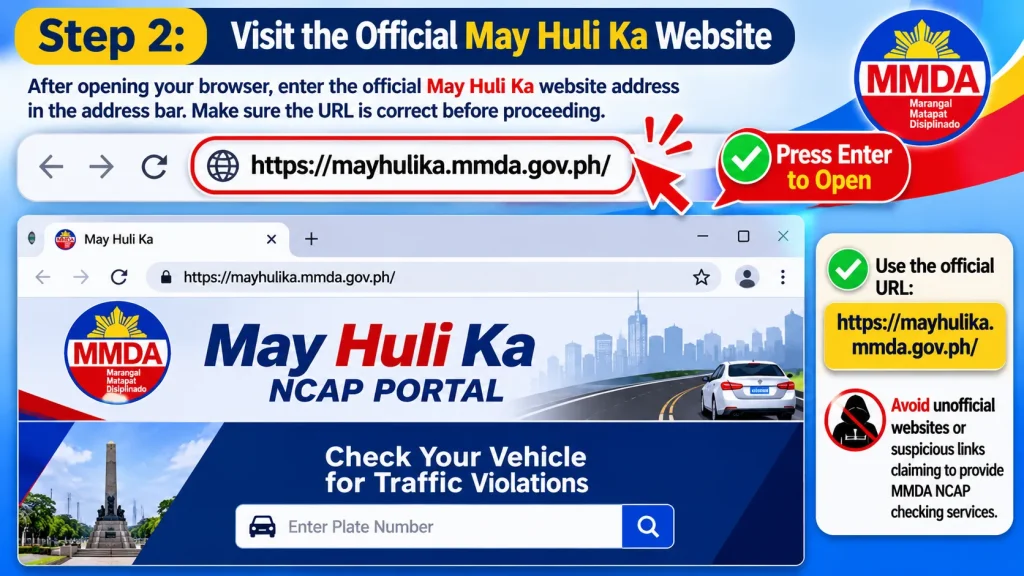
Step 2: Visit the Official May Huli Ka Website
After opening your browser, enter the official May Huli Ka website address in the address bar. Make sure the URL is correct before proceeding because you will be using vehicle information to check traffic violation records.
- Enter the official URL: https://mayhulika.mmda.gov.ph/.
- Press Enter to open the website.
- Avoid unofficial websites or suspicious links claiming to provide MMDA NCAP checking services.
Step 3: Wait for the Portal Homepage to Load
Allow the May Huli Ka NCAP Checker homepage to load completely before selecting any option. A stable connection helps display the available vehicle search features and portal instructions properly.
- Wait until the homepage and its main sections appear.
- Check that the website address belongs to the official MMDA portal.
- Refresh the page if it does not load correctly or displays an error.
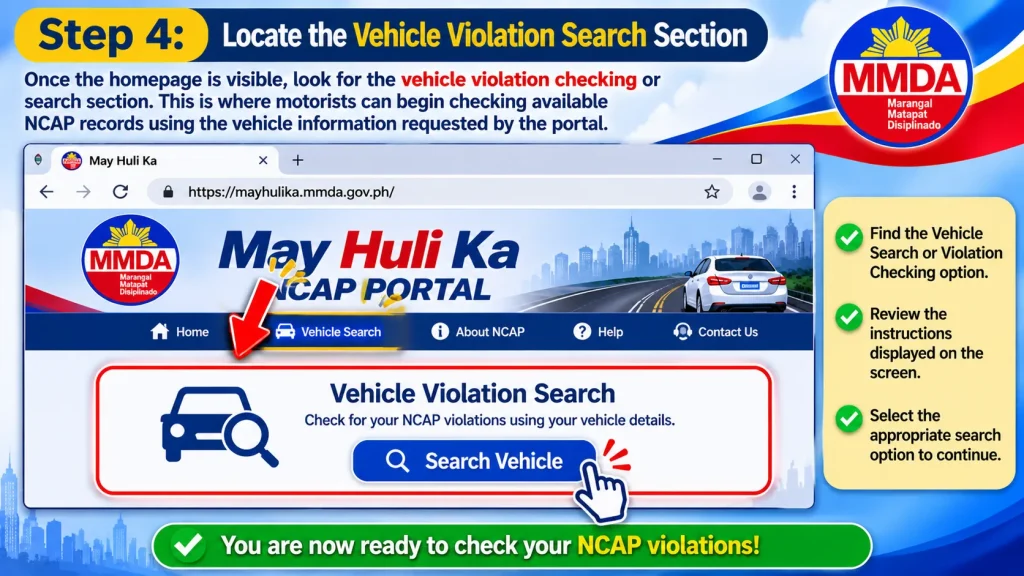
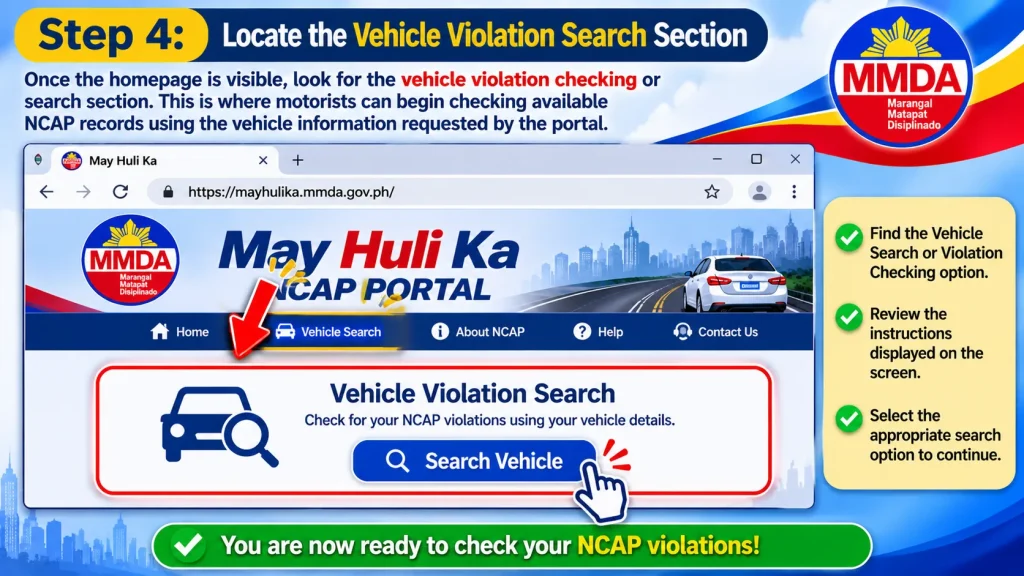
Step 4: Locate the Vehicle Violation Search Section
Once the homepage is visible, look for the vehicle violation checking or search section. This is where motorists can begin checking available NCAP records using the vehicle information requested by the portal.
- Find the vehicle search or violation checking option.
- Review the instructions displayed on the screen.
- Select the appropriate search option to continue.
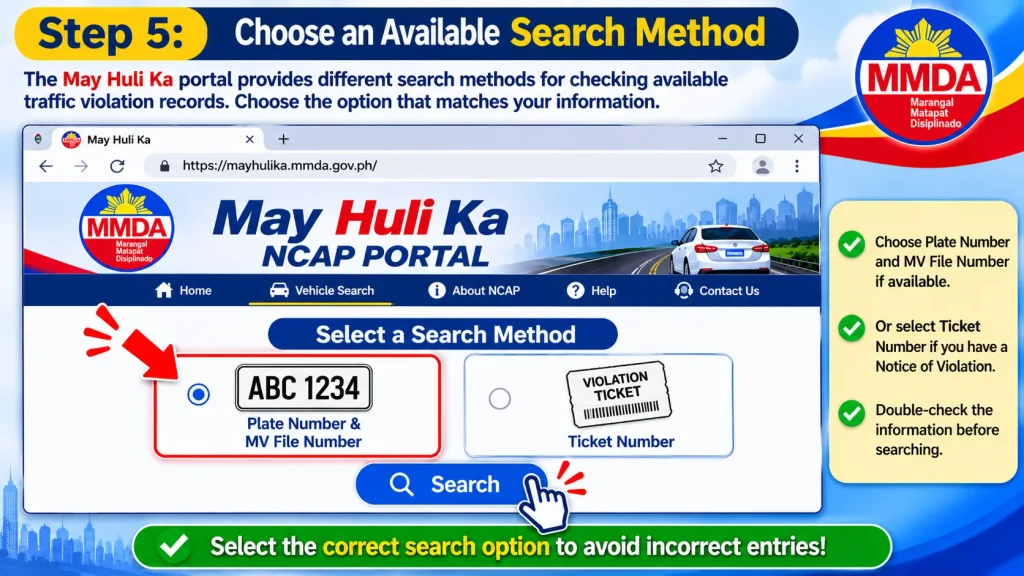
Step 5: Choose an Available Search Method
The May Huli Ka portal provides different search methods for checking available traffic violation records. Depending on the options currently displayed, you may be able to search using your vehicle’s plate number and MV file number or an available ticket-number option.
- Choose the plate number and MV file number search method if available.
- Select the ticket number option if you already have a Notice of Violation and the portal supports this method.
- Check the required information before continuing to avoid incorrect search entries.
Step 6: Proceed to the NCAP Checker
After selecting your preferred search method, follow the instructions shown on the official portal. Enter the requested vehicle or ticket details in the appropriate fields to proceed with checking your available NCAP records.
- Enter the required plate number, MV file number, or ticket details.
- Complete the CAPTCHA or other verification requirement if displayed.
- Click the Search or corresponding submission button to view the available results.
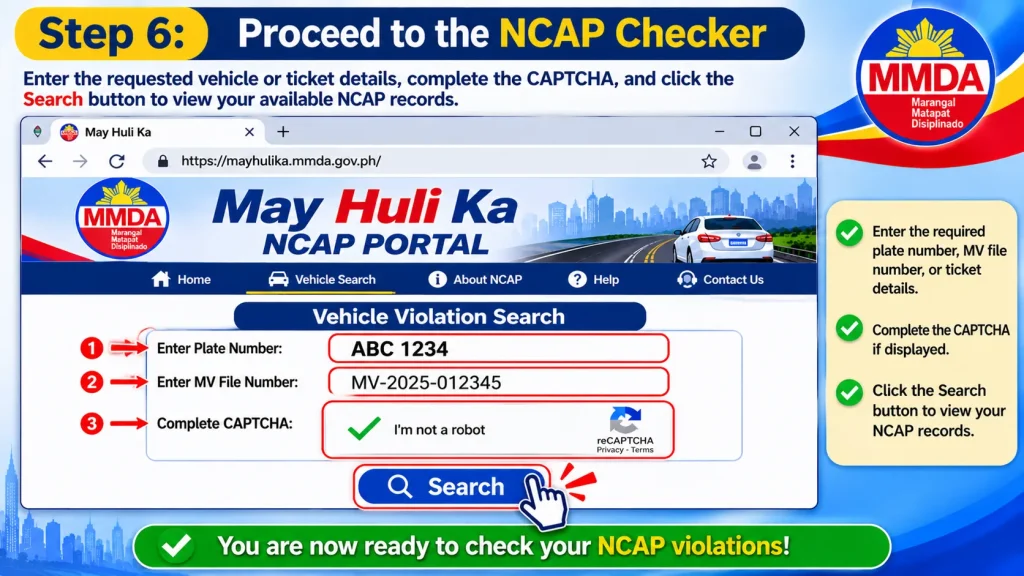
Important: A separate account may not be required for a basic vehicle violation search through the May Huli Ka portal. Follow the current instructions displayed on the official website, as account requirements and available features may change.
How to Check NCAP Violations Using a Plate Number
Searching with your vehicle’s plate number is one of the main methods of checking traffic violations through the MMDA NCAP Checker. However, the upgraded May Huli Ka platform requires additional vehicle information to improve security and protect registered vehicle records.
Before starting the search, prepare your complete vehicle plate number and Motor Vehicle (MV) file number. Having both details ready can make the NCAP verification process easier.
Step-by-Step Plate Number Search
Step 1: Open the Official NCAP Checker
Visit https://mayhulika.mmda.gov.ph/ using an updated web browser. Before entering any information, carefully check the website address to confirm that you are using the official MMDA portal.
Step 2: Select the Vehicle Search Option
Once the May Huli Ka homepage opens, locate the vehicle search section. Choose the available option that allows you to search using your vehicle’s registration plate number.
Step 3: Enter Your Plate Number
Enter your complete vehicle plate number in the required field. Make sure that all letters, numbers, and characters match the actual registration plate of your vehicle.
Examples of plate number formats include:
- ABC-1234
- ABC-123
These are sample formats for reference only and do not represent actual vehicle records.
Step 4: Provide the MV File Number
If requested by the selected search method, enter the corresponding MV file number printed on your vehicle’s Certificate of Registration (CR).
Make sure you provide the correct identification number. Do not enter your engine number or chassis number because these are different vehicle identifiers.
Step 5: Complete the Security Verification
If the NCAP Checker displays a CAPTCHA or another security verification requirement, follow the instructions provided on the screen.
This additional verification helps protect the website against automated searches and unauthorised access to vehicle information.
Step 6: Submit Your Search
After entering the required vehicle details, click the available Search, Check, or Submit button.
Wait a few moments while the May Huli Ka system processes your information and searches for matching NCAP violation records.
Step 7: Review the Search Result
Once the search is completed, carefully examine the result displayed by the portal.
If a matching traffic violation record is available, review the citation details and follow the instructions provided. If the system displays no matching record, double-check your plate number and MV file number before trying again.
Image placement: Insert a desktop screenshot showing the May Huli Ka plate number and MV file number search process.
Alternative Method: Search Using the NCAP Ticket Number
If you have already received a Notice of Violation (NOV) or an NCAP ticket reference, you may be able to use the alternative ticket-number search option available through the May Huli Ka portal.
This method is useful when you want to retrieve information about a particular traffic citation instead of searching through your vehicle registration details.
How to Search Using a Ticket Number
- Visit the official May Huli Ka NCAP Checker.
- Find the alternative search option for an NCAP ticket number.
- Enter the ticket number exactly as it appears on your Notice of Violation.
- Provide any additional vehicle or verification information requested by the portal.
- Submit the details to begin the verification process.
- Review the matching citation record, if available.
Always compare the information displayed by the NCAP Checker with your original Notice of Violation. A typing mistake, missing character, or incorrect reference number may prevent the system from finding the intended record.
How to Find Your MV File Number for NCAP Verification
Many first-time users experience difficulty when using the May Huli Ka portal because they are unsure where to locate their Motor Vehicle (MV) file number.
This information is normally printed on the vehicle’s Land Transportation Office (LTO) registration documents, particularly the Certificate of Registration (CR).
Steps to Locate the MV File Number
Follow these steps to find the correct MV file number before using the NCAP Checker:
- Locate your vehicle’s Certificate of Registration (CR).
- Examine the vehicle identification information printed on the document.
- Find the field labelled MV File Number or MV File No.
- Carefully copy the complete number.
- Enter the same number when completing your May Huli Ka vehicle search.
If you cannot locate your vehicle registration document, contact the LTO or the appropriate authorised office for assistance.
Official LTO website: https://lto.gov.ph/
Tip: Keep a secure digital copy of your vehicle registration documents. Having these details readily available can save time when checking NCAP traffic records or completing other vehicle-related transactions.
How to Check Violations Using a Conduction Sticker Number
Newly registered vehicles may not yet have permanent licence plates. In these situations, the conduction sticker number can serve as an alternative vehicle identifier when the May Huli Ka portal supports this search method.
A conduction sticker helps identify a newly registered vehicle before its permanent registration plate becomes available. Vehicle owners can use the following procedure to check relevant NCAP records.
Follow These Instructions
- Open the official May Huli Ka website.
- Locate and select the conduction sticker search option, if available.
- Enter your vehicle’s complete conduction sticker number.
- Provide the corresponding MV file number when requested.
- Complete any CAPTCHA or additional security verification displayed by the website.
- Submit your search request.
- Review the available result and follow the instructions provided by the portal.
Before submitting your information, make sure the conduction sticker number matches the details in your vehicle registration documents. Incorrect or incomplete information may prevent the NCAP Checker from locating the correct vehicle record.
How to Understand Your NCAP Checker Search Results
After submitting your vehicle information, the May Huli Ka NCAP Checker processes the details and displays the available search results.
Generally, you may encounter two different outcomes when checking your vehicle’s traffic violation records.
1. No Record Found
<text>Search result: No Record Found</text>
If the NCAP Checker displays a No Record Found message, it means the information you submitted did not return a matching NCAP violation record in the system.
Before concluding that your vehicle has no traffic violations, review the following details:
- Confirm that your vehicle plate number is entered correctly.
- Compare your MV file number with the information printed on your Certificate of Registration.
- Try the conduction sticker search option if it applies to your vehicle.
- Check whether you selected the correct search method.
- Make sure you are using the official MMDA NCAP Checker website.
Remember that the May Huli Ka portal only covers violations recorded under the MMDA’s NCAP system. It does not automatically display every traffic ticket issued by the Land Transportation Office (LTO), local government units (LGUs), or other traffic enforcement authorities.
2. A Violation Record Is Found
<text>Search result: Record Requires Review</text>
If the NCAP Checker identifies a matching traffic violation, carefully examine the available information before making a payment or submitting a contest.
Depending on the violation record and the portal’s available features, you may be able to review the following details:
- Violation or ticket reference number.
- Date and time of apprehension.
- Location where the alleged incident occurred.
- Type of recorded traffic violation.
- Available photographic or video evidence.
- Corresponding traffic fine.
- Payment or contest instructions.
- Current violation settlement status.
Do not rely only on the violation description when reviewing a citation. Compare the recorded date, location, vehicle identification details, and supporting evidence with your own travel history and vehicle records.
Taking time to examine the information can help you understand the citation and determine whether further action is necessary.
How to View NCAP Violation Photos and Video Evidence
Photographic and video evidence plays an important role in the NCAP verification process. It helps motorists understand why a particular vehicle was identified by the camera-based traffic enforcement system.
The upgraded May Huli Ka platform introduced access to more detailed violation evidence, allowing motorists to review available information online when the relevant records and features are provided.
What Should You Check in the Evidence?
When reviewing your NCAP violation evidence, pay attention to the following details:
| Evidence Detail | What to Verify |
|---|---|
| Vehicle Plate | Check whether the displayed plate number matches your vehicle. |
| Date | Confirm whether your vehicle was using the road on the recorded date. |
| Time | Compare the recorded time with your recollection or available records. |
| Location | Verify whether the stated road or intersection is correct. |
| Violation Type | Examine whether the evidence supports the alleged traffic violation. |
| Photo or Video | Check whether the vehicle and traffic situation are clearly identifiable. |
If the available evidence appears incorrect or does not match your vehicle or travel records, preserve the relevant information and consider following the official MMDA contest procedure.
You should not automatically pay a disputed citation without first understanding the available review and contest process.
May Huli Ka Account Registration and Login
The upgraded May Huli Ka platform also supports account-based services, including multiple vehicle management and online E-Contest functionality.
It is important to understand that basic vehicle verification and account-based services are not necessarily the same process. A basic NCAP search may be available without creating an account, while certain features may require users to register or sign in first.
Follow the registration and login instructions displayed on the official May Huli Ka portal when accessing services that require an account.
How to Register an Account
If you need an account to access additional May Huli Ka features, follow these general registration steps:
- Visit the official website: https://mayhulika.mmda.gov.ph/.
- Locate the account registration or Sign Up option.
- Enter the personal information requested by the website.
- Provide the required contact details.
- Complete the verification process if prompted.
- Review the displayed terms and privacy information.
- Submit your registration and follow the confirmation instructions.
Always provide accurate information during registration because your account may be associated with your vehicle records and online contest submissions.
How to Log In to May Huli Ka
If you have already created a May Huli Ka account, you can follow these general instructions to access the available account features.
- Open the official May Huli Ka website.
- Locate and select the Login or Sign In option.
- Enter your registered email address or username, depending on the portal’s requirements.
- Type your account password.
- Complete any security verification displayed on the screen.
- Click the Login button.
- Access the available services and account features.
If you cannot access your account, check whether your email address or username and password are correct. You can also use the password recovery option if it is available on the official platform.
How to Add and Manage Multiple Vehicles
The multiple-vehicle management feature is particularly helpful for individuals and organisations that own or operate several registered vehicles.
For example, a transport company may need to monitor NCAP records for multiple cars, motorcycles, or public utility vehicles. The account-based management feature can make it easier to review these records without treating every vehicle as a completely separate monitoring task.
Typical users who may benefit from this functionality include:
- Transport operators.
- Fleet management companies.
- Ride-hailing service operators.
- Logistics and delivery businesses.
- Owners of multiple registered vehicles.
To add another vehicle, follow the instructions provided through your May Huli Ka account. Make sure the vehicle details belong to the correct registered owner or authorised account holder.
NCAP SMS and Email Notifications: How Do They Work?
The MMDA introduced SMS and email notifications to inform motorists when an NCAP violation has undergone validation.
These notifications help vehicle owners become aware of recorded traffic violations without needing to visit the May Huli Ka website repeatedly to check for updates.
According to the MMDA’s published notification information, the following details apply:
- Official SMS Sender ID: MMDA_NCAP.
- Official Email Sender: [email protected].
- Notification Timing: Alerts are sent after a violation has undergone validation.
- Payment Links: Official notification messages do not contain payment links.
- Contact Information: Motorist contact details are obtained through the LTO’s Land Transportation Management System (LTMS).
Vehicle owners should keep their contact information updated in their LTO records to help receive relevant NCAP notifications.
Important NCAP Scam Warning
Never click suspicious NCAP payment links received through SMS messages or emails.
In August 2026, the MMDA again warned motorists about fraudulent traffic violation messages and fake websites requesting credit card information and CVV details.
Always verify your traffic violation records directly through the official May Huli Ka website:
Do not share your banking information, credit card details, passwords, or other sensitive personal information through suspicious links. If you receive an unexpected payment request, verify the citation through the official MMDA platform before taking any action.
How to Pay NCAP Fines Through the May Huli Ka Portal
If your vehicle has a confirmed NCAP violation, the next step is to review the Notice of Violation (NOV) and follow the authorised payment instructions. The MMDA provides several payment options through its May Huli Ka platform, allowing motorists to settle eligible traffic fines conveniently without necessarily visiting the MMDA Head Office.
The official May Huli Ka NCAP Checker website lists several digital payment channels, including GCash, Maya, Bayad App, iCash, and Landbank LinkBizPortal. Motorists can also use designated physical payment locations when available.
Official portal: https://mayhulika.mmda.gov.ph/
Digital Payment Methods
The following digital payment channels are listed on the official May Huli Ka website for settling eligible MMDA traffic violation penalties.
| Payment Channel | Description |
|---|---|
| GCash | Pay through the supported MMDA bill payment service. |
| Maya | Use the available digital payment facility. |
| Bayad App | Settle eligible MMDA payments through the application. |
| iCash | Select the payment option listed by the MMDA. |
| Landbank LinkBizPortal | Complete your transaction through the supported LandBank online payment facility. |
These payment channels are provided through the official May Huli Ka platform. However, availability, transaction requirements, and payment procedures may vary. Always check the latest instructions displayed on the official website before completing a transaction.
Step-by-Step Guide to Paying an NCAP Fine
Follow these steps to settle a confirmed NCAP traffic violation through an authorised payment channel.
Step 1: Verify Your Violation
Visit the official May Huli Ka website and search for your vehicle using the required registration details. Confirm that the system has identified a matching violation record.
Step 2: Review the Citation
Carefully examine the violation date, location, ticket number, description, and available photographic or video evidence. Make sure the information corresponds to your vehicle and the recorded incident.
Step 3: Select the Payment Option
Open the official payment instructions and review the available authorised payment channels. Choose your preferred option, such as GCash, Maya, Bayad App, iCash, or Landbank LinkBizPortal, if available.
Step 4: Enter the Required Payment Information
Provide the ticket number, reference number, or other details requested by your selected payment provider. Before proceeding, double-check the payment amount and transaction information.
Step 5: Complete the Transaction
Follow the instructions displayed by the payment provider. Confirm the transaction only after checking the relevant details, and wait until the payment process has been completed.
Step 6: Save Your Payment Receipt
Download your electronic receipt or take a screenshot of the successful payment confirmation. Keep the transaction reference number, payment date, and other relevant details for future verification.
Step 7: Check the Payment Status
Return to the relevant official platform to confirm that your payment has been properly recorded. If the status does not update immediately, keep your receipt and contact the appropriate MMDA support channel for assistance.
Can You Pay NCAP Fines Through the eGovPH App?
Yes. Since July 2026, NCAP violation records and cashless payment services have also been made accessible through the Philippine government’s eGovPH Super App.
This integration allows motorists to register their vehicles, review available traffic violations, and settle eligible fines through supported cashless payment facilities. Depending on the available services, payment methods may include e-wallets, bank transfers, and payment cards.
For more information about the government application, visit the official eGovPH website.
Remember that paying an NCAP fine and disputing a traffic citation are two separate processes. If you believe that a violation was recorded incorrectly, follow the MMDA’s designated E-Contest procedure instead of treating payment as a substitute for an appeal.
How to File an NCAP Violation Contest or Appeal
Sometimes, a vehicle owner may disagree with an NCAP citation issued through the May Huli Ka system. For example, the vehicle may have been incorrectly identified, sold to another person, or recorded under circumstances that require further investigation.
In these situations, the Metropolitan Manila Development Authority (MMDA) provides a formal contest procedure through its Traffic Adjudication Division (TAD). This process allows motorists to explain why they believe a citation is incorrect and submit supporting documents for review.
<badge color=”warning”>10-working-day deadline</badge>
According to the official May Huli Ka website, motorists who disagree with an NCAP citation must file their contest within ten working days from receiving the Notice of Violation.
Documents to Prepare Before Filing a Contest
Before submitting an NCAP appeal, prepare the relevant documents that support your explanation. The required evidence may depend on the reason you are challenging the citation.
Common supporting documents include:
- Notice of Violation (NOV) or citation ticket.
- Vehicle Certificate of Registration (CR).
- Official Receipt (OR), if applicable.
- Valid identification document.
- Supporting photographs or videos.
- Proof of vehicle sale or ownership transfer, if relevant.
- Other documents explaining why you believe the NCAP citation was issued incorrectly.
Make sure your documents are clear, complete, and readable before uploading them to the online contest platform.
Step-by-Step Online E-Contest Process
The May Huli Ka E-Contest facility allows eligible motorists to challenge an NCAP violation online. Follow these general steps to submit your contest.
Step 1: Open the Official Contest Platform
Visit the MMDA E-Contest service using the official link:
Make sure you are accessing the authorised MMDA website before entering personal or vehicle information.
Step 2: Create an Account or Sign In
Follow the account registration instructions if you are a new user. If you already have a May Huli Ka account, enter your registered login details to access the available contest services.
Step 3: Provide Your Ticket Information
Enter the relevant NCAP citation or ticket details requested by the platform. Explain clearly why you disagree with the apprehension and provide the necessary information to support your case.
Step 4: Upload Supporting Documents
Attach the requested documents, photographs, videos, or other supporting evidence. Check that every uploaded file is readable and relevant to the violation being contested.
Step 5: Submit Your Contest
Review all the information before submitting your application. Make sure the ticket details, explanation, and supporting documents are correct.
After submission, keep the confirmation message or reference number provided by the platform for future tracking.
Step 6: Monitor the Decision
Regularly check your registered email address and the May Huli Ka contest platform for updates from the Traffic Adjudication Division.
Follow any additional instructions provided by the MMDA while your NCAP contest is being reviewed.
Can You Contest an NCAP Violation in Person?
Yes. The official May Huli Ka information also provides an option for motorists to bring their concerns directly to the MMDA Traffic Adjudication Division.
The MMDA Head Office is located at:
MMDA Head Office
Julia Vargas Avenue corner Molave Street, Barangay Ugong, Pasig City, Philippines.
Motorists can also contact the MMDA through its official hotline at 136 to ask about the appropriate contest procedure before visiting the office.
If you plan to dispute a citation in person, bring your Notice of Violation and all relevant supporting documents. Having the necessary records ready can help the concerned office understand your case more efficiently.
Common NCAP Checker Problems and Their Solutions
Although the May Huli Ka NCAP Checker is designed to make traffic violation verification easier, some motorists may experience difficulties when searching for vehicle records, accessing their accounts, viewing evidence, or completing online payments.
Most common problems can be addressed by checking the submitted information, refreshing the website, or following the appropriate support procedure.
The following table explains common NCAP Checker problems and their possible solutions.
| Common Problem | Possible Solution |
|---|---|
| No Record Found | Recheck your vehicle plate number and MV file number. |
| Incorrect MV File Number | Compare the number with your LTO Certificate of Registration. |
| Search Is Not Responding | Refresh the website or try another updated browser. |
| Website Is Loading Slowly | Check your internet connection and try again later. |
| Cannot Access Account | Verify your login details and use the password recovery option if available. |
| Payment Not Reflected | Keep your transaction receipt and contact the payment provider or MMDA. |
| Cannot View Evidence | Check your internet connection and try opening the violation record again. |
| Cannot Submit E-Contest | Review the required fields, document formats, and contest deadline. |
| Wrong Vehicle Information | Contact the MMDA through its official support channels. |
| Suspicious NCAP Payment Message | Do not click the link. Verify your violation directly through the official website. |
What Should You Do If the Website Is Not Working?
If the May Huli Ka portal is temporarily unavailable or does not respond properly, avoid repeatedly submitting the same vehicle information.
Instead, follow these troubleshooting steps:
- Check whether your internet connection is stable.
- Reopen the official May Huli Ka website after a short interval.
- Try accessing the portal through another supported and updated browser.
- Clear your browser cache if the website continues displaying an error.
- Contact the MMDA through its official hotline if the issue continues.
Do not submit your vehicle registration information to unofficial websites claiming to provide faster NCAP violation results. Always use the authorised MMDA portal to protect your personal and vehicle information.
Important Things Every Motorist Should Know About NCAP
Before using the May Huli Ka NCAP Checker, motorists should understand several important points about traffic fines, vehicle ownership information, violation notices, and online payment security.
Keeping these details in mind can help you manage your vehicle records and avoid common mistakes when dealing with NCAP citations.
NCAP Fines Do Not Automatically Increase with Late-Payment Interest
The MMDA has clarified that its NCAP fines are fixed and do not accumulate interest or late-payment penalties.
Therefore, motorists should be cautious of suspicious messages threatening additional charges or demanding immediate payment through unfamiliar links. Always verify the actual violation and applicable fine through the official May Huli Ka website.
Keep Your Vehicle Ownership Records Updated
If you sell your vehicle, make sure you complete the appropriate ownership transfer process with the Land Transportation Office (LTO).
Outdated vehicle ownership information can create difficulties when traffic violation notices are associated with a vehicle. Keeping registration and ownership records updated can help reduce confusion when checking NCAP citations.
Check Your LTO Registration Information
Your MV file number and other vehicle registration details should match the information printed on your official LTO documents.
Entering incorrect registration information may prevent the NCAP Checker from locating the appropriate vehicle record. Always review your Certificate of Registration before submitting a search.
Do Not Ignore an Official Notice
If you receive a valid Notice of Violation, review it promptly and examine the available citation details.
If you disagree with the apprehension, remember the ten-working-day deadline for filing a contest from receipt of the Notice of Violation. Preparing your documents early can help you complete the process within the prescribed period.
Protect Yourself from Fake NCAP Websites
Motorists should use only the official MMDA May Huli Ka website for NCAP violation verification and related services.
Legitimate NCAP notifications use the sender ID MMDA_NCAP, and official alerts do not contain payment links.
Never provide your banking password, one-time password (OTP), credit card CVV, or other sensitive financial details through suspicious messages or unverified websites.
If you receive an unexpected NCAP payment request, independently verify your vehicle’s record through the official MMDA platform before taking any action.
Benefits of Using the May Huli Ka NCAP Checker
The May Huli Ka NCAP Checker provides several practical benefits for Philippine motorists, registered vehicle owners, and organisations managing multiple vehicles.
Its online features make it easier to review available traffic violation records, access supporting information, and follow the appropriate payment or contest procedures.
Some important benefits include:
- Convenient Vehicle Verification: Motorists can check available MMDA NCAP records online without initially visiting a physical government office.
- Improved Information Security: The additional MV file number requirement provides another layer of vehicle verification.
- Access to Violation Evidence: Vehicle owners can review available photographic or video records associated with a citation.
- Digital Payment Options: Supported online payment channels allow motorists to settle confirmed fines more conveniently.
- Online Contest Facilities: Eligible users can challenge traffic citations through the E-Contest platform.
- Multiple Vehicle Management: Fleet operators and eligible account holders can manage more than one registered vehicle through supported account features.
- Better Record Monitoring: Motorists can keep track of citation references, payment confirmations, and contest updates.
- Fewer Unnecessary Office Visits: Online verification, payment guidance, and contest facilities make several administrative tasks more accessible.
Frequently Asked Questions About NCAP Checker Philippines
Final Thoughts
The NCAP Checker Philippines 2026 is a useful online service for motorists who want to check and manage MMDA traffic violations through the official May Huli Ka Portal. By entering the required vehicle information, such as the plate number and MV file number, users can review available violation records, understand their notices, check applicable fines, and access the available payment or contest procedures.
Whether you are checking a newly issued Notice of Violation, reviewing evidence, paying an outstanding fine, or submitting an appeal, it is important to follow the correct process and use official government platforms. Always check your vehicle information carefully, keep copies of payment receipts and submitted documents, and observe the deadline stated on your notice.
Most importantly, stay alert to fake NCAP messages and suspicious payment links. Visit the official MMDA May Huli Ka website directly at https://mayhulika.mmda.gov.ph/ for reliable information. Regularly checking your vehicle records and responding to valid notices on time can help you avoid unnecessary problems with your traffic records and vehicle registration.