UC Web Portal Philippines 2026: Login, Student Account, Online Services & Complete User Guide
The UC Web Portal is an online platform developed to help University of Cebu students access their academic accounts and available university services conveniently. Through the UC Web Portal Philippines, students can manage their student accounts, review academic information and access relevant online services without relying entirely on in-person enquiries. The platform provides a convenient way for students to stay connected with their university using an internet-connected computer, laptop or smartphone.
The official UC Web Portal for the Lapu-Lapu and Mandaue campuses is accessible through https://lmportal.uc.edu.ph/. It provides an online access point for students who need to manage their university accounts and access available academic features. Whether you are a freshman, continuing student, transferee or returning student, understanding how to use the UC Web Portal login system can make your academic activities easier to manage. This complete guide explains the login process, account requirements, portal features and solutions to common access problems.
What Is the UC Web Portal and Who Can Use It?
The UC Web Portal is an online student access platform associated with the University of Cebu. It allows authorised students to sign in using their assigned account credentials and access academic information and university services available through the system. The platform is intended to simplify routine student account activities by providing an online environment for accessing relevant university information.
Students from the Lapu-Lapu and Mandaue campuses can use the designated portal at lmportal.uc.edu.ph to access their student accounts. Instead of visiting the university for every routine account enquiry, students can use the UC Web Portal Philippines to check available information and manage supported academic activities online.
The UC Web Portal is relevant to different categories of university students:
- Freshmen: Newly admitted students who need to access their assigned student accounts and become familiar with the university’s online system.
- Continuing Students: Currently enrolled students who want to review their academic information and manage available student account services.
- Transferees: Students who have transferred to the University of Cebu and received the necessary credentials for accessing the student portal.
- Returning Students: Formerly enrolled students who have resumed their studies and need to access their university accounts.
Access to the UC Web Portal login system may depend on admission, enrolment and account activation status. Newly admitted students who cannot access their accounts should contact the appropriate university office to confirm whether their student accounts have been created and activated.
Main Features and Online Services of the UC Web Portal
The UC Web Portal is designed to provide convenient access to student-related information and available university services through a central online platform. Its purpose is to help students manage routine academic activities without depending entirely on manual enquiries. However, the exact services and features available may vary according to campus, account permissions and current university arrangements. Visit Homepage
Here are some of the main functions associated with the UC Web Portal Philippines.
Online Student Registration and Enrolment
The UC Web Portal provides access to available online registration and enrolment-related services. Students can use their university accounts to manage supported academic registration activities and review relevant enrolment information.
Before completing any registration activity, students should check the latest university announcements and enrolment instructions. Registration schedules, requirements and available options may differ depending on the academic term, programme and student status.
Grade Checking and Academic Information
Accessing academic information is another important purpose of the UC Web Portal. Students can use their accounts to review available grade records and monitor their academic progress when the university has published or made the information accessible.
When checking grades through the UC Web Portal login, make sure you select or review the correct academic term and subject information. If a grade is missing, incomplete or appears incorrect, contact the relevant academic department for clarification instead of assuming that the displayed information has been finalised.
Student Account Management
The UC Web Portal provides an online access point for managing student account information. Students should use their assigned login credentials and follow the university’s instructions when accessing or updating any available account details.
Keeping your student information accurate and protecting your login credentials are important steps towards maintaining uninterrupted access to university services.
Enrolment Status and University Announcements
Students can also use the UC Web Portal Philippines to review available enrolment information and relevant university updates. These details can help students remain informed about their academic activities and account-related matters.
However, students should not depend exclusively on the portal dashboard for important announcements. Continue checking official University of Cebu communication channels for enrolment deadlines, policy changes, academic schedules and other important instructions.
UC Web Portal Login Requirements
Before accessing the UC Web Portal login page, make sure you have the necessary information and equipment. Preparing your login details in advance can help prevent unnecessary authentication errors and make the sign-in process easier.
| Requirement | Purpose |
|---|---|
| Official portal URL | Opens the correct University of Cebu student portal |
| Student ID number or username | Identifies your assigned student account |
| Account password | Authenticates your login request |
| Internet connection | Allows your device to communicate with the portal |
| Updated web browser | Helps display the portal correctly |
| Registered email address | May be required for account assistance or recovery |
Important: Your Student ID number and password must be obtained through the university’s authorised account procedures. Never use another student’s login credentials or share your password with other people. Always access the UC Web Portal Philippines through its official website to protect your personal and academic information.
How to Access the UC Web Portal Login Page
To begin using the UC Web Portal, you first need to open the correct university login website. The University of Cebu provides a dedicated portal address for students accessing the Lapu-Lapu and Mandaue student platform.
Follow these steps to access the official UC Web Portal login page:
Step 1: Open a Web Browser
First, launch Google Chrome, Mozilla Firefox, Microsoft Edge or another updated web browser on your desktop computer, laptop or smartphone. Make sure your device has a stable internet connection before proceeding.
Step 2: Visit the Official Website
Enter the following official portal address into your browser’s address bar:
Make sure you enter the address correctly to avoid opening an unofficial website.
Step 3: Wait for the Login Page to Load
After entering the website address, press Enter and allow the UC Web Portal to load completely. You should see the portal’s account authentication interface, where you can enter your assigned student login details.
Step 4: Verify the Website Address
Before entering your personal information, check the browser’s address bar and confirm that you are visiting the official University of Cebu domain. Avoid unfamiliar websites or third-party pages requesting your student credentials.
Step 5: Prepare Your Login Credentials
Once the login interface appears, prepare your assigned Student ID number or username and account password. You can now proceed with the UC Web Portal login process.
Using the correct website is important because your university credentials should only be entered into an authorised portal.
Step-by-Step Guide to UC Web Portal Login
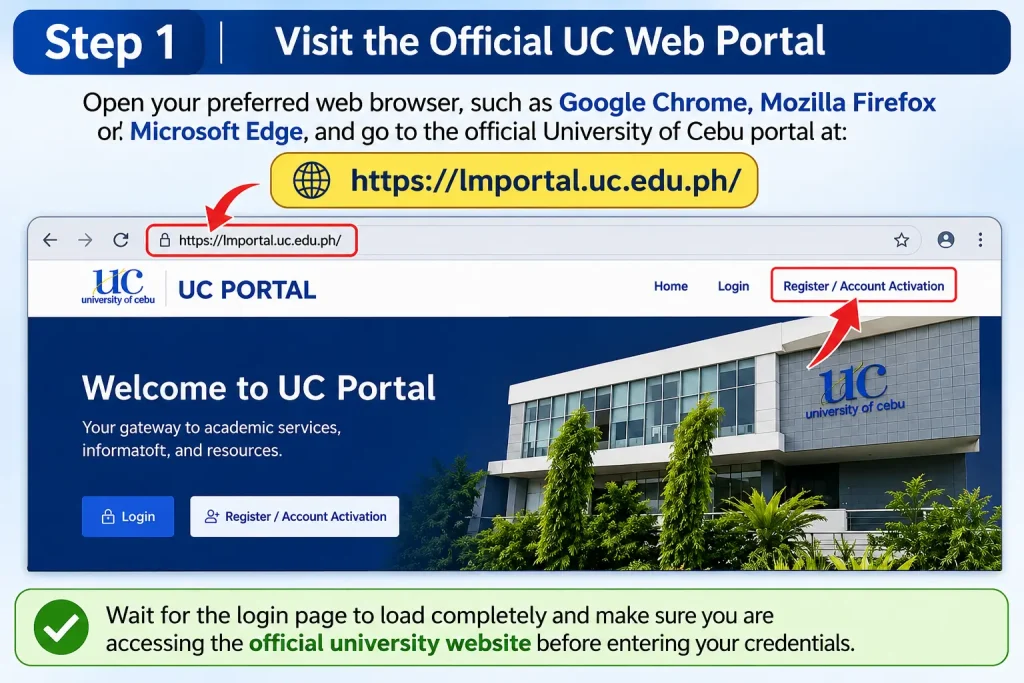
Step 1: Visit the Official UC Web Portal
Open your preferred web browser, such as Google Chrome, Mozilla Firefox or Microsoft Edge, on your computer, laptop or smartphone. Visit the official University of Cebu Lapu-Lapu and Mandaue Student Portal using the following link:
Wait for the login page to load completely and locate the student account login section. Make sure you are accessing the official university website before entering your credentials.
Step 2: Enter Your Student Login Credentials
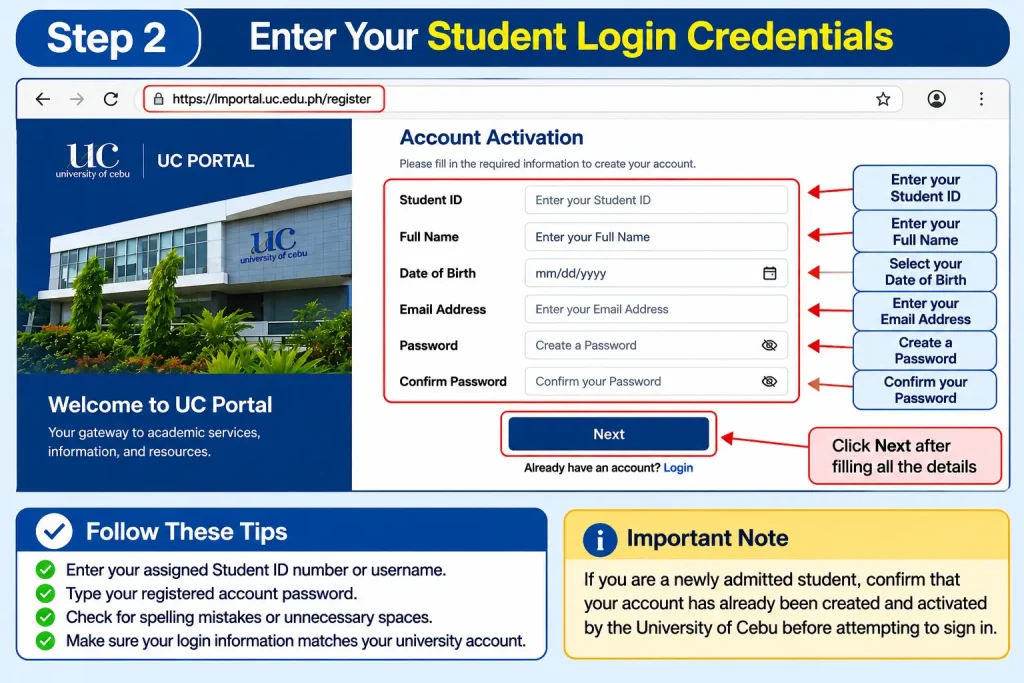
On the login page, locate the Student ID or username field and enter the credentials assigned to you by the University of Cebu. Next, provide your account password in the password field.
Carefully review your information before continuing:
- Enter your assigned Student ID number or username.
- Type your registered account password.
- Check for spelling mistakes or unnecessary spaces.
- Make sure your login information matches your university account.
If you are a newly admitted student, confirm that your account has already been created and activated by the university before attempting to sign in.
Step 3: Verify Your Details and Access Your Student Account
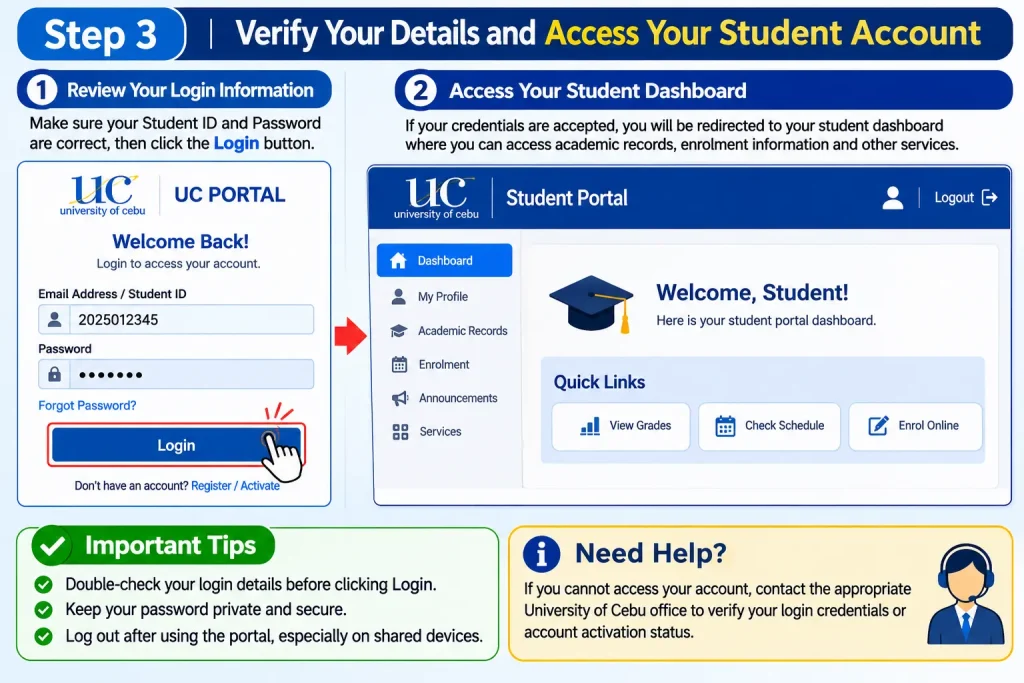
After entering your login credentials, review both fields to ensure that your information is correct. Click the Login button to submit your details and allow the UC Web Portal to process your authentication request.
If your credentials are accepted, you will be redirected to your available student dashboard. From there, you can explore the academic information and university services enabled for your account.
If you cannot access your account, contact the appropriate University of Cebu office to verify your login credentials or account activation status.
What to Do If You Cannot Log In to the UC Web Portal?
Students may occasionally experience difficulties when accessing their university accounts. A failed UC Web Portal login does not automatically mean that your student account has been deactivated. Incorrect credentials, browser issues, internet connectivity problems or account activation requirements can prevent successful authentication.
Before contacting the university, try the following troubleshooting steps:
- Re-enter your Student ID number or username carefully.
- Check whether Caps Lock is enabled on your keyboard.
- Confirm that you are entering the correct account password.
- Refresh the login page and attempt to sign in again.
- Check your internet connection and ensure it is stable.
- Open the UC Web Portal using another updated browser.
- Clear your browser cache and cookies if the login page is not loading correctly.
- Confirm your account activation status with the appropriate university office if you are a newly admitted student.
If these basic solutions do not resolve the problem, contact the appropriate University of Cebu office for assistance. Provide a clear explanation of the issue and follow the authorised account recovery or technical support instructions.
How to Register or Activate Your UC Web Portal Account
Students accessing the University of Cebu system for the first time may need to complete the required admission procedures and have their student accounts created or activated before using the UC Web Portal. This is particularly important for freshmen, transferees and students who have recently completed their admission or enrolment requirements.
It is important to understand that submitting a university admission application and activating an existing student portal account are two different processes. Students should first obtain their assigned account details and confirm their access status with the university before attempting to sign in.
For admission-related information, students can also visit the University of Cebu Online Admission Portal.
Account Registration and Activation Process
If you are a newly admitted student, follow these general steps to prepare your account for UC Web Portal login:
Step 1: Complete Your University Admission Process
First, complete the required admission procedures with the University of Cebu. Follow the instructions provided by the admissions or registrar’s office for your respective campus.
Step 2: Obtain Your Student ID or Account Details
After your student information has been processed, contact the appropriate university office to obtain your assigned Student ID number and portal login credentials.
Step 3: Visit the Official UC Web Portal
Open the official Lapu-Lapu and Mandaue student portal using the following address:
Step 4: Confirm Your Account Activation
If you have received your login credentials but cannot access the portal, contact the university to verify whether your student account has been activated. Remember that completing an admission application does not automatically confirm that your student portal login is ready.
Step 5: Sign In to Your Account
Once your account activation has been confirmed and you have received the required credentials, return to the UC Web Portal and enter your assigned Student ID number or username and password.
New Student Reminder: A universal self-registration or email-activation procedure for the Lapu-Lapu and Mandaue student portal has not been established by the available information. Always follow your campus’s official instructions instead of relying on unverified registration links.
Understanding the UC Student Dashboard
After completing a successful UC Web Portal login, students can access their account interface and explore the academic and administrative services available to them. The student dashboard serves as the starting point for navigating the portal and reviewing relevant university information.
The available dashboard sections may vary depending on your campus, student account permissions and the services currently supported by the university.
Here are some important areas students should become familiar with.
Student Profile and Personal Information
The student profile contains information associated with your university account. After accessing the UC Web Portal, review your available personal and academic details to make sure the information is accurate.
Check your identifying information carefully and contact the appropriate university office if you notice incorrect or outdated details. Some personal information may only be updated by authorised university personnel, so follow the official correction procedure when necessary.
Academic Records and Grades
The academic records section allows students to review available grade information and monitor their performance across different subjects. It can be useful when checking academic progress and reviewing published results.
Before contacting your instructor about a missing grade, verify the correct semester, subject and available academic information. Keep in mind that instructors or academic departments may still need to finalise or publish certain results.
Class Schedules and Enrolment Information
Students may also need to review their class schedules and enrolment information when preparing for a new academic term. Where these features are enabled, the UC Web Portal may provide access to details such as:
- Subject or course information.
- Available class schedules.
- Assigned section or block.
- Current enrolment status.
- Relevant academic announcements.
Always follow the latest instructions issued by the registrar or your academic department when selecting, adding or changing subjects.
Student Announcements
University announcements help students stay informed about important academic activities, enrolment periods, deadlines and other university-related matters.
Make it a regular habit to review available announcements through your student account. You should also check official university communication channels rather than depending entirely on information shared by classmates or unofficial social media pages.
How to Use UC Web Portal for Online Enrolment
Online enrolment is an important academic activity associated with university student services. The UC Web Portal Philippines can provide students with access to relevant enrolment information and available academic services through their university accounts.
However, the exact enrolment procedure may differ according to the student’s academic programme, year level and campus instructions. Before starting, make sure you understand the current registration requirements and applicable enrolment schedule.
Steps to Prepare for Enrolment
1. Check the Enrolment Schedule: Review official University of Cebu announcements to identify the applicable enrolment period for your academic term.
2. Access Your Student Account: Visit the official UC Web Portal and sign in using your assigned student credentials.
3. Review Your Academic Information: Check your existing student records and available enrolment details before proceeding with any registration activity.
4. Follow the Enrolment Instructions: Use the enrolment options available to your account and follow the university’s instructions for the relevant academic term.
5. Review Your Selected Information: Carefully check your selected subjects, class schedules and other displayed details before confirming an available transaction.
6. Keep Your Confirmation Details: Save any official enrolment confirmation, transaction reference or other information provided by the system.
Important: Successfully accessing the UC Web Portal does not automatically mean that your enrolment has been completed. Always verify your final enrolment status through the appropriate university channel.
How to Check Your Grades Through the UC Web Portal
Checking grades online allows students to monitor their academic progress without depending entirely on physical enquiries. If grade-checking functionality is available in your UC Web Portal account, you can use it to review published subject results and check your academic performance.
Follow these instructions to access your available grade information:
- Open the official UC Web Portal.
- Enter your assigned Student ID number or username.
- Type your account password.
- Select the Login option to access your student account.
- Navigate to the academic records or grades section, if available.
- Select the relevant academic period or semester.
- Review your published subject grades and available results.
- Contact your instructor or the registrar’s office if you notice missing or incorrect information.
Tip: Keep a personal record of your academic results for future reference. If you require an official transcript, certification or another formal academic document, confirm the application procedure directly with the University of Cebu registrar’s office.
Other Useful Services Available Through the UC Web Portal
Apart from enrolment and grade checking, the University of Cebu provides different student and administrative services through its online systems. The services available to individual students may depend on their campus and the particular system currently used for each transaction.
Understanding these services can help students make better use of the UC Web Portal Philippines and other university platforms.
Student Information Management
Student information systems help universities maintain academic and personal records. Through the available student account services, students should review their information regularly and make sure their details remain accurate.
If you identify an error or need to update particular information, report it through the university’s authorised channels. Some changes may require supporting documents or approval from the relevant department.
Assessment and Payment-Related Information
Students may need to review assessment details and payment instructions during the enrolment process. Always check the latest assessment information provided by the university before making any payment or completing a financial transaction.
Never rely on an old payment receipt, outdated instructions or an unofficial social media post as confirmation of current payment arrangements. Follow the university’s official payment procedures and retain your transaction receipts for reference.
Academic Documents and Requirements
Students may also need to review their academic requirements and outstanding documents throughout their university studies.
If a particular document, certification or academic record is not available through the UC Web Portal, contact the registrar’s office to confirm the correct application and request procedure.
Campus-Specific Student Services
The University of Cebu operates multiple campuses, and its online services may differ depending on the student’s location. Therefore, it is important to use the system intended for your campus.
Students from the Lapu-Lapu and Mandaue campuses should check the relevant instructions before using another campus’s online platform. This helps avoid confusion when accessing student records, enrolment services and other university transactions.
UC Web Portal Login on Mobile Phones
You do not necessarily need a desktop computer or laptop to access your university account. The UC Web Portal can also be accessed using a smartphone with a supported web browser and a reliable internet connection.
Mobile access allows students to check their accounts and review available university information while away from their computers.
To access the UC Web Portal login page on your smartphone, follow these instructions:
- Connect your smartphone to a stable Wi-Fi network or mobile data connection.
- Open Google Chrome, Safari or another updated mobile browser.
- Enter the official portal address: https://lmportal.uc.edu.ph/.
- Wait for the login page to load completely.
- Enter your assigned Student ID number or username.
- Type your account password carefully.
- Tap the Login button to submit your credentials.
- After successful authentication, navigate through the student services available to your account.
If the UC Web Portal login page does not display correctly on your smartphone, try switching your device to landscape orientation or opening the website using a desktop browser.
Mobile Security Tip: Avoid saving your university password on shared smartphones or devices that other people can access. Always sign out after completing your academic activities, particularly when using someone else’s phone.
How to Keep Your UC Web Portal Account Secure
Your university student account may contain personal information and academic records. Protecting your login credentials is therefore an important part of using the UC Web Portal Philippines responsibly.
Follow these security recommendations to help protect your account:
- Use a Strong Password: Choose a password that is difficult for other people to guess. Avoid using easily identifiable personal information.
- Keep Your Credentials Private: Never share your Student ID login details or account password with strangers or unauthorised individuals.
- Avoid Suspicious Links: Always access the student portal through the official University of Cebu website.
- Log Out After Use: Sign out of your account whenever you finish using a shared computer or public device.
- Use a Secure Connection: Avoid entering your university password through an untrusted public Wi-Fi network.
- Check Account Activity: Report unusual account behaviour or suspected unauthorised access to the appropriate university office.
- Protect Personal Information: Do not send screenshots containing passwords or sensitive student details to unknown individuals.
Following these basic precautions can reduce the risk of unauthorised access and help keep your university information protected.
University of Cebu Official Support and Contact Information
If you experience problems with your UC Web Portal login, account activation, enrolment or academic records, contacting the appropriate university office is usually the best way to receive assistance.
Students from the Lapu-Lapu and Mandaue campuses can refer to the following contact information.
University of Cebu – Lapu-Lapu and Mandaue Campus
Campus Address:
A.C. Cortes Avenue, Looc, Mandaue City, Cebu, Philippines 6014
Telephone:
+63 32 345 6666
General Enquiries:
[email protected]
Campus Registrar
For questions concerning student records, academic documents, enrolment information and other registrar-related matters, students can contact:
Email: [email protected]
Accounting / Cashier
For assessment and payment-related enquiries, students can use the following contact address:
Email: [email protected]
Source: University of Cebu Lapu-Lapu and Mandaue Campus official contact information.
Other Official University Resources
Students can also refer to the following university resources for additional information and campus-specific instructions:
- UC Lapu-Lapu and Mandaue Campus: Official campus information and announcements.
- UC Official Website: General University of Cebu information and services.
- UC Web Portal: https://lmportal.uc.edu.ph/
- UC Online School Management System: University online academic and administrative services.
Important Information About UC Online Systems: The University of Cebu’s newer School Management System provides campus-specific access, including a Lapu-Lapu/Mandaue option. Published system information also indicates that active transactions should be completed through the newer system, while migrated information remains accessible through the older system. Therefore, students should review the latest campus instructions before starting enrolment or another academic transaction to ensure they are using the correct platform.
Common UC Web Portal Login Problems and Solutions
Although the UC Web Portal provides convenient online access to student accounts and university services, students may occasionally encounter difficulties when signing in, checking academic information or accessing specific features. These issues can result from incorrect login credentials, account activation problems, browser settings or temporary technical interruptions.
Understanding the possible causes can help students resolve common problems without unnecessary delays. Before contacting university support, review the following UC Web Portal login problems and solutions.
UC Web Portal Login Not Working
Students may sometimes be unable to access their accounts because of incorrect login credentials or temporary authentication issues. If your UC Web Portal login is unsuccessful, first verify that you are entering the correct Student ID number or username and password.
Possible Solutions:
- Re-enter your assigned Student ID number carefully.
- Check your password for typing mistakes.
- Make sure Caps Lock is not enabled.
- Refresh the login page and try again.
- Access the portal using another updated web browser.
If the problem continues, contact the university to verify your student account status and login access.
Forgotten UC Web Portal Password
Forgetting an account password is another common problem, particularly among students who have not accessed the UC Web Portal for several months.
Possible Solutions:
- Check whether a password recovery option is available on the login page.
- Follow the official account recovery instructions, if provided.
- If no recovery option is displayed, contact the university’s IT support team or appropriate campus office.
- Keep your updated password in a secure location.
Never share your password or verification information with anyone offering unofficial account recovery assistance.
Student ID or Username Not Recognised
An invalid username or Student ID error may appear when the information entered does not match an existing university account. This can happen because of typing mistakes, incorrect account details or an account that has not yet been activated.
Possible Solutions:
- Check your Student ID number against your university-issued records.
- Avoid adding unnecessary spaces or characters.
- Confirm that you are accessing the correct campus portal.
- Contact the registrar’s office if your student account cannot be identified.
UC Web Portal Website Not Opening
Sometimes the UC Web Portal may fail to load because of internet connectivity problems, browser errors or temporary website interruptions. Students may experience a blank page, loading delays or an error message when opening the login website.
Try the following troubleshooting steps:
- Check your internet connection and make sure it is working properly.
- Refresh the official portal website.
- Clear your browser’s cached data and cookies.
- Try opening the website using another updated browser.
- Restart your device if the problem continues.
- Try accessing the portal again later if the website is temporarily unavailable.
Always make sure you are visiting the official University of Cebu website before entering your login information.
Grades Not Showing in the Student Account
If your grades are not appearing in your UC Web Portal account, first check whether the relevant academic results have been published by the university.
Possible reasons include pending grade submissions, incomplete academic records or delays in updating the student information system.
Contact your instructor or registrar’s office if your academic information remains unavailable after the expected publication period.
UC Web Portal Troubleshooting Table
The following table provides a quick reference to common UC Web Portal login problems and their possible solutions. Students can use it to identify basic account difficulties and understand the appropriate next steps.
| Common Problem | Possible Solution |
|---|---|
| Incorrect password | Recheck your password and use authorised recovery assistance. |
| Student ID not recognised | Verify your assigned Student ID with the university. |
| Login page not loading | Check your internet connection and refresh the browser. |
| Forgotten password | Use the available recovery procedure or contact university support. |
| Account not activated | Request account activation confirmation from the university. |
| Grades unavailable | Check the publication status and contact your instructor. |
| Enrolment information missing | Confirm your enrolment status with the registrar. |
| Website displaying errors | Clear your browser cache or try accessing the website later. |
These are general troubleshooting recommendations. The exact error messages, available recovery options and technical solutions may differ depending on the portal version and university account arrangements.
Benefits of Using the UC Web Portal
The UC Web Portal Philippines provides students with a convenient online access point for available university services and academic information. It can reduce the need for routine in-person enquiries and help students manage their academic activities more efficiently.
Here are some important advantages of using the UC Web Portal.
Convenient Student Account Access
Students can access their university accounts through an internet-connected device without visiting the campus simply to sign in or review available online information. This makes routine account access more convenient for freshmen, continuing students and returning students.
Easier Access to Academic Records
Where academic record and grade-checking features are enabled, students can review their available information and monitor their academic progress. This helps them stay informed about published academic results and subject performance.
Support for Online Enrolment
The UC Web Portal provides access to enrolment-related information and services for eligible students. It can help students manage relevant academic activities and review available registration details.
Better Access to University Information
Students can review available announcements, enrolment information and student account details through the university’s online systems. Regularly checking these updates can help students stay informed about important academic matters.
Flexible Device Access
The web-based platform can be accessed using a desktop computer, laptop or compatible smartphone browser. As long as the website is available and the device has a reliable internet connection, students can access their accounts without depending entirely on a particular device.
Important Tips for UC Students Using the Online Portal
To avoid unnecessary account problems and make better use of university online services, students should follow a few important practices whenever accessing the UC Web Portal Philippines.
- Use the Correct Campus Portal: Make sure you are using the Lapu-Lapu and Mandaue student portal if that is your campus.
- Keep Your Student ID Safe: Your assigned Student ID and account credentials are important for accessing university services. Store them securely.
- Check University Announcements: Stay informed about enrolment schedules, academic updates, deadlines and other important notices.
- Review Your Information Regularly: Check your available student profile and academic records for incorrect or outdated information.
- Save Important Confirmations: Keep copies of official enrolment confirmations, transaction references and payment receipts for future reference.
- Use Official Support Channels: Contact the registrar or IT support team if you experience account activation, login or technical difficulties.
- Avoid Unofficial Websites: Never enter your university credentials into suspicious websites or unfamiliar login pages.
Following these recommendations can help students maintain secure account access and manage their university activities more effectively.
Important Update About the Old and New UC Systems
The University of Cebu has introduced a newer School Management System powered by DigisoftPH. Its official system website identifies Lapu-Lapu/Mandaue as one of the available campus options.
The newer system describes several student and administrative services, including student profiling, enrolment, payments, clearance, academic records and notifications. However, the published rollout information indicates that implementation is being carried out in phases. Therefore, students should not assume that every listed feature is already available to all accounts.
The previous UC Web Portal also displays a notice directing users towards the newer system. According to the new platform’s published information, migrated data may remain accessible through the old system, while active transactions should be completed through the newer system.
For this reason, students should check the latest campus instructions before starting enrolment, payment or another academic transaction. Using the correct platform helps prevent confusion and reduces the risk of completing a transaction through an outdated system.
Official University of Cebu Links:
- UC Lapu-Lapu and Mandaue Web Portal: https://lmportal.uc.edu.ph/
- UC New School Management System: https://emis.uc.edu.ph/
- UC Lapu-Lapu and Mandaue Campus Website: https://lm.uc.edu.ph/
Always verify which system your campus currently requires you to use before completing an enrolment or payment transaction.
Frequently Asked Questions About the UC Web Portal
Final Thoughts
The University of Cebu (UC) Web Portal provides students with a convenient way to access important academic information and manage selected university services online. From checking grades and reviewing announcements to accessing enrolment-related features and maintaining student account information, the portal helps make everyday academic tasks easier and more organised.
Whether you are a freshman, transferee, returning student or continuing student, understanding how to access and use the UC Web Portal can help you stay updated throughout your academic journey. Always use the correct portal for your campus, enter your assigned Student ID or login credentials carefully, and keep your account information secure.
Students should also remember that portal features, enrolment procedures and account access may vary depending on their campus and current university arrangements. If you experience login problems, cannot access your academic records or need assistance with your account, contact the appropriate UC campus office or IT support team for guidance. For the latest enrolment information and system updates, visit the university’s official website and the relevant student portal.