SSS Employer Portal 2026: Login, Registration, Contributions & Payment Guide

The SSS Employer Portal is an online platform that helps registered employers in the Philippines manage their Social Security System (SSS) responsibilities. Through the available employer services, businesses can handle employee information, prepare contribution reports, generate Payment Reference Numbers (PRNs), monitor payment records, and complete other employer-related transactions. The portal is useful for business owners, human resources (HR) personnel, payroll officers, accounting teams, and authorised company representatives who manage employee records and statutory contributions.
The official SSS Employer Portal is available at https://employer.sss.gov.ph/. Before accessing employer-specific services, businesses generally need to complete the applicable SSS employer registration process and obtain the necessary employer identification details. Understanding the SSS Employer Login procedure, registration requirements, and contribution workflow can help businesses maintain organised records, reduce administrative errors, and fulfil their reporting and payment obligations more efficiently.
What Is the SSS Employer Portal?
The SSS Employer Portal is an online service designed to help registered employers manage their SSS accounts and employer-related transactions. It provides digital access to available services, reducing the need to depend entirely on manual processing for routine administrative tasks.
For businesses with employees covered by the SSS, the portal can support contribution reporting, payment preparation, employee record management, and the review of relevant transaction information. The exact services available may depend on the employer’s account, registration status, and the current SSS system procedures.
Main Features of the SSS Employer Portal
Employers may use the SSS Employer Portal for several important purposes, including:
- Employer account access: Sign in to an existing SSS Employer Account through the official website.
- Employee information management: Review employee details and maintain relevant employment records using the applicable SSS procedures.
- Contribution reporting: Prepare and review employee contribution information for the appropriate reporting period.
- PRN generation: Generate a Payment Reference Number for applicable contribution payments.
- Payment monitoring: Retain payment references, receipts, and other transaction records.
- Payroll reconciliation: Compare payroll information with contribution reports and payment confirmations.
- Compliance management: Support the timely reporting and remittance of required SSS contributions.
Important: Always access employer services through the official SSS website. Do not share your employer credentials, employee information, or payment details with unauthorised websites or individuals.
Who Should Use the SSS Employer Portal?
The SSS Employer Portal is intended primarily for registered employers and their authorised representatives. Different members of a business may be responsible for registration, employee reporting, contribution preparation, and payment processing.
| User | Typical responsibility |
|---|---|
| Business owner | Oversees employer registration and SSS compliance |
| HR personnel | Maintains employee and employment records |
| Payroll officer | Reviews salary information and contribution calculations |
| Accounting staff | Coordinates contribution payments and financial records |
| Authorised representative | Performs approved employer transactions |
Sole proprietorships, partnerships, corporations, cooperatives, and other eligible organisations should confirm the requirements applicable to their business structure before starting SSS Employer Registration. Access to the employer account should be restricted to personnel who have permission to manage the company’s SSS transactions.
Requirements for SSS Employer Registration
Before beginning SSS Employer Registration, prepare the relevant business information and supporting documents. The exact checklist may vary depending on the legal structure of the organisation, the registration channel, and the current instructions issued by the SSS.
The following documents are commonly associated with business registration and may be relevant when preparing an employer application.
| Business structure | Potential supporting document |
|---|---|
| Sole proprietorship | Department of Trade and Industry (DTI) Certificate of Business Name Registration |
| Partnership | Applicable Securities and Exchange Commission (SEC) registration documents |
| Corporation | SEC Certificate of Incorporation and relevant incorporation documents |
| Cooperative | Cooperative Development Authority (CDA) registration certificate |
Other information or supporting documents that may be requested include:
- Mayor’s permit or local business permit, where applicable.
- Bureau of Internal Revenue (BIR) Certificate of Registration, commonly associated with BIR Form 2303.
- Company Tax Identification Number (TIN).
- Valid identification documents for authorised signatories.
- Employer registration details and the applicable date of coverage.
- Specimen signatures or additional verification documents, if required.
These items are preparation guidelines, not a guarantee that every document will be required for every application. Check the current instructions on the official SSS website before submitting your documents.
How to Register as an SSS Employer Online
Registering an online account with the Social Security System (SSS) allows members to access available digital services and manage their membership information more conveniently. By creating a My.SSS account, eligible members can sign in to the official portal and access the online services available to their accounts.
Follow the steps below to complete the SSS online registration process.
Step 1: Visit the Official SSS Member Portal
To begin your SSS online registration, open a secure web browser and visit the official Social Security System website. Navigate to the My.SSS Member Portal and locate the registration option for users who have not yet created an online account.
Before proceeding, verify that you are using the official SSS website to protect your personal information and avoid fraudulent pages.
- Open the official SSS website or My.SSS Member Portal.
- Click “Not yet registered in My.SSS?” or the available “Register” option.
- Verify that the website address is correct before entering any personal information.
- Use a stable internet connection to help prevent interruptions during registration.
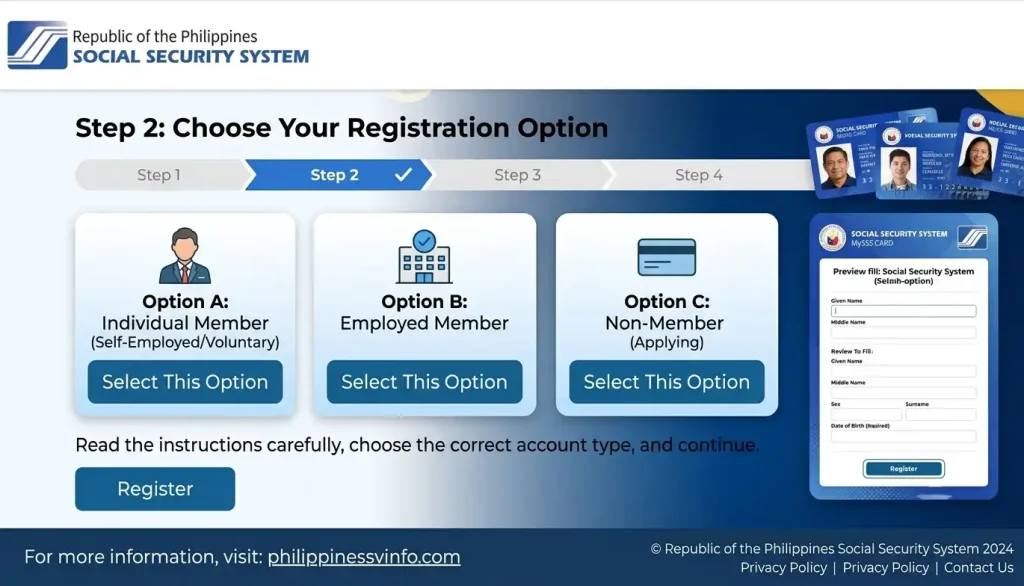
Step 2: Choose Your Registration Option
After opening the registration page, select the registration option that matches your SSS membership details. Carefully review the available choices and follow the instructions displayed on the screen to ensure that you select the appropriate option for your account.
Choosing the correct registration category helps you provide the information required for the next stage of the process.
- Click the “Register” button on the portal.
- Select the registration option that corresponds to your membership information.
- Choose the appropriate account or registration category.
- Read the instructions carefully before proceeding to the next page.
Step 3: Enter Your SSS Registration Information
Enter the requested information accurately and ensure that your details match the records maintained by the Social Security System. Correct information is important because the registration system may use these details to verify your identity and membership.
Review every field before submitting the form to reduce the risk of errors or registration delays.
- Enter your SS Number or Common Reference Number (CRN), as applicable to the selected registration option.
- Provide your registered email address and other requested personal information.
- Complete the required verification fields.
- Check your entries carefully before continuing.

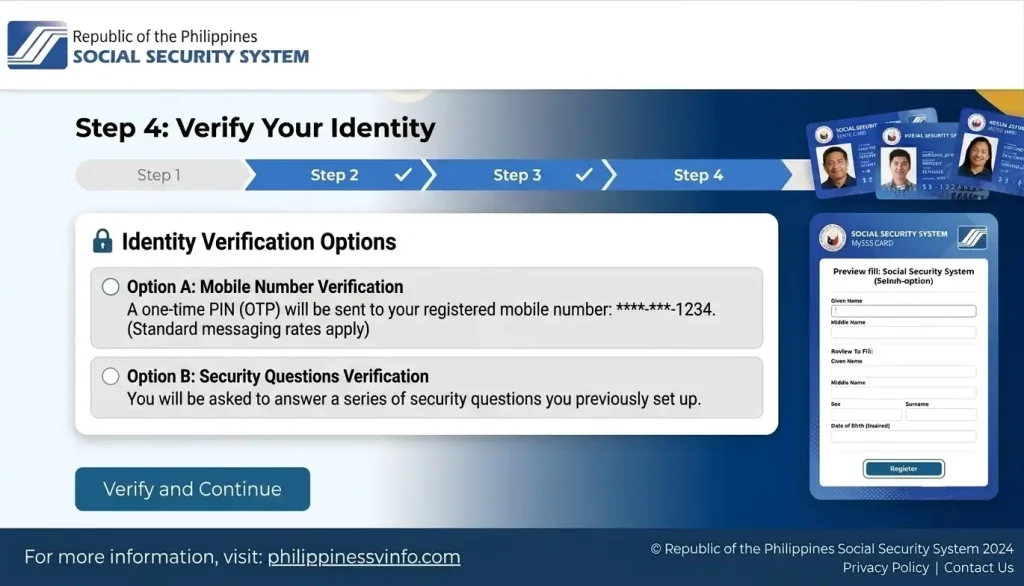
Step 4: Verify Your Identity
The SSS registration process may require additional information to verify your identity and confirm that your details match the records associated with your membership. Follow the verification instructions provided on the official portal and ensure that all required information is accurate.
If the system identifies an error, review the relevant fields and correct the information before continuing.
- Enter the requested identity verification details.
- Confirm that your information matches your SSS membership records.
- Review and correct any errors identified by the system.
- Click “Next” or the corresponding button displayed to proceed.
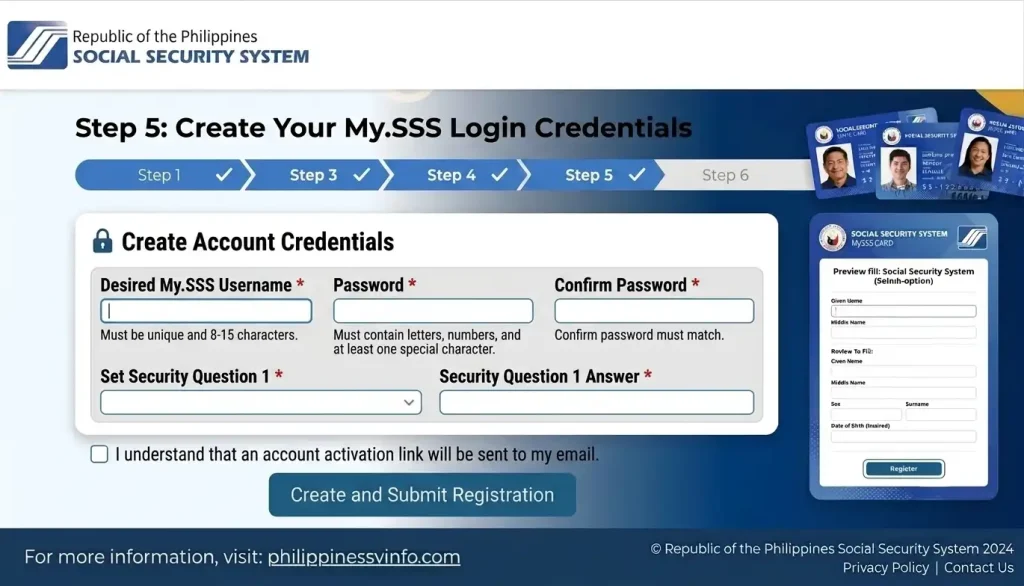
Step 5: Create Your My.SSS Login Credentials
After completing the required information and verification steps, follow the portal’s instructions to establish your My.SSS login credentials. Your username and password will be used to access your online account, so choose credentials that are secure and keep them private.
Carefully review the credential requirements displayed on the registration page before submitting your details.
- Create a unique username that meets the portal’s requirements.
- Choose a strong password that follows the displayed security rules.
- Enter the password again if confirmation is required.
- Submit your registration details and check your registered email for any activation instructions.
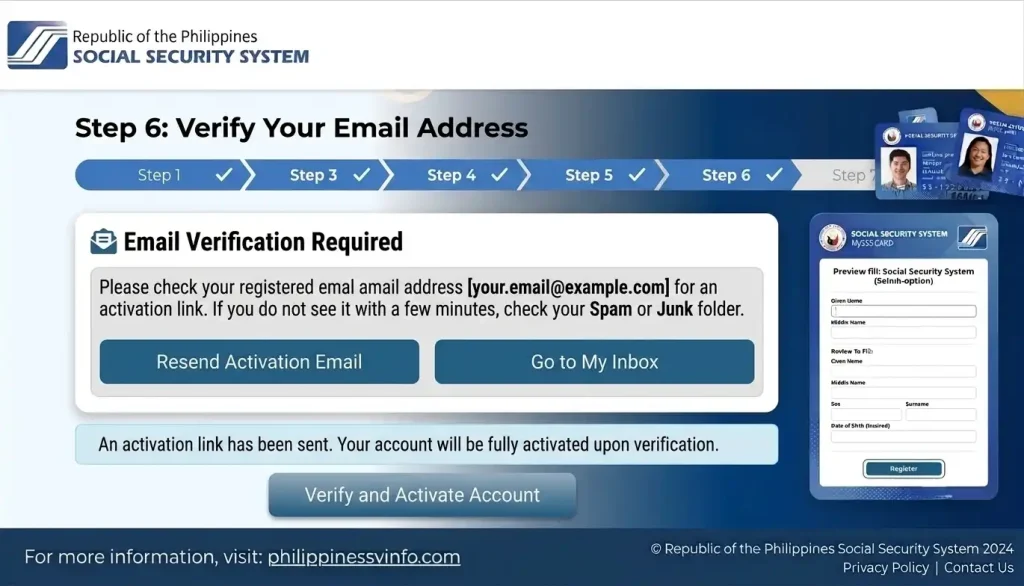
Step 6: Verify Your Email Address
After submitting your registration, check the email address you provided for an SSS confirmation or account activation message. If the SSS sends an activation link, open the message and follow the instructions to complete the email verification process.
Make sure you use the email address associated with your registration and follow the instructions in the official message.
- Open your registered email inbox.
- Look for the SSS registration confirmation or activation email.
- Check your spam or junk folder if the message is not in your inbox.
- Click the activation link, if provided, and follow the instructions to activate your account.
Step 7: Log In to Your My.SSS Account
Once your registration and account activation are complete, visit the official SSS Member Portal to sign in. Enter your registered login credentials and complete any additional security verification required by the system.
After successful login, you can access the online services available to your SSS account.
- Open the official SSS website and navigate to the My.SSS Member Portal.
- Enter your username and password in the appropriate fields.
- Complete any security verification displayed on the screen.
- Access your account dashboard and select the service you need.
Important: Registration options, verification requirements, and portal screens may change. Always follow the instructions currently displayed on the official SSS website, and never share your password or other confidential account information with unauthorised individuals.
What Is the Date of Coverage?
The date of coverage is an important detail in employer registration because it relates to when the employer’s SSS coverage obligations begin under the applicable rules. The registration information supplied for this guide describes it as the date the first employee was hired.
Before entering this information, review your employment records and confirm the applicable requirements with the SSS. Accurate dates help maintain consistent employment records and can assist with reviewing reporting periods and historical employer information.
Registration tip: Keep digital copies of business certificates, submitted registration forms, employer identification details, and SSS confirmation messages. Organised documentation can make application follow-ups and account-related inquiries easier to manage.
How to Log In to the SSS Employer Portal
After your employer registration has been approved and the account has been activated, you can use the official SSS Employer Portal to access the services available to your business.
Follow these steps for the SSS Employer Login process:
- Open the official login page: Visit https://employer.sss.gov.ph/.
- Enter your login credentials: Type your assigned Employer User ID and password into the appropriate fields.
- Complete the security verification: If a CAPTCHA or another security check appears, follow the instructions displayed on the screen.
- Access your employer dashboard: After successful authentication, proceed to your account dashboard.
- Select the required service: Open the relevant section for contribution reporting, PRN generation, payment-related information, or other available employer transactions.
The dashboard layout and available options may change as the SSS updates its online systems. Follow the instructions displayed on the current official website rather than relying exclusively on older screenshots or tutorials.
SSS Employer Login Security Checklist
Protecting your SSS Employer Account is essential because it may contain sensitive business and employee information.
- Verify the website address before entering your credentials.
- Never share your password or security codes with unauthorised individuals.
- Avoid saving login credentials on public or shared computers.
- Use a secure internet connection when accessing employer services.
- Sign out after completing your transactions, especially on shared devices.
- Restrict access to authorised HR, payroll, and accounting personnel.
Following these practices helps reduce the risk of unauthorised access and protects your organisation’s SSS records.
What If the SSS Employer Login Does Not Work?
SSS Employer Login problems can occur because of incorrect credentials, incomplete account activation, browser issues, or temporary service interruptions. Before contacting support, check whether the problem can be resolved through basic troubleshooting.
Try the following steps:
- Re-enter your Employer User ID and password carefully.
- Check for accidental spaces or incorrect capitalisation.
- Refresh the page or reopen the official portal.
- Try an updated browser and a reliable internet connection.
- Review your registered company email for activation messages or account notices.
- Follow the official account recovery instructions if they are available.
- Contact the SSS through its official support channels if the issue persists.
Avoid repeatedly guessing passwords or creating a duplicate employer account as a workaround. If the account remains inaccessible, consult the official SSS website for current assistance options.
How to Manage SSS Contributions Through the Employer Portal
Managing employee contributions is one of the most important responsibilities handled through the SSS Employer Portal. Employers must maintain accurate employee information, prepare contribution reports using the applicable procedures, and remit the required contributions according to current SSS rules.
The SSS uses an electronic collection process that includes the Payment Reference Number (PRN) for applicable payments. The PRN helps identify the contribution billing or collection transaction associated with a payment. Employers should review the information generated by the system before completing any transaction.
Step 1: Review Your Employee Information
Before preparing a contribution report, review the employee information recorded in your payroll system. Accurate records help reduce discrepancies between company payroll data and the information maintained by the SSS.
Check the following details:
- Employee names and SSS numbers.
- Employment dates and applicable employment status.
- Salary or compensation information relevant to contribution calculations.
- Changes in employment that require reporting.
- Employee records for the contribution period being processed.
The supplied reference material identifies SS Form R-1A in connection with employment reporting. Confirm the form’s current applicability and the appropriate reporting method through the official SSS instructions before submitting employment information.
Reviewing employee records before preparing contributions can help prevent incorrect entries, missing employees, and mismatched contribution totals.
Step 2: Prepare the Contribution Collection List
Sign in to the SSS Employer Portal and locate the applicable contribution reporting or PRN section. Follow the instructions displayed in your account to prepare the contribution information for the relevant payment period.
The supplied guidance refers to the online R-3 details or Contribution Collection List. The exact workflow may vary depending on the employer’s account and the current portal interface.
Before proceeding, verify the following information:
- All employees requiring reporting for the period are included.
- Employee SSS numbers and identifying details are correct.
- Contribution amounts follow the applicable SSS contribution schedule.
- Relevant employee status changes have been addressed.
- The contribution period is correct.
- The total amount agrees with the verified payroll records.
Review the entire collection list before submitting it or generating the associated payment reference. Errors in employee information or contribution amounts may result in discrepancies that require further investigation or correction.
Step 3: Generate the SSS Payment Reference Number (PRN)
The SSS Payment Reference Number (PRN) is an important part of the electronic contribution payment process. It identifies the relevant payment transaction or contribution billing information and helps employers match their payment records with the appropriate contribution period.
To prepare the payment information, follow these general steps:
- Log in to your SSS Employer Account through the official portal.
- Open the applicable contribution reporting or PRN section.
- Select the option for preparing or reviewing the contribution collection list.
- Verify the employee details, reporting period, and contribution totals.
- Follow the system instructions to generate the PRN and associated payment information.
- Save or download the available payment statement for your accounting records.
Menu labels and available functions may change when the SSS updates its online services. Use the options currently displayed in your account instead of relying on outdated screenshots.
Important: Before making a payment, verify the PRN, contribution period, total amount, and applicable deadline. For current payment instructions, visit the official SSS website.
Step 4: Pay the SSS Contributions
After generating the PRN, proceed through a payment channel authorised to accept the relevant SSS transaction. Available methods and supported services may change, so employers should confirm the current options before initiating payment.
Follow these payment precautions:
- Confirm that the PRN corresponds to the intended contribution period.
- Enter the reference and payment details exactly as instructed.
- Verify the total amount before confirming the transaction.
- Check whether the selected payment provider supports the intended employer payment.
- Retain the transaction reference and official payment confirmation.
- Review the payment status through the appropriate SSS service.
Use the official SSS website to locate current payment instructions and available collection channels. Do not assume that every bank, digital wallet, or payment provider supports all employer transactions.
Step 5: Save the Payment Receipt and Reconcile Your Records
After completing a payment, retain the receipt, transaction reference, payment confirmation, and relevant contribution statement. Compare these documents with your payroll records and the PRN information to verify that the transaction corresponds to the correct reporting period.
Remember that successful payment and the posting of contributions to individual member records are related but separate stages. If a payment appears incomplete or an employee’s contribution is not reflected as expected, review the transaction details and follow up through an official SSS support channel when necessary.
Monthly SSS Employer Contribution Checklist
Use this checklist as part of your regular payroll and accounting routine:
- Save the generated PRN and contribution statement.
- Retain the official payment receipt or confirmation.
- Match the payment amount against payroll records.
- Verify the contribution period and employee list.
- Record and follow up on unresolved discrepancies.
Maintaining these records can help your business investigate payment issues, respond to employee inquiries, and support future compliance reviews.
Understanding SSS Contribution Deadlines and Penalties
Employers must follow the applicable SSS contribution remittance schedule. The correct deadline should be verified using current official guidance and the rules that apply to the employer and contribution period.
Late or unremitted contributions can have financial and legal consequences. Republic Act No. 11199, also known as the Social Security Act of 2018, provides the legal framework for the Philippine Social Security System and related employer obligations.
The reference information supplied for this guide mentions a penalty of 2% per month for late remittance. Employers should not rely on this figure alone to calculate a current liability. Confirm the applicable penalty, calculation method, and any relevant rules directly with the SSS before making financial or compliance decisions.
Practical Ways to Avoid Contribution Errors
1. Review payroll monthly. Compare employee information, salary details, and contribution calculations with the collection list before generating a PRN.
2. Assign clear responsibilities. Establish who prepares the contribution report, who reviews it, and who authorises payment.
3. Set internal reminders. Schedule payroll checks and payment preparation ahead of the applicable remittance deadline.
4. Reconcile payments regularly. Compare payroll records, generated PRNs, payment confirmations, and available SSS records to identify discrepancies.
5. Maintain organised documentation. Store contribution reports, receipts, and supporting documents in a secure location accessible to authorised staff.
Accurate reporting and timely remittance help businesses manage their SSS responsibilities while supporting the proper recording of employee contributions.
How to Maintain SSS Employer Compliance
Using the SSS Employer Portal is only one part of managing employer responsibilities in the Philippines. Businesses must also maintain reliable payroll records, report employee information through the appropriate procedures, review contribution calculations, and monitor payment transactions.
SSS contributions help support benefits available to eligible covered members, subject to the applicable rules and qualification requirements. Employers should follow the relevant procedures for employment reporting and any sickness or maternity benefit reimbursement transactions that apply to their circumstances.
A consistent compliance process helps businesses identify errors early, maintain accurate records, and respond to employee questions more efficiently.
SSS Employer Compliance Best Practices
| Compliance task | Recommended action |
|---|---|
| Employee reporting | Report new hires and employment changes through the applicable SSS procedure. |
| Contribution preparation | Review employee information and calculations before submitting reports. |
| Payment monitoring | Verify PRNs, applicable deadlines, and transaction confirmations. |
| Recordkeeping | Retain payroll reports, contribution statements, and payment receipts. |
| Account security | Restrict portal access to authorised company representatives. |
| Discrepancy management | Investigate missing payments and inaccurate employee records promptly. |
Employers can consult the official SSS website for current employer services and review Republic Act No. 11199 for the applicable legal framework.
Common SSS Employer Portal Problems and Solutions
Even when an employer follows the correct process, technical issues and record discrepancies can occur. Understanding the appropriate troubleshooting steps can help reduce delays and prevent unnecessary duplicate transactions.
1. Unable to Access the SSS Employer Portal
If the portal does not open or your SSS Employer Login fails, first check your internet connection and login credentials. Confirm that your account has been activated and that you are using the official website.
Try refreshing the page, opening the portal in an updated browser, or following the available account recovery instructions. If the problem continues, contact the SSS through an official support channel.
2. Incorrect Employee Information
Incorrect names, SSS numbers, employment details, or salary information can create discrepancies in contribution reporting.
Compare the information in your employer account with your verified payroll and employment records. Follow the current SSS correction or updating procedure, and prepare supporting documents if requested.
Avoid submitting changes based on assumptions. Confirm the correct procedure before modifying official employee records.
3. PRN Details Do Not Match Payroll Records
If the PRN amount differs from your payroll calculations, review the contribution period, employee list, applicable contribution schedule, and individual contribution entries.
Check whether an employee was omitted, entered incorrectly, or reported under the wrong period. Resolve the discrepancy before completing payment whenever possible.
If the difference cannot be explained through your records or the available portal functions, request assistance from the SSS.
4. Payment Confirmation Is Missing
A missing payment confirmation does not necessarily mean the transaction failed. Review your payment provider’s transaction history and check for a receipt, reference number, or pending status.
Contact the relevant payment provider or SSS through the appropriate official channel to determine the transaction status. Avoid making a duplicate payment until you have established what happened to the original transaction.
5. Employee Contributions Are Not Reflected
If an employee’s contribution does not appear as expected, compare the relevant contribution statement with your PRN and payment confirmation.
Verify the employee’s SSS number, reporting period, payment amount, and transaction status. If the information remains inconsistent, contact the SSS for assistance and retain all supporting records.
Creating a Strong My.SSS Password
Creating a strong password is an important part of securing your My.SSS account. Follow these four steps to protect your personal information and help prevent unauthorized access.
Step 1: Create a Strong Password
Choose a password that is difficult for others to guess. Where permitted by the system, use a combination of uppercase letters, lowercase letters, numbers, and special characters. Make sure your password is sufficiently long and unique.
Step 2: Avoid Using Personal Information
Do not use details that other people can easily discover or associate with you. Avoid using your birthdate, mobile number, SS Number, or a family member’s name. Also, stay away from simple keyboard patterns such as 123456 or qwerty.
Step 3: Set Up Security Questions
Depending on the current My.SSS registration process, you may be asked to provide security questions or other account-recovery information. Choose answers that you can remember, avoid information that is publicly available, and keep your answers consistent.
Step 4: Keep Your Security Details Safe
Use a unique password that you do not reuse for other important accounts. If you need to keep a personal record of your security answers, store it securely. Never share your password or security answers through social media, email, or messaging apps.
Official SSS Links for Employers
Use the following official resources when registering an employer account, accessing online services, or reviewing current contribution and payment procedures.
| Resource | Purpose |
|---|---|
| SSS Employer Portal | Access employer online services and the login page. |
| Official SSS Website | Find current announcements, employer guidance, and service information. |
| Philippine Central Business Portal | Review applicable business registration services. |
Security reminder: Before entering credentials or submitting sensitive business information, verify that the website is official. Registration channels, portal menus, document requirements, and payment options may change over time.
Benefits of Activating Your My.SSS Account
After successfully activating your My.SSS account, you can sign in to the official member portal and access the online services available to your membership. The platform provides a convenient way to review your SSS information, monitor contributions, and manage eligible loan and benefit-related transactions without relying entirely on in-person services.
The services available may vary depending on your membership status, eligibility, and the online features currently offered by the Social Security System.
1. Access Your Membership Information
Your My.SSS account provides online access to relevant membership information and account records. Reviewing these details regularly can help you keep track of your registered information and identify discrepancies that may require clarification.
Depending on the services available, you may be able to:
- View your SSS membership information.
- Review your registered account details.
- Check available registration information.
- Access relevant online member records.
Keeping your membership information accurate can help you manage your SSS account more effectively.
2. Monitor Your SSS Contributions
One of the useful features of My.SSS is the ability to review contribution-related information available in your account. Checking your records regularly can help you determine whether reported contributions appear correctly in your membership history.
Members may be able to:
- View posted SSS contributions.
- Review available payment records.
- Check contributions reported by their employers.
- Monitor their contribution history.
If a contribution appears missing or incorrect, compare the available information with your employment and payment records. Contact the SSS through its official support channels if you need assistance clarifying a discrepancy.
3. Access SSS Loan Services
Eligible members may also use My.SSS to access available loan-related services. Depending on the current online features and applicable eligibility requirements, the portal may allow members to manage certain loan transactions and review relevant information.
Available services may include:
- Applying for eligible SSS loans.
- Checking outstanding loan balances.
- Reviewing available repayment information.
- Monitoring loan application status.
Loan availability, application requirements, and approval depend on current SSS rules and the member’s eligibility. Review the official instructions before submitting a loan application.
4. Review SSS Benefit Services
My.SSS may also provide access to selected benefit-related services and information. These online features can help members review relevant transactions and monitor available claim information.
Depending on the benefit and your eligibility, you may be able to:
- Monitor the status of available benefit applications.
- Review claim-related information.
- Check relevant benefit details.
- View available transaction records.
The specific services offered may vary according to your membership status and the SSS’s current online features. Always check the official portal for the latest instructions and requirements for a particular benefit.
Important Security Tips for Your My.SSS Account
Your My.SSS account contains personal membership information, making account security essential. Protecting your login credentials and registered contact details can help reduce the risk of unauthorised access.
Follow these recommended security practices:
- Keep your password private. Never share your login credentials with unauthorised individuals.
- Protect your verification codes. Do not disclose one-time passwords (OTPs) or security codes to anyone.
- Avoid public computers. Whenever possible, sign in using a trusted personal device.
- Log out after use. Always sign out when accessing your account on a shared computer.
- Maintain updated contact information. Keep your registered email address and other contact details current, following the applicable SSS procedures.
- Use a strong password. Choose a unique password that meets the portal’s security requirements.
- Avoid saving credentials on unfamiliar devices. Do not allow shared computers or untrusted browsers to store your login information.
- Use the official SSS website. Access your account through https://www.sss.gov.ph/ and navigate to the official My.SSS Member Portal.
If you suspect unauthorised access to your account, follow the official SSS account-security instructions and contact the appropriate support channel for assistance.
Frequently Asked Questions About the SSS Employer Portal
Conclusion
The SSS Employer Portal is an important online resource for Philippine businesses managing employee information, contribution reporting and payment transactions. By registering through the appropriate channel, protecting account credentials, checking contribution details and retaining payment records, employers can make their SSS administration more organised and reduce avoidable errors.
Before completing a transaction, always consult the official SSS Employer Portal and current SSS guidance. Registration procedures, available portal features, payment channels and compliance deadlines can change, so current official instructions should take priority over older tutorials.